


FarmGold
- By
FarmGold.jpg
Description
FarmGold – how it works
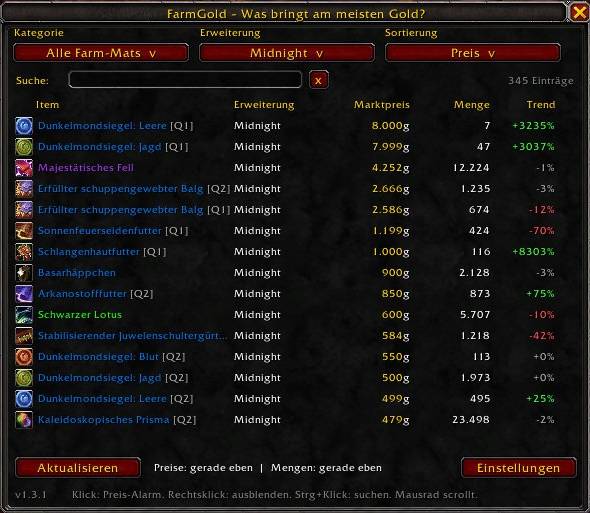
FarmGold shows which profession materials (herbs, ore, bars, leather, cloth and more, all expansions) currently earn the most gold at the auction house. It shows price, quantity and price trend.
Setup: Open the auction house once. FarmGold updates itself: it reads Auctionator's saved prices, then scans quantities. It waits up to 20 seconds for Auctionator to finish, and rescans every 10 minutes while the AH stays open. Auctionator is optional but recommended.
Using the list: Open it with /fg or the minimap button.
Filters: Category, expansion and sort (price, quantity, trend, name) are dropdowns.
Search: Find items by name or ID. Search ignores the category and expansion filters.
Ctrl+click: An item in the list, your bags, the AH or chat puts its name in the search box (window must be open).
Click a row: Set a price alert. You choose "at or above" or "at or below" a target price in gold. You get a chat message, an on-screen message and a sound.
Right-click a row: Hide the item. Under the category "Hidden items", right-click shows it again.
Tooltips: Item tooltips show FarmGold's market price, lowest price, quantity and trend.
Rows: Only items of white quality or better are listed. The tier appears as [Q1] or [Q2].
Commands:
/fg (or /farmgold): open or close the window
/fg config: settings
/fg update: same as the Update button
/fg auto: toggle auto-update
/fg check [item link or ID]: shows why an item is or isn't tracked
/fg debug: status info for bug reports
/fg unstick: reset a stuck update
/fg reset: delete this realm's price data
/fg help: list all commands
Settings: Auto-update, tooltip prices, alert sound, minimap button, reset hidden items, delete realm data.
Limits:
Quantities: The Update button re-reads Auctionator's saved prices without the AH. New quantities need the AH open. This is a Blizzard restriction.
Alerts: They only check when new data arrives.
Prices: They come from your own scans, so they are only as fresh as your last AH visit.
Language: The addon follows your game client's language: German and English. All other languages fall back to English.
Classic: Tested mainly on Retail. Classic support is included but hasn't been tested in game.
The FarmGold Team
