Lucky's Warband Stockist
- By
Warbank Stockist automatically manages item quantities between your bags and the Warband Bank, keeping your inventory tidy and ready for adventure.
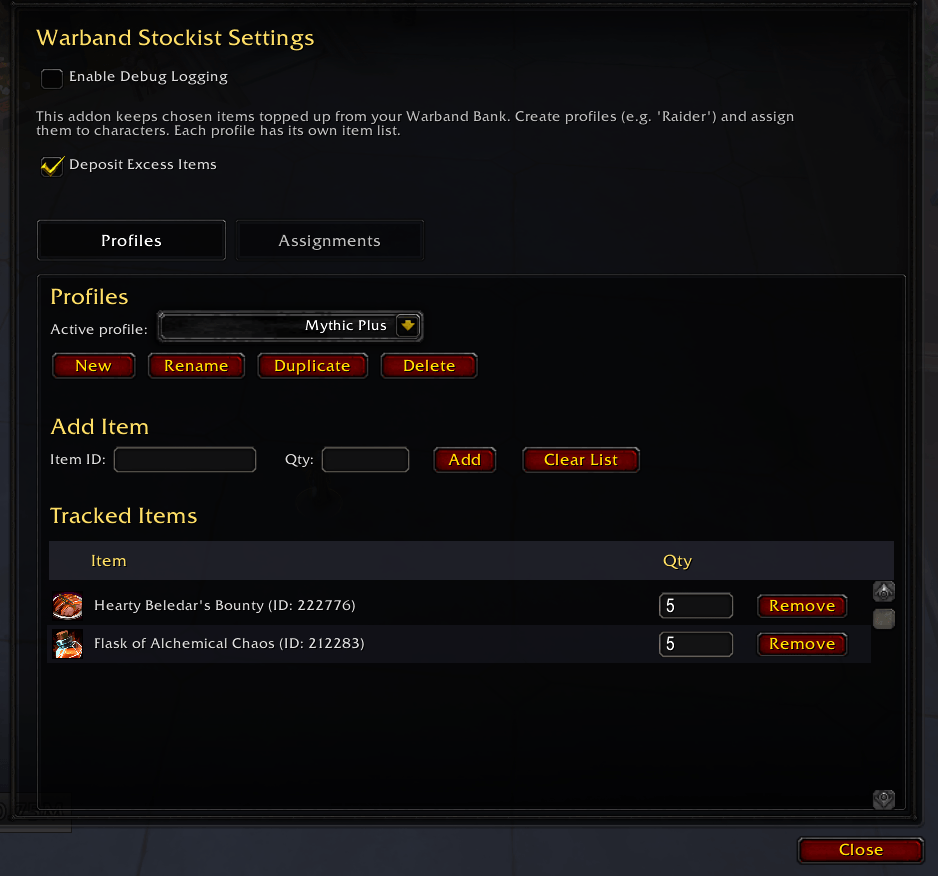
Wow_af6f31Sxzx.png
Description
Lucky's Warband Stockist
Keep chosen items and gold topped up across your characters using the Warband Bank.
Features
- Stock profiles: Create separate item lists for raiders, crafters, gatherers, leveling characters, or any other purpose.
- Automatic withdrawals: Opening the Warband Bank withdraws missing items until your bags reach the quantities configured in the active profile.
- Excess deposits: Optionally return stock above the configured quantity to the Warband Bank.
- Warbound auto-deposit: Opening the Warband Bank can deposit warbound armor, weapons, and tier tokens from your bags before the restock runs.
- Automatic bank sorting: Each profile can clean up and sort the Warband Bank after its deposit pass finishes.
- Character assignments: Assign each character to a profile, leave it unassigned, or ignore it completely.
- Flexible item entry: Add tracked items by item link or item ID, or pick up a bag item and drop or click it onto the Item ID field, and choose the quantity each character should keep.
- Deposit-only items: Profiles that deposit excess can start the quantity box at 0, so items you want sent straight to the bank take one click to add.
- Profile management: Create, rename, duplicate, and delete profiles without changing other characters' assignments.
- Searchable item lists: Filter large profiles by item name or item ID.
- Gold targets: Keep characters at a chosen gold amount using level brackets, with optional per-character overrides.
- Manual transfers: Deposit or withdraw a single item with slash commands while the Warband Bank is open.
- Minimap access: Open settings from a draggable minimap button, which can be hidden in settings.
Installation
Install from CurseForge, or place the Luckys_Warbank_Stockist folder in World of Warcraft/_retail_/Interface/AddOns/.
Lucky's Utils is required. CurseForge release packages include it automatically.
Usage
- Open Options > AddOns > Lucky's Warband Stockist, or enter
/wbs. - On the Profiles tab, create or select a profile and add the items and quantities that character should keep.
- On the Assignments tab, assign the profile to one or more characters.
- Open the Warband Bank on an assigned character. Missing items are withdrawn automatically, and enabled deposit or gold rules are applied.
Slash Commands
| Command | Action |
|---|---|
/wbs |
Open the settings panel |
/wbs report |
Print the current tracked inventory and missing items report |
/wbs autoopen [on|off|toggle] |
Control whether settings open automatically when this character logs in |
/wbdeposit <itemID> |
Deposit one of the specified item while the Warband Bank is open |
/warbanddeposit <itemID> |
Alias for /wbdeposit |
/wbwithdraw <itemID or item link> |
Withdraw one of the specified item while the Warband Bank is open |
/warbandwithdraw <itemID or item link> |
Alias for /wbwithdraw |
/wbhelp |
Print the manual transfer command list |
Settings
Open settings with the minimap button, /wbs, or Options > AddOns > Lucky's Warband Stockist.
- Profiles: Manage profiles, tracked item quantities, excess deposits, bank sorting, item-list search, and whether the Add Item quantity box starts at 0 instead of blank.
- Assignments: Assign profiles to characters, unassign characters, or move unused characters into the ignored section.
- Gold: Set target gold by level range and add overrides for individual characters.
- Warbound: Choose whether warbound armor, weapons, and tier tokens are deposited when you open the bank.
- Minimap Button: Show or hide the addon button.
A note on AI
My addons are made by one person who plays the game and wants them to work properly. I use AI tools to move faster, mostly on code, bug hunting, and docs, but every change is reviewed and tested in game before release. If a feature feels off or something breaks, that's mine to fix, and the Discord is the fastest way to reach me.
Author
Lucky Phil
The Lucky's Warband Stockist Team