Lucky's Loot Wishlist
- By
Track your must-have loot and get instant alerts the moment your coveted drops appear.
Wow_Uy3UuNjBic.png
Description
Lucky's Loot Wishlist
Track loot from the Adventure Guide and manage a per-character wishlist with spec-aware alerts.

Features
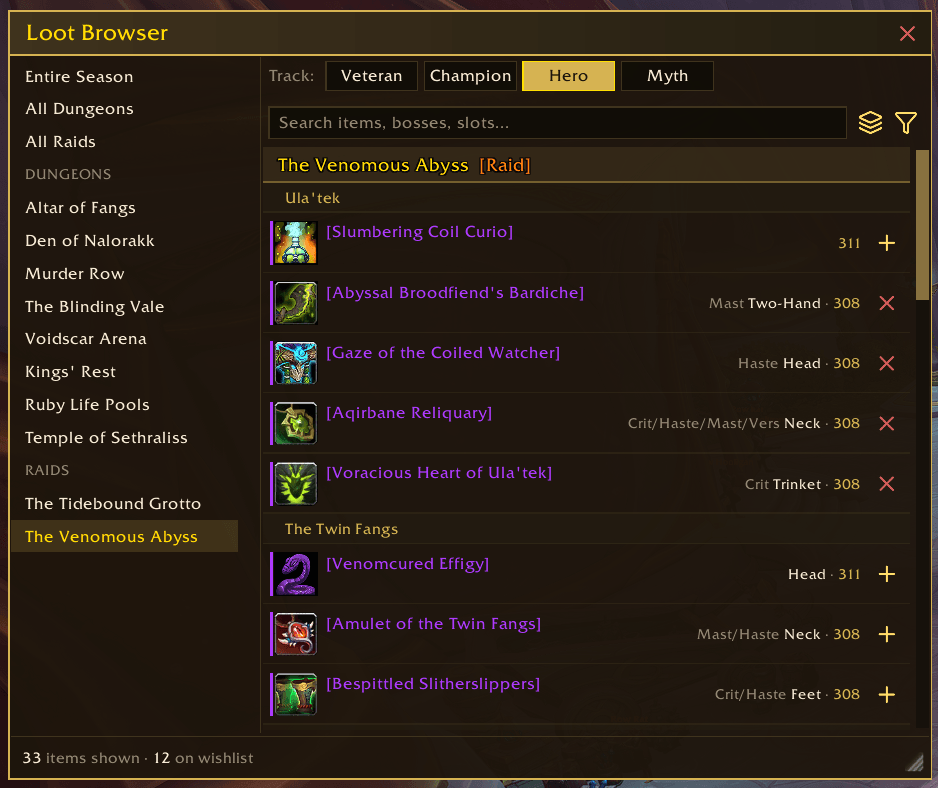
- Loot Browser — browse the current season's dungeon and raid drop tables in one window, no Adventure Guide needed
- See every dungeon's loot at once, or switch to all raids or the entire season
- Filtered to your class with patterns and cosmetic drops left out, and narrowable to a single spec
- Peek at any other class's loot table, view only, so you can scout for an alt or a friend
- Pick a gear track (Veteran, Champion, Hero, Myth) and items are tracked at the matching difficulty
- Group the list by source or by gear slot with the layers icon beside the search box
- Click a raid, dungeon, boss or slot heading to fold its loot away; folds are remembered, and a search or slot filter shows every match regardless
- The funnel icon beside it holds the filters: class and spec, slot, and secondary stats, with a Reset Filters entry at the foot of the menu
- Filter by slot to see every trinket, weapon, or pair of hands in the pool, with tier tokens under the slot they create
- Filter by stat, asking for pieces that carry any of the stats you pick, all of them, or only them
- Search by item name, boss, slot, or armor type
- Every row names the secondary stats a piece carries, largest first, beside its slot and item level
- An item a bonus roll already gave you says so under its name
- Add or remove wishlist items with one click
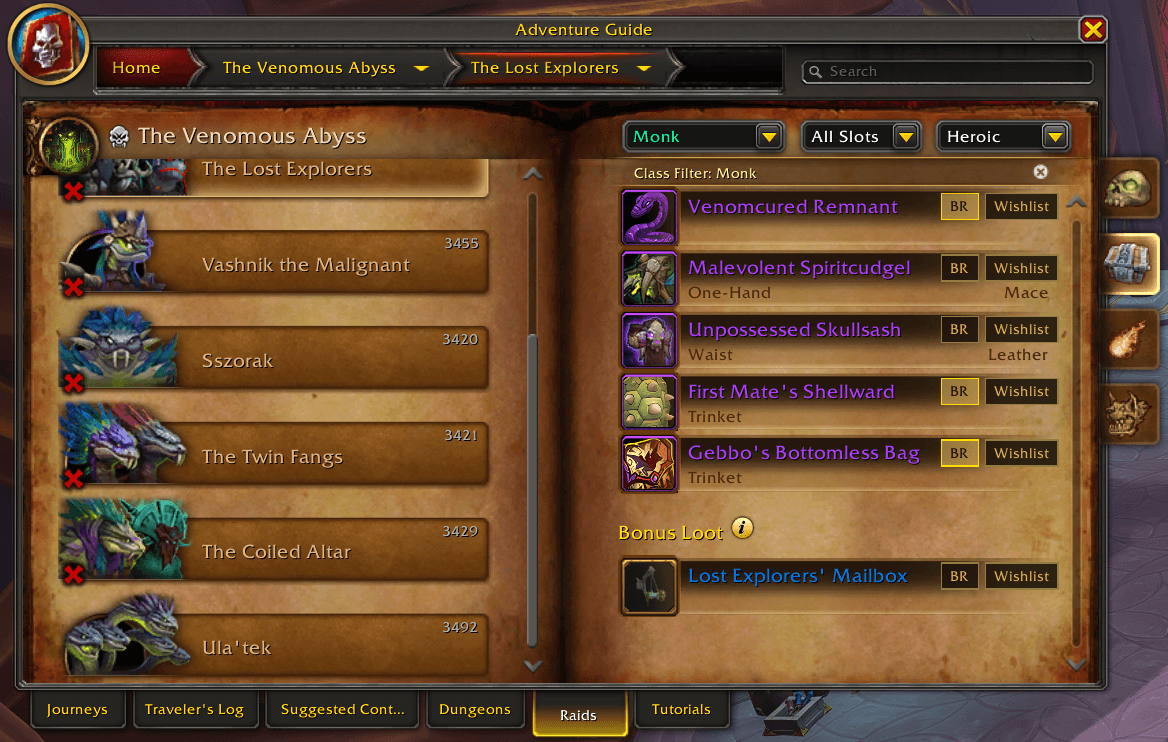
- Adventure Guide integration — a "Wishlist" button appears on each loot row in the Encounter Journal; click to track any item across all tiers and difficulties
- Manual add — track any item by ID or item link with
/wishlist add, handy for items outside the Adventure Guide - Spec-aware tracking — records which specs can loot each item and shows them inline; items usable by all specs are tagged accordingly
- Drop alerts — notifies you when a tracked item drops, with context-sensitive actions:
- Self-looted: Remove from wishlist or Keep tracking
- Looted by others: Whisper the looter, announce to Party, or Dismiss
- Raid rolls: reminder popup when a group loot roll starts for a wishlisted item
- A sound plays with each alert, one for your own drop and another when it drops for someone else
- Actions appear only when the drop reaches the gear track you track the item at; a copy on a lower track is highlighted and says so
- When a teammate loots the item, the alert checks what they have equipped in that slot and warns you when the drop is likely an upgrade they cannot trade
- Warbound items ("Warbound until equipped") are automatically filtered out of alerts
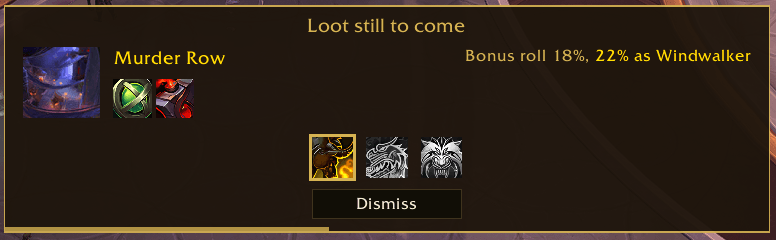
- Upcoming loot — entering a raid or a dungeon shows what is still ahead of you, a row at a time:
- Each row carries the boss portrait, its name, and an icon for every wishlist item it drops; hover an icon for the item
- An item your loot spec cannot be given is greyed and struck through, and the line beside it names the spec those items need
- An item a bonus roll already gave you is ticked, and hovering it says so
- An item you marked as a bonus roll chase carries a dice icon, so the odds on each boss line read against what you mean to spend a charge on
- Each raid boss row gives your bonus roll chance and what a loot spec switch would make it; a dungeon is a single row, since a keystone charge is spent on the whole instance
- Changing loot spec while it is up redraws it, and closes it once the switch leaves nothing to say
- Your specs sit along the bottom, the one you are on ringed; click another to set your loot spec without leaving the reminder
- Shows once per instance or boss and resets when you leave
- Group assist suggestions — in dungeons, suggests party members who could switch loot spec to help funnel a tracked item, with one-click Whisper or Party prompts
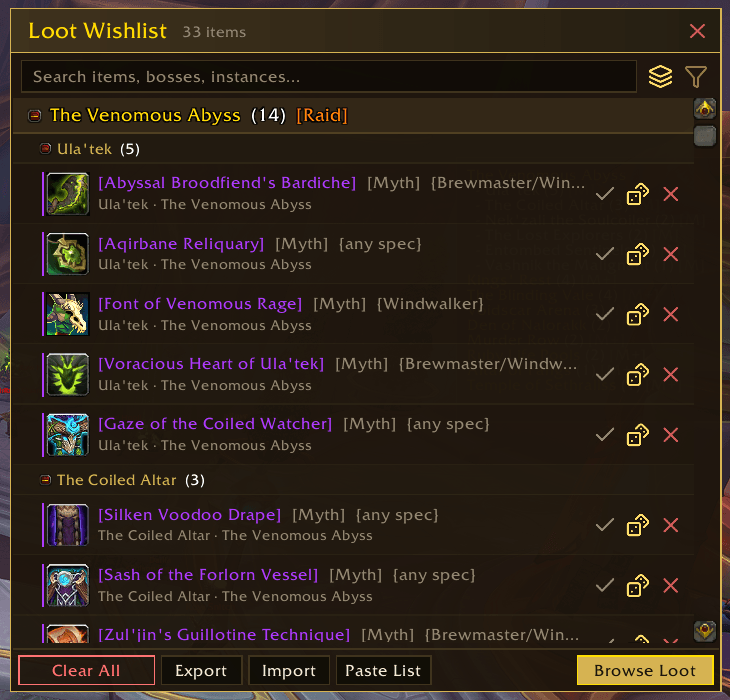
- Gear track labels — each wishlist row names the track it is tracked at, so a Hero entry and a Myth entry read apart at a glance
- Multi-difficulty tracking — adding an item on Normal automatically tracks it on Heroic and Mythic too; items tracked across difficulties appear as a single row with combined tags (e.g.
[N·H·M]) so the list stays clean - Tooltip status — every item tooltip, in a bag, at a vendor, in a chat link or the Adventure Guide, says when the item is on your wishlist and names the boss it drops from and the difficulties you track it at
- Great Vault highlights — a gold star marks every vault reward slot that contains a wishlisted item; hover the star or the reward itself to see which boss and dungeon it comes from, so you can pick the right chest at a glance
- Search and filters — a search box at the top of the wishlist window narrows the list by item, boss or instance, and the funnel icon beside it filters to one gear slot
- Collapsible headings — click an instance or boss heading on the wishlist to fold everything under it away; folds are remembered between sessions, and a search shows every match whether its heading is folded or not
- Boss order — the layers icon on the wishlist window orders bosses the way the Adventure Guide lists them or by most wishlist items first; the summary window follows the same order
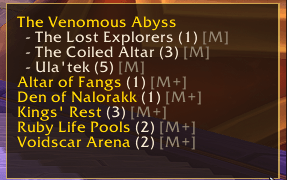
- Summary window: a compact overview of dungeons and raid bosses with remaining wishlist items, folded into a small draggable button by default; click the button to show or hide it, or click the summary to open the full list
- Custom message templates — configure Whisper and Party messages with
%item%and%looter%placeholders - Multiple difficulty support — track items across Normal, Heroic, Mythic, and LFR
- Bonus roll targets — mark any wishlist item as a bonus roll chase with the "BR" button in the Encounter Journal or on a wishlist row; a popup reminds you to spend Nebulous Voidcore charges after a Mythic+ 10+ run or a Heroic/Mythic raid boss kill when a flagged item could drop
- Tier Token Odds — tier tokens are split by armour type, so switch this on and joining a raid opens a window counting how many others wear yours and what that leaves your odds at, beside the odds a fair split of a group that size would give
- Pick which raid difficulties open it, or leave it off and open it yourself
- Reopens as people join, and counts itself away along the foot of the window before fading out; resting your mouse on it puts the time back to full
/wishlist tokenscalls it back any time, and one you open yourself stays until you close it- Drag it where you want it and it opens there from then on, per character
- Roll History — the dice icon on the Loot Browser switches it to Roll History, where you tick anything a bonus roll already gave you and count the charges you spent on each boss and dungeon, so the odds are right from the day you install rather than from your next roll; the first time you open the wishlist or the Loot Browser on a character with no rolls on record, a card offers to take you there
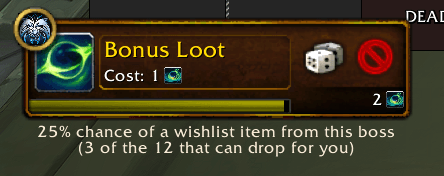
- Bonus roll odds — a line under Blizzard's Bonus Roll popup giving your chance of a wishlist item, counted against the loot that can actually drop for you, plus the charges you have already spent there and the loot spec that would give better odds; a raid roll reads one boss, a keystone run the whole dungeon, and anything a roll already gave you drops out of the count
- Auto-dismiss Bonus Roll — handles Blizzard's Bonus Roll popup for you, keeping it only in the content you pick per character; an unwanted popup is either passed outright or left on screen with the dice locked and the reason on hover, and can be narrowed to bosses you flagged an item on
- Mark as obtained — tick an item off on the wishlist and it stays on the list, greyed out, while its alerts and reminders stop; untick it if you were wrong, or hide obtained items entirely from settings
- Wishlist sharing — the Export button on the wishlist window turns your list into a copyable string; Import reads one back and asks whether to add it to your current list or replace it, so you can back up a wishlist or move it between characters
Installation
Install from CurseForge or extract the release zip into your Interface/AddOns folder.
Dependencies
- LuckyUtils — shared UI library (bundled automatically in CurseForge releases)
Usage
- Open the Loot Browser with
/wishlist browse(or the Browse Loot button on the wishlist window) and click + on anything you want - Or browse to a boss in the Adventure Guide (Shift+J) and click the Wishlist button on any loot row
- Open your wishlist with
/wishlist showor/lwl show - Alerts appear automatically when tracked items drop in your group
- Customise templates and toggles via
/wishlist settingsor ESC > Options > AddOns > Lucky's Loot Wishlist
Slash Commands
/wishlist and /lwl accept the same subcommands:
| Command | Action |
|---|---|
/wishlist show |
Open the wishlist window |
/wishlist hide |
Hide the wishlist window |
/wishlist browse |
Open the season loot browser |
/wishlist rolls |
Open the loot browser in Roll History, to fill in bonus rolls you made before installing |
/wishlist odds |
Print the bonus roll odds for each boss in the instance you are in |
/wishlist tokens |
Open the tier token odds window for your raid |
/wishlist settings |
Open the settings panel (also accepts options) |
/wishlist add <itemID or link> |
Manually add an item by ID or item link |
/wishlist list |
Print the number of tracked items |
/wishlist remove <itemID> |
Remove a single item by ID |
/wishlist clear |
Remove all tracked items |
/wishlist export |
Show a copyable share string of your wishlist |
/wishlist import |
Paste a share string to add to or replace your wishlist |
/wishlist reset-spec |
Show the upcoming loot reminder again for the instance you are in |
/wishlist debug |
Toggle debug logging |
Settings
Access via /wishlist settings or ESC > Options > AddOns > Lucky's Loot Wishlist.
- Toggle the minimap button, which can also sit on a panel addon such as Titan Panel instead
- Choose what a plain, Ctrl- and Shift-click on the minimap button opens: both windows, the wishlist, or the Loot Browser
- Choose whether the summary window is folded into a button, always open, or hidden
- Adjust summary window and summary button opacity when your mouse isn't hovering over them
- Order bosses by Adventure Guide order or by most wishlist items first, in the summary and wishlist windows alike
- Toggle automatic multi-difficulty tracking (on by default)
- Toggle Great Vault highlights (on by default)
- Toggle the wishlist line on item tooltips (on by default)
- Hide obtained items from the wishlist window
- Toggle raid roll reminder alerts
- Toggle the sound played when a tracked item drops
- Toggle bonus roll reminders and their sound
- Toggle the odds line under the Bonus Roll popup (on by default)
- Toggle the tier token odds window opening itself in a raid (off by default), and pick the raid difficulties it opens on
- Handle the Bonus Roll popup automatically, keeping it only in the content you pick (per character). Chat names the setting that acted
- Choose what an unwanted popup gets: the roll locked with the reason on hover, or passed outright
- Narrow that to bosses you flagged a wishlist item on, so the popup only appears where the roll could land something you want
- Configure the delay before spec reminders show after a boss kill
- Enable debug mode for troubleshooting
- Customise Whisper and Party message templates (
%item%,%looter%)
Known Issues
- Item data sometimes loads asynchronously, so spec tags and links may appear a moment after opening the list
- Group assist suggestions are based on class and spec; they assume teammates can set loot spec even if not currently in that spec
A note on AI
My addons are made by one person who plays the game and wants them to work properly. I use AI tools to move faster, mostly on code, bug hunting, and docs, but every change is reviewed and tested in game before release. If a feature feels off or something breaks, that's mine to fix, and the Discord is the fastest way to reach me.
Author
Lucky Phil
Lucky's Loot Wishlist Team