LuckyDeal
Makes the “everyone rolls, sell at N× vendor price” dungeon loot rule quicker and easier — announcements, /roll judging, and trades in one board.
LuckyDeal (럭키딜)
Helps run a new dungeon loot rule: every item goes to a /roll, then a private trade at N× the vendor price.
새로운 던전입찰룰의 진행을 도와줍니다: 모든템 올주사위 + 상점가의 N배에 따라 개인거래. -한국어 설명은 아래에 있습니다.
I don't know whether this loot rule is used in regions outside Korea. So I can't be sure whether this addon will be useful outside Korea. The English (non-Korean client) version of this addon was translated by AI and has not been fully tested in-game.
This addon helps run a special dungeon loot rule quickly and conveniently: every party member rolls on each dropped item, and the winner may sell it to another party member through a personal trade at N times the vendor price.
Whether this kind of dungeon loot rule is permitted in the game under Blizzard's policies is left to each user's own judgment.
LuckyDeal
An addon that helps you run a dungeon loot-bidding rule quickly and easily — where party members buy and sell the blue and purple items that drop in a dungeon at N times the vendor price.
It works even if only one party member has the addon; party members without it take part through party chat.
Whether this kind of dungeon bidding rule is allowed in-game under Blizzard’s policy is left to the user’s own judgment.
Bidding rule summary
When a blue or better item drops, everyone rolls the loot roll.
If the person who wins the item wants to sell it, they type "판매" (sell) in party chat within the set time.
Anyone who wants to buy rolls /roll 100, and the highest roller becomes the buyer.
The seller and buyer trade at N times the vendor price. The trade must be done within 2 hours of looting.
Bind-on-Equip items are not for sale.
How it works
Item looted: the host’s addon announces the win and the sale price in party chat, and shows a countdown on screen.
Sell: the winner clicks the [Sell] button or types "sell" in party chat.
Buy request: anyone who wants it clicks the spinning dice button or types /roll 100.
Decision: the addon automatically picks the highest roller as the buyer and announces it in party chat. On a tie, only the tied players reroll.
Trade: clicking the [Trade] button opens a trade window with the other person, and the seller’s item is added automatically. The buyer enters the gold themselves.
Trade check: if you have the addon, a popup next to the trade window tells you whether the item and gold have been entered correctly.
If there’s no "sell" within the sale time, it ends as “not for sale”; if no one rolls, it ends as “no buyer.”
For the roll, the seller is excluded, only each person’s first roll counts, and only values in the 1–100 range are accepted.
In party chat, the price is wrapped in the Cross (X) raid marker and the buyer in the Diamond raid marker so they stand out.
Host
The announcement chat and the decision are handled by a single host’s addon.
A party leader who turns on the setting “Automatically start LuckyDeal when entering a dungeon” automatically becomes the host upon entering a dungeon.
Otherwise, the first person to click [Become the host] on the progress board becomes the host.
The sale-input time, roll time, and price multiplier follow the host’s settings.
While someone is hosting, the dice on the on-screen icon, the minimap icon, and the progress-board title spin.
Progress board
Opens when you click the on-screen icon or the minimap icon.
It shows the items currently in progress and what you need to do (sell, roll, trade, cancel); finished items disappear after 10 seconds.
Clicking [View all bids in this dungeon] shows every item that dropped in this dungeon with its winner, buyer, and result.
[Past dungeon bid records] shows per-dungeon records from the last month.
Next to the title, the current sale multiplier (N times the vendor price) is shown.
If a trade is canceled, it stays on the seller’s and buyer’s boards as “Seller canceled the trade” or “Buyer canceled the trade,” and that trade does not disappear on its own.
When you leave the dungeon, any of your items whose trade isn’t finished remain under “Unsettled trades from the last dungeon.”
Character names are shown in class colors, and prices in gold, silver, and copper colors.
Price check
The addon of a party member who is not the host automatically checks whether the price in the sale announcement matches “the vendor price my addon calculated × N,” and if it differs, sends a warning in party chat.
Settings (the gear icon on the progress board)
Automatically start LuckyDeal when entering a dungeon (applies only when you are the party leader)
Automatically show the LuckyDeal progress board when entering a dungeon / Show only during the bidding and selling process
Progress-board font size
Sale-input time (5–20 sec), roll time (5–20 sec)
Price: 2–10 times the vendor price
Show the on-screen LuckyDeal icon, show the minimap icon
Commands
/ld, /luckydeal : open/close the progress board
Good to know
It runs only in 5-player dungeons. Raids are not supported.
The sale price is calculated from the game’s vendor price, so no other addon is needed.
Trade gold cannot be added automatically due to game restrictions. The buyer must enter it themselves. The check box next to the trade window tells you whether the item and gold are correct.
던전에서 나온 파란 템과 보라 템을 파티원끼리 상점가의 N배로 사고파는 던전 입찰 룰을 빠르고 편하게 진행하도록 도와주는 애드온입니다.
파티원 중 한 명만 애드온이 있어도 진행할 수 있고, 애드온이 없는 파티원은 파티 채팅으로 참여합니다.
블리자드 운영정책에 따라 이러한 던전 입찰 룰이 게임 내에서 허용되는지는 사용자의 판단에 따릅니다.
입찰룰 요약
- 파란 템 이상이 나오면 모두 입찰 주사위를 굴립니다.
- 템을 얻은 사람이 팔고 싶으면 정해진 시간 안에 파티 채팅에 "판매"를 입력합니다.
- 사고 싶은 사람은 /주사위 100을 굴리고, 가장 높은 사람이 구매자가 됩니다.
- 판매자와 구매자가 상점가의 N배 가격(파티장이 미리 설정)으로 거래합니다. 거래는 획득 후 2시간 안에 해야 합니다.
착용 시 귀속 템은 판매 대상이 아닙니다.
진행 순서
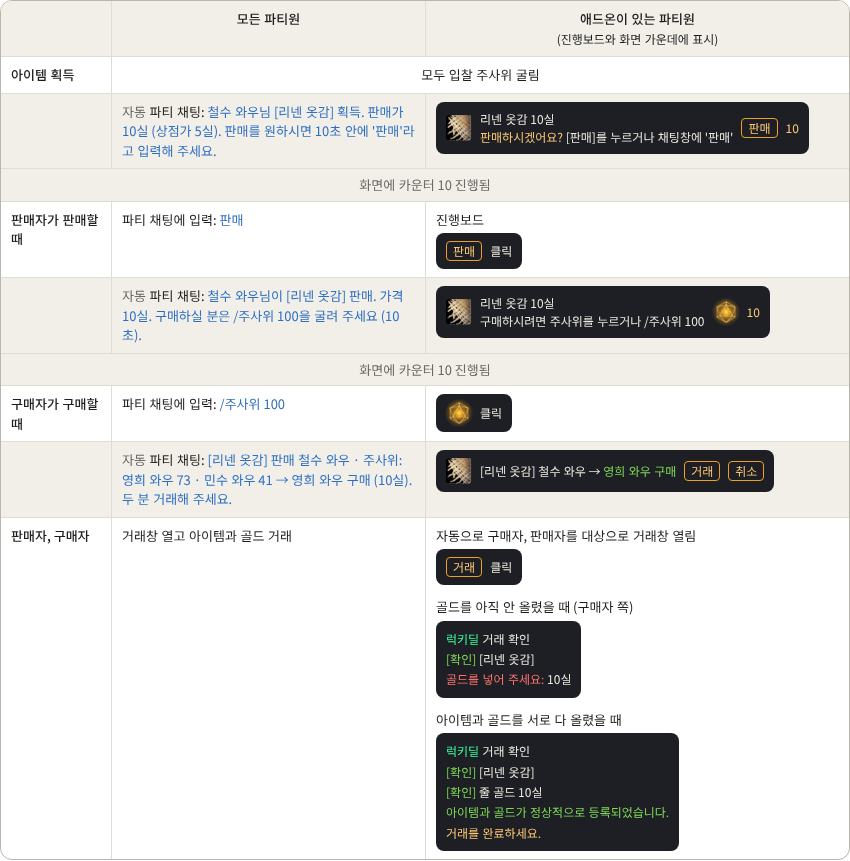
템 획득: 진행자의 애드온이 파티 채팅으로 획득과 판매가를 안내하고, 화면에 카운트다운을 띄웁니다.
판매: 획득자가 [판매] 버튼을 누르거나 파티 채팅에 "판매"를 입력합니다.
구매 신청: 사고 싶은 사람이 돌아가는 주사위 버튼을 누르거나 /주사위 100을 입력합니다.
판정: 애드온이 자동으로 1등을 구매자로 정해 파티 채팅으로 알립니다. 동점이면 동점자만 다시 굴립니다.
거래: [거래] 버튼을 누르면 상대와 거래창이 열리고 판매자의 템이 자동으로 올라갑니다. 골드는 구매자가 직접 넣습니다.
거래경고: 애드온이 있으면 거래창 옆에 팝업을 보여줍니다: 아이템과 골드가 정상 등록되었는지 문구 표시.
판매 시간 안에 "판매"가 없으면 "판매하지 않음", 아무도 주사위를 굴리지 않으면 "구매자 없음"으로 끝납니다.
주사위는 판매자를 빼고, 한 사람당 첫 주사위만, 1-100 범위만 인정합니다.
파티 채팅에서 가격은 가위표, 구매자는 다이아몬드 공격대 징표로 감싸 잘 보이게 표시합니다.
진행자
안내 채팅과 판정은 진행자 한 사람의 애드온이 맡습니다.
설정 "인던에 들어가면 럭키딜 자동으로 시작하기"를 켠 파티장은 던전에 들어가면 자동으로 진행자가 됩니다.
그렇지 않으면 진행보드의 [진행자가 됩니다]를 먼저 누른 사람이 진행자가 됩니다.
판매 입력 시간, 주사위 시간, 판매가 배수는 진행자의 설정으로 진행됩니다.
누군가 진행 중이면 화면 아이콘, 미니맵 아이콘, 진행보드 제목의 주사위가 돌아갑니다.
진행보드
화면 아이콘이나 미니맵 아이콘을 누르면 열립니다.
지금 진행 중인 템과 내가 할 일(판매, 주사위, 거래, 취소)이 보이고, 끝난 템은 10초 뒤 사라집니다.
[이 던전의 입찰 모두보기]를 누르면 이 던전에서 나온 모든 템과 획득자, 구매자, 결과를 볼 수 있습니다.
[지난 던전의 입찰 기록]에서는 최근 한 달 동안의 던전별 기록을 볼 수 있습니다.
제목 옆에는 이번 판매 배수(상점가의 N배)가 표시됩니다.
거래를 취소하면 판매자와 구매자 보드에 "판매자가 거래 취소" 또는 "구매자가 거래 취소"로 남고, 그 거래는 자동으로 사라지지 않습니다.
던전을 나가면 거래가 끝나지 않은 내 템은 "지난 던전에서의 미결 거래"에 남습니다.
캐릭터 이름은 직업 색으로, 가격은 골드, 실버, 코퍼 색으로 표시됩니다.
판매가 확인
진행자가 아닌 파티원의 애드온은 판매 안내 채팅의 가격이 "내 애드온이 계산한 상점가 × N배"와 같은지 자동으로 확인하고, 다르면 파티 채팅으로 경고를 보냅니다.
설정 (진행보드의 톱니바퀴)
인던에 들어가면 럭키딜 자동으로 시작하기 (파티장일 때만 적용)
인던에 들어가면 럭키딜 진행보드 자동으로 보기 / 입찰·판매 과정에서만 보기
진행보드 글자 크기
판매 입력 시간 (5~20초), 주사위 시간 (5~20초)
판매가: 상점가의 2~10배
화면에 럭키딜 아이콘 보이기, 미니맵 아이콘 보이기
명령어
/럭키딜, /ld, /luckydeal : 진행보드 열기/닫기
알아 두실 점
5인 파티 던전에서만 진행됩니다. 공격대는 대상이 아닙니다.
판매가는 게임의 상점 판매가로 계산하므로 다른 애드온이 필요 없습니다.
거래 골드는 게임 제한 때문에 자동으로 올릴 수 없습니다. 구매자가 직접 입력해 주세요. 거래창 옆 확인 상자가 템과 골드가 맞는지 알려 줍니다.
LuckyDeal Team