MaxClick
Creates a row of left-click / right-click spell icons for each party member, so you can cast on any party member with a single click.
Creates a row of left-click / right-click spell icons for each party member, so you can cast on any party member with a single click.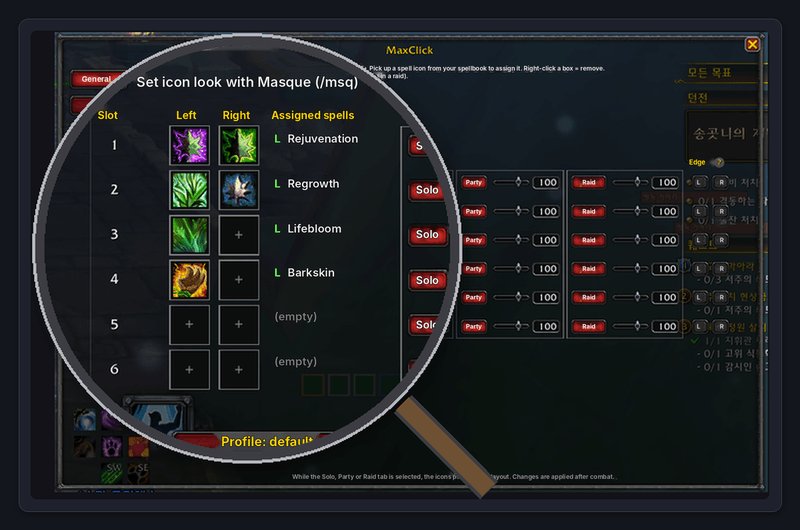
1. Features
1) 6 slots × 5 party members — assign separate spells to left-click and right-click for each slot
2) Besides spells, Target and Unit Menu can also be assigned as click actions
3) Icon rows follow the order shown in the Blizzard party frames (raid frames in a raid)
4) Icon size, spacing and position are saved separately for Solo, Party and Raid
5) Opacity per slot and per situation — at 0 the icon is invisible but still clickable
6) Dims icons when out of range, shows cooldowns
7) Choose the raid group layout (1×8, 2×4, 4×2, etc.)
8) Adjust spacing and height of the Blizzard party / raid frames
9) Masque support, profiles
Note: When the icons are placed apart from the party frames, assign the 'Target' action to select a party member. However, when the icons overlap the party frames and are made transparent, simply leave that click empty — the click passes through to the party frame and selects the party member as usual.
2. How to use
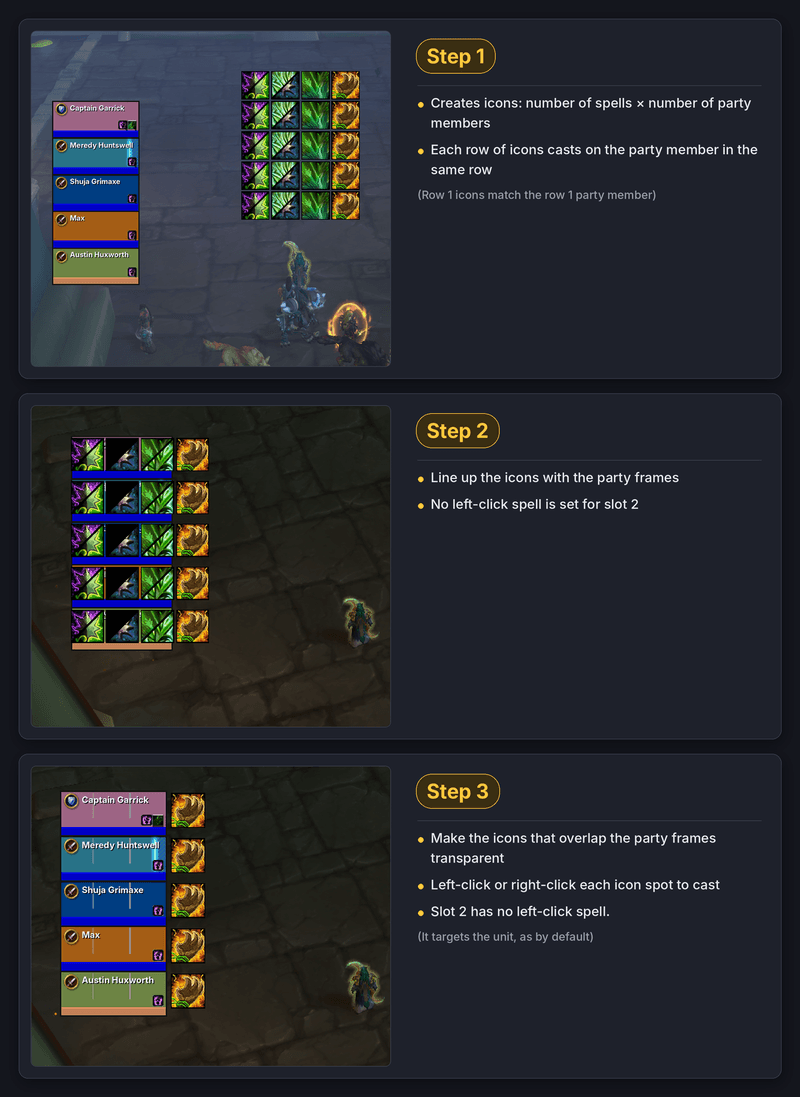
1) Icons are created for each spell you assign × each party member. Each row casts on the party member in the same row.
2) Line up the icons with the party frames.
3) Set the opacity of the icons over the party frames to 0 — now simply left-click or right-click the party frames to cast. Spots without a spell still target the unit, as by default.
3. Commands
1) /maxc — open MaxClick settings
2) /maxc reset — reset the current layout (Solo / Party / Raid) to the center of the screen
3) /maxc minimap — show / hide the minimap icon
4) /maxc castby name | id — cast method (name (rank) / spell ID)
5) /maxc help — list commands
This addon was Designed by me, coded with AI
좌클릭 · 우클릭으로 주문을 시전하는 아이콘을 파티원 수만큼 만들어, 클릭 한 번으로 파티원에게 기술을 시전합니다.
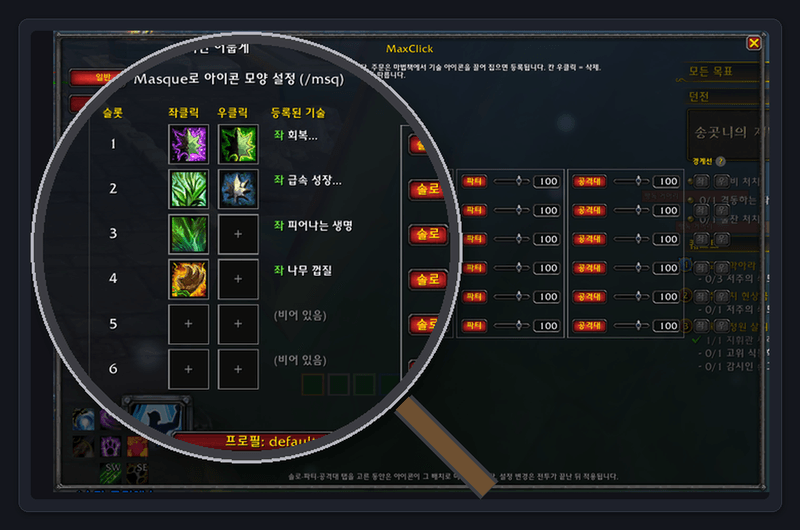
1. 주요 기능
1) 슬롯 6개 × 파티원 5명 — 슬롯마다 좌클릭 · 우클릭에 주문을 따로 등록
2) 주문 외에 대상 선택 · 유닛 메뉴도 클릭 동작으로 등록 가능
3) 아이콘 순서는 블리자드 파티창(공격대에서는 공격대창)에 보이는 순서를 그대로 따름
4) 솔로 · 파티 · 공격대 상황별로 아이콘 크기 · 간격 · 위치를 따로 저장
5) 슬롯별 · 상황별 불투명도 — 0으로 하면 아이콘은 보이지 않지만 클릭은 됨
6) 사거리 밖이면 아이콘을 어둡게, 재사용 대기시간 표시
7) 공격대 파티 배열(1×8, 2×4, 4×2 등) 선택
8) 블리자드 파티창 · 공격대창의 간격과 높이 조절
9) Masque 지원, 프로필 저장
주의: 아이콘을 파티창과 분리한 상태에서 대상을 선택하기 위해서는 '대상 선택'메뉴 선택, 그러나, 아이콘을 파티창과 겹친 상태에서 투명하게 한 경우 파티원을 선택하기 위해서는 아이콘을 비워두면 됩니다- 비워두면 아이콘이 없는것처럼 아래의 파티원창을 선택하게 됩니다.
2. 사용 방법
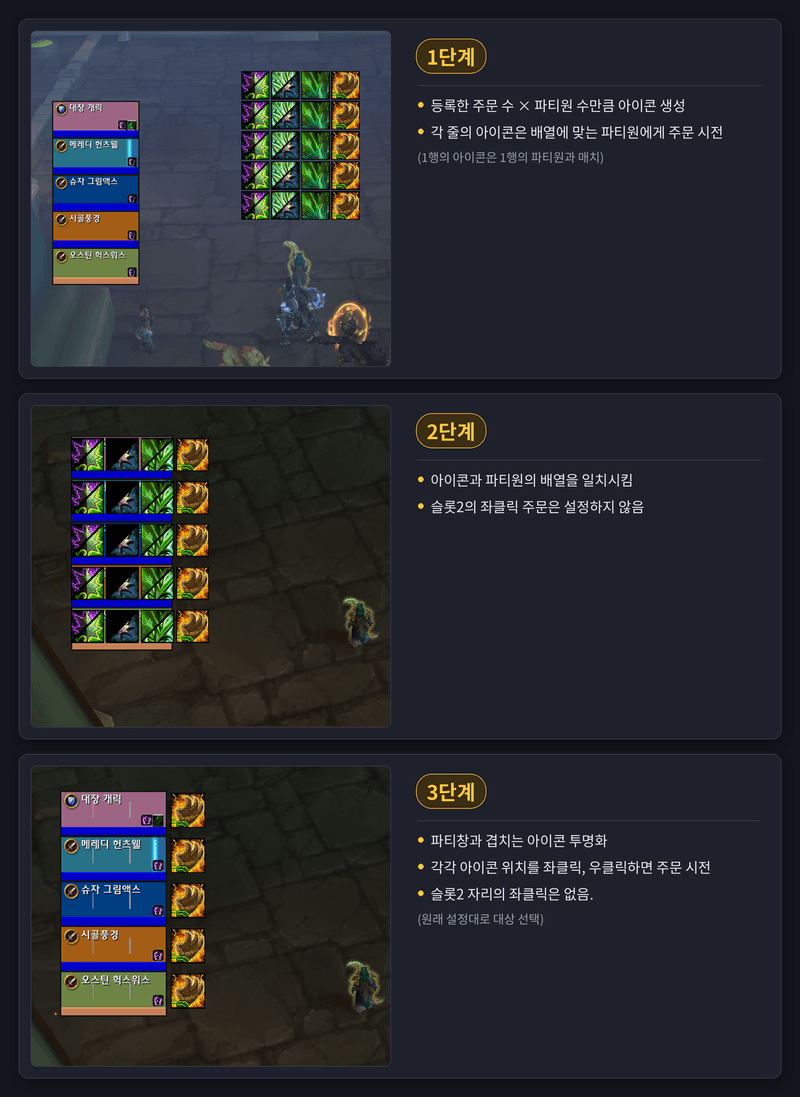
1) 등록한 주문 수 × 파티원 수만큼 아이콘이 만들어집니다. 각 줄의 아이콘은 같은 줄의 파티원에게 시전합니다.
2) 아이콘 배열을 파티창에 맞춥니다.
3) 파티창과 겹치는 아이콘의 불투명도를 0으로 하면, 파티창을 좌클릭 · 우클릭하는 것만으로 주문이 시전됩니다. 주문을 등록하지 않은 자리는 원래대로 대상을 선택합니다.
3. 명령어
1) /maxc — MaxClick 설정창 열기
2) /maxc reset — 지금 배치(솔로·파티·공격대)의 위치를 화면 정중앙으로 초기화
3) /maxc minimap — 미니맵 아이콘 보이기/숨기기
4) /maxc castby name | id — 시전 방식 (이름(레벨) / 기술 ID)
5) /maxc help — 명령어 목록
이 애드온의 코딩은 ai로 수행되었습니다.
MaxClick Team