LuaWorkbench
- By
Write, run and debug Lua in WoW with saved scripts, reusable helpers, event callbacks, breakpoints and live variable inspection.
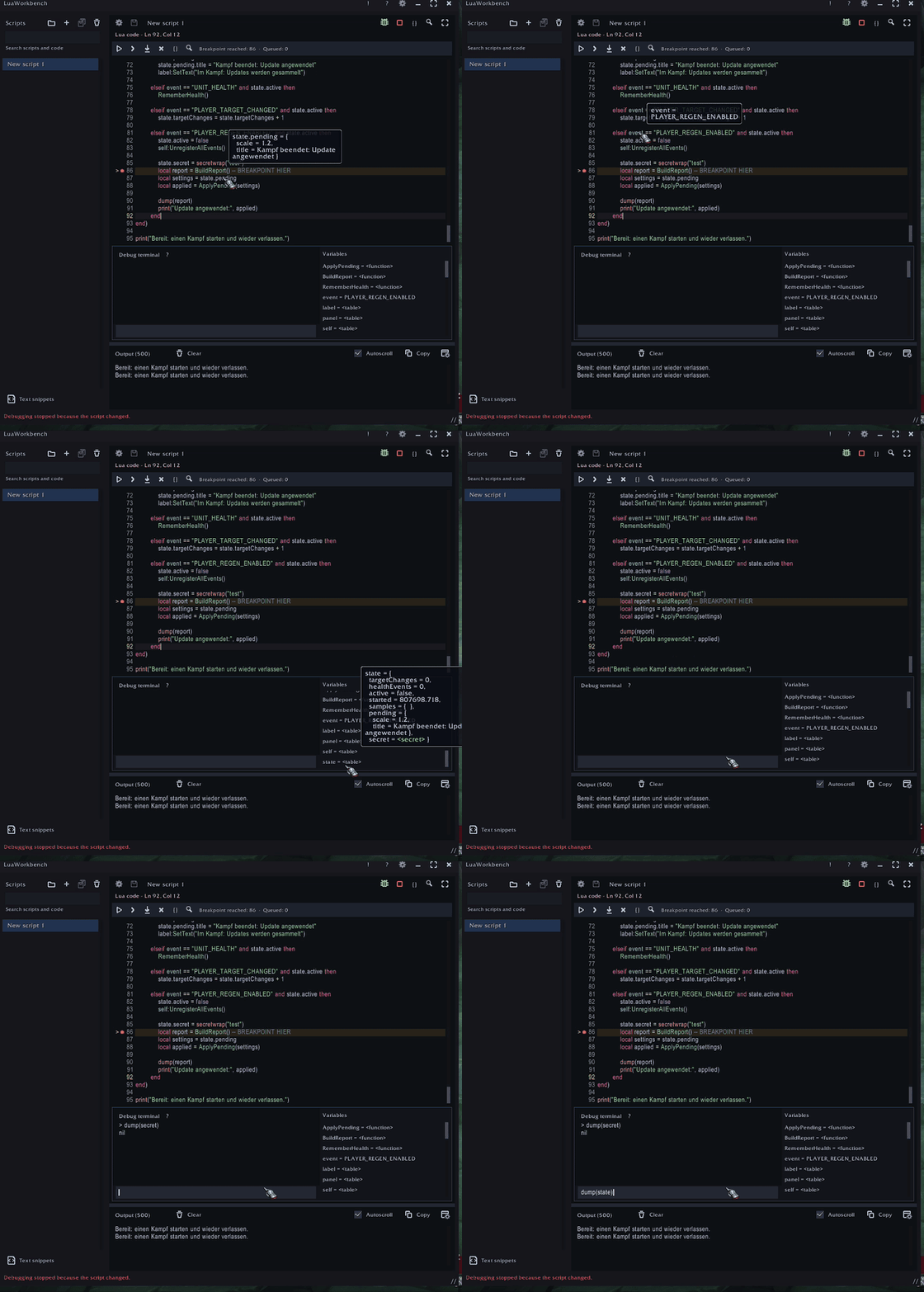
Animated preview of breakpoints, live variable inspection and the integrated debug terminal.
Description
LuaWorkbench
LuaWorkbench lets you write, run and debug Lua scripts in WoW. It includes a code editor, saved scripts, reusable helper modules and an output panel for inspecting results, event data and errors.
Open it with /lua, /le, /luaeditor or /luaworkbench. Supports Retail, Forever and TBC, with translations for all 11 WoW languages.
Write and organize scripts
The editor includes syntax highlighting, code formatting, bracket completion and configurable indentation. Fonts and syntax colors can be customized.
Organize saved scripts in folders, search within a script or across your scripts, and insert reusable text snippets from the context menu. Use F12 to jump to definitions. Save scripts individually or with Save All, with draft recovery for unfinished work.
Share code between scripts
Move shared functions and data into named helper modules. Save a helper that returns a Lua table, then load it in another script with requireHelper("MyHelper").
Scripts can also run automatically at startup, login or on selected WoW events. Automatic execution is off by default and uses the saved version of your code, not unsaved edits.
Debug scripts and event handlers
Set breakpoints next to the line numbers to pause execution and inspect what your code is doing. World of Warcraft keeps running while your script is paused. Step over statements or into supported script and helper calls. The debugger also supports saved helper modules and inline OnEvent handlers. Supported incoming events are queued while execution is paused.
Inspect variables in the side panel or hover over code to explore nested tables. The debug terminal lets you evaluate expressions, print values, change accessible locals and update table contents before continuing. Previous commands are available with Alt+Up/Down.
Use F5 to continue, F10 to step over, F11 to step into supported calls and Shift+F5 to stop debugging. Breakpoints are saved across reloads and move with your code as you edit. A breakpoint notice lets you return to paused code when the editor is minimized.
Inspect output
A dedicated panel collects print, dump, return values and errors. When dumping multiple arguments, each is numbered and nil positions are preserved, so you can tell which argument belongs where in an event payload.
Keep output inside the editor, detach it into a resizable window or dock it beside your code. Copy or clear output, toggle autoscroll and configure output limits. Session error history keeps errors available for review, and multiline previews let you check output while minimized.
The editor and help windows are resizable. Fullscreen mode, saved window placement and optional screen clamping let you adjust the layout to your screen.
Getting started
Create a script and run it with Play or Ctrl+Enter. Save with Ctrl+S, use the bug button to start debugging, and open ? for categorized help and keyboard shortcuts.
Debugger scope and beta notes
The debugger supports your scripts, helpers and supported event callbacks. It cannot step through arbitrary Blizzard or other addon internals, or pause callbacks that must return synchronously to native code. WoW’s restrictions on secret values still apply; values can be shown in hover tooltips where permitted.
LuaWorkbench is currently in beta. Scripts run with normal addon permissions, so only run code you trust. An infinite loop can freeze the client; the debugger’s Stop button cannot interrupt arbitrary blocking code.
LuaWorkbench is MIT-licensed. Bundled libraries retain their original licenses and notices. The repository is private during initial development. Contributions and translations will be welcome once it opens.
LuaWorkbench Team

Owner