Lotus Chat: Quick Chat and Roleplay Lines
- By
Lotus Chat: Quick Chat and Roleplay Lines
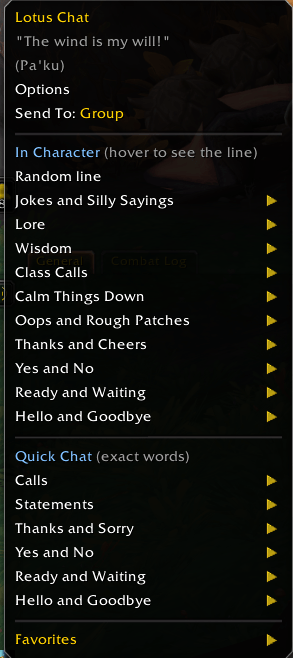
A quick chat menu for World of Warcraft, like the one in Final Fantasy XIV, with in-character lines for light RP. Pick a line from the menu to greet the group, thank your healer, call Lust, own a mistake or calm a heated chat, worded for your race and class. A massive ammount of pre-written lines for every playable race through Midnight, and nothing ever posts unless you click.
Why Lotus Chat
Most quick-chat addons give everyone the same canned line. Lotus Chat writes each line for who you are playing. An orc warrior, a pandaren monk and a goblin rogue thank the healer three different ways, and none of them sound like a macro.
It works just as well when you only want to be clear and quick. Switch quick chat to Plain and you get "Yes." "GG." "Lust now." with nothing extra.
The name comes from the lotus, which grows up out of the mud and comes out clean. When a group gets rough, there is always a calm, often funny reply one click away.
Features
Quick chat
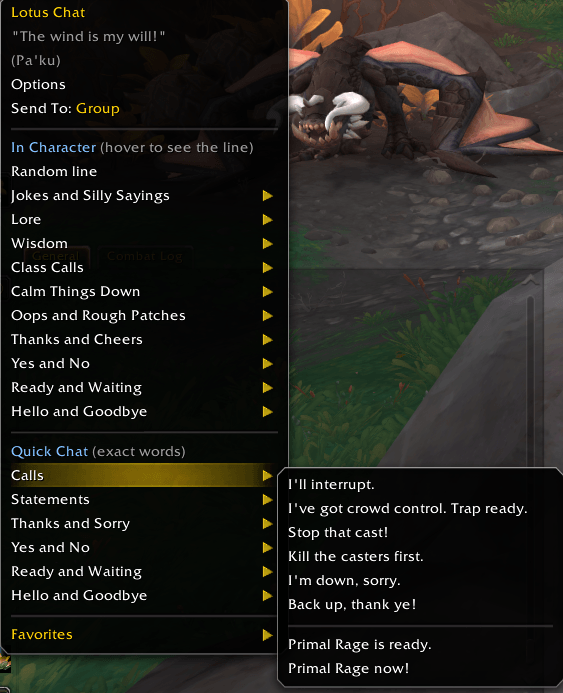
Short, clear calls, shown in the menu exactly as they will be sent.
- Hello and goodbye, ready and waiting, yes and no, thanks and sorry
- Statements: "First time here, please be patient with me." "I don't know the mechanics for this fight." "Need a summon, please."
- Calls for your role and class: pulling and waiting for tanks, drinking and range for healers, interrupts and crowd control for DPS, plus battle res, healthstones, portals and gateways for the classes that have them
- Lust timing for tanks: on pull, on cooldown, next pull, on the boss, save it for the last boss, hold, now
- Short orders for tanks: wait here, stack on me, line of sight, kill the marked target, skip this pack
Quick chat voices. Choose how quick chat sounds:
- Your race and class (default). A goblin says "Hey hey, hello!", a troll says "Hey, mon!", a Kul Tiran says "Ahoy!"
- Plain. Just the call.
- 16 archetypes in the spirit of Warcraft characters: Warchief, Lorewalker, Wanderer, Tinker, Trade Prince, Explorer, Archmage, Paladin, Veteran, Trickster, Dark Ranger, Archdruid, Deathlord, Illidari, Innkeeper and Corsair.
In-character lines for every situation
Greetings and farewells, thanks and cheers, oops and rough patches, calming things down, getting ready and waiting, answers, wisdom, jokes and lore. Every line is written for your race, class and role.
Hover a line in the menu to see exactly what it will say, scroll the mouse wheel to browse others, and click to send what is showing.
Lore about where you are
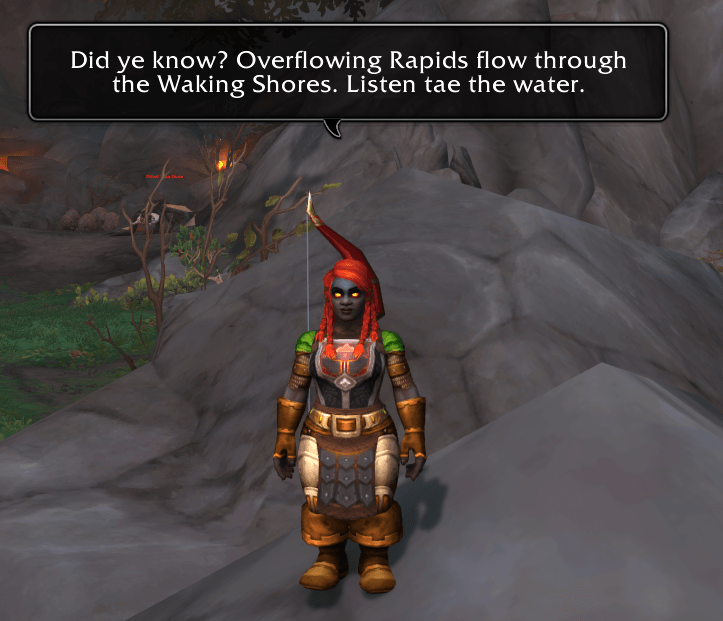
Ask for "Lore about where I am" and your character talks about the spot you are standing in, then the zone, then the area around it. That covers every zone in retail, over 4,000 towns, camps and city districts, and every dungeon and raid, from Ragefire Chasm to the newest Midnight content. Every place line plays once before any repeats, and leaving a zone and coming back starts it fresh.
Voices and accents
- A voice for every playable race, each with its own sayings and its own way of bringing up lore
- Three accent levels. Full (default): a goblin talks like a fast-talking Jersey salesman, a troll says "da" and "mon", a dwarf says "ye" and "tae". As written shows each line exactly as written. Smoothed keeps each race's lines in plain English.
- Worgen speak proper Gilnean in human form and cockney in wolf form
- Voice options for Draenei with the Man'ari Eredar look and for Void Elves played as high elves
- Real in-game food, drink and gems, your hunter pet or warlock demon by name, and the weapon you are holding
No repeats
Every line plays once before any line comes back, and Lotus Chat remembers where you were across reloads.
Extras
A fortune cookie on the Extras tab, one per session: a real fortune and a lucky dungeon with a famous drop you have not collected yet. Lotus Chat checks your warband's mounts, pets, toys and appearances.
And if you need someone to talk to, Lorewalker Cho is on the Extras tab too. Type anything and he will answer. He is a very good listener and a slightly worse therapist.
How to use it
- Left-click the lotus to post a random line. You choose what it draws from: wisdom, lore, silly sayings or jokes.
- Right-click the lotus for the menu. Right-click any line to pin it to Favorites at the top.
- Send To at the bottom of the menu switches where lines go: Only Me, /say or Group.
- Lotus Chat is also in the chat bubble menu beside the chat box and in the addon list on the minimap.
- Keybinds: Esc > Options > Keybindings > AddOns > Lotus Chat.
Where lines go. By default, lines go to group chat when you are in a group and only to you when you are solo.
Mythic+ and boss fights. Blizzard blocks addons from sending chat there, so the line appears in a small copy box instead. Press Ctrl+C, then Enter, Ctrl+V and Enter to send it yourself.
Options
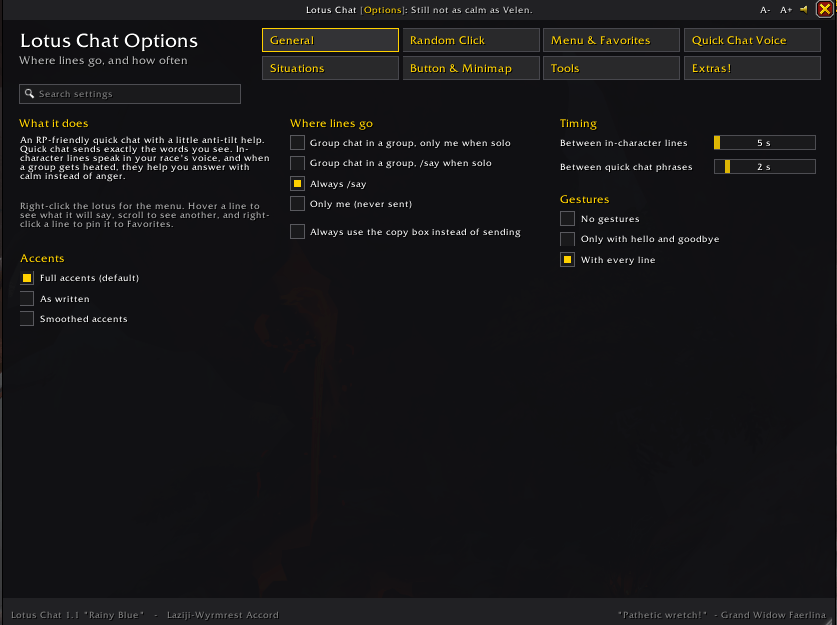
A tabbed, searchable options window. Every setting is saved per character, and new characters start from a template you choose. Make the window and its text bigger or smaller with A- and A+ in the title bar, Ctrl + mouse wheel, or the corner grip.
- General: where lines go, the wait between lines, emotes, accents and your character's voice
- Random Click: what a plain click posts, and lore about where you are
- Menu & Favorites: quick chat on or off, menu order, the chat bubble menu and your Favorites
- Quick Chat Voice: your race and class, Plain or one of the 16 archetypes, with a preview
- Situations: which in-character situations show in the menu
- Button & Minimap: the lotus button, the minimap icon and the small lotus above the chat bubble
- Tools: help, line counts and the settings template for new characters
- Extras!: the fortune cookie and Ask Lorewalker Cho
Slash commands
| Command | What it does |
|---|---|
/lotus |
Posts a random line |
/lotus <situation> |
Posts a line for one situation, for example /lotus thanks (works in macros) |
/lotus list |
Shows every situation and how many lines you have |
/lotus menu |
Opens the menu |
/lotus preview |
Shows a line only to you |
/lotus accents |
Switches between full, as written and smoothed accents |
/lotus options |
Opens the options window |
/lotus tips |
Opens the tips window |
/lotus cookie |
Cracks open a fortune cookie |
/lotus debug |
Shows your settings, in case something seems off |
FAQ
Is this an AI chatbot? No. Lotus Chat is a menu of pre-written lines that ship inside the addon. It does not generate anything, does not connect to anything, and does not read or answer other players. You pick a line and it posts it.
Is this allowed? Yes. Lines are sent only when you click or press a key, with a short wait between lines. Nothing posts automatically.
Why don't some lines show for my class? Lines go only to race and class pairs that exist in the game, and some situations are role-specific.
Does it work for DPS? Yes. DPS have their own quick calls and their own lines.
Can I turn the accents down? Yes. Pick As written or Smoothed in Options, or type /lotus accents.
Found a bug or a lore mistake? Please leave a comment with your race, class and what happened. The output of /lotus debug helps.
If you enjoy Lotus Chat and are on Wyrmwrst Accord feel free to send me a letter or a message! Please don't be mean though. :c
Lotus Chat by Laziji-Wyrmrest Accord. Free software under the GNU General Public License v3 (or later); see LICENSE.txt. World of Warcraft and Warcraft are trademarks of Blizzard Entertainment, Inc. This addon is not made or endorsed by Blizzard.
Lotus Chat: Quick Chat and Roleplay Lines Team