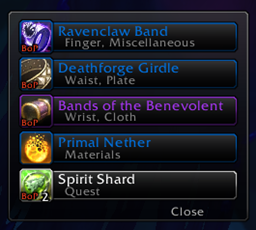
Loot Pro
- By
An ultra-lightweight (~350KB) replacement for WoW's floating combat and loot text, clean, movable feeds for loot, money, XP, honor and rep, plus a session recap, and rare-drop alerts For Midnight (12.1), Classic (Era, TBC, MoP) and Forever Beta
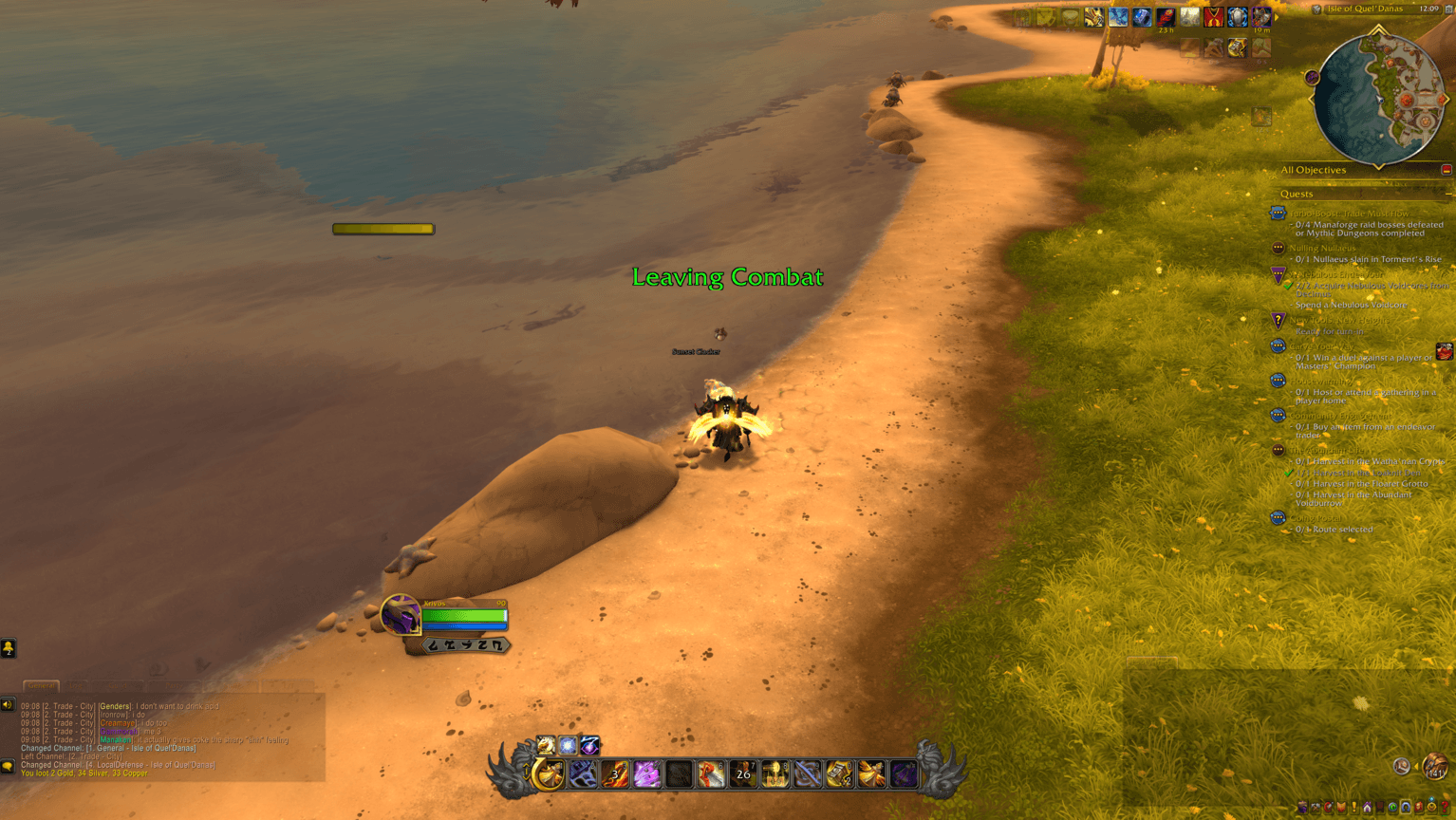
This is what it looks like when you leave aggro
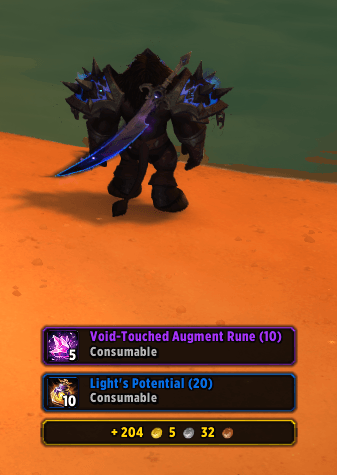
The new framed loot pop up option
Description
Loot Pro
A clean replacement for World of Warcraft's loot and combat text. Two repositionable readouts, one for combat and system messages and one for loot and money, with a color and a toggle for every kind of message. On top of the live feed it adds the loot tools the default UI never had: a session recap with gold per hour, watched-item alerts, gear markers, a name block list, and automatic gray selling. Install it and it works right away. Everything beyond the basics is off until you turn it on, apart from a loot spec reminder that stays quiet unless something is wrong.










WoW Forever support is a work in progress
Loot Pro runs on the WoW Forever beta from the same download as every other version, so there is nothing extra to install.
Forever plays by the original game's rules on the modern Midnight client, so Loot Pro treats it as Retail and nearly every option is present there, the Retail-only gear markers and the collectible tooltips included. What those can actually find is another matter, since a Vanilla ruleset has no appearance collection, no tertiary stats, and no upgrade tracks. The loot spec reminder is the one option missing, since Forever has no loot specializations.
Contents
- What it does
- Quick start
- Layout: sizing and placing the two readouts
- Colors
- Notifications: what shows up at all
- Custom: fonts, framed rows, and behavior
- Recap: your session at a glance
- Watch: alerts for items you name
- Rare Drops: alerts, gear markers, and loot spec
- Block: hiding loot by name
- Vendor: selling grays
- Item tooltips
- Slash commands
- Minimap button
- Flavor differences
- Reset to Defaults
- Dependencies
- Gallery
- Found a bug
What it does
Loot Pro replaces the default scrolling combat and loot text with two frames you control.
The combat readout carries combat start and end, experience, skill gains, honor, reputation, and Delve companion experience.
The loot readout carries money, currency, and item loot.
Each one has its own size, width, height, fade time, maximum line count, font, and outline. Every kind of message has its own color and its own on and off switch. Out of the box you get clean text with inline item icons and a running total of how many of each item you own.
Everything past that is optional and off by default. Turn on only what you want. The one exception is the loot spec reminder, which is on from the start because it only speaks up when your loot spec does not match the spec you are playing.
Loot Pro never equips, trades, or destroys anything. Two features do act for you once you turn them on, and both are off by default: Speedy AutoLoot takes items from a corpse on your behalf, and the Vendor tab sells gray items while a merchant window is open.
Quick start
- Install and log in. Your loot and combat text is already running through Loot Pro.
- Type
/lp, or left-click the minimap button, to open the options. - Click Unlock Windows at the top left, drag the two readouts where you want them, then click Lock Windows.
- Click Start Test Mode at the top right to fill both readouts with sample lines while you pick colors and sizes. Click it again to stop.
That is enough to use it. Everything below is optional.
The settings window has ten tabs: Layout, Colors, Notifications, Custom, Recap, Watch, Rare Drops, Block, Vendor, and About.
Layout: sizing and placing the two readouts
Options > Layout. Twelve sliders, six for each readout, plus a sync button.
| Slider | Range | Default | What it does |
|---|---|---|---|
| Combat Text Size | 10 to 50 | 20 | Font size of the combat readout |
| Combat Fade (sec) | 1 to 30 | 6 | How long a line stays before it fades |
| Combat Frame Width | 200 to 1200 | 200 | |
| Combat Frame Height | 50 to 800 | 200 | |
| Max Combat Lines | 1 to 20 | 4 | How many lines can be on screen at once |
| Combat Frame Scale | 50% to 200% | 100% | Makes the whole readout bigger or smaller |
| Loot Text Size | 10 to 50 | 22 | |
| Loot Fade (sec) | 1 to 30 | 6 | |
| Loot Frame Width | 200 to 1200 | 200 | |
| Loot Frame Height | 50 to 800 | 200 | |
| Max Loot Lines | 1 to 20 | 4 | |
| Loot Frame Scale | 50% to 200% | 100% |
Sync Combat Layout to Loot copies the six combat values onto the loot readout. It goes one way only, from combat to loot, and it overwrites whatever the loot readout had. There is no button for the other direction, so set up combat first if you plan to use it.
Frame width and height set the area a readout occupies, which decides where long lines wrap. To move a readout, use Unlock Windows at the top of the settings panel and drag it.
Text Size changes only the font. Frame Scale grows or shrinks everything in the readout together, including icons, framed row borders, and spacing, and the readout stays where you placed it while it scales.
Colors
Options > Colors. Twelve color swatches, one for each kind of message. Click a swatch to open the standard color picker. Next to each one is a live sample line in that color, so you can see the result as you drag.
Money, Currency, Loot, Quest Items, Combat Start, Combat End, Experience, Delver XP, Skill, Honor, Rep Gain, and Rep Loss.
Turn on Start Test Mode first and the real readouts fill with sample lines that recolor as you pick, which is a better preview than the swatch alone.
Quest item coloring
Two checkboxes sit below the swatches, both off by default.
Color quest items paints your own quest drops in the Quest Items color instead of their item quality color, so they stand out in a busy feed. Framed rows take the color on the item name and the borders, plain text lines take it on the whole line.
It covers more than the items tagged Quest. When an active quest asks you to collect ordinary cloth, meat, or ore, those count too, which is the half that is easy to miss because the game does not flag them as quest items at all. Since most of them are white or gray, they are shown even when they fall below your Minimum Loot Quality, as otherwise the feature would do nothing on a filtered feed. Your Hide from loot feed categories and your block list still hide anything they are set to hide.
A gray quest item also keeps its own framed row instead of collapsing into the combined Junk Items row.
Use my class color paints them in your class color and ignores the swatch. It is there for anyone whose color picker does not already offer a class color of its own, and it picks up a class color addon's palette when one is installed.
Notifications: what shows up at all
Options > Notifications. This tab decides which messages reach a readout, and how much of each item drop you see.
Message toggles
Sixteen checkboxes. All are on by default except Display Delve Companion XP and Show Combat Follower XP.
The loot readout carries Display Money, Display Currency, Display Item Loot, and Display Party Loot. The combat readout carries Display Experience, Display Combat START, Display Combat END, Display Skill Gains, Display Honor Gains, Display Reputation GAIN, and Display Reputation LOSS.
Three of them change formatting rather than turning a message on or off:
Enable Clean Mode (on) strips the game's wrapper text, so "You receive loot: [Linen Cloth]" becomes just the item with its icon. Turn it off to see the original message.
Inject Item Totals (on) adds how many you now own in parentheses after the item, as in Linen Cloth (14). The total counts your bags, your bank, and your warband bank, so ore you have parked in the warband bank is included. Turn it off to see only what just dropped.
Use Coin Icons (on) shows looted money as gold, silver, and copper coin icons instead of the words. It only applies while Clean Mode is on.
Show Combat Follower XP (off) adds experience earned by your pet, battle pet, or follower. Your own experience is controlled separately by Display Experience.
Minimum Loot Quality
Two dropdowns that hide drops below a quality you choose. Each cycles through Poor+ (All), Common+, Uncommon+, Rare+, Epic+, and Legendary+.
Your Loot applies to what you pick up. Others' Loot applies to what the group picks up. They are separate on purpose, so you can watch every scrap you loot while only hearing about the group's rares. Both default to Poor+ (All), which hides nothing.
If the game client has not cached an item yet, Loot Pro shows the line rather than risk hiding something you wanted.
Hide from loot feed
Nine checkboxes that hide whole categories of item, all off by default: Trade Goods, Consumables, Quest Items, Recipes, Gear, Gems, Enhancements, Misc, and Glyphs.
Gear covers weapons and armor together. There is no separate weapon and armor split.
Hidden items still count toward the session recap. Only the line in the feed is suppressed, so your totals stay honest no matter how much you filter.
Blizzard loot toasts
Hide Blizzard's loot toasts (off) stops the popups Blizzard shows when you loot something, since the loot feed already lists the same drops. It covers item drops, along with the money, currency, and honor that share the same popup, won loot rolls, and item upgrades. Legendary items, new mounts, pets, and toys, achievements, and quest rewards still get their popups. Untick it and the popups come straight back. Classic has no loot toasts, so the option only appears on Retail and WoW Forever.
Custom: fonts, framed rows, and behavior
Options > Custom.
Fonts
Combat Font and Loot Font list every font registered with LibSharedMedia-3.0, so any font pack you already have shows up automatically. With no font pack installed you get the game's default.
Combat Outline and Loot Outline each offer None, Thin, Thick, and Pixel. Thin is the default. Choosing None adds a drop shadow instead, so text stays readable on a light background.
Sync Combat Fonts to Loot copies the font and outline from combat onto loot. Like the layout sync, it goes one way only.
Framed rows
By default both readouts are scrolling text. Framed rows draw each line as its own bordered row instead.
Framed loot rows (off) gives every drop a row with the item icon, the name, your running total, and the item category. The border and the name are colored by item quality. You can shift-click a row to link the item in chat, control-click it for the dressing room, and hover it for the normal item tooltip.
Framed combat rows (off) does the same for combat, skill, and reputation lines, with the border colored to match that line.
Combine repeated drops (on) makes repeats of the same item stack into one growing row with a rolling count, collapses gray junk into a single Junk Items row, and merges rapid money pickups into one running total. This is what keeps the feed readable during an AoE pull. It only does anything while Framed loot rows is on.
Click through locked rows (off) is the fix for one trade-off. A framed row has to receive your click for shift-click linking to work, so a visible row keeps catching clicks even while the readout is locked. Turn this on and clicks pass through to whatever is behind the feed, at the cost of shift-click linking.
If you have Masque installed, the icons on framed loot rows take your chosen Masque skin.
Behavior
Fast Loot is Blizzard's own Auto Loot setting, exposed here so you do not have to go looking for it. It grabs everything from a corpse in one click instead of opening the loot window. Because it is the game's own setting and not Loot Pro's, Reset to Defaults does not touch it.
Speedy AutoLoot (off) is Loot Pro's own, and it works even with Fast Loot off. When loot becomes available it takes every slot automatically, about thirty per second, so the loot window never opens. Hold your auto-loot modifier key (Shift by default) as you loot and it stands aside so you can open the window by hand.
Warn on currency cap (on) tags a currency line with a red (capped) or an orange (weekly cap) once you have hit its maximum, so you can see at a glance that further gains are being wasted. It is a tag on the line, not a popup or a sound.
Keep busy feeds up longer (off) stretches how long lines stay visible when many arrive at once, adding time per extra line and easing back to your normal fade setting as the feed clears.
Pause fade while hovering the feed (off) freezes fading while your cursor rests on a readout, so you can actually read a busy feed. Clicks still pass through to whatever is behind it.
Show Minimap Icon (on) hides or shows the minimap button.
Minimap Button Clicks
Three dropdowns set what left, right, and middle click do. Each offers Open Settings, Print Recap, Toggle Lock, and Nothing. The defaults are Open Settings, Print Recap, and Toggle Lock.
Options Window Scale
A slider from 75% to 125% that resizes the settings window and nothing else. Your readouts, the minimap icon, and the alert banner are unaffected. To resize a readout, use Frame Scale on the Layout tab. The percentage updates as you drag and the new size applies when you let go.
Combat text
Combat Start Text and Combat End Text are edit boxes for the words shown when you enter and leave combat. Press Enter to save, or Escape to discard.
Recap: your session at a glance
Options > Recap. Off by default. Tick Enable Session Recap to start tracking.
Once on, the tab shows a live panel with your current zone, your gold broken down by where it came from, gold and items per hour once a minute has passed, a count of items looted broken down by rarity, every currency you have earned, and up to ten of your most recent Epic-or-better drops.
Gold is split into Gold looted, Quest rewards, Vendor income, Mailbox, and Trade. Each line appears once it has something to show, and a Total gold line joins them when more than one source has paid out. Vendor income is what merchants paid you, not only for grays, and spending never counts against any of them. Gold per hour counts looted gold, quest rewards, and vendor income only. Mailbox and trade gold, such as auction sales or gold sent from an alt, show in the total but stay out of the hourly rate, so one big payout cannot inflate it.
Reset Session starts a fresh session. Pause Timer stops the clock without stopping the tracking, so a trip to the mailbox or a long queue does not drag your per-hour numbers down. Loot is still counted while paused, and the pause survives a /reload.
The session lives in memory. A /reload keeps it, logging out clears it, so it never bloats your saved variables.
You can print the same summary to chat at any time with /lp recap, which is handy for pasting into a group chat.
Watch: alerts for items you name
Options > Watch.
Tick Enable Watch Alerts (off by default) and build a list of items you do not want to miss. When one drops, Loot Pro shows a banner in the center of your screen and plays a sound.
Add an item by typing its name, typing its item ID, or shift-clicking it straight into the box. A name matches any item containing that text, so Ore catches every ore. A link or an ID matches that one item exactly. The list holds up to thirty entries and each has a Remove button.
Alerts fire only for items you loot, not the group's. Play Alert Sound (on) controls the sound, and Test Alert fires a sample banner so you can check placement.
The box under Play Alert Sound picks which sound plays: Default (a raid warning horn), one of eight built-in Blizzard sounds, or any sound a media addon such as SharedMedia, BigWigs, or ElvUI has registered. Picking a sound plays it once so you can hear it. Alert sounds play on the Master channel, so you still hear them with sound effects muted. If you remove the media addon a sound came from, the alert falls back to Default instead of going quiet.
Rare Drops: alerts, gear markers, and loot spec
Options > Rare Drops. Three groups of settings share this tab. The third, the loot spec reminder, only appears on game versions that have loot specializations.
Rare Drop Alerts
A separate alert for anything valuable, whether or not it is on your watch list. There are five triggers and three effects, and you mix them freely.
Alert on quality sets the rarity that fires the alert. It offers Uncommon+, Rare+, Epic+, and Legendary+, and defaults to Legendary+.
Also alert on notable items (off) fires for mounts, pets, and toys even when they fall below that quality bar, so an uncommon mount still gets your attention. On Retail this only counts collectibles you do not already own.
Alert on value (gold, 0 = off) fires when a single drop is worth at least the number of gold you enter. This catches the expensive trade goods that never reach epic quality. Worth knowing: the figure used is the item's vendor sell price multiplied by the stack, not its auction house value, so a soulbound item with no sell price can never trigger it. Press Enter to save.
Also alert on gear upgrades (off, Retail only) fires when you loot a weapon or armor piece with a higher item level than what you have equipped in that slot, whatever its quality. It uses the same check as the Mark gear upgrades marker below, but works whether or not the marker is turned on.
Alert on item level (0 = off) fires when a weapon or armor piece you loot is at least the item level you enter, whatever its quality. Shirts, tabards, and cosmetic armor never count. Press Enter to save.
The three effects are Color loot line by rarity, Flash the loot frame, and Play alert sound, all off by default. The sound has its own picker under its checkbox, with the same choices as the watch list, and its Default is the epic loot fanfare. Note that coloring by rarity is part of the alert rather than a general setting, so it applies to lines that trip one of the triggers above, not to every drop.
Test Rare Drop fires the flash and sound so you can judge them without waiting for a real drop.
Gear markers
Five tags that get appended to a loot line so you can judge a drop without opening its tooltip. All are off by default.
| Marker | Looks like | What it means |
|---|---|---|
| Show item level on gear | [485] in gold |
The item level of any looted weapon or armor. This one applies to the group's drops as well as your own, and works on every game version. Shirts, tabards, and cosmetic armor are skipped, since their item level is meaningless. |
| Mark new transmog appearances | (new look) in blue |
You have not collected this appearance from any source yet, so it is not safe to vendor. Retail only. |
| Mark gear upgrades | (upgrade) in green |
Higher item level than what you have equipped in that slot. It only fires when the drop is the same armor or weapon type you already wear, and when the primary stat matches, so an Intellect piece is never flagged for an Agility character. Retail only. |
| Mark gear with a tertiary stat | (Leech) in teal |
The piece rolled a bonus tertiary stat, named on the line. Leech, Avoidance, Speed, or Indestructible. Retail only. |
| Show upgrade track on gear | (Hero 4/6) in lavender |
The piece's upgrade track and how far it has been upgraded. The track decides how high the piece can go. Gear that cannot be upgraded gets no tag. Retail only. |
The Retail-only markers appear on your own drops. The item level tag also applies to loot the group picks up, and so does the upgrade track when you tick Include the group's loot under it.
Loot spec reminder
Warn when my loot spec isn't my current spec (on) catches the classic mistake of running a dungeon with your loot specialization still set for another spec. When you enter a dungeon, a raid, or on Retail a delve, and your loot spec is set to a different spec than the one you are playing, Loot Pro shows a banner in the middle of your screen and prints a chat line naming both specs. It checks again if you change spec or loot spec while inside, and it warns once per mismatch rather than every few seconds.
A loot spec set to follow your current spec never triggers it. Loot Pro never changes your loot spec for you. Right-click your character portrait to change it.
This section only appears on game versions that have loot specializations, which means Retail and Mists of Pandaria Classic.
Block: hiding loot by name
Options > Block. A list of words. Any drop whose name contains one of them never reaches the loot feed.
Matching is case-insensitive and partial, so Tattered hides every tattered thing. Add an entry by typing it or by shift-clicking an item into the box. The list holds up to fifty entries.
This is the tool for the specific junk that slips past a quality or category filter. As with every other filter, blocked items are still counted in the session recap.
Vendor: selling grays
Options > Vendor. Off by default.
Automatically sell gray items at vendors (off) sells every poor-quality item in your bags as soon as you open a merchant. Quest items and items with no sell value are never sold, and each bag slot is checked again in the instant before it sells, so an item you moved mid-sale is never vendored by mistake. While you are holding an item on your cursor, selling pauses and picks up again once you put it down.
To skip it for one visit, hold your auto-loot modifier key (Shift by default, the same key Speedy AutoLoot uses) as you open the merchant. A chat line confirms how many grays were left alone, and Sell Grays Now still works if you change your mind. If ElvUI's own Vendor Grays option is also on, ElvUI sells them anyway, because its seller ignores that key. The Vendor tab shows a red warning while both are on, so turn one of them off.
Sell Interval (0.1 to 1.0 seconds, default 0.2) is the delay between each item. A longer interval is gentler on the server and makes the progress bar easier to follow.
Show progress bar while selling (on) shows a small on-screen bar counting through the run.
Print each item sold to chat (off) lists every item and what it sold for.
Sell Grays Now runs a pass on demand, even with automatic selling turned off. Hover it to see what your current grays are worth before you commit. It needs an open merchant window.
A This Session line shows how many grays you have sold and for how much. It covers both automatic and manual sales, and clears when the session recap does.
The merchant's own Sell All Junk button already sells everything at once. What this adds is doing it automatically, at a pace you can watch, with a running total.
Item tooltips
Three optional lines that Loot Pro can add to item tooltips. They are spread across two tabs because each belongs with the feature that feeds it.
Show "looted this session" on item tooltips (Recap tab, on by default) adds how many of that item you have looted this session. It needs the session recap turned on to show anything.
Show "already owned" on mount, pet, and toy tooltips (Recap tab, off) tells you that you already have the mount, pet, or toy in your hands, so a duplicate is safe to sell or pass on without opening a journal to check. Retail only, since the Classic versions have no shared collection journals.
Show vendor sell price on item tooltips (Vendor tab, off) adds the sell price, plus the value of the whole stack when you hover a stack in your bags.
Slash commands
| Command | What it does |
|---|---|
/lp |
Open or close the settings window |
/lp recap |
Print the session recap to chat |
/lp recap reset |
Start a fresh recap session |
/lp pause |
Pause or resume the session timer |
/lp about |
Open the About tab and the in-game changelog |
/lp whatsnew |
Show the What's New popup again |
/lp whatsnew reset |
Make What's New show once more on your next /reload |
/lp test |
Run a self-check that posts one of every message type and reports pass or fail |
/lp help |
List the commands |
Minimap button
A LibDataBroker launcher with a LibDBIcon minimap button, so Titan Panel, ChocolateBar, Bazooka, and similar display addons pick it up automatically.
| Click | Default action |
|---|---|
| Left | Open Settings |
| Right | Print Recap |
| Middle | Toggle Lock |
All three are configurable on the Custom tab, and each can be set to Nothing. Hovering the icon shows the version, a reminder of what your three clicks currently do, and on game versions with loot specializations your current loot spec, in red when it does not match the spec you are playing. The button itself can be hidden from the Custom tab.
Flavor differences
Loot Pro runs on Midnight (12.1), Classic Era (1.15.9), Burning Crusade Classic (2.5.6), Mists of Pandaria Classic (5.5.4), and WoW Forever (1.60.1 beta) from one install. The differences all come down to features a client does not have.
| Feature | Retail (Midnight) | Classic | WoW Forever |
|---|---|---|---|
| Item level on gear | Yes | Yes | Yes |
| Quest item coloring | Yes | Yes | Yes |
| New transmog appearance marker | Yes | Not available, no appearance collection | Present, but a Vanilla ruleset has no appearances to collect |
| Gear upgrade marker and alert | Yes | Not available | Present, and works from item level and primary stat as on Retail |
| Tertiary stat marker | Yes | Not available, no tertiary stats | Present, but Vanilla gear carries no tertiary stats |
| Upgrade track marker | Yes | Not available, no upgrade tracks | Present, but a Vanilla ruleset has no upgrade tracks |
| Loot spec reminder and tooltip line | Yes | Mists of Pandaria Classic only, Era and TBC have no loot specializations | Not available, the game reports no loot specializations on Forever |
| Hide Blizzard's loot toasts | Yes | Not available, Classic has no loot toasts | Yes, the same toasts as Retail |
| "Already owned" collectible tooltips | Yes | Not available, no shared journals | Present, with only what Forever's own journals hold |
| Notable-item alerts for uncollected mounts, pets, and toys | Yes | Fires for all mounts, pets, and toys | As Retail |
| Everything else | Yes | Yes | Yes |
On the Classic versions, options that do not apply are simply absent from the settings panel rather than present and broken. Forever is the exception, since it runs on the modern client and Loot Pro reads it as Retail, so the Retail-only options are present even where a Vanilla ruleset gives them nothing to find. The loot spec reminder is the one option it leaves out.
Reset to Defaults
A button at the bottom of every tab except About. It is behind a confirmation prompt, because it clears more than it might sound like: every color, every toggle, every slider, your window positions, and both your watch list and your block list. It cannot be undone.
Two things it leaves alone. Your current recap session keeps running, and Fast Loot is Blizzard's own setting so it stays as you had it.
Dependencies
Required: none. Loot Pro is standalone. LibStub, LibDataBroker-1.1, CallbackHandler-1.0, LibDBIcon-1.0, and LibSharedMedia-3.0 all ship inside it, so there is nothing to install alongside it.
Plays well with, but does not need:
- A font pack such as SharedMedia. Loot Pro already bundles LibSharedMedia-3.0, so any font pack you install shows up in the two font pickers on its own.
- Masque skins the item icons on framed loot rows. Without it, the icons keep a clean built-in border.
Manual install
Download the latest release, then extract the LootPro folder into World of Warcraft/_retail_/Interface/AddOns/. For the other versions use the matching folder instead of _retail_: _classic_era_ for Classic Era, _anniversary_ for Burning Crusade, _classic_ for Mists of Pandaria, or _classic_beta_ for WoW Forever.
Gallery
Found a bug or have an idea?
Report it on the GitHub Issues page. Include the error text if you can grab it, since BugSack and BugGrabber make that easy, and what you were doing when it happened.
Made with care for the Midnight expansion and WoW Classic. Got a question or want to hear about updates? Join the Discord If you like this one, check out my other addons: Cooldown Master, Everything Quests, and Everything Delves. Released under the MIT License.
Loot Pro Team

Owner