Listener Continued
- By
RETAIL - Quick update of the original Listener project for Midnight and on.
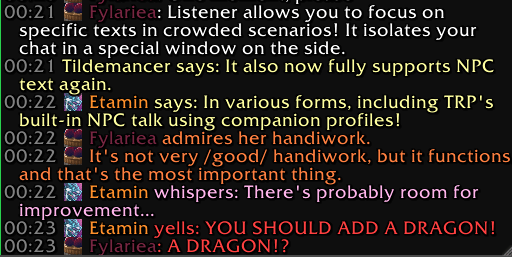
Listener window, with NPC text.
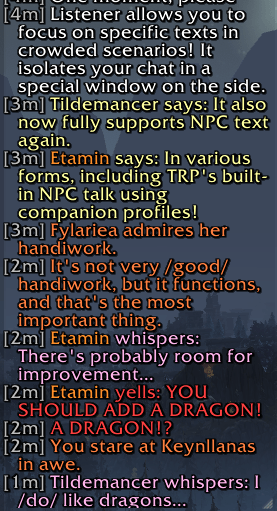
Snooper and NPC text.
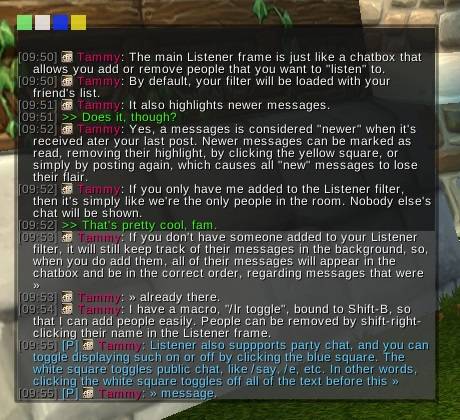
(from Tammya, Listener) Showing the Listener frame
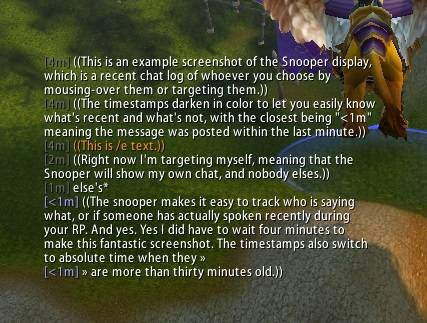
(from Tammya, Listener) The snooper makes it easy to see what a single character has said (or if they have said anything) by displaying a recent chat history from them only.
Description
FOR RETAIL ONLY
Author's Comments
This is a quick fix for Listener. It updates as close to Tammya's original Listener code as possible, with some help from raptormama upstream to make it stop throwing errors.
Please direct feedback or support to my Listener repo; I am not a part of the Listener team and you will likely not get support from them while using this fork.
This update was created in adherence to Listener's licensing.
The only difference from core Listener functionality is the inclusion of an NPC chat filter option, which was added as a part of an effort to fix incorrectly flagged (or, more specifically UNflagged) NPC emotes.
Original Description
Listener is designed for roleplayers. It makes it easy to keep track of each player's chat messages when there is a lot going on, to help you in a crowded setting, or if you're hosting a scenario for a lot of people.
Cool Features
- Listener chat windows can filter messages from players, so you can show only who you want in a crowded environment.
- Listener adds the "Snooper", which shows emotes only from the person that you're mousing over. You'll never again need to search back through your chat history for them or ask, "Did I miss your emote?"
- Listener provides notifications when someone uses a character emote that's targeted at you. (e.g. /wave)
Quick-Start
For beginners, it's recommended to just start by using the Snooper display only. Exit the main chatbox by clicking the X. Click the minimap icon to configure things. You can also right-click the title of Listener windows to configure them.
The Snooper works by showing you a chat log of who you mouse over. It essentially alleviates the need to scroll through your chat history to try and spot if you had missed something from someone.
By default, Listener will make a sound when your target emotes, and if you're tabbed out, it'll flash the task bar icon – useful when someone is taking a while to type (or they're eating a burrito) and you'd rather be watching Youtube instead of the chat box.
Listener Continued Team