Lil's GoodBags
- By
Bags that notice what's new: fresh loot glows in a Loot Inbox, everything else sorts itself, and junk sells in one click.
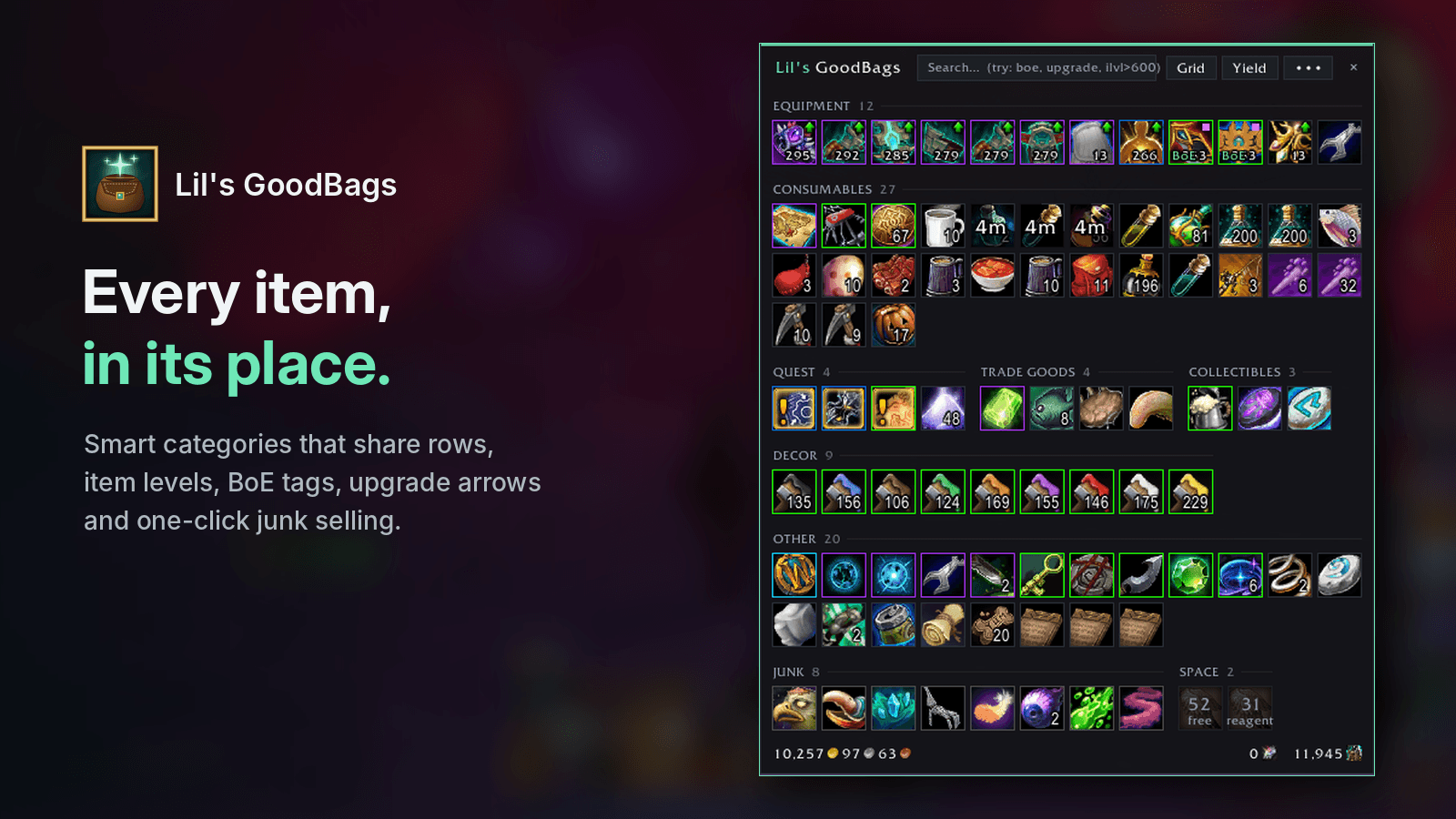
Smart categories that share rows, item levels, BoE tags, upgrade arrows and one-click junk selling.
Description
Bags that notice what's new.
Loot lands in a glowing Loot Inbox. Everything else sorts itself.
Your bank follows you everywhere. Junk sells in one click. No setup, no options maze, no lag.
📥 The Loot Inbox
Everything you loot, buy, trade or pull from the mail appears at the top of your bags, glowing, with a +N badge showing exactly how many you just got. No more hunting through 150 slots for the thing that just dropped.
- Sort to Bags sends it all to its category in one click.
- Alt+Right-Click keeps an item in the Inbox, even through a sort.
- Forget about it and it tidies itself after 30 minutes.
- Moving items around, stacking, equipping or banking never count as "new". Only real loot does.
🗂️ Categories that just make sense
Equipment · Consumables · Quest · Trade Goods · Collectibles · Decor · Recipes · Junk, plus your own Pinned items at the top. Small sections share a row, so the window stays compact. Click a header to collapse it.
Prefer the classic look? One click switches to one big grid.
🏷️ Know what it's worth at a glance
- Item level on every piece of gear
- BoE and WuE tags
- Smart green upgrade arrows: item level, your spec's main stat and sockets are all compared with what you wear. One win gives a soft arrow, two a bright one, all three a pulsing glow. Hover to see exactly why.
- A blue badge on equipment set gear, so it never gets vendored or banked by mistake
- Your Mythic Keystone pinned at the top with its level and dungeon
- A purple dot on uncollected appearances, toys, pets and mounts
💰 One-click vendoring
At any vendor, Sell Junk shows how many items and how much gold before you click. It sells grays plus anything you've marked as junk, and never touches equipment-set gear or items marked Never sell. Selling more than 12? It asks first, because only 12 can be bought back.
⏱️ Session Yield
Press Yield before you farm. Your haul gets its own section with a live timer, item count, estimated value and gold per hour. Rare drops pop a toast. Stop for a summary in chat. Uses Auctionator or TSM prices if installed, vendor prices otherwise.
🔨 Crafting Needs
Track a recipe or claim a crafting order and its reagents get their own section. Hover one to see what it's for.
🌐 Your whole Warband in one tooltip
Hover any item to see how many each character has, plus your Warband bank. Hover your gold to see every character's gold. Hover a currency to see your Warband's totals.
🏦 A bank that works like a workspace
One compact window for your bank and Warband bank. Tabs live on a rail down the side with fill bars and a + to buy more. Every tab sorts itself into categories (or flip to its real slots), and all shows a whole bank at once.
- Rename tabs, pick icons and choose what auto-deposits where, without leaving GoodBags
- Deposit Reagents or Warbound items, Clean Up, and move Warband gold from the footer
- Optional Auto Clean Up after every visit, separately for each bank
- Drag to bank: drop anything on the strip under the grid and it goes into the right tab
✨ GoodBags Clean
One click gives every bank tab a job. GoodBags looks at what you store, names each tab (Gear, Consumables, Trade Goods, Collections, Junk), gives it an icon from what's inside, sets what it collects, then runs Clean Up so everything lands where it belongs. You see the whole plan before anything changes, and tabs you've set to "leave alone" are skipped.
🌍 Bank Anywhere
Press Bank in your bags to see your bank and Warband bank from anywhere, for any of your characters. It refreshes every time you visit a banker. Spot something you need? Click it and it's withdrawn automatically on your next visit.
📦 Bank it & Restock
- Bank it: one click sends new trade goods from your Loot Inbox to the bank. At a banker they go in instantly; anywhere else they're queued for your next visit.
- Restock: tell GoodBags how many flasks, potions or food to carry and every bank visit tops you back up.
✂️ Split stacks
Shift+Right-Click any stack for a small split window. Type a number, slide, or tap Half, 1, 5 or 20. Both stacks then wear a tiny tag showing the other one's count.
🎨 Make it yours
Right-click GoodBags in the addon list (or click the gear) for clear, simple settings: Native, Flat or Match my UI (follows ElvUI's colors and font), accent colors including your class color or any custom color, background opacity, text size, quality tint, columns, icon size and every badge on or off. Using another bag addon? GoodBags asks once which one should open when you press B.
🔎 Search that understands you
Type a name, or try boe, upgrade, uncollected, new, junk, ilvl>600, q:epic. Mix them: boe ilvl>620.
Controls
| Alt+Click an item | Copy its Wowhead link (Tab for the item ID) |
| Alt+Right-Click an Inbox item | Keep it in the Inbox |
| Alt+Right-Click any other item | Pin · Junk · Never sell · Send to bank · Restock · Send to Inbox |
| Shift+Right-Click a stack | Split it |
| Addon-list button | Left-click: bags · Right-click: settings |
| Click a section header | Collapse or expand it |
Everything else (right-click to use, shift-click to link, drag and drop) works exactly like the default bags, because GoodBags uses Blizzard's own item buttons.
Commands
/gb open or close · /gb bank Bank Anywhere · /gb restock your restock list · /gb sweep sort the Inbox · /gb yield start or stop a session · /gb age 30 Inbox auto-sort minutes · /gb settings settings · /gb setup pick your layout again · /gb help everything else
Built to stay out of your way
Lightweight and event-driven. In combat, buttons never shuffle under your cursor: icons, counts and cooldowns stay live, and new loot slides into place the moment the fight ends.
Love it? Hit Follow. Found a bug or have an idea? Leave a comment, every one gets read.
Lil's GoodBags Team