Lil's GoodMap
- By
Your zone map becomes your minimap: follows you, shows gathering nodes and quest icons, docks minimap buttons.
GM.png
Description
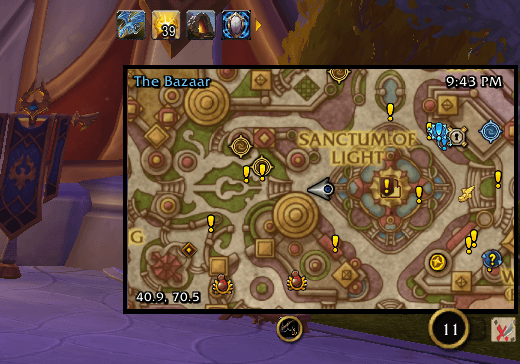
GoodMap turns Blizzard's zone map into your minimap. It sits in the minimap's corner and follows you as you move. One clear map shows gathering nodes, quests, rares, flight points and your party. Press M for the world map and GoodMap steps aside; close it and GoodMap is back.
Your minimap, upgraded
- The real minimap is built into the map, so herb and ore nodes, tracking icons and quest blips appear exactly where they are.
- Minimap buttons sit in a tidy bar under the map: tracking, calendar, mail, the addon compartment and your addons' buttons.
- When your tracked quest or map pin is off screen, an arrow on the map's edge points to it, with the distance in yards.
- A clock, the zone name in PvP colours, and your coordinates. Click your coordinates to re-centre, Shift-click to share your location in chat.
Smart, not in the way
- Zooms out while you fly, skyride or take a taxi, and back in after you land.
- Hands over to the Blizzard minimap in dungeons and raids, where addons can't see your position.
- Zoom buttons and the resize grip appear when you hover. Click-through and hold-Alt modes let you click the world beneath it.
- Shift-M hides or shows GoodMap. Whenever it's hidden, the Blizzard minimap is back.
Light on your FPS
- No libraries. Nothing runs while GoodMap is hidden, and per-frame work happens only while you move or hover the map.
- Every map layer can be turned off, and one-click presets switch between Lean (best FPS), Balanced and Everything.
- World quests refresh every 2 seconds instead of every half second, and you can change the rate.
Controls
|
Action |
How |
|---|---|
|
Show or hide GoodMap |
Shift-M |
|
Zoom |
Mouse wheel, the hover buttons, or your Minimap Zoom keys |
|
Move |
Shift-drag the map |
|
Resize |
Hover the map and drag the corner grip |
|
GoodMap menu |
The GoodMap button in the bar, or Ctrl + right-click |
|
Tracking menu |
Middle-click |
|
Re-centre / share your location |
Click / Shift-click your coordinates |
|
Place a map pin |
Ctrl-click |
|
TomTom waypoint |
Alt + right-click (needs TomTom) |
Settings
Options → AddOns → GoodMap, or type /goodmap. Commands: /goodmap toggle, menu, reset, lock, unlock, radar, lean, balanced, everything.
Works with
HandyNotes, RareScanner and TomTom map icons, and any addon minimap button that uses LibDBIcon. Other addons that move the Blizzard minimap may conflict.
FAQ
Why does GoodMap disappear in dungeons? Blizzard doesn't give addons your position in most instances, so GoodMap hands you the Blizzard minimap there. Press Shift-M to keep GoodMap shown anyway.
How do I get the normal minimap back? Press Shift-M, or turn off "Replace the Blizzard minimap" in settings.
Where did my minimap buttons go? They're in the bar under GoodMap, and they go back to the minimap whenever GoodMap is hidden.
Lil's GoodMap Team