Lifeline (Cell 2.0)
- By
Clean, lightweight party & raid frames for WoW Forever, with click-casting, buff reminders and profiles.
Lifeline-01-overview.png
Lifeline-02-raid.png
Lifeline-03-buff-indicators.png
Lifeline-04-debuffs.png
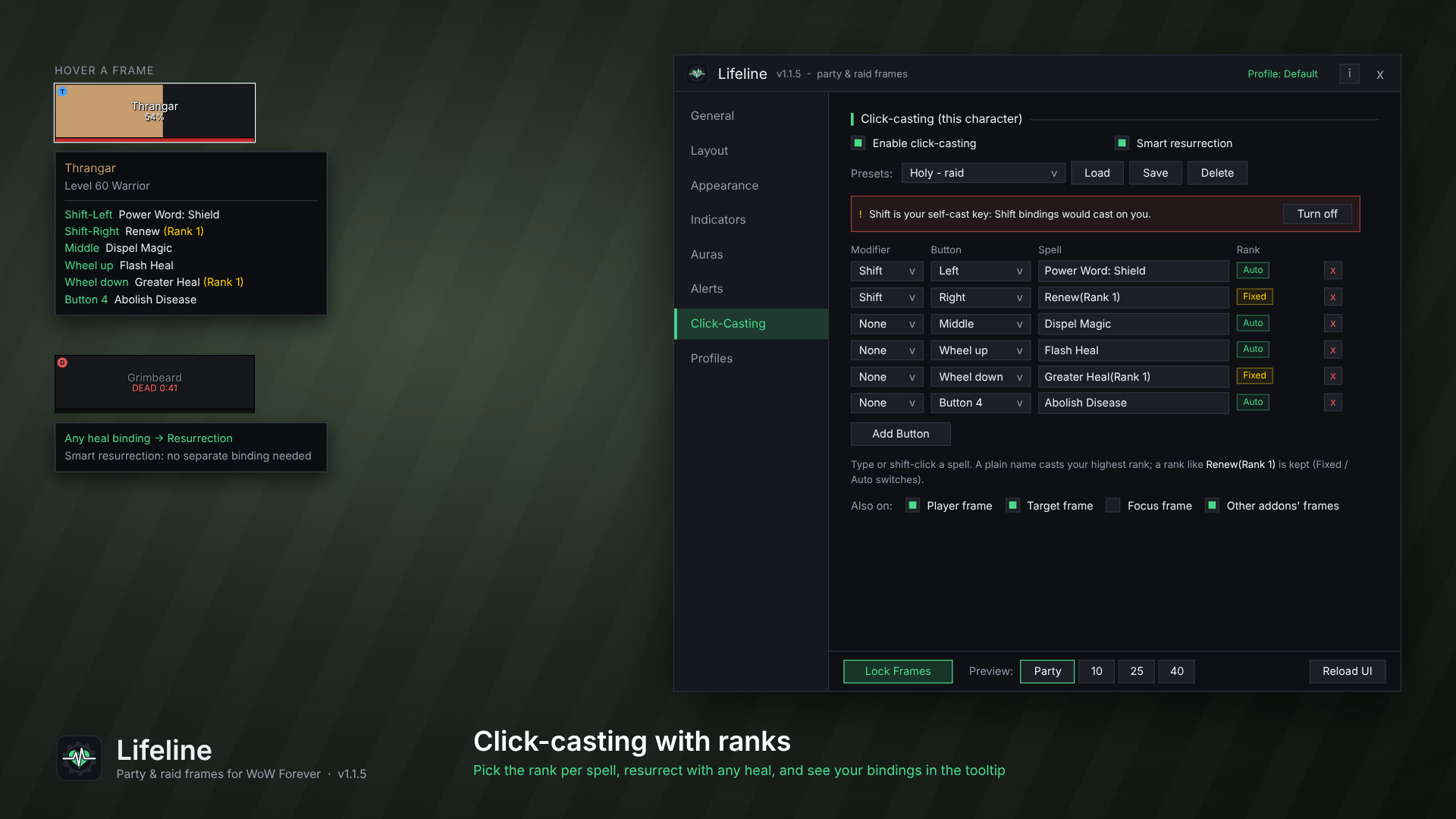
Lifeline-05-click-casting.png
Description
Lifeline
Clean, lightweight party & raid frames built for WoW Forever.
Lifeline gives healers and group leaders (or anyone for that matter) frames that are easy to read and quick to set up. A live example sits beside the settings so you see each change as you make it. It's built from the ground up for the WoW Forever client and its addon rules, so it keeps working in raids, dungeons and PvP, where many older frame addons break.
From the maker of Artisan Network and Salvage Station(coming soon).
Features
Frames & layout
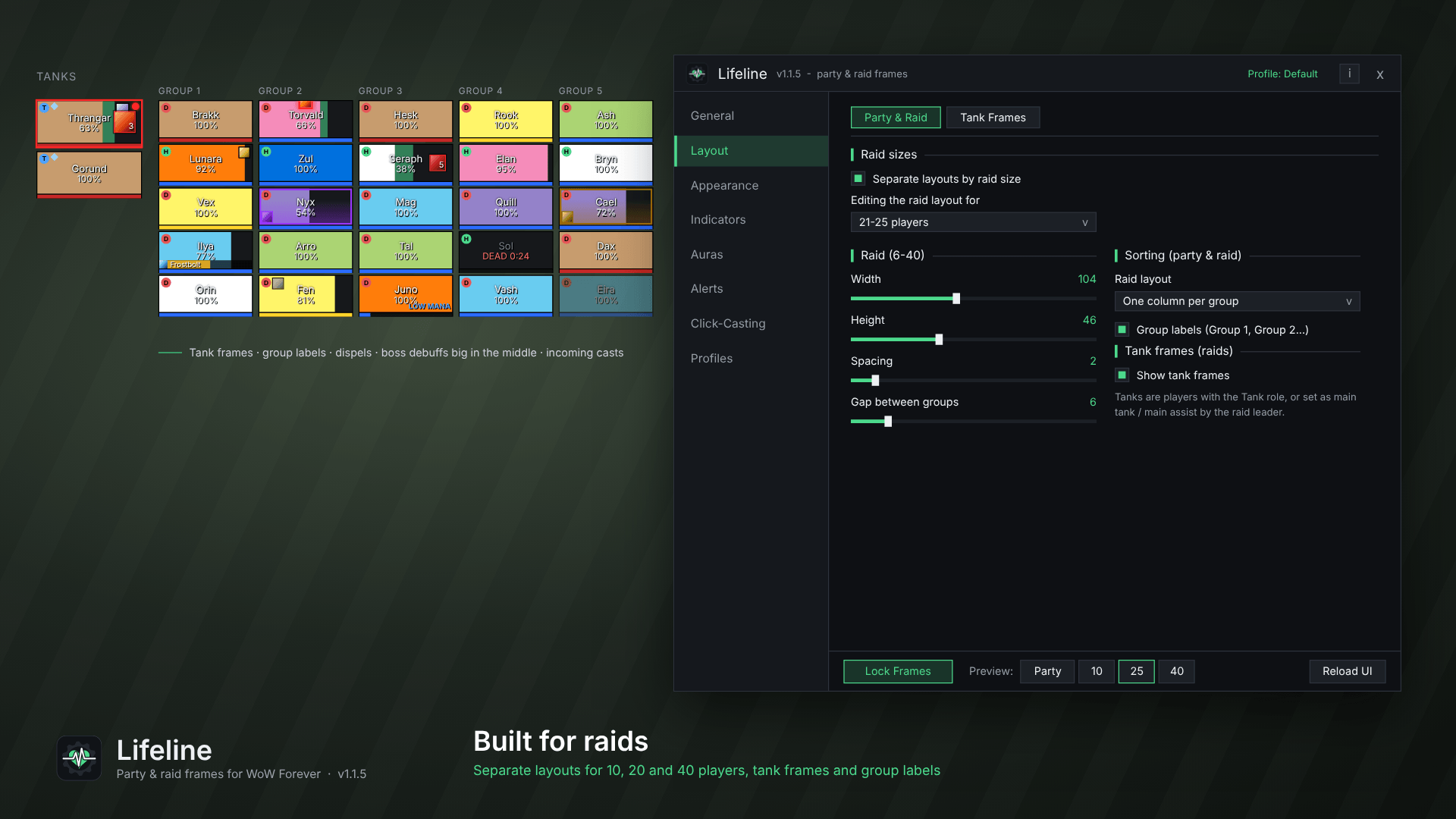
- Party (2-5) and raid (6-40) frames, each with their own size, spacing, orientation and growth direction
- Raid layouts: one column per group, or combined by role, by class or in raid order
- Separate layouts by raid size: give 10, 20 and 40-player raids their own size and layout, switched automatically
- Tank frames: a separate, movable group that keeps your tanks (or players you name) in one place
- Group labels above each raid group, and optional pet frames
- Drag to move, overall scale, and a preview for party, 10, 25 and 40 players
- Hides Blizzard's default party & raid frames
Bars & text
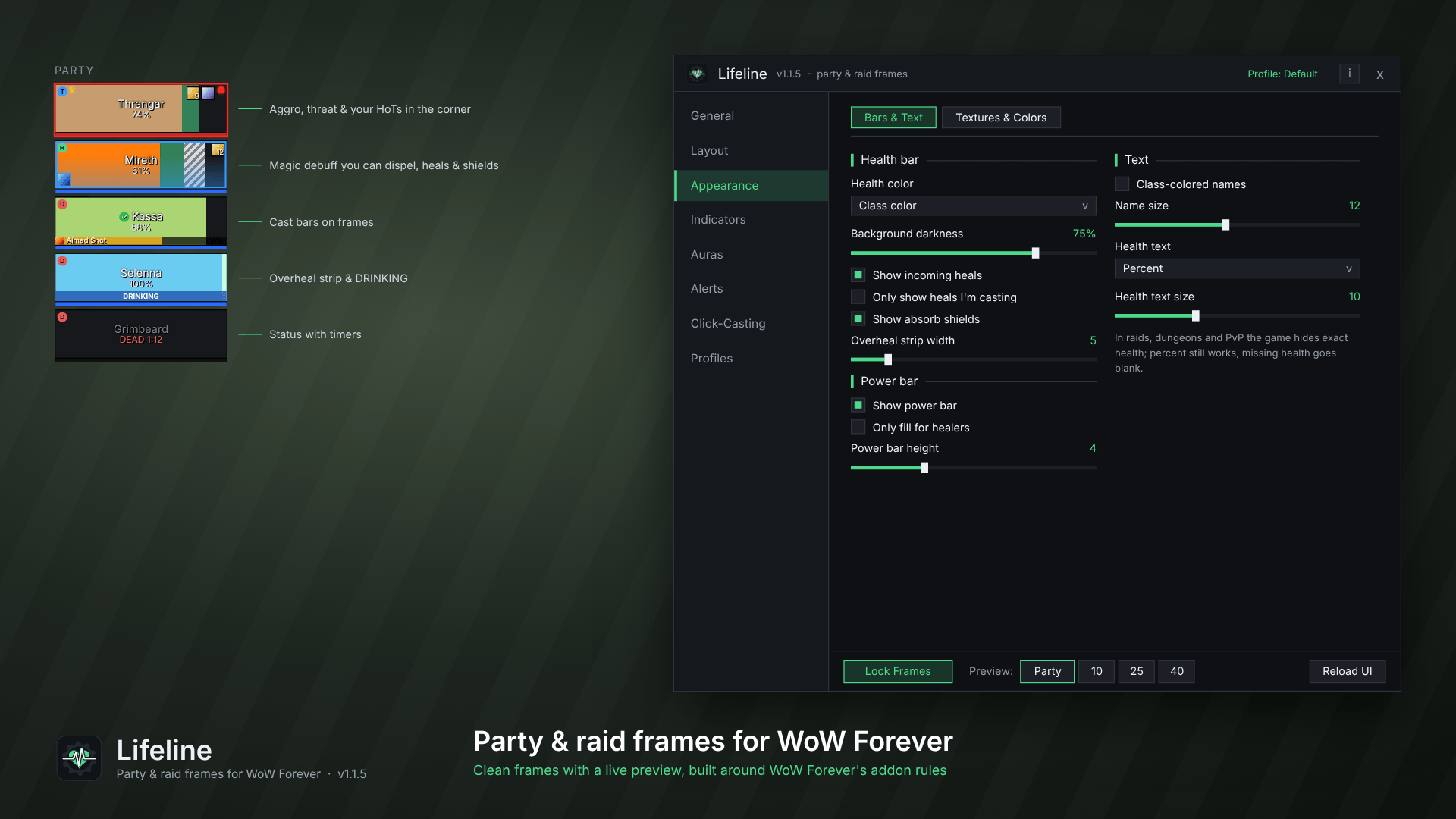
- Class-colored, dark or single-color health bars, with your own class colors and a darken slider
- Incoming heals, absorb shields and overheal (the part of a heal that would be wasted)
- Health fill in any direction, bar and background opacity, and a color for dead & offline players
- Any bar texture or font from your other addons (LibSharedMedia), with previews in the list
- Status with timers: DEAD 1:12, OFFLINE, AFK
- Move anything: nudge the name, health text and every icon in any direction
Indicators
- Role, leader, raid marker, main tank / main assist, ready check, resurrection and summon icons
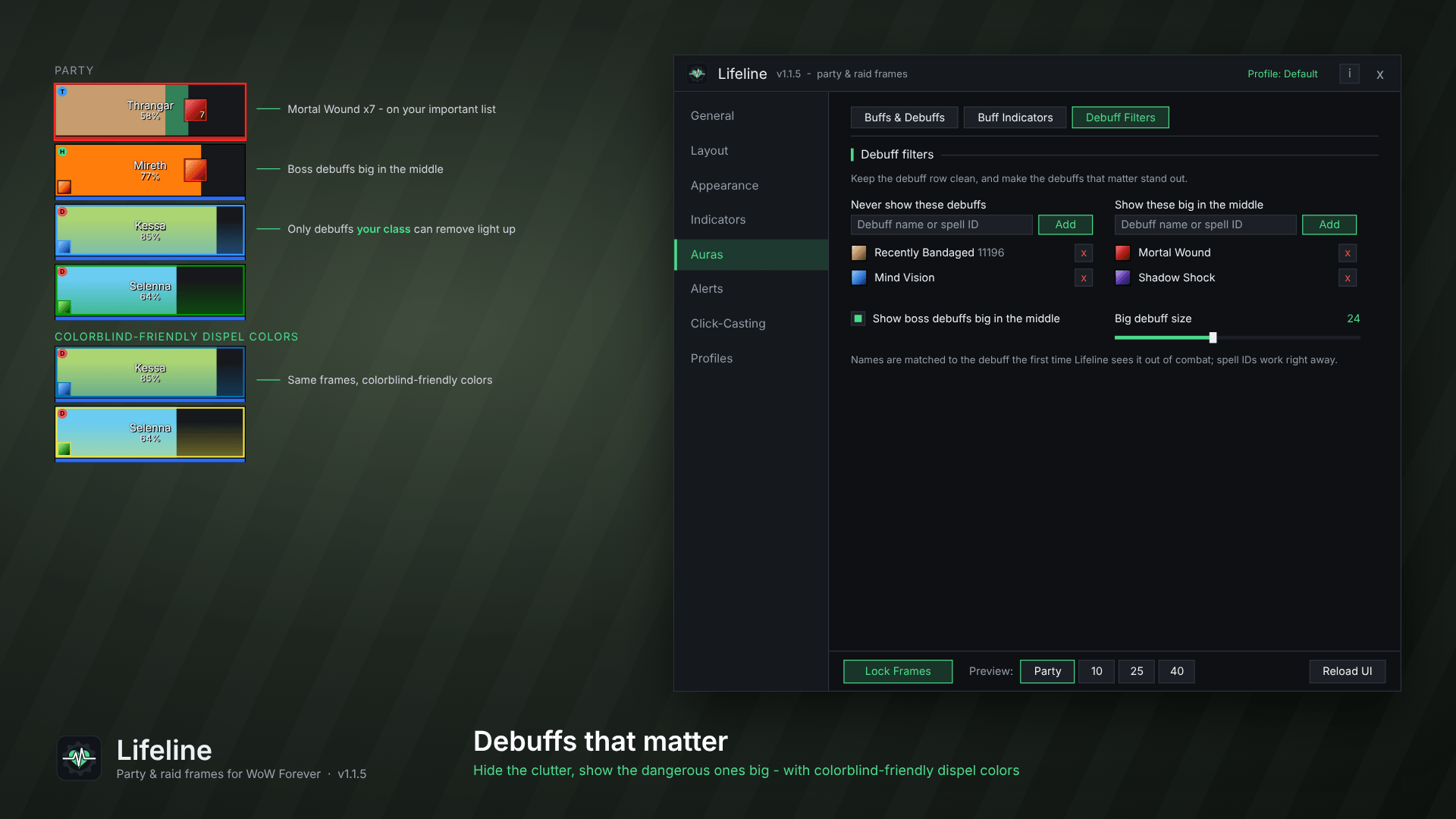
- Dispellable debuffs color the frame by type: only the ones your class can remove, with a colorblind-friendly option
- Cast bars on frames, and incoming cast warnings when an enemy casts at a group member
- Threat icon, aggro and target borders, out-of-range fading (optionally by your own spell's range)
- A DRINKING banner and a LOW MANA tag on healers
Buffs & debuffs
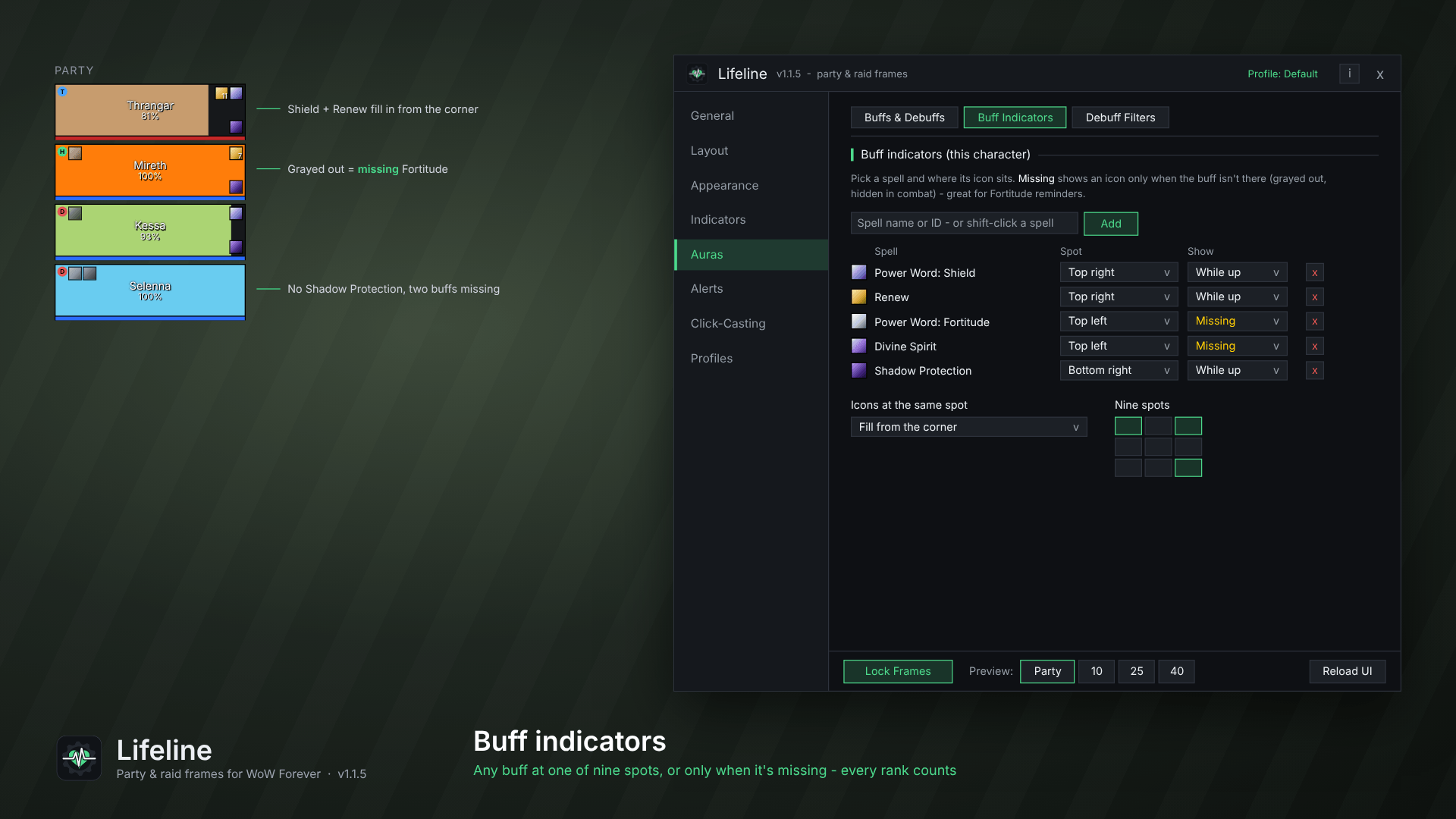
- Buff indicators: place any buff's icon at one of nine spots, shown while it's up or only when it's missing. Perfect for Fortitude, Spirit and Mark of the Wild reminders
- Indicators sharing a spot fill in from the corner, and every rank of a spell counts
- Group and single-target versions count as the same buff (Prayer of Fortitude / Power Word: Fortitude and more)
- Debuff filters: hide clutter like Recently Bandaged, and show the debuffs that matter (and boss debuffs) big in the middle of the frame
Click-casting
- Auto target per spell: heal a player and make them your target in the same click
- Left, right and middle click, scroll up/down, and extra mouse buttons (4-16) with Shift, Ctrl or Alt
- Per-spell ranks: a plain name always casts your highest rank; type a rank like Renew(Rank 1) to keep that one
- Smart resurrection: click a dead player with any heal binding to resurrect them
- Presets saved per class, your bindings listed in the frame tooltip, and a warning if a binding clashes with the self-cast key
- Also works on the player, target and focus frames, and plays nicely with Clique
Alerts
- Aura sounds: a sound when a buff or debuff is gained, fades or stacks (e.g. Weakened Soul fading). The game plays it, so it works in combat
Profiles & sharing
- Use one Default profile for everyone, or give a character its own settings
- Export your layout, click-casting, buff indicators and aura sounds as a code to share or copy to another character
Settings & updates
- Dark, flat settings window with 8 tidy sections and a live example beside it
- Tells you when a newer version is out (when a guild or group member has it), and shows what's new after you update
Getting started
- Install Lifeline and log in. Your party and raid frames appear right away.
- Type /ll (or click the minimap button) to open the settings.
- Click Unlock Frames, drag the green bar to where you want your frames, then lock them again.
- Set up click-casting and buff indicators for each character.
- Type /ll showcase to see everything Lifeline can show at once.
Commands
| Command | What it does |
|---|---|
/ll |
Open or close the settings |
/ll unlock / /ll lock |
Move the frames |
/ll test |
Toggle the preview layout |
/ll showcase |
Preview with every indicator switched on |
/ll news |
What's new in this version |
/ll debug |
Print a report to include with bug reports |
/ll reset |
Reset the frame position |
/ll minimap |
Show or hide the minimap button |
WoW Forever notes
WoW Forever limits what addons can see during combat and in raids, dungeons and PvP. Lifeline is built around those rules:
- Health bars, heals, absorbs, range fading, dispel colors and your buff indicators keep working everywhere.
- Aura sounds are played by the game itself, so they work in combat too.
- When the game hides an exact value, Lifeline leaves it blank instead of guessing.
- Missing-buff reminders pause during combat, since the game doesn't let addons check buffs then. They come back as soon as combat ends.
- Incoming cast warnings need enemy nameplates turned on.
Feedback, bugs & beta builds
Join The Forge on Discord to report bugs, suggest features or test new builds early: https://discord.gg/yskDeZjQj7
Lifeline (Cell 2.0) Team