Artisan Network
- By
Share your professions with other players and instantly find an online crafter for any recipe.
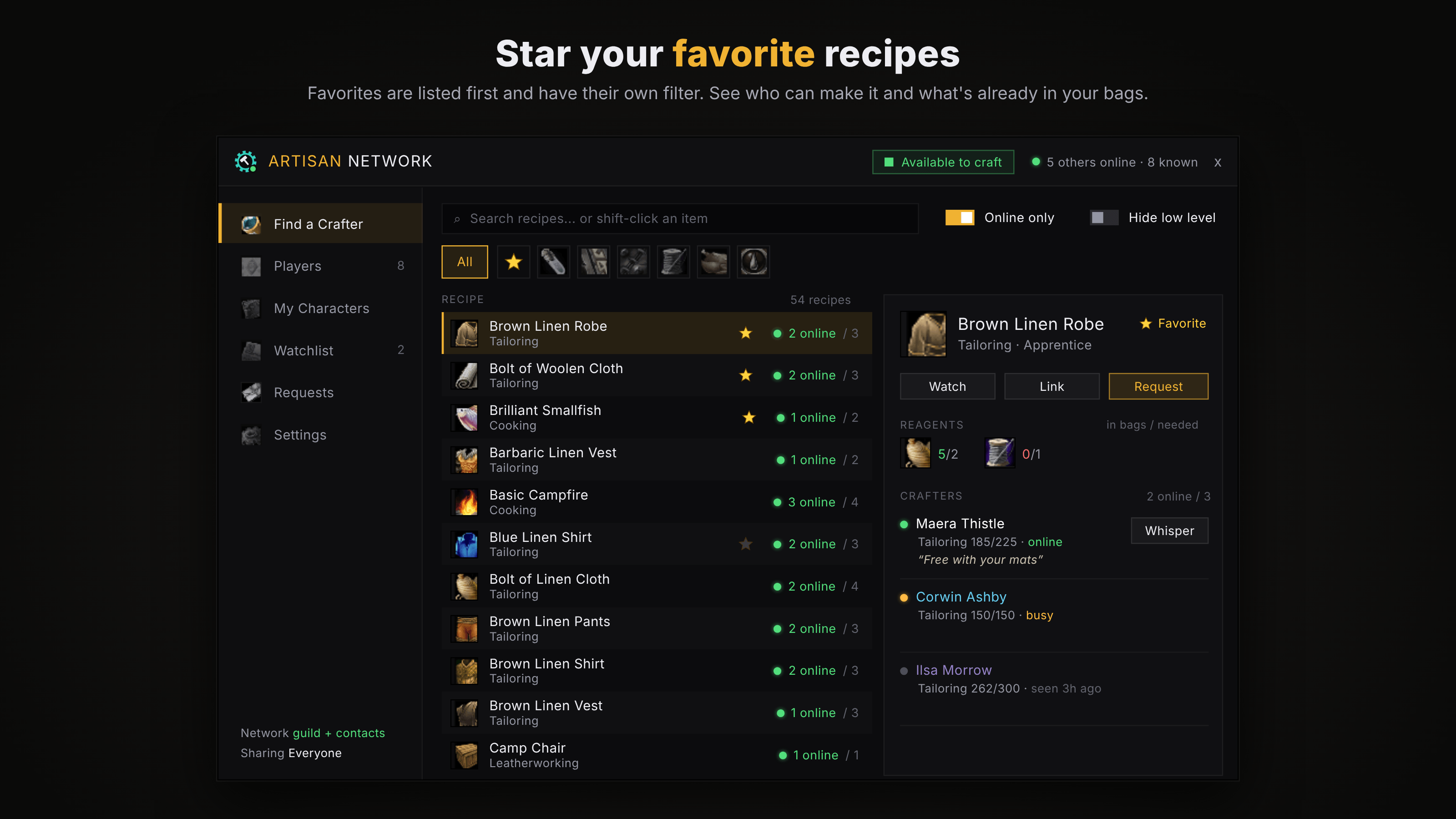
Find a Crafter
Description
Artisan Network
Find a crafter for anything, see who's online to make it, and share your own professions automatically. Made for WoW: Forever.
Need a cloak stitched, boots enchanted, or a rare transmute? Artisan Network shows you who can craft it, whether they're online right now, and lets you ask them in one click. Your own recipes are shared the same way, so people can find you too.
⚠️ It grows with its players
Artisan Network only knows what other people running it share. When you first install it, there won't be much to see. You'll find your own characters, plus anyone in your guild or group who also has it, and that's it.
Every new user adds their recipes for everyone else, so the network gets more useful with each person who joins. The quickest way to fill it up is to get your guild using it. One guild running it together already makes a working crafting directory. If you like it, please tell your friends!
Want to see what a busy network looks like before anyone joins you? Type /artisan test to fill every screen with sample players.
🧪 Become a beta tester
Artisan Network is brand new, and I'm looking for beta testers to help shape it. Testers get new versions first, help find bugs before everyone else sees them, and have a real say in what gets built next. Guilds that want to try it together are especially welcome.
Interested? Join the Discord
What it does
Find a Crafter
- Search every recipe anyone on the network knows, or shift-click any item to search for it
- See who can make it, their skill and specialization (Dragonscale, Gnomish, Armorsmith…), and whether they're online, busy or away
- Filter by profession, show only crafters who are online, and hide low-level recipes
- See the reagents a recipe needs and how many you already have: green when you're covered, yellow when some are in your bank, red when you're short
- Rare recipes known by only one or two players are tagged
Crafting requests
- Press Request to send a pop-up, with an optional note, to every available crafter online who knows the recipe
- The Requests page keeps what you sent and received for a day, so a missed pop-up is never lost
Players
- Everyone on the network you know: online status, class, level, professions, skill and specializations, and their full recipe lists
- Crafter notes: add a short line to your profile, like "Free with your mats, tips welcome"
My Characters
- All your characters' professions in one overview
- Crafting cooldowns like Transmutes, Mooncloth and Salt Shaker, with when each is ready
- "Could learn": recipes other players know that your character doesn't have yet
- Keep any alt's recipes private
Watchlist
- Watch a recipe and get a pop-up when someone who can craft it comes online
And more
- Item tooltips show who can craft the item, online players first
- An Available / Busy switch so you stay listed while raiding, without being pestered
- Data bar support for EllesmereUI (Broker Plugin), ElvUI, Titan Panel and other LibDataBroker bars
- Minimap button, accent colors and window scale
How players find each other
WoW: Forever only lets addons talk through your guild, your party or raid, and whispers, so Artisan Network meets people in those ways:
- Your guild: everyone running it, as soon as you log in
- Groups: anyone running it you party or raid with, from any guild
- Contacts: people you've met are remembered and greeted each time you log in
- Introductions: guildmates share the people they've met, so your whole guild meets everyone any member has grouped with
- By name: type /artisan add First Surname
Rather keep it to your guild? Turn off "Find addon users outside my guild" in Settings.
Privacy
- Share your recipes with Everyone, Guild only, or Nobody. Your online status is still shared.
- Turn sharing off for individual characters.
- It never posts in chat or whispers anyone for you. Everything goes through hidden addon messages.
Getting started
- Install it and log in.
- Open each of your profession windows once. That's how it learns your recipes. After that they're shared automatically.
- Type /artisan (or /an), or click the minimap button.
Commands
| Command | What it does |
|---|---|
| /artisan | Open or close the window |
| /artisan search text | Search for a crafter |
| /artisan who text | Show who can craft something in your chat window (only you see it) |
| /artisan add First Surname | Add someone outside your guild |
| /artisan ping First Surname | Check if a player is online with the addon |
| /artisan busy | Switch between Available and Busy |
| /artisan status | Check your connection: messages, contacts, who's online |
| /artisan test | Turn sample players on or off |
| /artisan resetpos | Put moved pop-ups back |
| /artisan minimap | Show or hide the minimap button |
Good to know
- A player's recipes only show up after they've opened their profession windows once.
- You can only reach players on your realm group and faction. That's a game limit.
Artisan Network is only as good as the number of people using it. Install it, get your guild on board, and help build the network!
Questions, bugs or ideas? Leave a comment or come chat on Discord. All feedback is welcome.
Artisan Network Team