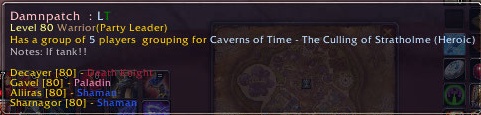
An example tooltip
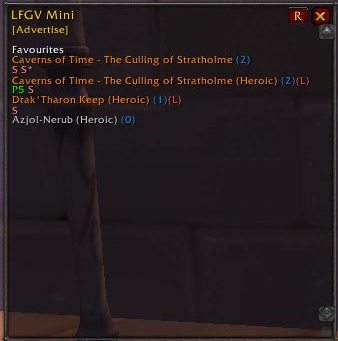
The mini LFGV display.
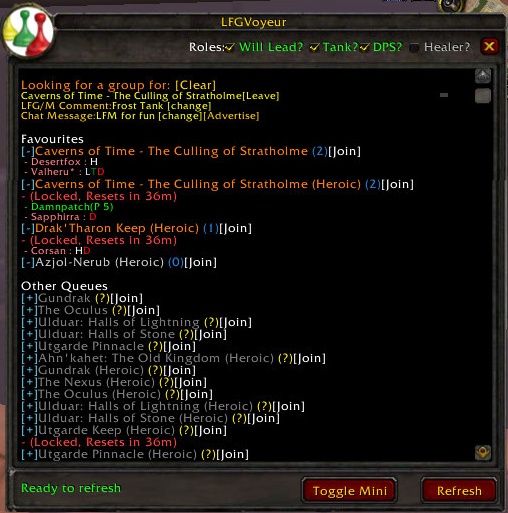
The main LFGV Window.
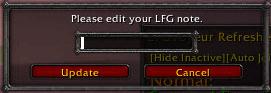
Dialog to change LFG note/comment.
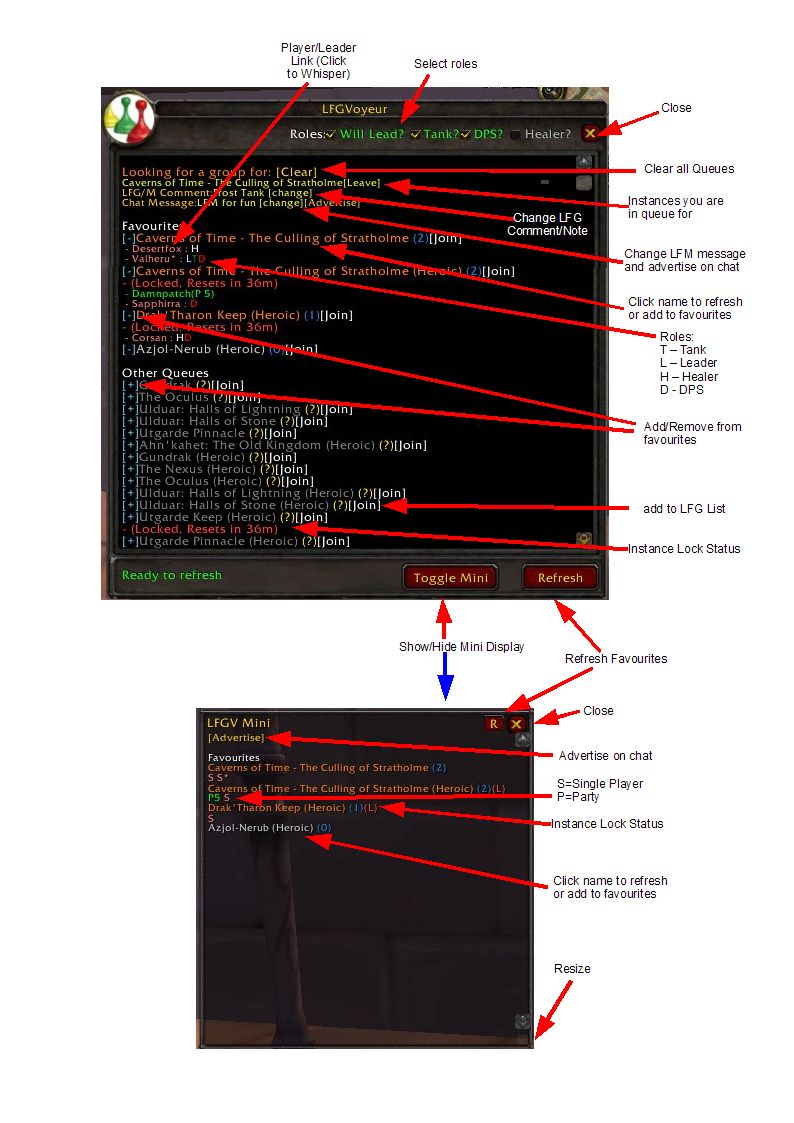
Instructions on how to use LFGV.
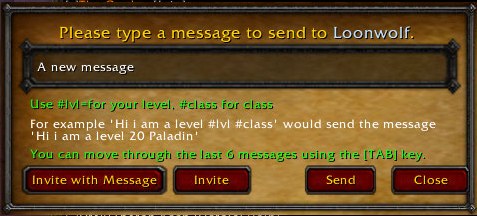
The whisper and invite window
Description
LFGVoyeur Refreshed
INTRODUCTION:
This is based on the concept by Lenja
The add-on list all the instances (heroic and normal) and raids you are eligible for. You can create a list of favourite queues (dungeons, raid, etc) and refresh the list of groups/players with a single click. You can also the refresh button to refresh all you favourites (unfortunately required confirmation for each due to a Blizzard limitation).
I really like the original and just wanted a few enhancements, hence the “refreshed” version.
It now also (optionally) monitors chat for LFG type messages and transmits all refreshed instance data to other users of LFG so that they can see instances that may be outside their current LFG range. This is handy when you want to check if there is anything going on for an alt.
PURPOSE:
A one stop shop for location players and groups for instances and raids.
OPTIONS:
The slash command for LFGVoyeur is "/lfgv". The following options exist:
show = Show main window
mini – Show Mini Window
[message] – Send a message (advertise) to both the zone and LFG channels.
E.g. "/lfgv show", "/lfgv lfm for a good raid" are both valid commands.
**All configuration is made through the standard WOW interface options screen**
KEY FEATURES:
Main Window
------------------
Favourites Tab
------------------
- Lists of all eligible instances and raids.
- Allows you to add those instances and raid to your favourites.
- Allows you to manage you favourites.
- Favourites persist between logins.
- Refresh individual instances or all favourites.
- Displays an asterisk (*) against and individual or party that is/has a guild member in it.
- Lists all players/groups looking for groups/more. Displays roles for individuals.
- Display lockout times and status.
- Add yourself to the LFG channel without selecting an instance (uses the default zone).
- Class colours in tool tips
- Tool tips show members of groups or help.
- One-click to join [Join]/leave [Leave] LFG/LFM queue for an instance/raid.
- Raids./instance titles colourized (Orange - active , Grey – inactive, Dark Grey not a favourite).
- Optionally use class colours for single players.
- Control the Gamma of the window.
- Advertise yourself in the general and LFG chat channels (configure on screen of by command line)
- Management of Roles and display of single player roles. Single player/leader roles in tool tips.
------------------
Chat Tab
------------------
- Displays all detected messages (when enabled)
- looks for key words such as (LFG, LFM, LF1M, etc)
- Automatically adds all LFG channel discussions
- Messages coloured by how sure you can be that the sender is lloking for group (light is less sure)
- Click message to whisper sender
- matching messages can be announced. An audio effect is played and a highlighted message is placed in the default chat frame.
------------------
Server Tab
------------------
- when LFGV refresh an instance is publishes the data to all other LFGV addons on the server.
- Lists all instances that have been published alphabetically.
- Instance name tool tip indicates how long since the instance was last refreshed.
- Name links can be clicked to whisper the player.
------------------
About Tab
------------------
- Gives credit where it is due!
Whisper Window
------------------
- Clicking on the player link in the main/mini window will open the whisper window.
- move through the history of the last 5 messages sent using the tab key.
- invite a player to your group (with or without message)
- Supported macros in message text:-
+ #class – your class is inserted
+ #lvl – your level is inserted
+ #std - Places a standard message in the whisper (Includes all macros text available in whispers)
+ #health = Adds health points (xx HP)
+ #mana = Adds mana points to whisper (xx MP)
+ #epic = Add Epic and Superior links to the whisper
+ #role - adds list of roles to whisper.
Mini Window
------------------
- Emulates the original LFGV window
- Displays P for Party's and S for a single player.
- *new* optionally replace the "S" with the role if available.
- Displays an asterisk (*) against and individual or party that is/has a guild member in it.
- Lists all favourites.
- Refresh an individual or refresh all.
- Lists all players/groups looking for groups/more.
- Tool tips show members of groups
- One click advertise
- Optionally use class colours for single players.
- Control the Gamma of the window.
Key Bindings
------------------
- Key binding available for displaying the main window.
- Key binding available for sending a LFG message (advert).
- Please see attached images for instructions.
Other
------------------
- Integration with Fubar (left-click for main window, right-click for options an other show options).
- Configuration through the standard WOW interface menu (also accessible via the Fubar addon)
- Favourites refresh screen with progress bar.
- Integration with DOIKnowYou Scoring
- Integration with GearScore
Languages
----------------
- English
- German
LFGVoyeur Team