screenshot01.png
Description
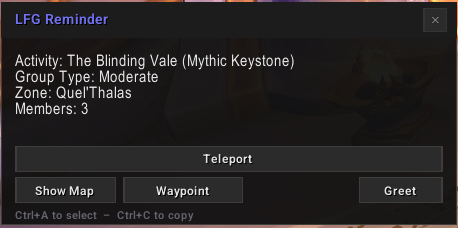
LFG Reminder shows a window with details about the group you just joined: the activity, the zone it takes place in, and what the group is asking for. It opens on its own when a Dungeon Finder queue pops up, or a Group Finder application is accepted. Optional "instance text" can be configured to show until you reach the group's instance destination or it is clicked.
The Dialog Shows
- Activity name, listing title, and the leader's comment
- Selectable text - copy a link or a note straight out with Ctrl+C.
- Draggable - place it where you want.
- Show Map — opens the world map to the zone the instance is in.
- Waypoint — drops a tracked waypoint on the entrance.
- Teleport — casts your dungeon teleport for that instance if you have earned it.
- Set Entrance — appears when the entrance location is not known, and records the spot you are standing in.
Instance Text
- Configurable Prefix
- Configurable Font - face, outline, size, color, positioning
- Hidden When No Longer Needed - instance arrival, group leave, or manual click
Entrance data
Coordinates for dungeon and raid entrances from every expansion. Anything you capture yourself is stored as an override and takes priority.
Greetings
A Greet button posts a short greeting to party chat. The built-in lines change with the time of day, and you can replace them in the greetings editor.
Group history
The last hundred groups you joined, with the same details and a timestamp.
How to use
- Install the addon.
- Join a group. The window opens on its own.
- Type
/lfgrto bring back the last group's details, or/lfgr configto open settings. Also accessible in addon compartments on minimaps and in addon settings.
Other commands: /lfgr entrances to edit entrance coordinates, /lfgr greetings to edit the greeting lines, /lfgr history to browse past groups.
Compatibility
LibSharedMedia-3.0 is optional and used for shared sounds when present.
Feedback
Bug reports and feature requests are welcome on the project's issues page.
Donate
Like what I do? Help me out!
Donate: https://ko-fi.com/raegx
LFGReminder Team