LFGG - Group Finder with Instant Invite & Quick Join
- By
Pictured dungeon and zone list, Quick Join, role and class Instant Invite, request tracking and more search languages.
Description
LFGG - Group Finder for WoW Forever
Find a group, ask for an invite, get on with your run. LFGG puts what you need to pick a group in one window: where people are going, who is in each group, which role they're missing, and whether they're running it fast or taking it easy.
Why LFGG
See where everyone is going
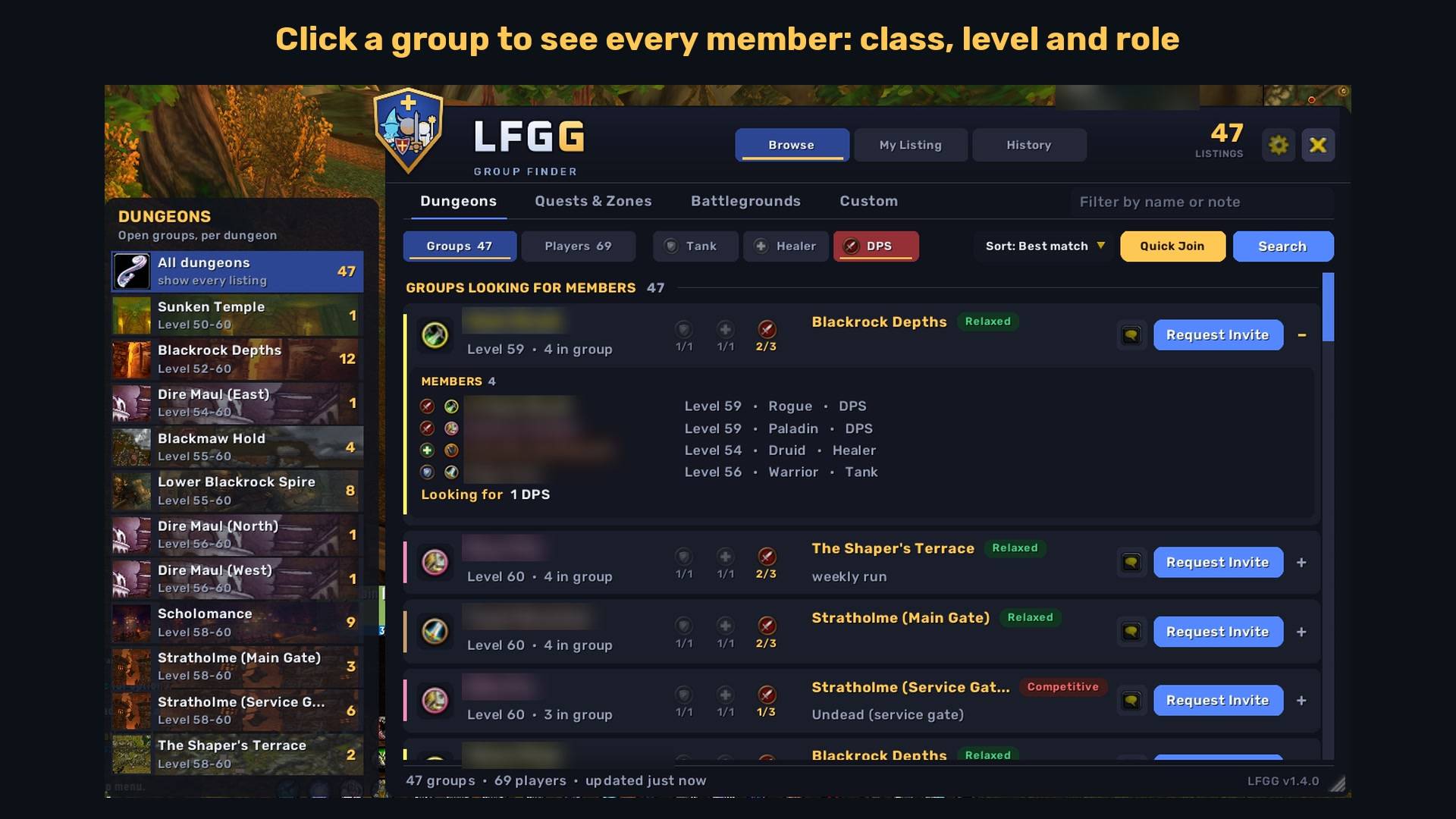
A list next to the window shows Dungeons, Raids, Battlegrounds or Quests & Zones, with art, level ranges and the number of listings for each place. In Quests & Zones, the busiest zones come first.
Click a place to see only its listings. LFGG also searches that place on its own. The game limits how many results one search returns, so this can show many more players than a search of everything.
One click to ask for an invite
Request Invite sends the leader the game's own invite request. No typing, no copy-pasted whispers. If you'd rather whisper, set the button to send your Ask to Join message instead, or both.
Quick Join asks the best matching group for you, one request per click. It skips anyone you contacted in the last hour, so it won't keep asking a leader who turned you down. If your list is more than a minute old, the first click refreshes it.
You can see what happened to your request
Every request is tracked. The group's card and the Your requests list show where each one stands: Invite requested, Replied, Invited you!, Joined, or Declined, Already in a group, Offline. If the leader whispers back, their reply shows up right there.
See the whole party before you ask
Click a group to open it: every member's name, class, level and role, what they still need ("Looking for 1 DPS") and the full note. Each card also shows role counts (2/3 DPS), so you can see where there's room without opening anything.
Groups and players in separate tabs
Groups shows parties looking for members. Players shows solo players looking for a group.
Competitive or relaxed?
Groups show the playstyle the leader picked as a tag: Competitive, Relaxed, Learning or Carry offered. Tags for New players, Auto invite, Voice and item level show up when the leader sets them.
Search more languages
LFGG searches every language the game offers on your realm, not only your client's. Turn languages on or off in settings, then press Search.
Instant Invite
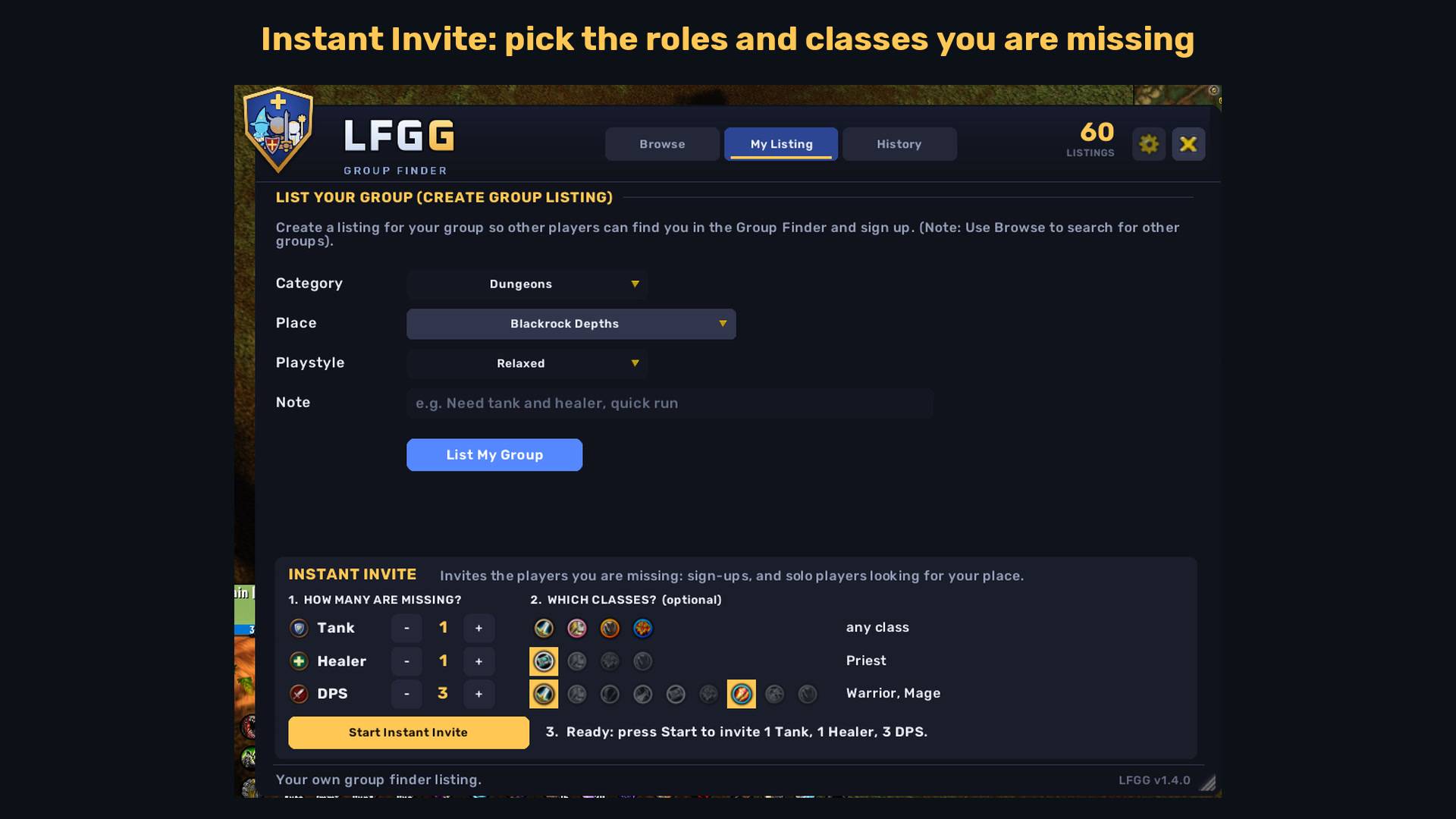
Building a group? In My Listing, choose a place, set how many tanks, healers and DPS you're missing, and pick classes if you care. Then press Start Instant Invite.
While it runs, LFGG sends invites on its own to matching solo players who sign up, and to matching solo players looking for your place.
- It asks each player only once per session, and skips anyone you contacted in the last hour.
- Searching continues only while the LFGG window is open.
- Stop it with STOP inviting,
/lfgg stop, or by closing the window. - It also stops when your party is full, when everyone you asked for has joined, when you delist from LFGG, or when you can no longer invite.
- It is always off after a reload or login.
Everything else
- Best match sorting. Groups with room for your role come first, then bigger groups and levels close to yours. Rows stay where they are while member details load, so you don't click the wrong group.
- Filter box for names and notes, plus an Only places for my level option.
- Quick messages from the chat button on each group, like "Ready to go for {dungeon}!" or "On my way, could someone summon me?". Edit them or write your own. Tokens:
{name}{dungeon}{me}{level}{class}{spec}{role}. - My Listing. List your own group with a place, playstyle and note. Sign-ups come in with their roles and level, and you invite or decline from the same screen.
- History of everyone you asked, invited or whispered, with their reply. If you're about to ask the same leader again within a few minutes, LFGG asks first (you can change the time or turn it off).
- Two looks. A clean Modern theme and a Classic WoW theme made from Blizzard's own art. You can switch any time, no reload needed.
- Drag the bottom-right corner to resize the window. You can also set background opacity, show or hide the minimap button, close with Escape and lock the position.
Commands
| Command | What it does |
|---|---|
/lfgg |
Open or close the window |
/lfgg settings |
Settings |
/lfgg listing |
Your own listing |
/lfgg history |
Contact history |
/lfgg stop |
Stop Instant Invite |
/lfgg key |
Show what your Group Finder key opens |
/lfgg classic / /lfgg modern |
Switch theme |
/lfgg reset |
Reset the window's position and size |
You can also open LFGG from the minimap button (right-click for settings) or the addon compartment.
Good to know
- Made for WoW Forever.
- Invite requests and Quick Join happen when you click. Instant Invite is the exception: once you start it, it sends invites by itself until it stops. LFGG can also refresh the list while the window is open; you can turn that off.
- If the game won't send an invite request, LFGG whispers your Ask to Join message instead, so your request still goes out.
- LFGG no longer has background Watch or its own pop-up alerts.
- No libraries or dependencies. Your settings are saved for your whole account.
- Font: Rubik (SIL Open Font License, included).
Found a bug or have an idea? Leave a comment. Screenshots of any error message help a lot.
LFGG - Group Finder with Instant Invite & Quick Join Team