Level Time Goals
- By
Set goals for yourself or your stream (level, kills, loot, battleground wins) and show them as live cards on screen, with a history. Requires Level Time Addon.
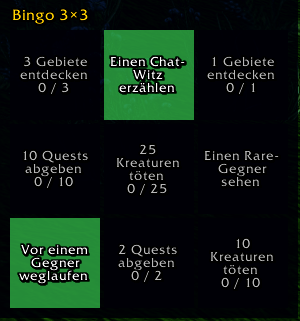
goal-bingo.png
Description
Level Time Goals
Set goals for your stream and show them as goal cards on screen. Viewers see at a glance what you are working on and how far along you are; when a goal is reached you get a big on-screen alert.
Requires Level Time. Level Time Goals builds on its cards, alerts, themes and tables, so install both.
Quick start
- Type
/sgto open the window. - Pick a goal kind from the tiles (all kinds at a glance; Level is preselected with your next level, Free text sits right next to it) and enter a number or text.
- Click Add goal: the goal card appears on screen. Free-text goals are ticked off by clicking the card (twice, so a stray click does nothing).
- Want more? Bingo tab > Create card, Wheel tab > Spin the wheel, or Collection > Packs to add a ready-made set.
Templates are saved goals that bingo cards and the wheel draw from; a pack adds several goals at once; the Collection tab holds both.
Goal types
- Reach a level: "Level 30 today"
- Kill enemies: N kills, all, PvE only or PvP only, optionally only in battlegrounds
- Loot an item or own an item: N looted, or N in your bags (optionally with the bank)
- Gold: earn N gold or own N gold
- Quests: turn in N quests, one specific quest or a chain in order (quest IDs or links)
- Profession: reach a skill rank
- Exploration: discover N areas or reach a zone
- Bosses: defeat N bosses, a named boss or bosses in one instance
- Reputation: gain N reputation or reach a standing with a faction
- Achievement (clients with achievements) and honor
- Win battlegrounds: N wins, optionally for one battleground
- Rules that can fail: no death, no trade/mail/auction house, no flight paths, naked, no healing potions, until a level or a deadline
- Checklists with your own items and other goals as sub-goals (attach or detach them in the window under Edit)
- Escape: run away from an enemy N times, detected by itself: the enemy attacked you for at least 2 seconds and the fight ends without anyone dying, or someone else takes its aggro off you (only outside dungeons and raids; Feign Death and Vanish don't count)
- Moments the game detects by itself: spot a rare enemy, fall off a cliff, greet a player, dance in front of an NPC, go for a swim, heal or resurrect another player, sell a quest reward, buy an accidentally sold item back
- Bingo: 3×3 or 5×5 cards whose fields tick themselves (also built-in fields like "Run away from an enemy" or "Go for a swim"), BINGO alert and optional group announcement. Fill the fields yourself (built-in or your own templates, a text, or New goal for field for any goal kind) or let empty fields fill at random
- Free text: anything you like, with or without a counter you click up yourself
Extras for every goal
- Deadline in real time or played time, countdown on the card, "failed" when it runs out
- Daily or weekly goals that renew themselves, with a streak
- Reward text and points, shown on the card and in the alert, total points in the history
- Templates: "Save as template" stores a goal from the form without starting it; bingo cards and the wheel draw from templates, and "Add as goal" in the Collection starts one
- Packs: several goals (with deadlines and rewards) added at once; built-in sets (Hardcore start, Self-found, Dungeon tour, Explorer), or save your running goals as a pack
- Collection: templates and packs in one place, share them as text and import with one button
- Wheel of fortune: a real spinning wheel picks your next goal; choose which built-in and own templates are on it, limited rerolls, optionally on every level-up, animation can be turned off
Features
- Goal cards in the look of your Level Time theme, stacked on screen; move and scale them in Level Time's edit mode, right-click for settings
- Settings window (
/sg options) with search: number of cards, card colors, size, sound, alert, chat line, own pages for bingo and the wheel, clean-up of goals from deleted characters - Minimap button: left click opens the window, Shift+left the history, right click the settings, Shift+right edit mode; the tooltip lists your running goals. Turn it off under Settings > Goal cards or with
/sg minimap - History: every finished, cancelled or failed goal in a table you can filter, sort and export as CSV
- Window (
/sg): tabs Goals (tiles for every goal type, form, extras behind "More options", running goals with Edit for number, text, deadline, repeat, reward, points and sub-goals), Bingo, Wheel, Collection and History; every goal type, form field and running goal explains itself in its tooltip - Languages follow Level Time: English, German, French, Spanish
- Works with the same game versions as Level Time
Commands
| Command | Effect |
|---|---|
/sg |
Open the window |
/sg options |
Open the settings |
/sg help / /sg help all |
Everyday commands / all commands and goal types |
/sg add level 20 |
Goal: reach level 20 |
/sg add kills 50 pve |
Goal: 50 PvE kills |
/sg add gold 100 [own] |
Goal: earn (or own) 100 gold |
/sg add quest 10 / /sg add quest <links> |
Goal: 10 quests, or these quests in order |
/sg add rule nodeath 30 |
Rule: no death until level 30 |
/sg add escape 3 / /sg add moment swim |
Run away 3 times / go for a swim |
/sg bingo 3 / /sg bingo edit |
Random bingo card / fill a card yourself |
/sg wheel / /sg wheel edit |
Spin the wheel / choose its entries |
/sg template add <text> / /sg template share |
Add a text template / share your templates |
/sg import / /sg collection |
Import a pack or templates / open the collection |
/sg deadline <Nr> 2h [played] |
Add a deadline to a goal |
/sg repeat <Nr> daily |
Renew a goal every day |
/sg pack hardcore |
Add a built-in pack |
/sg list / /sg cancel <Nr> / /sg history |
List running goals, cancel one, show the history |
/sg tracker / /sg move / /sg scale <0.5-2> |
Show or hide, move and resize the goal cards |
/sg minimap |
Show or hide the minimap button |
/streamgoal works as an alias for /sg, /sg own ... as an alias for /sg template ....
Good to know
- Goals belong to the character that was active when you created them; only that character progresses them.
- Up to six goals run at once per character (bingo fields don't count).
Feedback
Bugs and ideas: GitHub issues
Level Time Goals Team