


Level Time
- By
LevelTimer - Settings.png

LevelTimer - Vertical.png
LevelTimer - Charts.png
LevelTimer - Default.png
LevelTimer - History Journal.png
Description
LevelTimer
See how your leveling is really going. LevelTimer tracks your play time, XP per hour, kills, deaths, quests and income for your current level and your current session, and keeps a history of every finished level and every past session for all of your characters.
Features
Live window
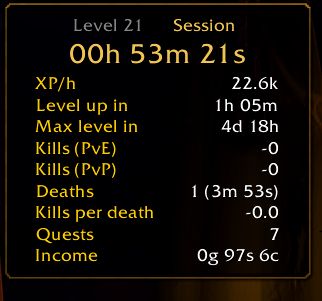
A small, movable window shows either your current level or your current session. Switch with the Level | Session tabs.
- Play time: on this level (synced with the server's
/played) or in this session, counted up live - XP bar with rested bonus
- XP per hour, the estimated play time until the next level and until max level
- Kills, split into PvE (every kill that granted experience, including group kills), PvP (honorable kills) and optionally elite and rare kills
- Deaths, with time spent dead or as a ghost and kills per death
- XP sources: share of XP from kills, quests and everything else (exploration, professions, …)
- Rested XP: bonus XP gained from rest and its share of your XP
- Quests turned in
- Income: money earned from loot, quests, sales and mail
- Level-up summary in chat when you ding
Shown as a clear table, label left and value right. Every value can be switched on or off on its own, e.g. PvE and PvP kills separately.
History and evaluation
- Levels: play time, XP/h, kills, deaths, quests and gold of every finished level, saved automatically on level-up
- Timeline: when each level was reached, with total /played and how long it took
- Sessions: start, duration, level range, XP/h, kills, deaths, quests and gold of every past session
- Kills: every killed creature and player with time, name, PvE/PvP, level and zone
- Deaths: every death with time, cause (enemy and spell, or falling, drowning, …), level and zone. Retail hides the combat log from addons, so the cause shows as "Unknown" there.
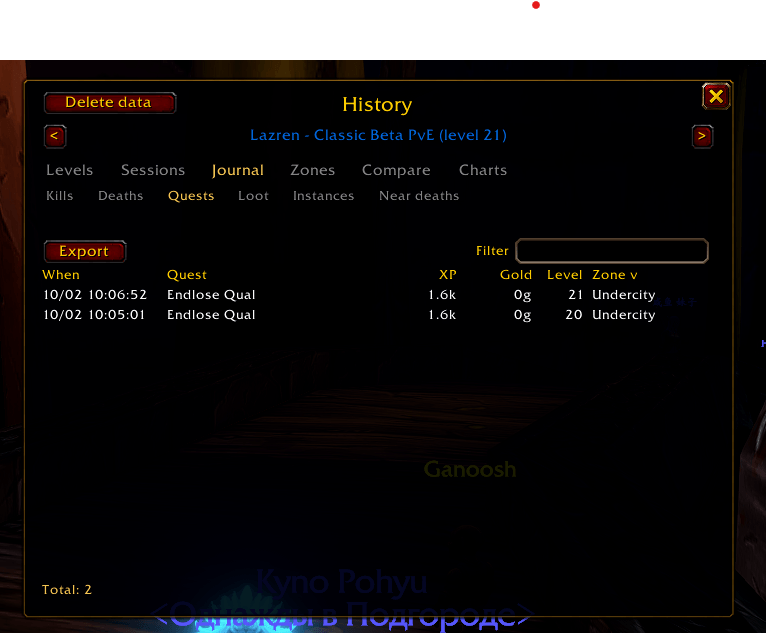
- Quests: every quest turned in with time, name, XP and gold
- Near deaths: every close call below 10 % health with lowest value and cause
- Loot: rare and better items with time, quantity and likely source
- Instances: every dungeon, raid and scenario run with duration, XP, kills and deaths
- Zones: XP/h, kills and deaths per zone, so you see where leveling pays off
- Compare: all your characters side by side, fastest leveler first
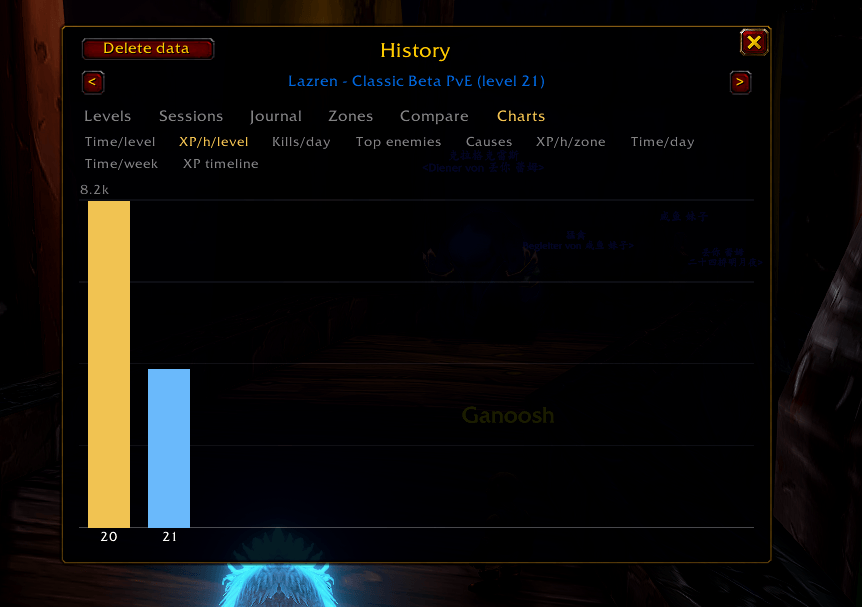
- Charts: time per level, XP/h per level, kills per day, top enemies, death causes, XP/h per zone, play time per day and week and the XP timeline of your session
- Sort by any column, filter by any text; a Total row sums up the shown rows; long lists scroll smoothly
- Export any table as CSV to copy into a spreadsheet
- Browse all your characters from any character
A session runs from login to logout. A /reload or a short break (up to 5 minutes) continues it.
Settings
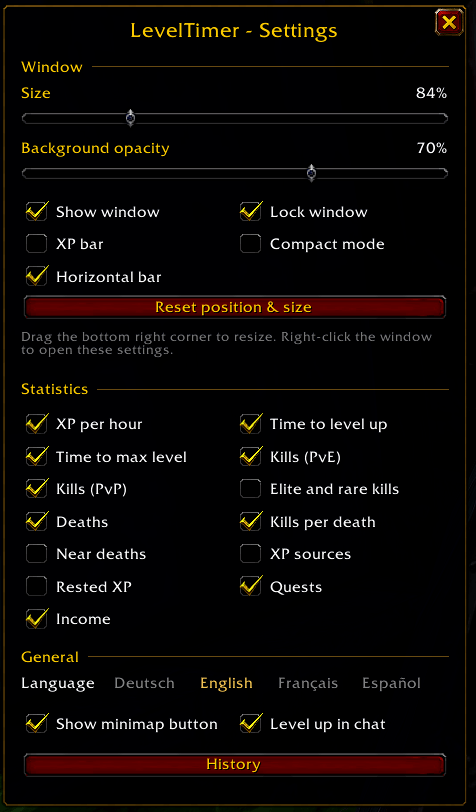
- Language: English, German, French or Spanish
- Window size (also by dragging the bottom right corner) and background opacity
- Lock, show or hide the window, reset position and size
- Show or hide the minimap button
- One toggle per statistic
Usage
- Window: drag the bottom right corner to resize, right-click to open the settings
- Minimap button: left-click opens the settings, Shift-left-click the history, right-click shows or hides the window, drag to move the button
- On Retail, LevelTimer also appears in the addon compartment menu
- Data text for Titan Panel, ElvUI and other LibDataBroker displays
| Command | Effect |
|---|---|
/lt or /lt config |
Open settings |
/lt history |
Open the history |
/lt lock / /lt unlock |
Lock or unlock the window position and size |
/lt reset |
Reset window position and size |
/lt compact |
Toggle compact mode (play time, XP bar and XP/h only) |
/lt bar |
Toggle horizontal bar layout (everything in one line, like an info bar) |
/lt newsession |
Archive the running session and start a new one (also a button in the settings) |
/lt stream |
Stream mode: transparent larger window, alerts on, names hidden; again restores your settings |
/lt splits |
Show or hide the split list (last levels with time and difference) |
/lt profile |
List profiles; /lt profile Name switches, save Name, delete Name, export, import (also in Settings > Profiles) |
/lt runs backup / /lt runs import |
Copy all runs as text, or paste runs shared by others (also buttons in History > Speedrun) |
/lt compare pb |
Splits against your personal best run (best = best time per level, or a character name) |
/lt recap |
Session summary card: time, levels, XP, kills, deaths, best loot, most dangerous enemy |
/lt goal 30 |
Set a goal level with progress and forecast in the window; /lt goal removes it |
/lt show / /lt hide |
Show or hide the window |
/lt sync |
Re-sync play time with the server |
/lt minimap |
Toggle the minimap button |
/lt debug |
Extended logging in chat until /reload; /lt debug help lists test commands (state, levelup, alert, remind, death, splits) |
/leveltimer works as an alias for /lt.
Good to know
- Statistics are recorded separately for every character and stored account-wide, so the history can show all of them.
- Level statistics start counting when the addon is installed. Play time and XP per hour use the server's values, so they are correct for the whole level right away.
- PvE kills count kills that gave you experience. Grey mobs and kills at max level don't count.
- LevelTimer supports several game versions from one download. Features a game version doesn't provide stay off quietly.
Feedback
Bugs and ideas: GitHub issues
The Level Time Team
