LetMeBuffYou!
- By
Buff the strangers you pass in the open world: see who's missing your buffs at a glance, then hover them and press one key, no targeting needed.
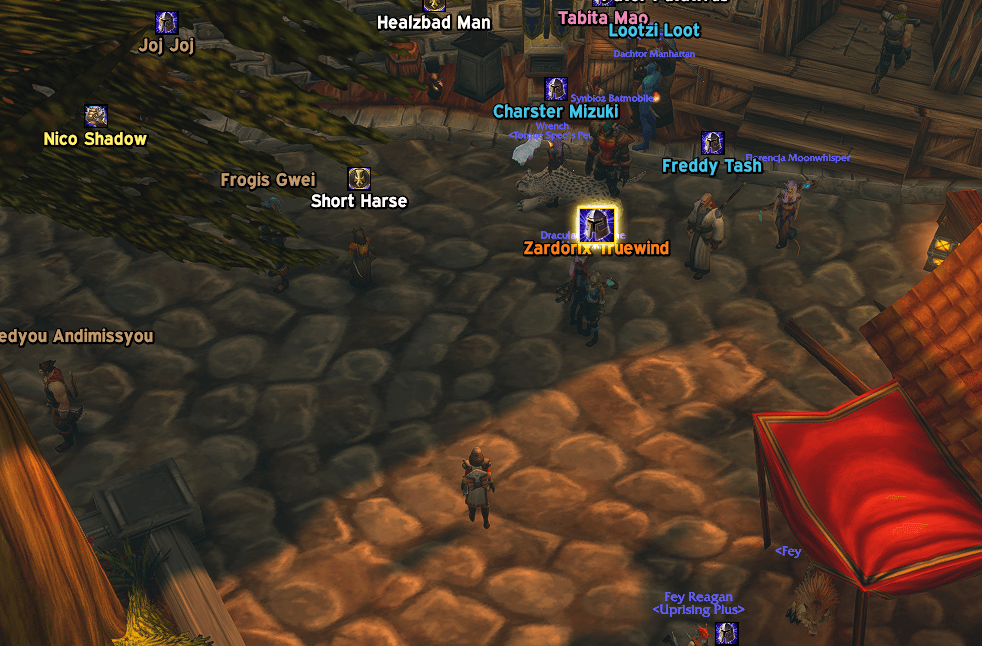
0.3.0-onhover.png
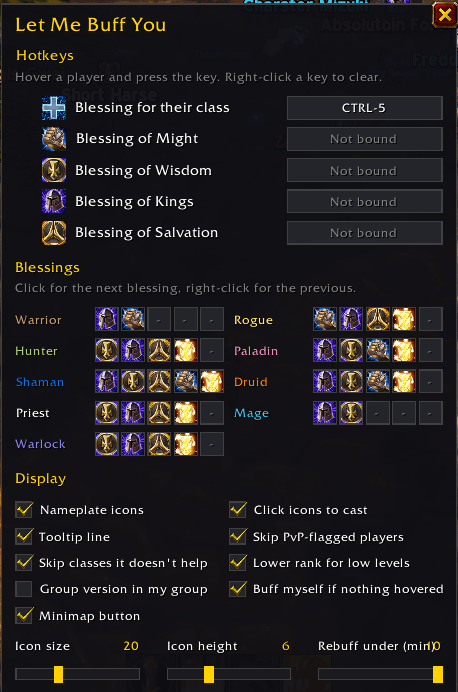
0.3.0-settings.png
Description
Let Me Buff You
Buff strangers in the open world without targeting anyone.
Hover a player and press your key. The addon casts the buff they're missing, at a rank their level can take. An icon over each friendly player's nameplate shows who still needs one of your buffs, and you can hover or click that icon to buff them.
Hover and press
- One key per buff, plus a Next missing buff key that casts whatever the player under the mouse is missing
- Works on players in the world, on nameplates and on unit frames. With nothing under the mouse, it buffs your friendly target, then you
- The icon over the player you're hovering glows, so you can see who your key will buff
- Hover a buff icon itself and press Next missing buff to give that player that icon's buff
- Picks the rank for the player's level: a level 20 gets Arcane Intellect rank 3, not a rank they're too low to take
- Optional: the group version (Brilliance, Prayer, Gift, Greater Blessing) on players in your own group, when you have the reagent
- Any key works, with Alt, Ctrl or Shift, as do mouse buttons 3 to 5 and the mouse wheel
Who still needs a buff
- An icon over the nameplate for each buff you can still give, and a "Needs:" line on the player's tooltip
- A player counts as covered by the same buff from someone else at equal or higher strength, including group, NPC and item versions
- A weaker rank still counts as missing, so a low-level Mage's Arcane Intellect gets upgraded
- No Intellect or Spirit for classes without mana
- PvP-flagged players are skipped while you aren't flagged, so you don't get flagged by accident
- Optional: treat buffs with less than a few minutes left as missing
Click the icons
Turn on Click icons to cast in the settings and a buff icon grows when you hover it. Left-click it to give that player that buff.
The game doesn't let addons cast on a player through their nameplate. Unless that player is already your target, your focus or in your group, the addon targets them for the cast and then puts your old target back.
Paladins
You can only have one blessing on each player. For each class, set up to five blessings in order. You give the first one no other Paladin has given yet, so several Paladins running the addon fill them in turn. No icon shows while your own blessing is up.
Buffs
- Mage: Arcane Intellect
- Priest: Power Word: Fortitude, Divine Spirit, Shadow Protection
- Druid: Mark of the Wild, Thorns
- Paladin: Blessing of Might, Wisdom, Kings, Salvation and Light
Getting started
- Click the minimap button or type
/lmbyto open the settings. It's also in the addon menu by the minimap. - Click a key box, then press the key you want.
- Turn on friendly nameplates (Shift+V) to see the icons.
- Optional: tick Click icons to cast to buff people by clicking their icons.
In combat
Addons can't check buffs during combat, so each key casts its buff's highest rank on the player under the mouse. Next missing buff casts your first buff. Icons don't glow or react to the mouse in combat, so hover the player instead. Everything works as normal again when combat ends.
Beta
WoW: Forever is in beta, and so is this addon. Please report problems in the comments. Typing /lmby debug makes the addon print what it's doing in chat. Paste those lines into your report.
LetMeBuffYou! Team