Leave Instance Group
- By
Adds the missing 'Leave Instance Group' option to the player unit frame menu with a confirmation popup.
English · Español más abajo




Leave Instance Group is a World of Warcraft addon for MoP Classic. Adds the missing Leave Instance Group option to your portrait menu.

What it does
In Mists of Pandaria Classic the Leave Instance Group option does not show up in the player frame menu. This addon makes it appear whenever you are in an instance group (for example one formed by the Dungeon Finder) and asks for confirmation before leaving.
Screenshots
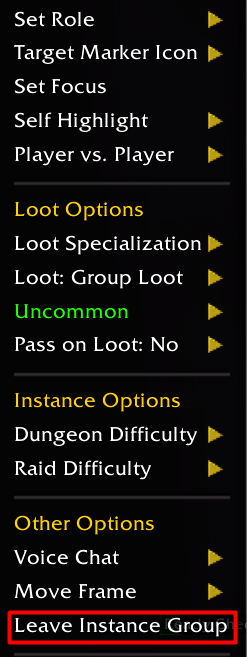 Option in the player menu |
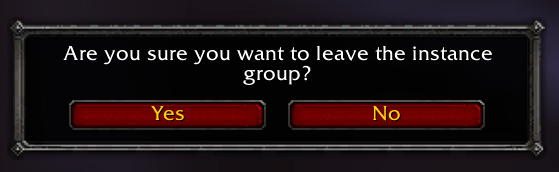 Confirmation popup |
Features
- Shows Leave Instance Group in the right-click menu of your player frame while you are in an instance group.
- A Yes/No confirmation popup before leaving, so you don't drop out by accident.
- The popup closes with Escape.
- Translated to the main client languages.
How to use
- Right-click your player frame, choose Leave Instance Group under Other Options and confirm.
- There are no slash commands or settings.
Installation
- Install it with the CurseForge app (recommended: it keeps the addon updated and puts it in the right client), or download the ZIP from the Files tab.
- If you install by hand, extract the
LeaveInstanceGroupfolder intoWorld of Warcraft/<version>/Interface/AddOns/. - Restart the game and make sure Leave Instance Group is enabled in the AddOns list.
Compatibility
Works on: MoP Classic · MIT License
Support the project
Leave Instance Group is made in my free time. If it makes your adventures better, you can support it, or simply leave a comment, a rating or share it with your guild.
Found a bug or have an idea? Tell me on Discord.






Leave Instance Group es un addon de World of Warcraft para MoP Classic. Añade la opción que falta para salir del grupo de instancia en tu retrato.
Qué hace
En Mists of Pandaria Classic la opción para abandonar el grupo de instancia no aparece en el menú del retrato del jugador. Este addon la muestra siempre que estés en un grupo de instancia (por ejemplo, uno formado con el Buscador de mazmorras) y pide confirmación antes de salir.
Capturas
Opción en el menú del jugador |
Ventana de confirmación |
Funciones
- Muestra la opción de abandonar el grupo de instancia en el menú de clic derecho de tu retrato mientras estás en un grupo de instancia.
- Ventana de confirmación Sí/No antes de salir, para que no te vayas sin querer.
- La ventana se cierra con Escape.
- Traducido a los principales idiomas del cliente.
Cómo se usa
- Haz clic derecho en tu retrato, elige la opción de abandonar el grupo de instancia en Otras opciones y confirma.
- No tiene comandos ni ajustes.
Autor: Pirson · GitHub · CurseForge · Licencia MIT
Instalación
- Instálalo con la app de CurseForge (recomendado: se actualiza solo y lo coloca en el cliente correcto) o descarga el ZIP de la pestaña Files.
- Si lo instalas a mano, descomprime la carpeta
LeaveInstanceGroupenWorld of Warcraft/<versión>/Interface/AddOns/. - Reinicia el juego y comprueba que Leave Instance Group está activado en la lista de addons.
Compatibilidad
Funciona en: MoP Classic · Licencia MIT
Apoya el proyecto
Leave Instance Group se hace en mi tiempo libre. Si mejora tus aventuras, puedes apoyarlo, o simplemente dejar un comentario, una valoración o compartirlo con tu hermandad.
¿Un bug o una idea? Cuéntamelo en Discord.


Leave Instance Group: World of Warcraft addon · Utility · Leave instance groups from your portrait · addon de World of Warcraft · Utilidad · Sal del grupo de instancia desde el retrato. Compatible with MoP Classic.
Leave Instance Group Team

Owner