Emoji & React
- By
Emojis in chat and speech bubbles, plus a Ping Wheel-style reaction wheel that pops reactions above your character.
English · Español más abajo




Emoji & React is a World of Warcraft addon for WoW Forever. Emojis in chat and speech bubbles, plus a reaction wheel above your character.

What it does
Emoji & React brings the emojis you use every day to WoW Forever's chat and speech bubbles, and adds a reaction wheel: hold a key, point the mouse towards a reaction, release, and it pops up above your character for nearby players who also have the addon.
| You type | You see |
|---|---|
:joy: :heart_eyes: :thumbsup: | the emoji, in chat and in the bubble |
:) :D <3 xD | the matching emoji |
| a pasted emoji (Win + .) | the emoji instead of a blank box |
| !Reactions above other players | !Reaction wheel |
| !Emojis in chat and speech bubbles | !Emoji panel |
| !Reactions settings | !Chat settings |
Screenshots
 Reactions in motion |
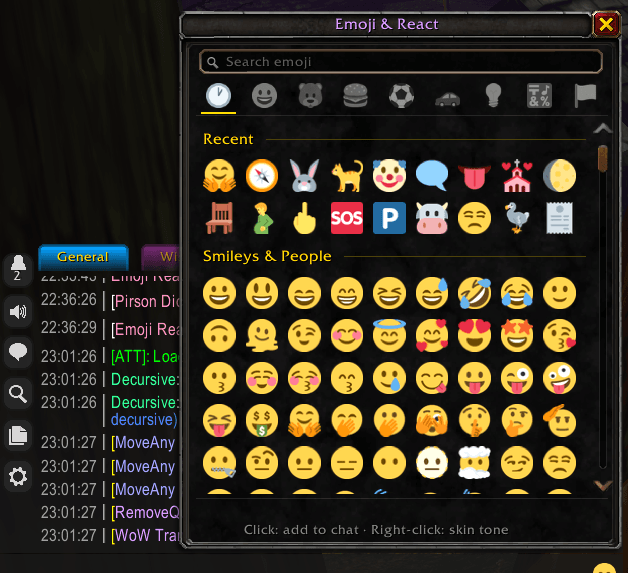 Emoji panel |
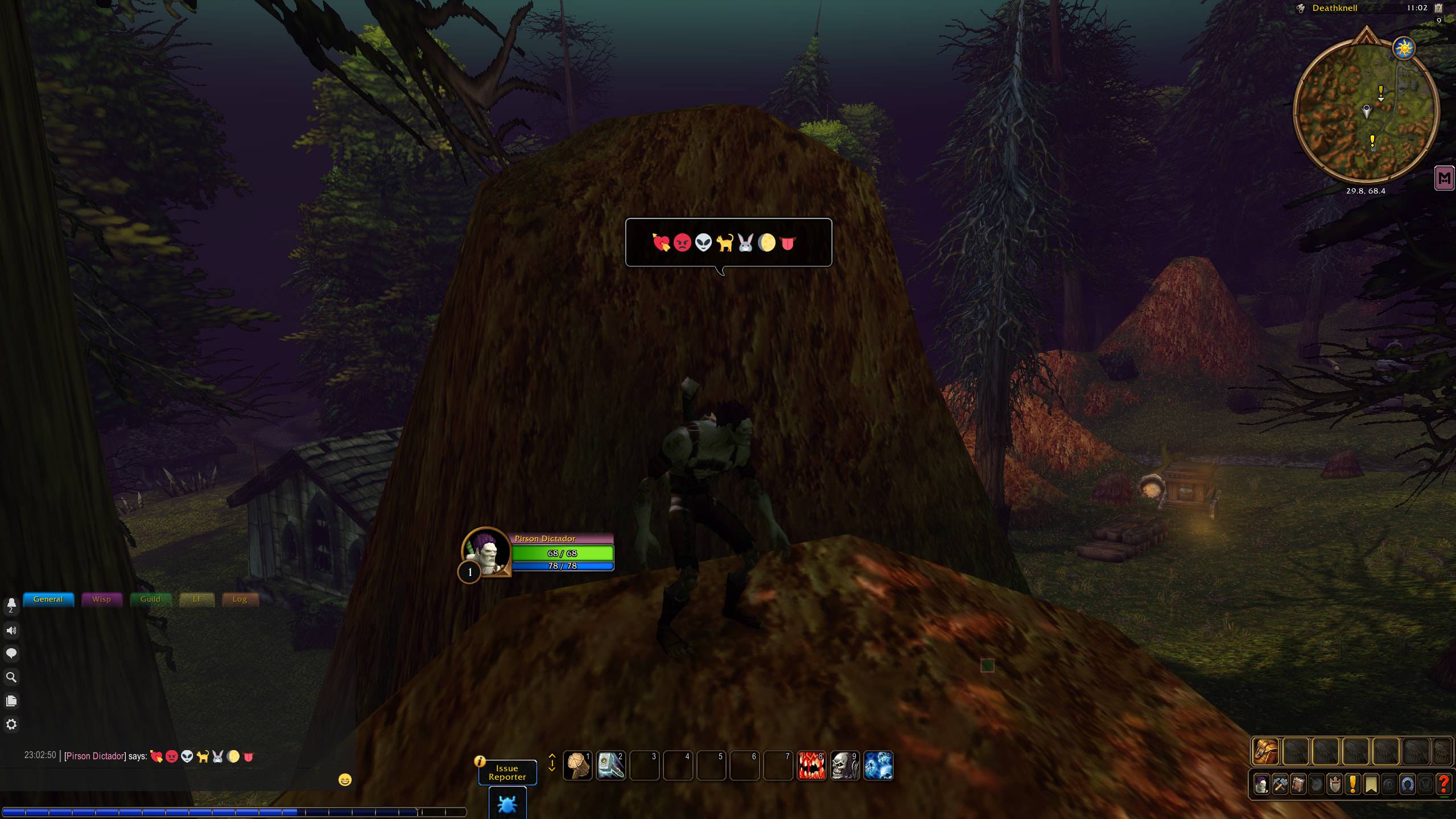 Emojis in chat and bubbles |
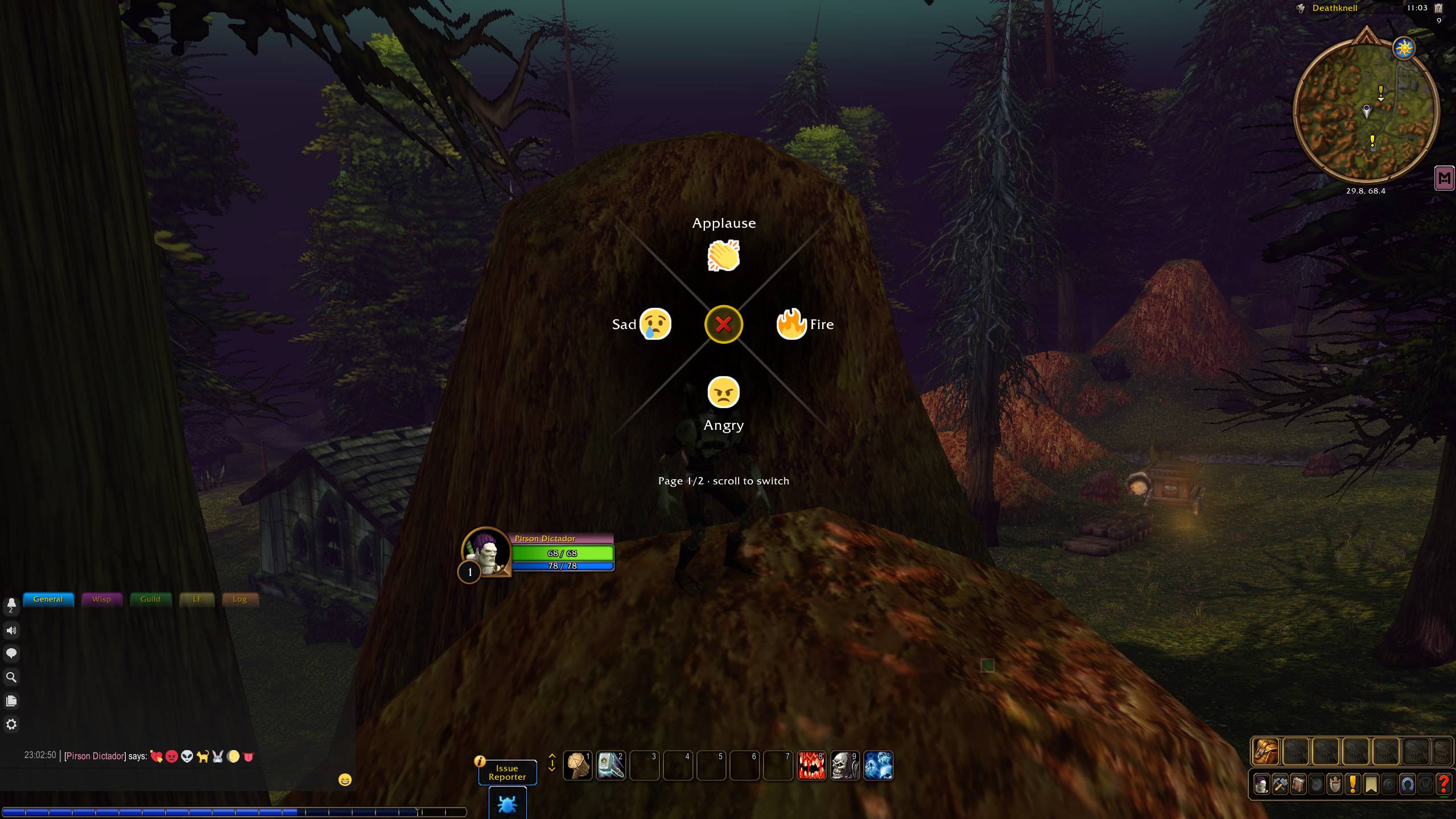 Reaction wheel |
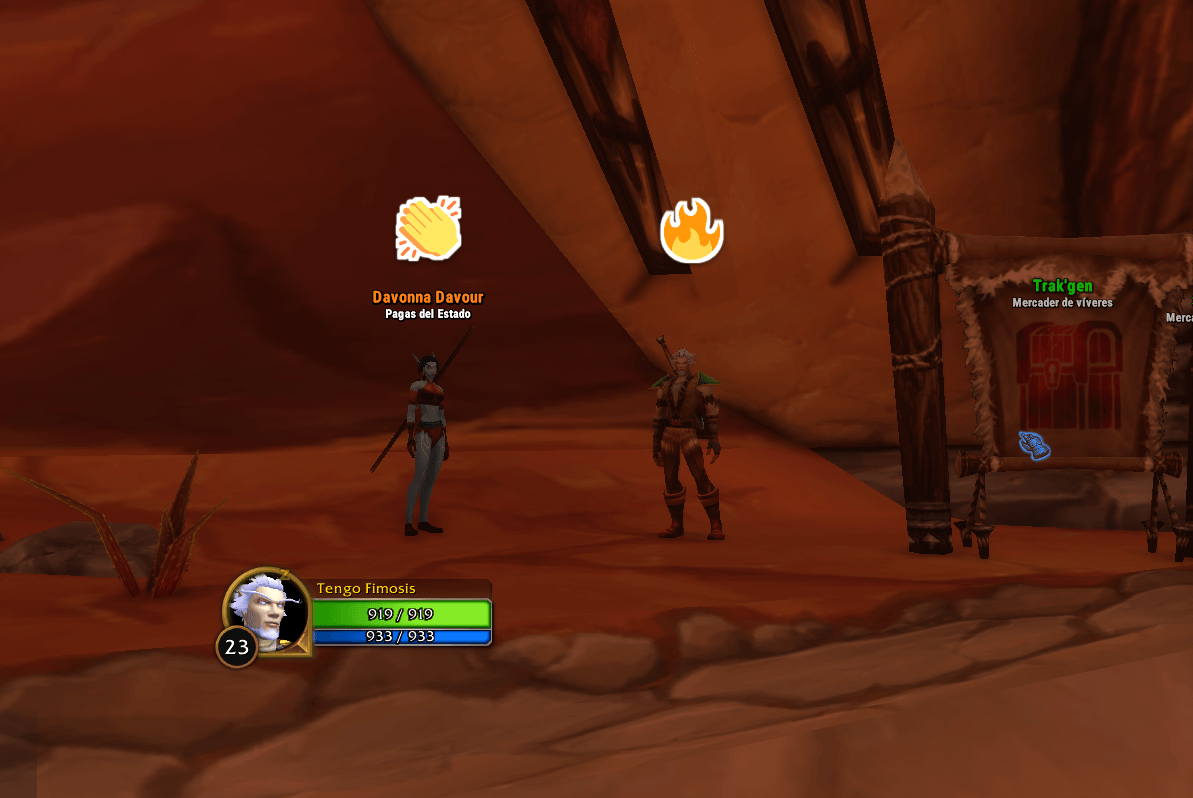 Reactions above players |
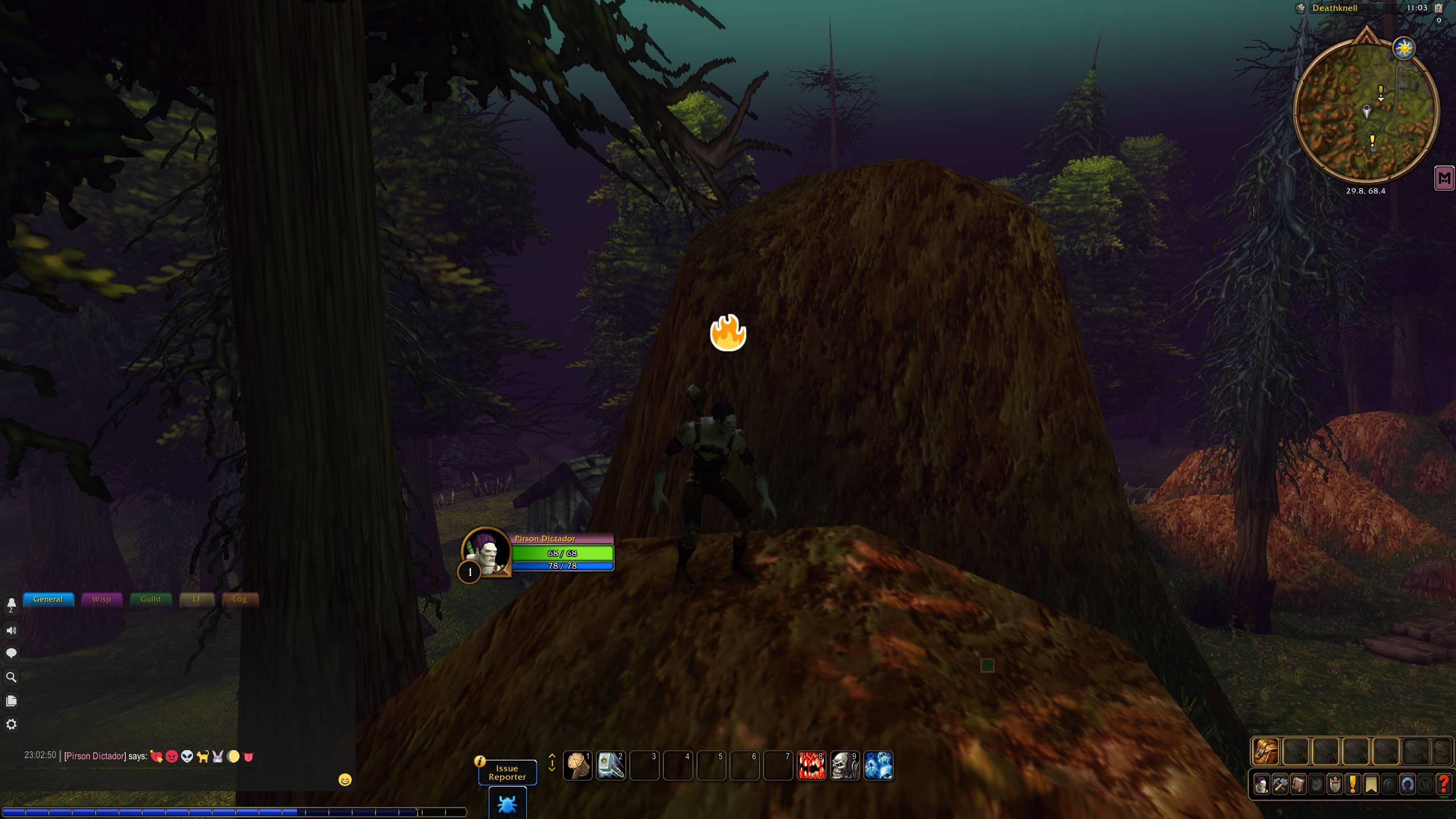 Your own reaction |
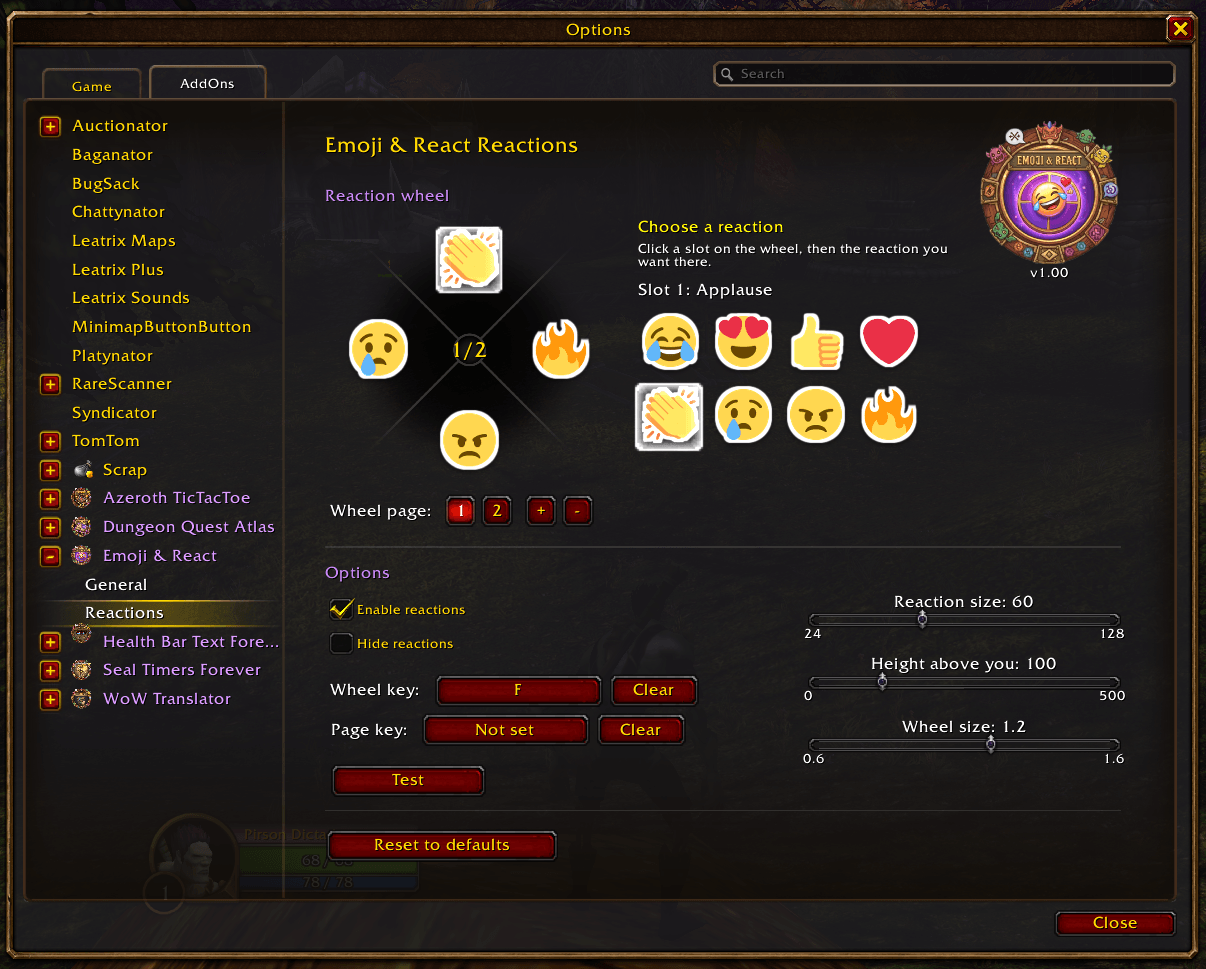 Customize the wheel |
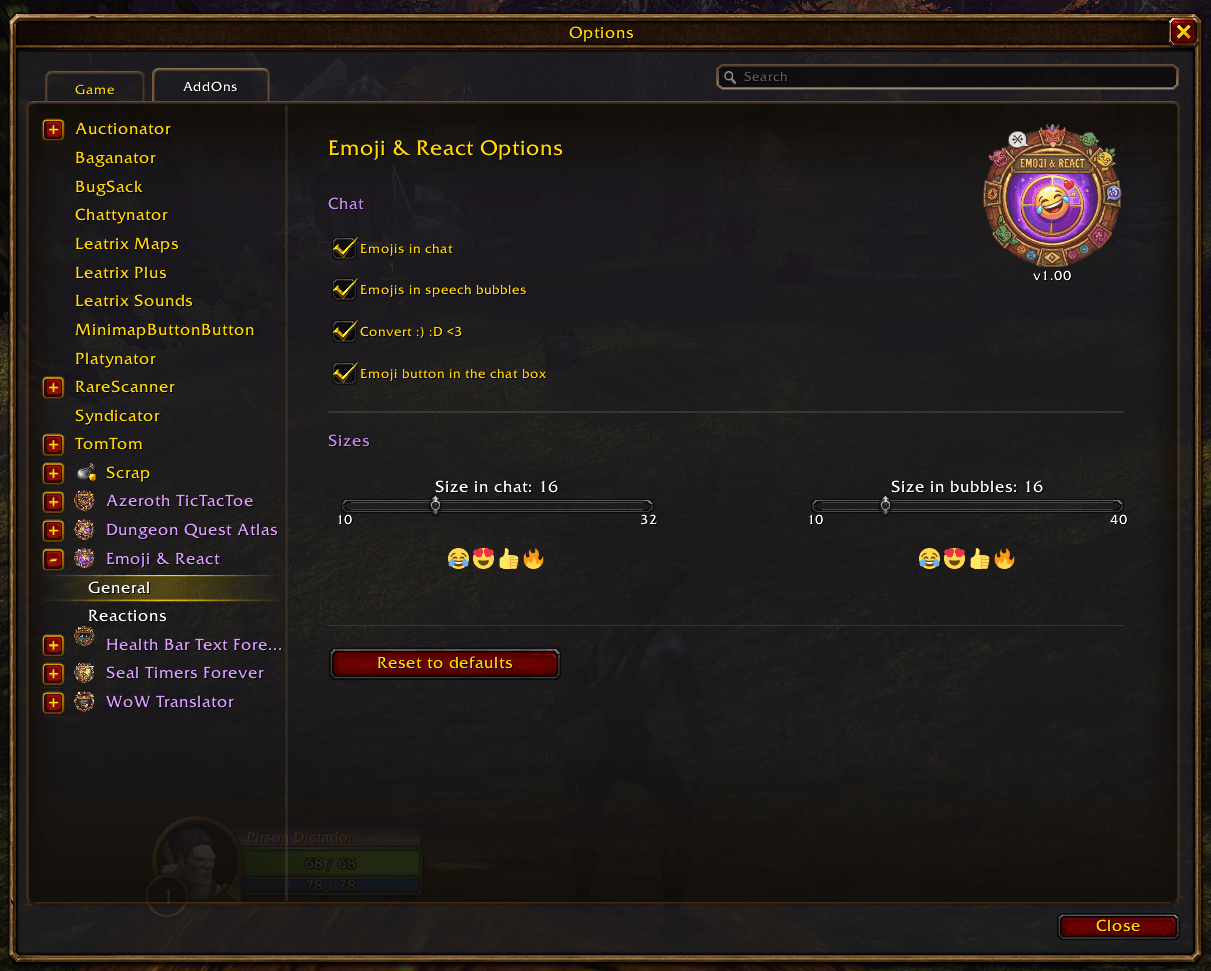 Options |
Features
- Every emoji (1,900 plus skin tones) in chat and in /say, /yell and party speech bubbles, written as
:joy:(Discord/Slack codes) or pasted. - WhatsApp-style emoji panel from a button inside the chat box: search in your language, categories, recently used and skin tones (right-click an emoji).
- Reactions with their own images, separate from the chat emojis, including PvP ones (GG, WP, EZ, 1V1, RIP, LOL). They pop in like Fortnite emojis: bounce in, wobble and burst away.
- Classic emoticons (
:),:D,<3...) converted too, without touching links or URLs. - Reaction wheel that looks and works like the game's own Ping Wheel: hold the key you choose (keyboard, combination or mouse button), point the mouse towards a reaction and release; release on the center X to cancel. Pages of 4 reactions (one per 4 reaction images), switched with the mouse wheel or a key of your choice, all of them chosen by you.
- Settings live in the game's own Options → AddOns panel: sizes, what to convert, the wheel key, the wheel reactions and the height of your own reaction.
- Lightweight, no libraries.
How to use
/emojiopens the settings./emoji wheelopens the reactions panel./emoji panelopens the emoji panel (also from the button in the chat box or its key binding)./emoji keychooses the wheel key./emoji testshows a reaction above you.- Options → AddOns → Emoji & React → General: chat and bubbles.
- Options → AddOns → Emoji & React → Reactions: the wheel as it looks in game. Click a slot and pick its reaction, add or remove pages, and set the key, sizes and height.
- Other players' reactions appear above their nameplate. If you don't use friendly nameplates, the addon turns them on only while the reaction lasts and puts them back as they were. Hide reactions hides other players' reactions, and then the addon never touches nameplates.
Installation
- Install it with the CurseForge app (recommended: it keeps the addon updated and puts it in the right client), or download the ZIP from the Files tab.
- If you install by hand, extract the
EmojiReactfolder intoWorld of Warcraft/<version>/Interface/AddOns/. - Restart the game and make sure Emoji & React is enabled in the AddOns list.
Compatibility
Works on: WoW Forever · MIT License
Good to know
- Messages are still sent as text (
:joy:): players without the addon see the text, as with any emoji addon. - Inside dungeons and raids Blizzard does not let addons read chat or touch speech bubbles and friendly nameplates: there are no emojis in chat or bubbles, and your group's reactions show next to their party frame instead of above them.
- Your own character has no nameplate, so your reaction is placed above the screen center. Adjust Height above you to your camera zoom.
Support the project
Emoji & React is made in my free time. If it makes your adventures better, you can support it, or simply leave a comment, a rating or share it with your guild.
Found a bug or have an idea? Tell me on Discord.






Emoji & React es un addon de World of Warcraft para WoW Forever. Emojis en el chat y los bocadillos, y una rueda de reacciones sobre tu personaje.
Qué hace
Emoji & React trae los emojis de siempre al chat y a los bocadillos de WoW Forever, y añade una rueda de reacciones: mantén una tecla, apunta con el ratón hacia una reacción, suelta, y aparecerá encima de tu personaje para los jugadores cercanos que también tengan el addon.
| Escribes | Ves |
|---|---|
:joy: :heart_eyes: :thumbsup: | el emoji, en el chat y en el bocadillo |
:) :D <3 xD | el emoji equivalente |
| un emoji pegado (Win + .) | el emoji en vez de un cuadro vacío |
| !Reacciones encima de otros jugadores | !Rueda de reacciones |
| !Emojis en el chat y en los bocadillos | !Panel de emojis |
| !Ajustes de reacciones | !Ajustes del chat |
Capturas
Reacciones en movimiento |
Panel de emojis |
Emojis en el chat y los bocadillos |
Rueda de reacciones |
Reacciones sobre los jugadores |
Tu propia reacción |
Personaliza la rueda |
Opciones |
Funciones
- Todos los emojis (1.900 más sus tonos de piel) en el chat y en los bocadillos de /decir, /gritar y grupo, escritos como
:joy:(códigos de Discord/Slack) o pegados. - Panel de emojis como el de WhatsApp desde un botón en la caja de chat: buscador en tu idioma, categorías, recientes y tonos de piel (clic derecho en un emoji).
- Reacciones con imágenes propias, distintas de los emojis del chat, también de PvP (GG, WP, EZ, 1V1, RIP, LOL). Aparecen como los emojis de Fortnite: entran rebotando, se balancean y estallan al irse.
- También convierte los emoticonos clásicos (
:),:D,<3...) sin tocar enlaces ni URLs. - Rueda de reacciones igual que la Ping Wheel del propio juego: mantén la tecla que tú elijas (tecla, combinación o botón del ratón), apunta con el ratón hacia una reacción y suelta; soltando en la X del centro se cancela. Páginas de 4 reacciones (una por cada 4 imágenes de reacción) que cambias con la rueda del ratón o con la tecla que elijas, todas elegidas por ti.
- Los ajustes están en el panel del propio juego, Opciones → AddOns: tamaños, qué convertir, la tecla de la rueda, sus reacciones y la altura de tu propia reacción.
- Ligero, sin librerías.
Cómo se usa
/emojiabre los ajustes./emoji wheelabre el panel de reacciones./emoji panelabre el panel de emojis (también desde el botón de la caja de chat o su atajo de teclado)./emoji keyelige la tecla de la rueda./emoji testmuestra una reacción encima de ti.- Opciones → AddOns → Emoji & React → General: chat y bocadillos.
- Opciones → AddOns → Emoji & React → Reacciones: la rueda tal como se ve en el juego. Haz clic en un hueco y elige su reacción, añade o quita páginas, y ajusta la tecla, los tamaños y la altura.
- Las reacciones de los demás salen encima de su placa de nombre. Si no usas placas amistosas, el addon las enciende solo lo que dura la reacción y luego las deja como estaban. Ocultar reacciones oculta las de los demás, y entonces el addon no toca las placas.
Instalación
- Instálalo con la app de CurseForge (recomendado: se actualiza solo y lo coloca en el cliente correcto) o descarga el ZIP de la pestaña Files.
- Si lo instalas a mano, descomprime la carpeta
EmojiReactenWorld of Warcraft/<versión>/Interface/AddOns/. - Reinicia el juego y comprueba que Emoji & React está activado en la lista de addons.
Compatibilidad
Funciona en: WoW Forever · Licencia MIT
A tener en cuenta
- El mensaje se sigue enviando como texto (
:joy:): quien no tenga el addon ve el texto, como con cualquier addon de emojis. - Dentro de mazmorras y bandas Blizzard no deja a los addons leer el chat ni tocar los bocadillos y las placas amistosas: ahí no hay emojis en el chat ni en los bocadillos, y las reacciones de tu grupo salen junto a su marco de grupo en vez de encima de ellos.
- Tu personaje no tiene placa de nombre, así que tu reacción se coloca encima del centro de la pantalla. Ajusta Altura sobre ti a tu zoom de cámara.
Autor: Pirson · GitHub · CurseForge · Licencia MIT · Gráficos de los emojis: Twemoji (CC-BY 4.0) · Datos de los emojis: emojibase (MIT)
Apoya el proyecto
Emoji & React se hace en mi tiempo libre. Si mejora tus aventuras, puedes apoyarlo, o simplemente dejar un comentario, una valoración o compartirlo con tu hermandad.
¿Un bug o una idea? Cuéntamelo en Discord.


Emoji & React: World of Warcraft addon · Chat & Communication · Emojis and a reaction wheel in chat · addon de World of Warcraft · Chat y comunicación · Emojis y rueda de reacciones en el chat. Compatible with WoW Forever.
Emoji & React Team

Owner