LearnMe Dungeons
- By
LearnMe Dungeons is a lightweight, modular dungeon coach for World of Warcraft: The Burning Crusade Classic Anniversary.
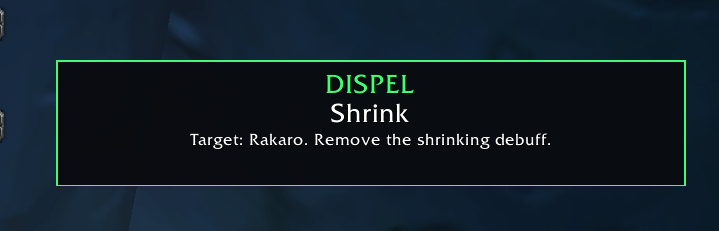
image-25.png
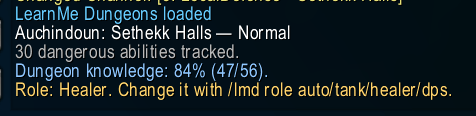
image3.png
lmdcc.png
lmdinterrupt.png
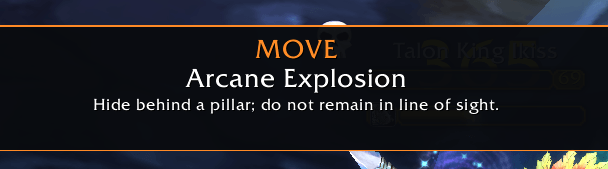
image-28.png
Description
LearnMe Dungeons
Learn every pull while you play
LearnMe Dungeons is a lightweight, modular dungeon coach for World of Warcraft: The Burning Crusade Classic Anniversary.
Instead of expecting you to memorize every dangerous mob, spell and boss mechanic before entering a dungeon, LearnMe Dungeons teaches you during the run. Mouse over an enemy to see what it can do, receive clear live alerts when an important mechanic happens, and get advice tailored to your class and role.
Whether you are entering a dungeon for the first time, returning to TBC after many years, learning to tank or heal, or simply trying to avoid unnecessary wipes, LearnMe Dungeons tells you what matters — when it matters.
Key features
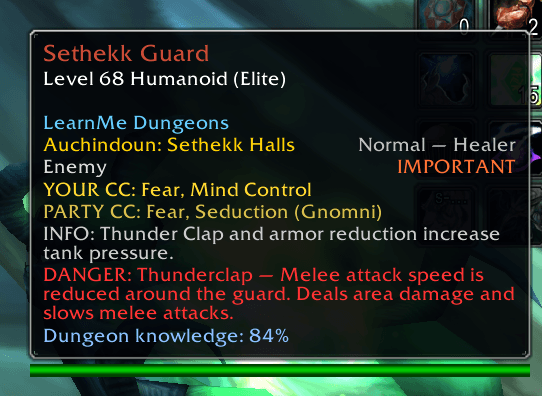
Context-aware enemy tooltips
Mouse over supported dungeon enemies to see:
- their most dangerous abilities,
- what should be interrupted, dispelled, purged or spellstolen,
- whether the enemy should be killed first,
- available crowd-control options,
- role-specific advice,
- boss and trash mechanics,
- Normal and Heroic difficulty information.
Tooltips are designed to help you understand the enemy before the pull without filling your screen with permanent windows.
Live mechanic alerts
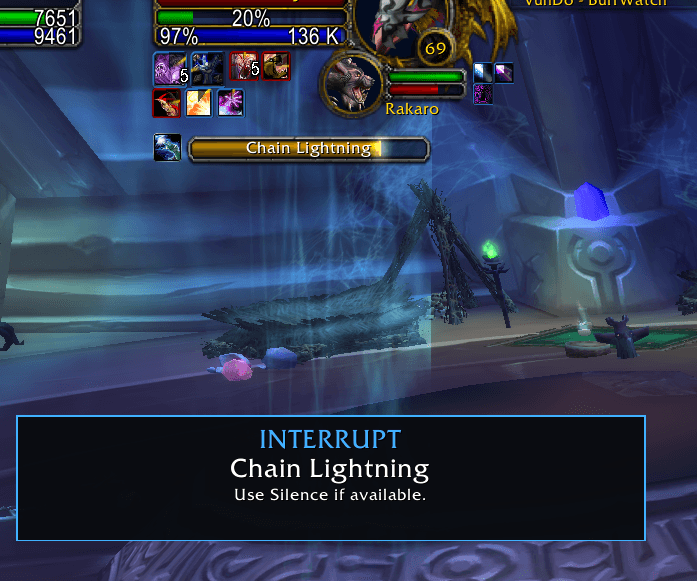
Important mechanics create temporary, easy-to-read alerts during combat, including:
- Interrupt
- Dispel
- Purge
- Spellsteal
- Crowd Control
- Move
- Frontal
- Defensive
- Stop Attacking
- Kill First
- Summon
- Danger
Alerts are prioritized so the most important mechanic remains visible.
Class- and role-aware guidance
LearnMe Dungeons adapts its instructions to your character.
A Mage may be reminded to use Counterspell, Polymorph or Spellsteal, while a Shaman may receive instructions for Earth Shock or Purge. Tanks, healers and damage dealers can receive different advice for the same mechanic.
Role detection can be automatic or manually configured.
Party crowd-control suggestions
The addon scans your group and determines which crowd-control abilities may be available against the selected enemy.
Instead of listing the same player several times, LearnMe Dungeons combines their relevant options into one clean suggestion, helping the group quickly decide who can control which target.
Pull analysis and priority marking
Analyze visible nameplates before engaging a pack to see:
- how many registered enemies are present,
- how many are high priority,
- which enemies have interruptible abilities,
- which enemies can be crowd controlled by your current party.
Priority enemies can also be automatically marked when you are the group leader or assistant.
Dungeon learning progress
LearnMe Dungeons tracks your experience with each supported dungeon:
- enemies discovered,
- Normal and Heroic visits,
- bosses defeated,
- successful interrupts,
- successful dispels,
- successful spell steals,
- overall dungeon knowledge percentage.
The more you explore and successfully handle mechanics, the more progress you build.
Death review
When you die, the addon can review recent incoming damage and display a short explanation of the dangerous ability or damage source that contributed to your death.
It is not only an alert addon — it helps you understand what went wrong.
Fully customizable
You can:
- move and resize the live alert window,
- choose a minimum alert priority,
- disable individual alert categories,
- disable sounds or positive feedback,
- switch between Coach and Expert detail modes,
- disable features you do not need.
Your settings are saved between sessions.
Modular dungeon support
LearnMe Dungeons uses a modular structure.
The main addon contains the interface, tracking and alert system, while individual dungeon modules contain the enemy and mechanic databases. This keeps the addon organized and allows dungeon modules to be installed or updated independently.
The LearnMe Dungeons core addon is required.
Install the core together with the dungeon modules you want to use.
Commands
Type:
/lmdto display the complete command list in game.
Both /lmd and /learnmedungeons can be used.
Basic commands
/lmd toggleEnable or disable LearnMe Dungeons.
/lmd statusDisplay the current addon status, active dungeon, difficulty, role, loaded modules, alert scale and other settings.
/lmd tooltip on
/lmd tooltip off
Enable or disable dungeon information in enemy tooltips.
/lmd alerts on
/lmd alerts off
Enable or disable temporary live combat alerts.
/lmd role auto
/lmd role tank
/lmd role healer
/lmd role dps
Select the role used for mechanic guidance.
/lmd mode coach
/lmd mode expert
Choose the amount of detail displayed in tooltips.
/lmd priority 1-5Set the minimum priority required for an alert to appear.
Priority 1 displays everything, while priority 5 displays only critical mechanics.
Alert window commands
/lmd unlockUnlock the alert window and move it with the left mouse button.
/lmd lockLock the alert window in its current position.
/lmd resetReset the alert window to its default position.
/lmd scale 80
/lmd scale 125
/lmd scale reset
Resize the entire alert window, including its text.
The supported scale range is 50% to 200%.
/lmd testDisplay a test alert.
Individual alert categories
You can enable or disable specific types of live alerts without removing their information from tooltips.
/lmd categoriesDisplay all alert categories and their current status.
Examples:
/lmd disable danger
/lmd disable frontal
/lmd disable move
/lmd enable interrupt
/lmd enable dispel
Disable or enable every category:
/lmd disable all
/lmd enable all
Available category names:
interrupt
dispel
purge
spellsteal
cc
move
frontal
defensive
stop
killfirst
summon
danger
info
success
Party and dungeon commands
/lmd party on
/lmd party off
Enable or disable party crowd-control suggestions.
/lmd partyscanDisplay the crowd-control and utility abilities detected in your current party.
/lmd pullAnalyze registered enemies visible on your target and nameplates.
/lmd automark on
/lmd automark off
Enable or disable automatic priority marking.
/lmd markApply the recommended raid marker to your current target. You must be the group leader or assistant.
/lmd progressDisplay your learning progress for the active dungeon.
Additional commands
/lmd sounds on|offEnable or disable critical alert sounds.
/lmd feedback on|offEnable or disable successful interrupt, dispel and spellsteal feedback.
/lmd death on|offEnable or disable death reviews.
/lmd entry on|offEnable or disable the dungeon entry summary.
LearnMe Dungeons Team