Lazy LockBoxes
- By
LazyBoxes scans your inventory for every lockbox, clam, and openable container in Classic/TBC and presents them in a clean button grid.
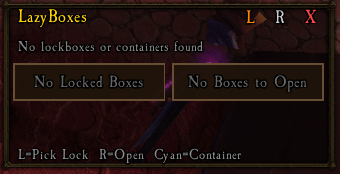
image (36).png
Description
LazyBoxes scans your inventory for every lockbox, clam, and openable container in Classic/TBC and presents them in a clean button grid. Left-click any lockbox to Pick Lock it (Rogues), or right-click any container to Open it. The addon auto-creates two character macros (`LBoxPick` and `LBoxOpen`) that you can drag to your action bar for one-click use outside the UI.
Features:
- Full Lockbox Database — All TBC junkboxes (Battered Junkbox through Strong Junkbox) and world lockboxes (Bronze through Khorium) with minimum lockpicking skill displayed
- Openable Containers — Clams (Small Barnacled through Darkwater Clam), scarab bags, fishing treasure bags, and more
- Left-Click = Pick Lock — Instantly applies Pick Lock via macro (Rogues only)
- Right-Click = Open** — Opens clams, bags, and other non-locked containers
- Auto-Macro Creation — Creates `LBoxPick` and `LBoxOpen` character macros automatically
- Movable & Scalable — Drag to reposition, lock in place, adjust scale from 0.5x to 2.0x
- Minimap Button — Quick toggle for the scan window
Slash Commands:** `/lb` or `/lazyboxes`
- `show / hide` — Toggle the frame
- `lock / unlock` — Lock frame position
- `refresh` or `scan` — Rescan bags
- `scale <0.5-2.0>` — Resize the UI
- `minimap` — Toggle minimap button
Lazy LockBoxes Team