LayerTracker
- By
LayerTracker reads the zoneUID field embedded in every NPC's GUID and numbers layers/shards by sorting the IDs it has seen
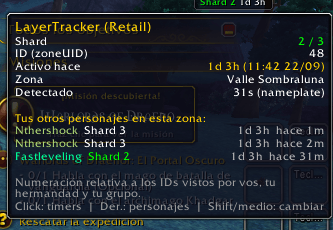
imagen_2026-09-23_175144391.png
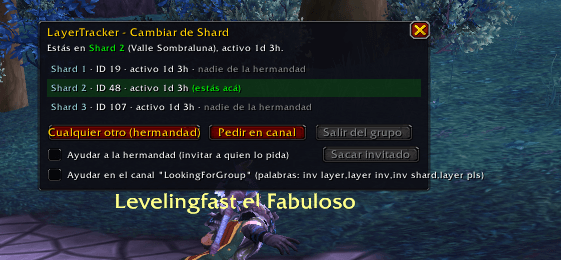
imagen_2026-09-23_175153082.png
Description
LayerTracker
Detects and displays the current Layer (Forever/Classic) or Shard (Retail) you're on— LayerTracker reads the zoneUID field embedded in every NPC's GUID and numbers layers/shards by sorting the IDs it has seen, shared live with your guild and group so everyone agrees on the numbering.
Features
- Minimap indicator: shows your current layer/shard number and how long it's been alive, with a tooltip breakdown.
- Layer age: decodes NPC spawn timestamps from their GUID to estimate how long the current layer has actually been running (based on the oldest NPC seen — city guards never die).
- Persistent timers: create named countdowns tied to a specific layer/shard that survive zone changes,
/reload, and logout. - Cross-character log: see where each of your characters last was — zone, layer, and how long that layer's been alive — without logging into them.
- Same-layer alerts: get warned if you're on a layer another of your characters has already visited, matched either by exact ID or by layer start time across zones.
- Layer Hop: request an invite (guild whisper, guild broadcast, or a chat channel) to jump onto a specific layer/shard, with an optional helper mode that auto-invites guildmates who ask for yours.
- Guild/group sync for all of the above via addon messages — no external server, no account data leaves the game.
Commands
Core — /lt
| Command | Effect |
|---|---|
/lt |
Print current layer/shard info and the full command list |
/lt list |
List all known layer/shard IDs for your current zone |
/lt show |
Toggle the minimap indicator |
/lt lock |
Lock/unlock the indicator's position |
/lt alert |
Toggle the chat alert on layer/shard change |
/lt sound |
Toggle the alert sound |
/lt sync |
Toggle sharing seen IDs with guild/group |
/lt nameplates |
Toggle detection via nameplates (in addition to target/mouseover) |
/lt age |
Toggle showing alive-time on the indicator |
/lt phase |
Toggle auto-reset on server/connection change |
/lt reset |
Reset the indicator's screen position |
/lt wipe |
Clear all known layer/shard IDs |
Timers — /lt timer
| Command | Effect |
|---|---|
/lt timer |
Open the Timers window |
/lt timer <duration> <name> |
Add a timer to your current layer (e.g. /lt timer 30 Rare Kazzak, /lt timer 1:30:00 Node) |
/lt timer list |
List active timers |
/lt timer del <n> |
Delete timer number n from the list |
/lt timer clear |
Delete all timers |
/lt timer sync |
Toggle sharing timers with guild/group |
/lt timer alerts |
Toggle timer expiry/warning alerts |
Characters — /lt chars
| Command | Effect |
|---|---|
/lt chars |
Open the Characters window |
/lt chars list |
List all logged characters and their last known layer |
/lt chars del <name> |
Remove a character from the log |
/lt chars history [name] |
Show the visit history for a character |
/lt chars alert |
Toggle same-layer alerts across your characters |
/lt chars time |
Toggle time-based matching across different zones |
/lt chars tol <seconds> |
Set the time-match tolerance (default 60s) |
Layer Hop — /lt hop
| Command | Effect |
|---|---|
/lt hop |
Open the Hop window |
/lt hop any |
Ask your guild for an invite to any layer other than your current one |
/lt hop leave |
Leave your current group |
/lt hop kick |
Remove the last player you invited as a helper |
/lt hop helper |
Toggle auto-inviting guildmates who request your layer |
/lt hop public |
Toggle auto-inviting from a public chat channel |
/lt hop channel <name> |
Set the channel used for public requests/help |
/lt hop text <message> |
Set the message sent when requesting in channel |
/lt hop keywords <a,b,c> |
Set the keywords the helper listens for in channel |
Shortcuts on the minimap indicator: left-click = Timers, right-click = Characters, Shift-click or middle-click = Layer Hop.
Compatibility
World of Warcraft Retail, WoW: Forever, and Classic. Layer/shard changes always require your own click to accept an invite or send a channel message — this addon never bypasses those game restrictions.
The LayerTracker Team