LayerETA - Layer Swap, Layer Finder & Shard Changer
- By
Shows which layer you are on and swaps layer with one click. You never host.
Description
LayerETA
LayerETA shows which layer you are on, and swaps layer with one click. You never host.
Part of the ETA family with LevelETA and GoldETA. Same look, and each one works on its own.
What it does
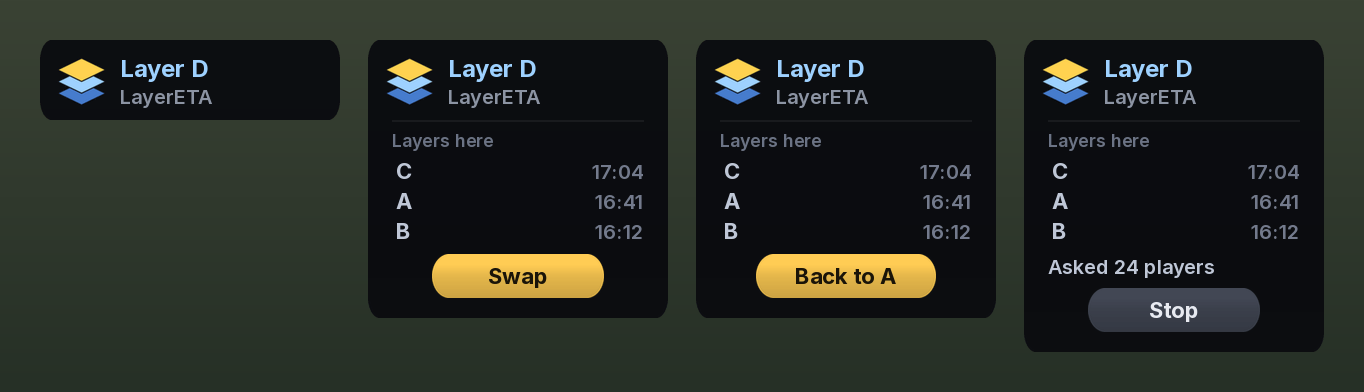
- Your layer at a glance: a small box that says Layer A, Layer B and so on
- One button: click the box to fold it out, then click Swap
- No hosting: you only ask for a swap, you never invite others
- Nothing in your chat: the request goes straight to the players around you, not into the layer channel
- Never the same layer twice: it asks for any layer you have not been on, unless you pick one yourself
- Cleans up after itself: accepts the invite, waits for the move, and leaves the group again
The list of layers
Every time you leave a layer it is added to a list in the window, with the time you left it. Click one to go back to that layer. The list is per zone and starts over every day.
How to use it
- Target or mouse over any NPC, so LayerETA can read your layer
- Click the box to fold it out
- Click Swap, and wait for a host to invite you
LayerETA accepts the invite, waits for the move, and leaves the group 4 seconds later. Click the box again to fold it back, and drag it to move it.
How it works
The game does not tell addons which layer you are on. LayerETA reads it from the id of the NPCs around you, the same way other layer addons do. Each layer in a zone gets a letter, so you see Layer B instead of a long number.
When you click Swap it looks up the players in your zone and sends your request to them directly, in the same format LayerSwap uses, so players hosting with LayerSwap, Bulo or Simple Layer can invite you. You do not need any of them installed. The request names the layers you have already been on, so a host standing on one of them leaves you alone.
Commands
/letashow or hide the box/leta swapsame as the Swap button/leta locklock or unlock the position/leta leave <seconds>how long to stay in the group after the move/leta debugwhat the addon can see right now/leta daor/leta enDanish or English
LayerETA - Layer Swap, Layer Finder & Shard Changer Team