VVTT's Layer Hop
- By
One Hop button that asks through AutoLayer and LayerSwap at once, so the first helper to answer moves you. Shows your layer too.
Description
The fastest way to change layer on World of Warcraft: Forever. One Hop button that asks through both of the top layer addons at the same time, so whichever helper answers first moves you.
AutoLayer and LayerSwap each have their own helpers, and each reaches them a different way. Use one and you only reach half of them. Layer Hop presses both for you in a single click, shows which layer you are on in one small window, and keeps your chat and minimap tidy while it does it.
It sits on top of AutoLayer by raizo and LayerSwap by Adam5288. Both must be installed and switched on. They do the real work: the layer requests and the invites. Layer Hop contains none of their code, so every update of theirs keeps working with it.
What you get
- One button, both addons. Press Hop and AutoLayer and LayerSwap both ask for another layer at once. More helpers hear you, so an invite comes sooner. The same request is never posted twice in the same place, and a line in chat tells you who was asked.
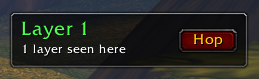
- Your layer, always in view. A small window shows "Layer 1", "Layer 2" and so on for the zone you are in. It reads this from the NPCs you target, mouse over or see nameplates of, so it works on Forever without any other addon.
- It tells you where you are up to. The window shows asking, invited and hopped. Once you have moved, the same button turns into Leave.
- One window, not three. While Layer Hop is on, LayerSwap's own minimap button and on-screen line are hidden (a tick box brings them back, and LayerSwap's own commands still work).
- Your own invites stay visible. AutoLayer's "Hide Group Notices" hides every invite, decline, join and leave line while it is on, including the ones for a friend you invite by hand. With Layer Hop, only the lines AutoLayer caused are hidden: the players it invited for a layer, and the comings and goings of your own hop.
- No more "already in a group" flood. After a request, every AutoLayer user who sees it invites you. Once you have joined one group, the rest bounce with "X invited you to a group, but you are already in a group". Those are hidden for a few minutes after each request.
- General stays on /1. AutoLayer's hidden channels sometimes take the low numbers at login, pushing General and Trade down the list. Layer Hop puts the game's channels back on top without leaving or rejoining anything.
How to use it
- Type
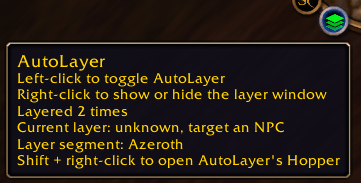
/lh, or right-click AutoLayer's minimap button, to show or hide the layer window. Drag the window anywhere. The X in its corner hides it too. - Hop asks for another layer. With AutoLayer it leaves your current group first, the same as AutoLayer's own request button.
- Now and then an invite comes from a player on your own layer and does not move you. Press Leave and hop again.
- Shift + right-click AutoLayer's minimap button opens AutoLayer's own Hopper window, which used to be on right-click.
- Left-click on AutoLayer's minimap button still turns its auto-invite on and off.
The window starts hidden the first time.
Settings
Type /lh settings.
- Show, lock and resize the window. Lock it so it cannot be dragged by accident, make it bigger or smaller, or put it back where it started.
- A sound when a hop lands, so you can look away while you wait. On by default.
- Quieter group notices on or off, without opening AutoLayer's settings.
- Hide LayerSwap's own minimap button and on-screen line. Ticked to start with.
Bar addons
If you use Titan Panel, ElvUI data bars or a similar bar addon, pick "Layer Hop" from its list to see your layer there. Left-click it to hop or leave, right-click to show or hide the window.
Chat commands
/lhshows or hides the layer window./lh hopasks for another layer./lh leaveleaves the group you are in. Handy in a macro next to/lh hop./lh settingsopens the settings page./autolayeropens AutoLayer's settings and/lsopens LayerSwap's panel, as before.
Good to know
- Layer numbers are your own. "Layer 1" is simply the first layer your computer saw in that zone. Another player may call the same layer something else.
- Target an NPC to find your layer. The window shows "Layer ?" until it has seen one, and waits for a second NPC to agree before it believes you have changed layer.
- The quieter group notices follow AutoLayer's own setting. Untick "Hide Group Notices" in
/autolayer, or the matching box on Layer Hop's settings page, and every group line shows again. - Nothing is sent or invited by Layer Hop itself. One click on Hop makes one request through AutoLayer and LayerSwap. All inviting is done by them, under their own settings.
- If a future AutoLayer or LayerSwap update changes something Layer Hop relies on, the part affected says so in chat and switches itself off, and the rest keeps working.
VVTT's Layer Hop Team