Last Call
- By
A last check before you leave town. Learns what you use and tells you what to buy.
leavingtownorflightmaster.png
vendorpanel.png

allready.png
buffsthataredown.png
beforedungeonrun.png
Description
Last Call
You know the feeling. You are halfway to the dungeon and you are out of water, your gear is red and your bags are full. Last Call checks all of that for you on your way out of town, while you can still do something about it.
There is nothing to set up. Just play. Last Call watches what you use and learns from it.
HOW IT WORKS
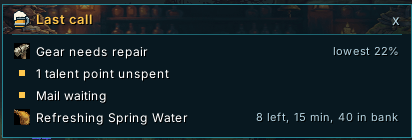
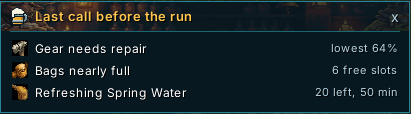
When you leave a town or inn, open a flight master or join a group, a small card pops up with anything that needs your attention. If everything is fine it just says you're ready.
It checks for:
Gear that needs repair
Bags that are nearly full
Unspent talent points
Mail waiting
Supplies running low
Buffs you usually keep up
Supplies are things like food, water, reagents and ammo. Last Call counts what you have, works out how fast you go through it, and warns you when you have less than 30 minutes left. You can change that number.
AT A VENDOR
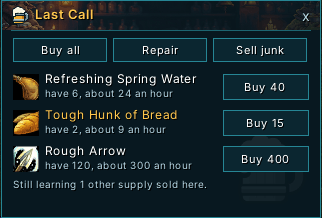
Open a vendor and Last Call shows what to buy and how many, enough to last about two hours at the rate you use it. It picks the best version you can use at your level. One click on Buy and it is done. It can also repair your gear and sell your grey junk from the same panel.
BUFFS
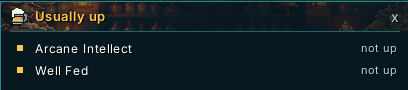
If you keep a buff up most of the time, Last Call notices and reminds you when it drops, in town or out in the field. Your own spells are learned quickly. Scrolls, elixirs and food take a few more uses, so one random scroll does not turn into a reminder.
ADDING AND REMOVING THINGS
Click the mug on your minimap to open the window. Your supplies are listed on the left.
To add an item, drag it from your bags onto the box that says "Drop an item here to watch it".
To pause an item, click the on button next to it. It stays in the list but you get no warnings for it.
To remove an item, click the x next to it.
To stop a buff reminder for good, right click that line on the card.
To stop a supply warning for good, right click that line on the card.
To quiet a line just for today, left click it.
If you remove something by mistake, drop the item back on the box and it returns.
OPTIONS
Every check has its own switch in the window, so you can turn off anything you do not care about. You can also turn off the vendor suggestions, the ready card, the chat message and the minimap button.
Right click the mug to check yourself any time.
GOOD TO KNOW
Everything is saved per character.
It needs a little play time to learn your habits. The first hour or so will be quiet.
It works on its own. No other addons needed.
Made for WoW: Forever.
Found a bug or have an idea? Leave a comment and I will take a look.
Last Call Team