
KickBaton
- By
Screenshot 2026-08-17 165304.png
Screenshot 2026-08-17 165726.png
Screenshot 2026-08-17 165411.png
Screenshot 2026-08-17 165434.png
Description
KickBaton
Interrupt rotation assignments by raid marker.
Your group already decides who kicks what. KickBaton keeps that decision on screen instead of in voice comms: assign players to raid markers, share the assignment with the whole group, and everyone gets a compact board showing whose interrupt is next.
Read this first: what KickBaton cannot do
Midnight closed most combat state off to addons. GetRaidTargetIndex is
restricted for enemy units, creature names and cast spell IDs are secret values
inside instances, and the combat log is gone.
KickBaton never sees the skull, and never knows it is casting. It will not tell you to press your interrupt.
You watch the nameplate, exactly as you always have. KickBaton tracks whose turn it is — the part that used to live in voice comms and got forgotten mid-pull.
If you are looking for an addon that calls interrupts for you, that no longer exists in Midnight, from anyone.
Squads
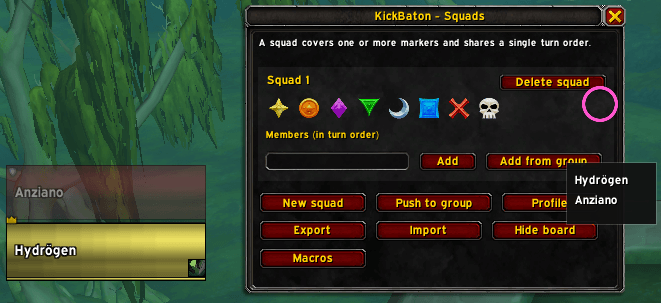
A squad is a set of markers, an ordered list of players, and one shared turn.
Squad 1 — [Skull] [Star] — Luca » Marco
Squad 2 — [Cross]        — Anna » Giulio
When Luca kicks, the turn passes to Marco across both of that squad's markers.
Two rules, enforced by the editor:
- a player belongs to at most one squad
- a marker belongs to at most one squad
The first is what makes the whole thing work. KickBaton cannot see which mob you kicked, so it identifies your squad from who you are. If you sat in two squads, an incoming kick could not be attributed to either.
The classic "two people on one marker" is simply a squad with a single marker.
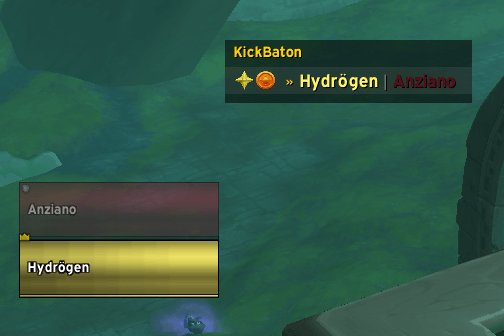
The board
- the squad's markers on the left
»and a full class colour — up now- a dimmed name — ready, but not their turn
- a grey name with a number — on cooldown, seconds remaining
- a highlighted row — your squad
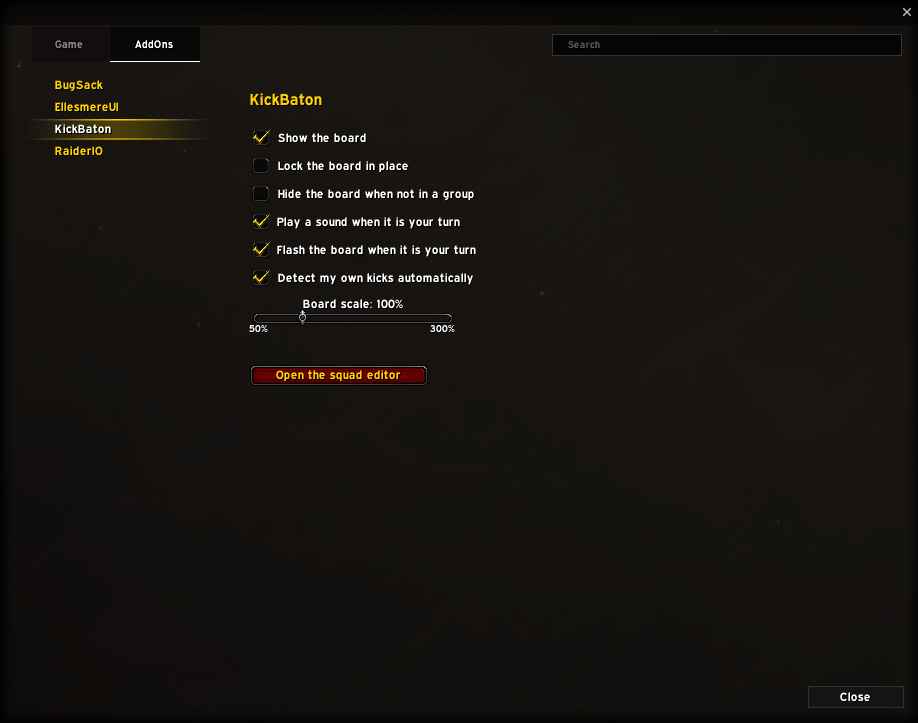
Movable, scalable and lockable. It hides itself when no squads are configured.
Sharing assignments
Push — one click sends the squads to everyone in the group, and it happens automatically when the roster changes or someone joins mid-session. This is what you use between pulls.
Export / import strings — share the assignments on Discord before anyone logs in. The profile name travels with the string, so it is recreated on the other side.
Multiple profiles, switchable at any time, account-wide across your alts.
Macros
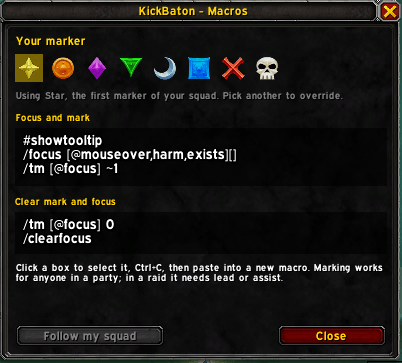
KickBaton generates the focus and marking macros for your chosen marker, ready to copy.
If your old marking macro stopped working, this is why: SetRaidTarget became
Protected in 12.0 (secure code only, so not from /run) and
GetRaidTargetIndex is restricted on enemy units, so the familiar
/run if not GetRaidTargetIndex('focus') then SetRaidTarget('focus',1) end
now fails at both the read and the write.
The replacement is native and better: /tm accepts secure command options, and
a ~ prefix applies your marker unless someone else already marked the unit —
exactly the condition that line was hand-rolling.
Requirements
Everyone in the group needs KickBaton installed. Both the assignment sync and the kick detection only work between clients that have it.
Commands
Short alias: /kbt
/kickbaton— open the squad editor/kickbaton status— report what the addon can and cannot do here/kickbaton macro— focus and marking macros/kickbaton push— send squads to the group/kickbaton export/import— share squads as a string/kickbaton profile <name>— switch profile/kickbaton next— advance your squad's turn manually/kickbaton scale <0.5-3.0>— resize the board/kickbaton show/hide/lock/unlock/reset
Three keybindings under Options → Keybindings → KickBaton. Settings under Options → AddOns → KickBaton. English and Italian.
How the detection works
Each client watches only its own casts and tells the group over addon messages. Nobody reads anyone else's cooldowns — they declare their own, which is both permitted and more accurate.
If a future patch closes that off, KickBaton detects the failure at load and disables the layer by itself, falling back to a keybinding. The board, the sync and the assignments do not depend on it and keep working.
Source, issues and full documentation: https://github.com/Hydr0gen19/KickBaton
Licensed under GPL-3.0-or-later.
KickBaton Team
