


KickBars
- By
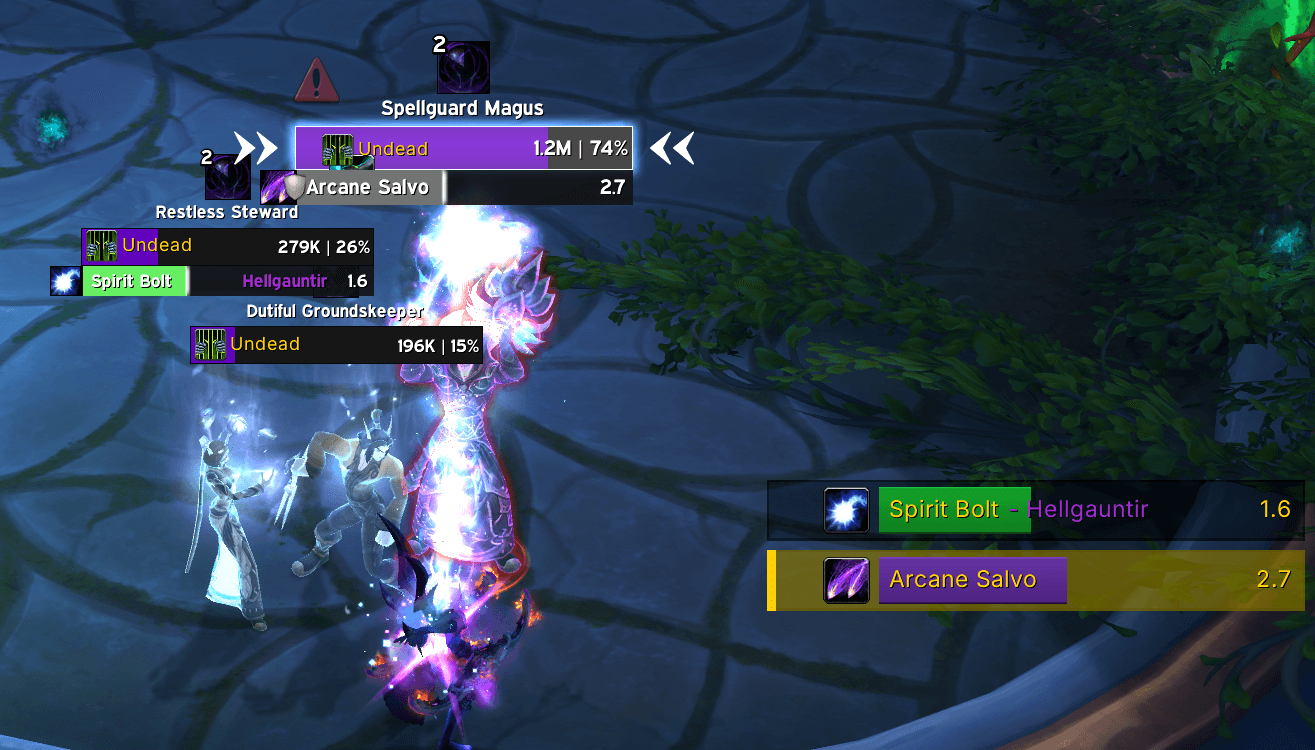
Combat example with priority spell, a kickable cast and nameplate alerts.
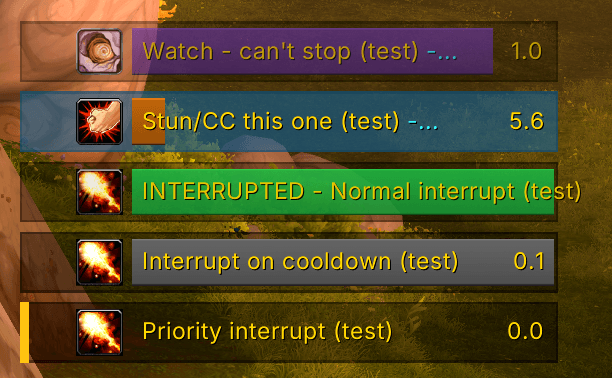
Blue tinted background (a focus target's cast) can be changed to border-coloration. Spells fall into different categories and the addon labels them as such.
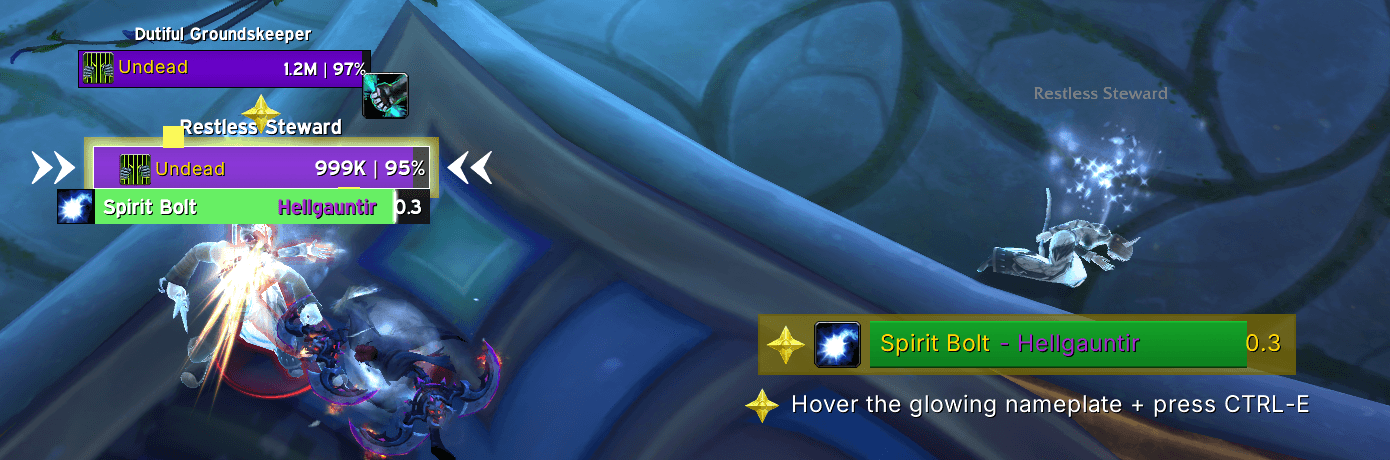
KickBars will prompt you to mark a casting mob if you don't have a marker out.
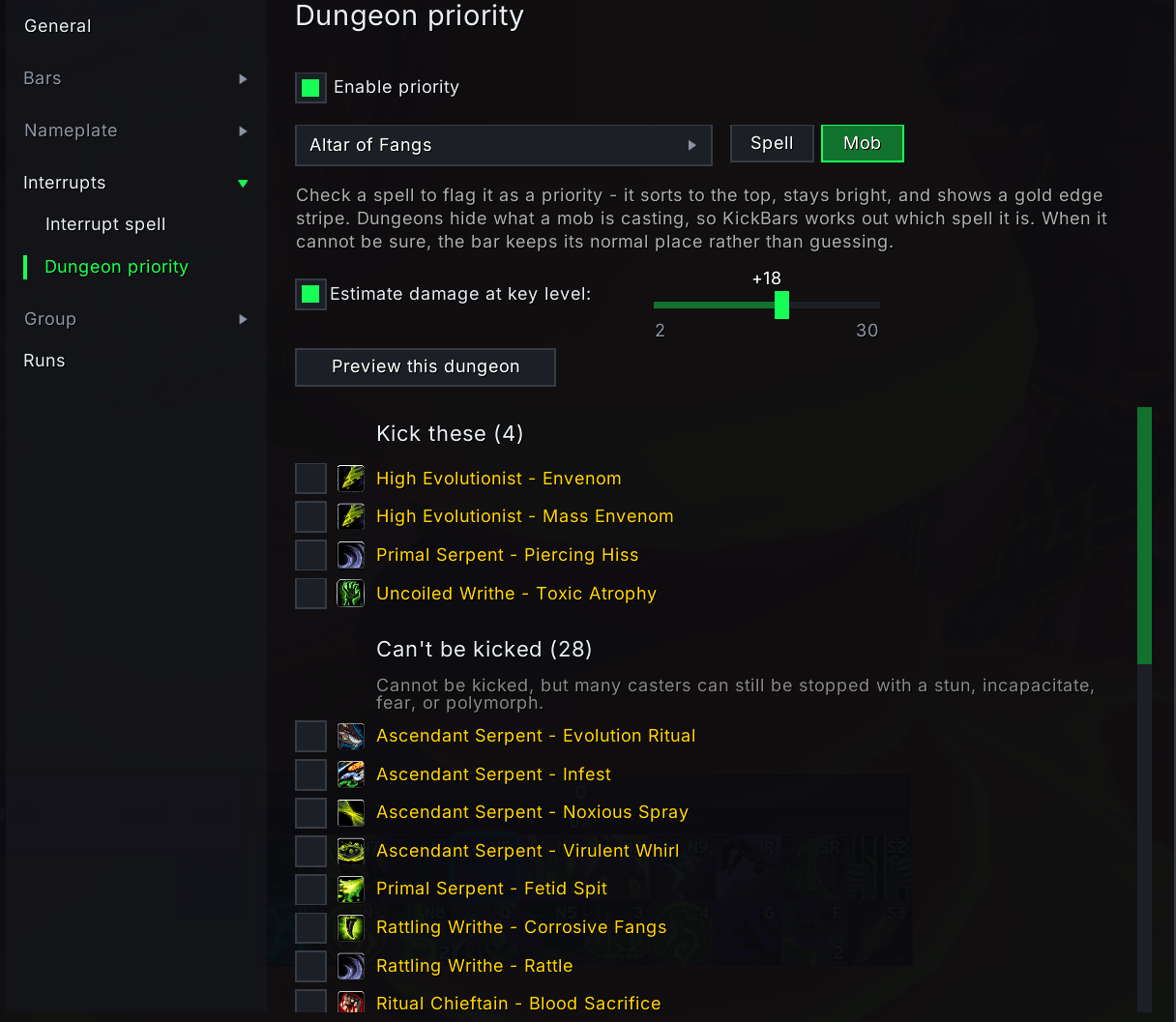
Every dungeon's spell list, split into what you can kick and what you cannot. Check spells you wanted sorted with priority on the cast bars.
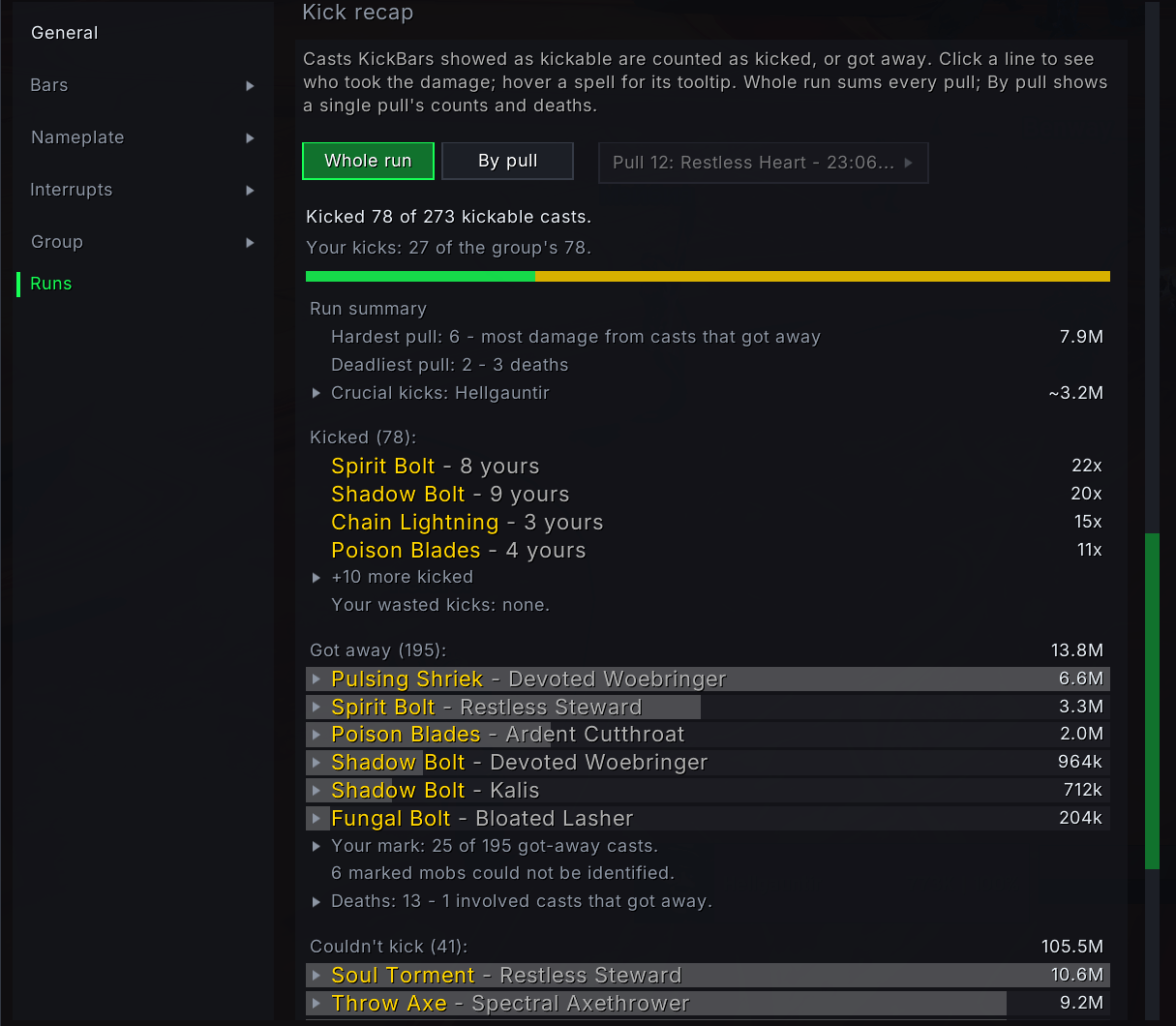
After each run: which priority casts the group kicked, which got through, and what they hit for - readable pull by pull.
Description
KickBars
Know what to do about every enemy cast, the instant it starts.
KickBars watches every spell being cast on your nameplates and tells you, at a glance, what action each one needs: kick it, stun the caster, or watch it land. No squinting at cast bars, no memorizing dungeon spell lists. One clean, color-coded list, a glow pointing at the mob that matters right now, and interrupt markers that stay in sync across your group.
Built for Mythic+ and group PvE.
Kick it, stun it, watch it
Every cast gets a bar, colored by the only thing you care about mid-pull: what you can do about it.
- Green - your interrupt is ready and the caster is in range. Kick it.
- Grey - interruptible, but your kick is down or the caster is out of reach. A white line marks the moment it comes back, so you know whether you will make it.
- Orange - cannot be interrupted, but the caster can be stunned, silenced, or disoriented. Stop it with crowd control instead.
- Purple - nothing stops it. The name on the bar is who it is aimed at, so a healer can pre-heal or the target can pop a defensive.
The list sorts your priority casts first, then by what needs action soonest, so the top of the list is always the next thing to do.
KickBars finds your interrupt on its own, whatever class and spec you play - including a warlock pet's Spell Lock or Axe Toss. Set a different spell by hand if you would rather, and it is remembered per character and spec, so a stand-in on one spec never follows you to another that has a real interrupt.
On the nameplates
The enemy cast list tells you what is happening. The nameplates tell you where.
- Cast glow. An outline marks the exact nameplate to act on, following your priority order. Hover it, press your keybind, done. Six animation styles and full color control.
- Kick icon. Your interrupt's own icon sits above any mob casting something you can kick, and greys out with a countdown while the spell is down.
- Incoming cast. A mark can appear above a nameplate a few seconds before that mob casts again, so you can be in position instead of reacting to a cast bar.
- Crowd control info. Out in the world KickBars checks a mob's creature type and shows your matching CC spell on its nameplate. Inside dungeons the game hides creature types from addons, so it writes the type under the nameplate and you match it against your own coverage.
Every one of these works on default Blizzard nameplates and on ElvUI, Plater, and other nameplate addons.
Know the dungeon before you get there
- The full season spell list, per dungeon, split into what you kick and what you stun. Read it by spell to match a route note, or by mob to plan a pull.
- Flag anything a priority to pin it to the top of the list, mark it with a stripe, and drive the pull marker.
- Priority works inside dungeons, where the game hides both the spell and who is casting it from addons. Your checked spells still get flagged.
- Damage estimates on spell tooltips, so you know which casts actually threaten the group at your key level.
Coordinate the group
- Interrupt marker claims sync silently between everyone running KickBars, so two people never claim the same icon. No addon chatter in your chat frame.
- Mark prompts. KickBars picks a kickable caster mid-pull and prompts you to place your marker: an optional sound, a hint at the cast list, and your marker icon previewed above the mob.
- Your teammate's mark survives your keypress by default. A hold-to-overwrite key forces the replacement when you mean it.
- Announce your kick target when a pull countdown starts, or post the group's markers as one line. Both texts are yours to edit.
Hear it as well as see it
An opt-in voice can call out the casts that matter - spoken lines in two voices, chimes, or a war horn, and any alert sound your other addons share. The marked-mob alert stays quiet while your interrupt is down and speaks the moment it is back, and says something different when the caster is out of range.
See how the run went
After each run, the Runs page shows which priority casts your group kicked and which ones got through, broken down pull by pull. An optional performance graph tracks how the addon behaved across the run.
Using it day to day
- One settings window, grouped by what you are configuring, with a live preview on every page that changes something visible.
- Colorblind support in its own section: a one-click palette that recolors kickable casts sky blue, plus optional category shapes so color is never the only signal.
- Fill textures and fonts drawn from the shared media your other addons provide, plus background and border opacity, and an out-of-combat fade.
- Share your whole setup as a text string - export yours to post it, or paste someone else's to import it.
- A minimap button, a What's new window, and settings that follow the character and spec where that is what you would expect.
- Lightweight. Event-driven and easy on CPU and memory, so it stays out of your framerate's way.
- A short walkthrough after an update opens the settings on each page that changed and says what changed there, so a new feature is not something you have to go looking for. Replay it whenever you like.
Getting started
Set the keybinds under Options > Keybindings > AddOns > KickBars - one to interrupt your mouseover, one to place your raid marker, and an optional one to set your focus. Open the settings any time with /kickbars or /kbars. That is all it needs.
Handy commands
| Command | Effect |
|---|---|
/kickbars |
Open the settings |
/kickbars unlock / lock |
Move the cast list, then lock it |
/kickbars test |
Preview every bar state |
/kickbars spell |
Show the interrupt it detected for you |
/kickbars priority |
Turn dungeon priority on or off |
/kickbars marker <1-8> |
Set your personal raid-marker icon |
/kickbars assignments |
Open the group's marker claims |
/kickbars runs |
Open the run report |
/kickbars whatsnew |
Show the version history |
Requirements
Current retail World of Warcraft. Dungeon data covers the live Mythic+ season and updates with the addon.
DamageCalculator is optional. When it is installed, KickBars reads its per-key damage figures for exact tooltip estimates; without it, KickBars uses its own.
Bug reports and feature requests
No account needed - pick "Report a bug" or "Request a feature", fill in the form, and leave an email address.
Confirm that address when the first email arrives. After that you are emailed whenever there is a reply, with a link to read it - and you can answer either from that page or by replying to the email.
The form asks which part of KickBars it is about and has a box for the details the addon can tell you about itself. If it is about a specific cast, the dungeon and mob name help most.
Credits
Dungeon, mob, and spell data is derived from MythicDungeonTools by Nnoggie.
KickBars Team
