KeystoneHistory
- By
Automatically records your Mythic+ runs with full group stats, keeps a searchable player index with ratings and notes, and lets you customize the entire interface.
Screenshot 2026-07-29 174030.png
Screenshot 2026-07-29 174115.png
Screenshot 2026-07-29 174036.png
Screenshot 2026-07-29 174125.png
Screenshot 2026-07-29 174044.png
Description
KeystoneHistory
Your complete Mythic+ history — recorded automatically, laid out clearly, and fully customizable.
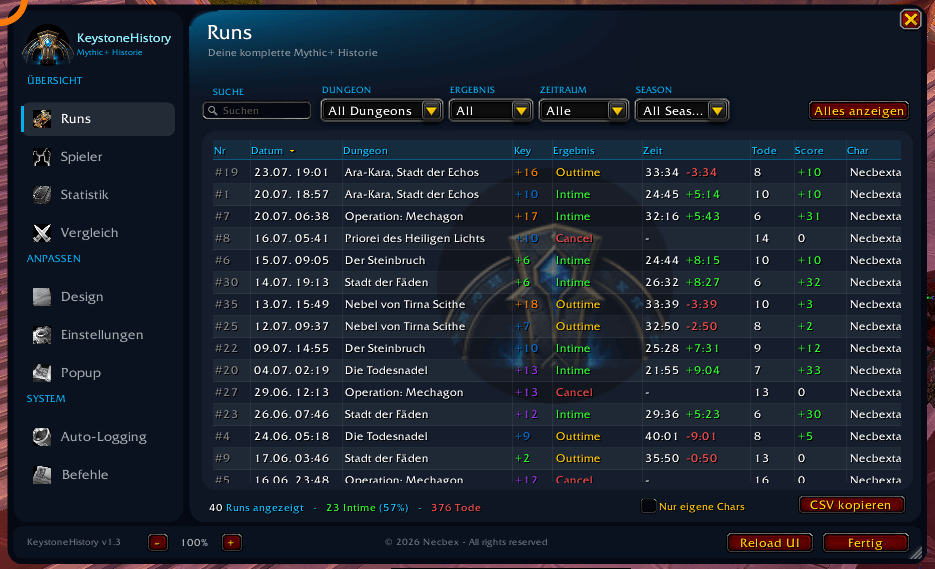
KeystoneHistory logs every key you run: time, deaths, damage, healing, interrupts, loot and the whole group. When the run ends you get a summary, and the history tells you later who you played with and how it went.
Features
Automatic recording
Keys and normal dungeons are logged without any input from you — including boss kills, a death log and loot. A reload or disconnect mid-run is no problem: recording continues afterwards.
Completion popup
Right after the key: result, time, time remaining, score and the full group with damage, DPS, healing, HPS, interrupts, dispels, avoidable damage and deaths.
- Sortable columns — click a header to sort
- Loot as item icons with tooltips, shift-click to link in chat
- Star rating directly in the row
- Top right shows how often you ran this dungeon before and when you last completed it
Player index
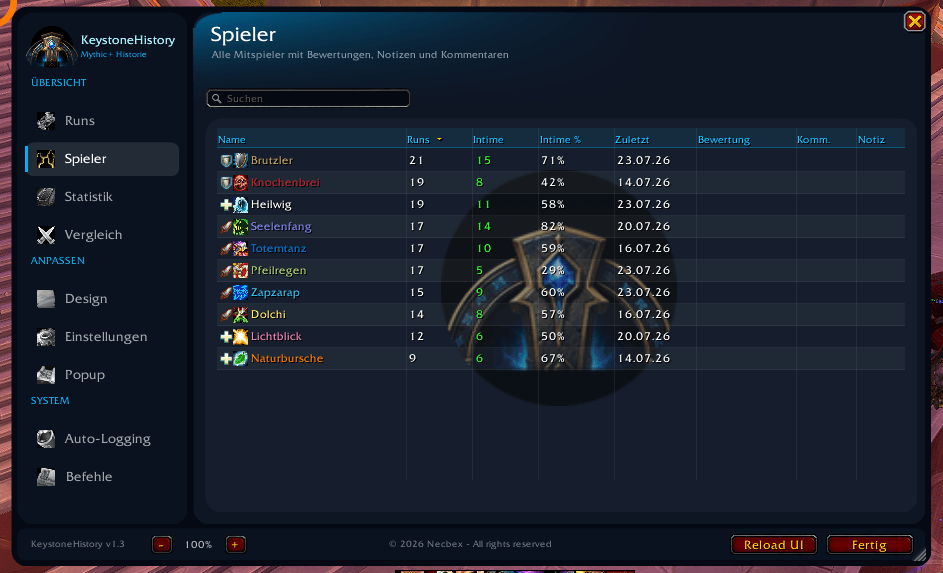
Every player you meet lands in an index: how many keys you ran together, how many were in time, which roles and specializations they played. Add ratings, short notes and comments — next time you will remember.
Group finder
When someone applies who you have played with before, the KeystoneHistory icon appears next to their name, with your shared record in the tooltip.
Statistics and comparison
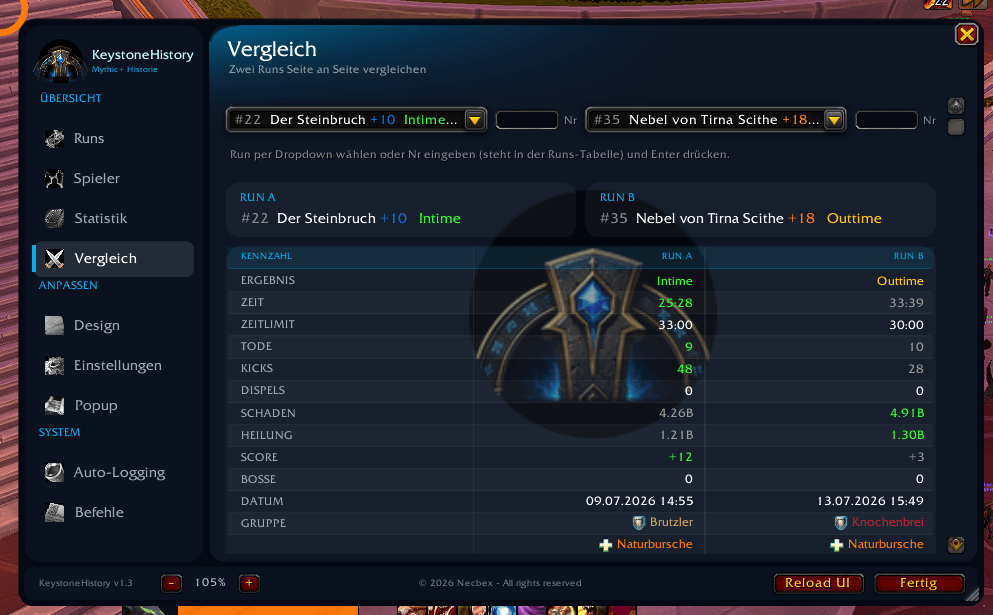
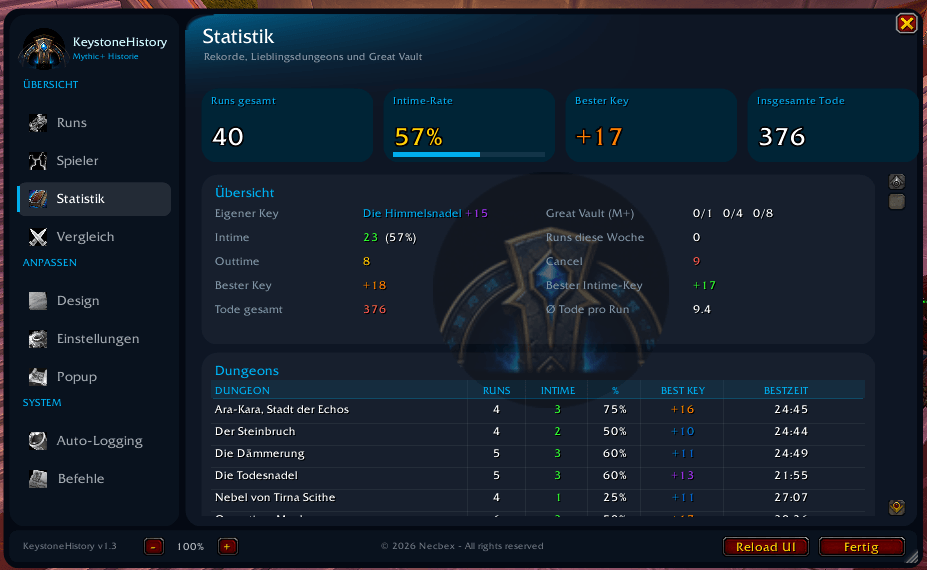
Records per dungeon, attempts per keystone level, most frequent teammates, class distribution. Click any dungeon to jump straight to its runs. Two runs can be compared side by side, with a verdict table showing which run was better in each metric.
Fully customizable
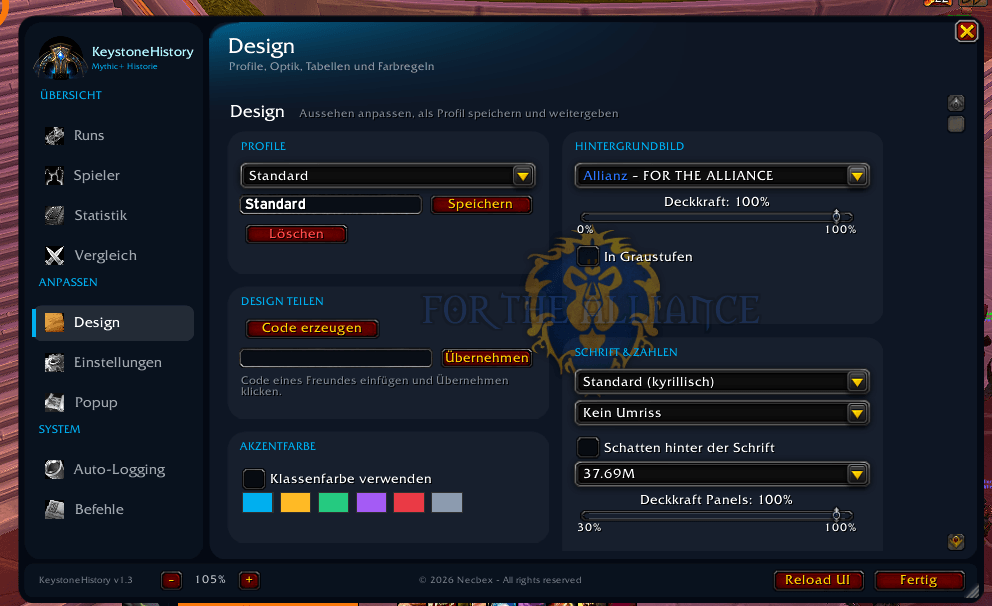
A dedicated Design tab:
- Save profiles, switch between them, share them as a text code with friends
- Accent color from six palettes or automatically from your class
- Font face, outline, shadow
- Number format:
37.69M,37.7 Mio.or37,690,000 - Row height, stripes, grid lines, column selection for the popup
- Class and specialization backgrounds with adjustable opacity
- Collapsible sidebar, hideable tabs
Commands
| Command | Effect |
|---|---|
/ksh |
Open the window |
/ksh options |
Settings |
/ksh testpopup |
Preview the popup |
/ksh testdata 20 |
Generate sample runs |
/ksh cleartest |
Remove sample runs |
/ksh undo |
Undo the last deletion |
/ksh vergleich 12 15 |
Compare two runs |
There is also a minimap button and Blizzard's addon compartment: left click opens the window, right click opens the settings.
Requirements
No libraries, no dependencies. Combat values come from Blizzard's damage meter API and are cross-checked with Details! when it is installed.
Supports patch 12.1 and 12.0.7.
© 2026 Necbex — All rights reserved
KeystoneHistory
Deine komplette Mythic+ Historie — automatisch aufgezeichnet, übersichtlich aufbereitet und vollständig anpassbar.
KeystoneHistory schreibt jeden Key mit: Zeit, Tode, Schaden, Heilung, Kicks, Beute und die komplette Gruppe. Nach dem Run erscheint eine Zusammenfassung, und in der Historie findest du jederzeit wieder, mit wem du gespielt hast und wie es gelaufen ist.
Funktionen
Automatische Aufzeichnung
Keys und normale Dungeons werden ohne Zutun mitgeschrieben — inklusive Bosskills, Todes-Protokoll und Beute. Ein Reload oder Disconnect mitten im Run ist kein Problem, die Aufzeichnung läuft danach weiter.
Abschluss-Popup
Direkt nach dem Key: Ergebnis, Zeit, Restzeit, Score und die ganze Gruppe mit Schaden, DPS, Heilung, HPS, Kicks, Dispels, vermeidbarem Schaden und Toden.
- Sortierbare Spalten — ein Klick auf die Überschrift genügt
- Beute als Item-Icons mit Tooltip, Shift-Klick verlinkt sie im Chat
- Bewertung per Sternchen direkt in der Zeile
- Oben rechts: wie oft du diesen Dungeon schon versucht und wann du ihn zuletzt geschafft hast
Spieler-Index
Jeder Mitspieler landet in einer Übersicht: wie viele Keys ihr zusammen wart, wie viele davon Intime, welche Rollen und Spezialisierungen er gespielt hat. Dazu Bewertungen, Kurznotizen und Kommentare — beim nächsten Mal weißt du wieder Bescheid.
Gruppenbrowser
Bewirbt sich jemand, mit dem du schon gespielt hast, erscheint das KeystoneHistory-Symbol neben seinem Namen, mit eurer gemeinsamen Bilanz im Tooltip.
Statistik und Vergleich
Rekorde pro Dungeon, Versuche je Keystone-Stufe, häufigste Mitspieler, Klassenverteilung. Ein Klick auf einen Dungeon führt direkt zu dessen Runs. Zwei Runs lassen sich Seite an Seite vergleichen — mit einer Fazit-Tabelle, welcher Run in welcher Kennzahl besser war.
Vollständig anpassbar
Ein eigener Design-Reiter:
- Profile speichern, umschalten und als Textcode an Freunde weitergeben
- Akzentfarbe aus sechs Paletten oder automatisch aus deiner Klasse
- Schriftart, Umriss, Schatten
- Zahlenformat:
37.69M,37,7 Mio.oder37.690.000 - Zeilenhöhe, Streifen, Gitterlinien, Spaltenauswahl fürs Popup
- Klassen- und Spezialisierungs-Hintergründe mit einstellbarer Deckkraft
- Einklappbare Seitenleiste, ausblendbare Reiter
Befehle
| Befehl | Wirkung |
|---|---|
/ksh |
Fenster öffnen |
/ksh options |
Einstellungen |
/ksh testpopup |
Popup ansehen |
/ksh testdata 20 |
Beispieldaten erzeugen |
/ksh cleartest |
Beispieldaten löschen |
/ksh undo |
Löschen rückgängig machen |
/ksh vergleich 12 15 |
Zwei Runs vergleichen |
Dazu der Minimap-Knopf und Blizzards Addon-Fach: Linksklick öffnet das Fenster, Rechtsklick führt zu den Einstellungen.
Voraussetzungen
Keine Bibliotheken, keine Abhängigkeiten. Kampfwerte kommen aus Blizzards Damage-Meter-API und werden — falls installiert — mit Details! abgeglichen.
Unterstützt Patch 12.1 und 12.0.7.
© 2026 Necbex — Alle Rechte vorbehalten
KeystoneHistory Team