KeyPusher
optimized Mythic+ group listing manager: compact applicant HUD, smart filters, quick keybind invites, one-click bump.
kp.png
Description
KeyPusher is a compact, applicant manager for Mythic+
leaders. It replaces the Blizzard group finder's applicant list with a
dense HUD that shows everything you need at a glance, and lets you invite
or decline with a single keypress.
How it works
Create your M+ listing in the Blizzard Group Finder like you normally
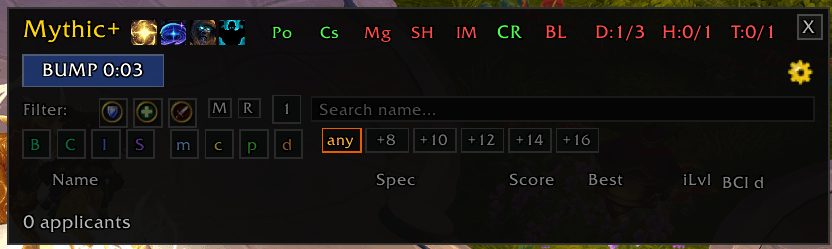
would. KeyPusher's HUD appears on screen and takes over applicant
handling - spec, class, M+ score, this-dungeon best, iLvl, and utility
badges all in one row per applicant.
Key Features
Applicant HUD - Compact rows with spec icon, class-colored name, M+ score
(colored by Blizzard's rarity tiers), this-dungeon best, iLvl, and
utility letters (L/B/I/S/Mg/Cs/Po/Ds). Group applications show all their
members nested below the primary. Russian and CJK player names render
correctly.
Auto-Invite - Instantly invite solo applicants (tanks, healers, or DPS)
who meet your minimum M+ score and item level. Optional whisper message
on invite.
Hide filled roles - Applicants whose role is already filled in your group
(e.g. tank applicants once you have a tank) are hidden by default. Toggle
off if you want to see everyone.
Hide dungeon leavers - Applicants flagged by Blizzard as leavers are
hidden by default. Toggle off to see them with a red warning icon.
Smart filters - Role, melee/ranged DPS, armor type, required utility
(Lust/Brez/Immunity/Shroud), required dispel types (Magic/Curse/Poison/
Disease), minimum this-dungeon best key level, solo-only, and a name
search box.
Group composition badges - Header shows T/H/D counts plus colored
booleans for Lust, Brez, Immunity, Shroud and dispel coverage (Magic,
Curse, Poison) so you can see gaps at a glance.
One-click bump - Re-submit your listing to the top of search results
with a keybind or a HUD button.
Auto-delist when full - Automatically remove your listing when the group
hits 5/5 so late joiners can't sneak in.
Blacklist - Right-click "Decline + Blacklist" to permanently hide a
player. Full BlacklistWarden integration: players blacklisted in either
addon are hidden in the KeyPusher applicant list, and the Blacklist tab
of the dashboard shows entries from both sources with a badge indicating
where each comes from.
Dashboard - /kp ui opens a dark-themed settings panel with per-character
profiles (AceDB), session stats (invited/declined), and category pages
for every option.
Commands
/kp - toggle the applicant HUD
/kp ui - open the settings dashboard
/kp bump - bump your listing now
/kp reset - reset HUD position
/kp debug - print current state
Keybinds (configurable in Blizzard → Key Bindings → KeyPusher)
Toggle HUD
Bump Listing
Feedback and bug reports welcome on the CurseForge page.
The KeyPusher Team