


Keine Ahnung Simon Says
- By
Memory aid for the Simon-Says mechanic on the Delve boss Azta'rec (WoW 12.1)
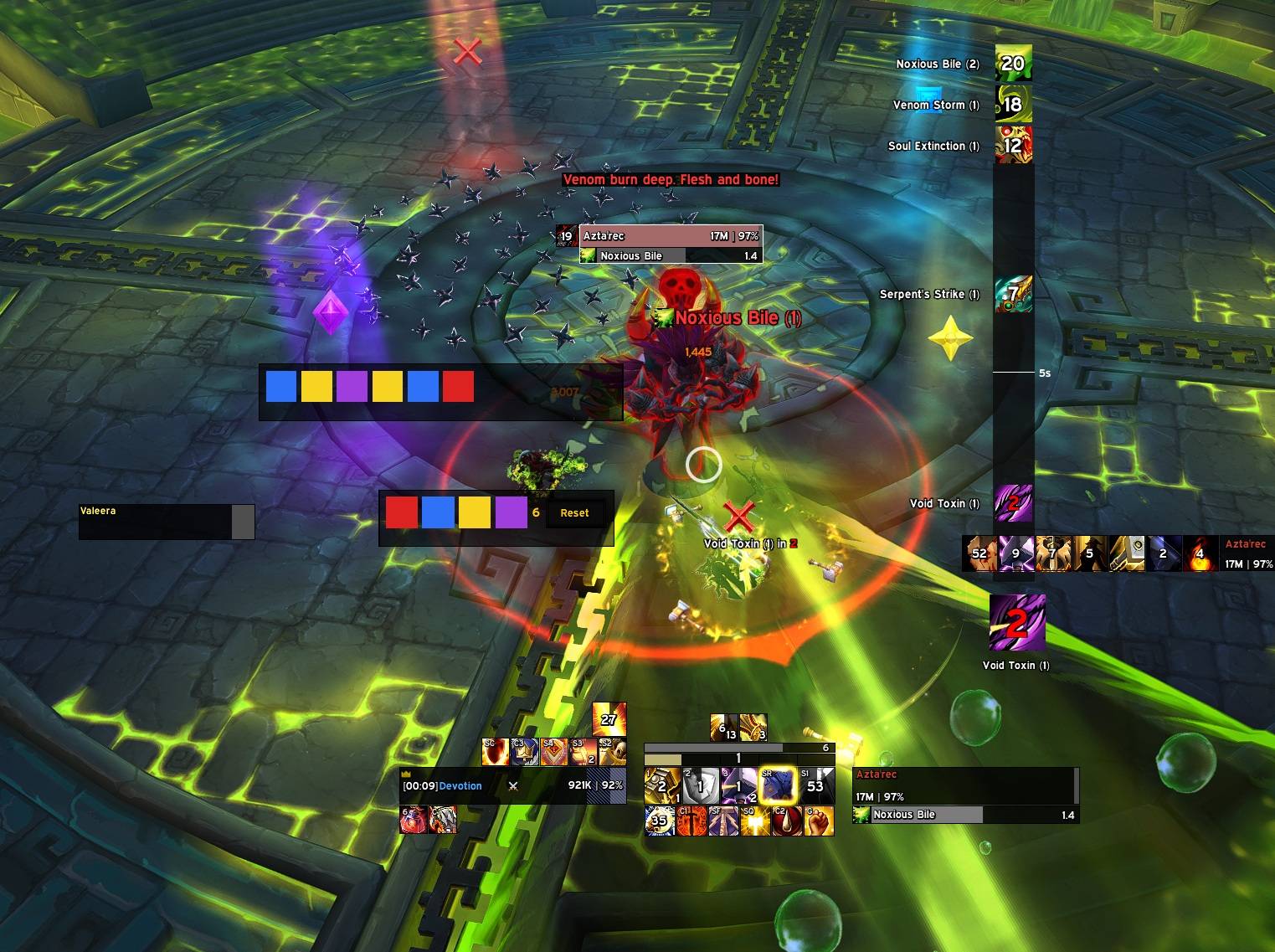
curse.jpg
Description
Keine Ahnung Simon Says
A memory aid for the Simon-Says mechanic of the Delve boss Azta'rec in World of Warcraft 12.1.
The boss plays a colour sequence — red, blue, yellow, purple — and expects it played back by clicking areas in the world. It does this several times per fight, and every round is a fresh sequence, one step longer than the last. This addon puts the sequence on screen so it does not have to be held in your head.
What it does not do
It cannot read the mechanic. World of Warcraft 12.x exposes nothing an addon could hook for it, so every colour is entered by hand while the boss plays it. The addon draws what you typed. That is the whole trick — and it is enough, because typing four keys is easy and remembering twelve colours is not.
It also does not click for you. Nothing here touches a protected function.
Install
- Download
KeineAhnungSimonSays.zipfrom the latest release. - Extract it into
World of Warcraft\_retail_\Interface\AddOns\. - Restart the game client. A
/reloadis not enough for a new addon.
The folder must be called exactly KeineAhnungSimonSays. Do not use GitHub's
green "Download ZIP" button — it names the folder KeineAhnungSimonSays-main
and the game will not find the addon.
Setting up
Open Game Menu → Options → Key Bindings and find the category Keine Ahnung Simon Says. Bind the four colours and the reset. There are no default keys on purpose: an addon that claims keys on install takes them away from your abilities.
Four keys within reach of your movement hand work best. The colours have no fixed keys, so pick whatever mirrors how the areas are laid out in front of you.
Using it
While the boss plays the sequence, press one key per colour. The squares appear in the order you pressed them. Read them back, click the areas, then hit reset before the next round.
There are three ways to enter a colour, all live at the same time:
- Key bindings — the fastest, and the only one that leaves your action bars alone.
- Macros —
/kass r,/kass b,/kass y,/kass p,/kass reseton clickable action-bar buttons. - Clicking — the four coloured buttons in the button window.
The two windows
The sequence and the buttons are separate frames. The sequence wants to sit where your eye already is; the buttons want to sit where your hand already is, and those are rarely the same place.
- Drag either window with the left mouse button.
- Drag the small grip in its bottom-right corner to resize it. This changes the window's scale rather than its width — the row is content-sized (ten squares, then it wraps), so a window stretched wider would have nothing to fill the space with.
- Position and scale are saved per window.
/kass lockfreezes both and hides the grips, so a stray drag in combat cannot move anything.
Commands
| Command | Effect |
|---|---|
/kass r b y p |
append red, blue, yellow or purple |
/kass reset |
clear the sequence |
/kass on / /kass off |
show or hide both windows |
/kass toggle |
the same, flipped |
/kass lock / /kass unlock |
freeze or release moving and resizing |
/kass scale <n> |
set both windows to a scale between 0.5 and 3 |
German words work too: rot, blau, gelb, lila.
Automatic reset
The sequence clears at ENCOUNTER_START and ENCOUNTER_END, so you never walk
into a fight with the last one still on screen. Round boundaries inside a
fight are invisible to the addon — clear those yourself with the reset key or
button.
Does this work during the encounter?
Yes, and it was measured rather than assumed. During the Azta'rec fight the
client reports the Map, Combat, Encounter and Chat addon restrictions as
active. Those restrictions gate protected functions, which this addon never
calls: it writes to a table and colours a texture. A probe macro pressed fifteen
times mid-fight executed every single time.
Compatibility
Built for Interface 120100 (World of Warcraft 12.1, Midnight). Retail only. No library dependencies, no other addons required.
Licence
MIT. See LICENSE.
Keine Ahnung Simon Says Team

