Keine Ahnung Raid Tools
- By
A lightweight, modular World of Warcraft addon built specifically for the guild "Keine Ahnung - Blackmoore." Provides quick access to essential raid lead functions.
Screenshot 2026-07-18 212348.png
Screenshot 2026-07-18 212636.png
Screenshot 2026-07-18 212726.png
Screenshot 2026-07-18 212748.png

Screenshot 2026-07-18 212901.png
Description
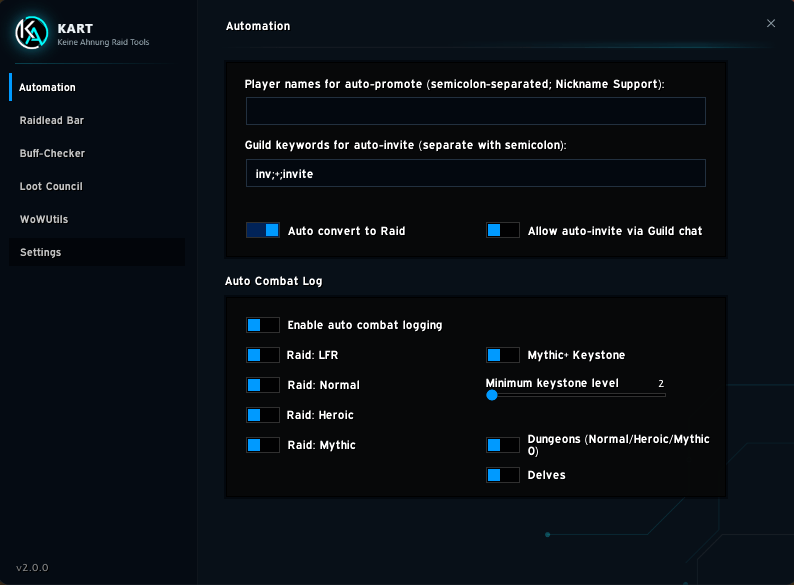
1. Automation
All automatic group functions bundled into a single tab:
- Keyword Invite: Reacts to configurable keywords (e.g. "inv", "+") in whispers, guild chat, or Battle.net messages.
- Auto-Promote: Automatically promotes predefined players to assistant as soon as they join the group. Ideal for co-leads and fixed raid roles.
- Auto-Raid: Automatically converts the group into a raid once more than 5 members join.
The former "Paste Raid Composition" feature (bulk invite via copy-paste) has been removed and fully replaced by WoWUtils Import.
2. Raid Lead Bar
A compact, movable bar for quick access to:
- Raid Target Icons: Set markers on targets.
- World Markers: Place colored pillars on the terrain.
- Ready Check: Instantly start a ready check.
- Pull Timer: Customizable countdown for pull start (default:
/pull 10).
3. Enhanced Ready Check
- When players click "Not Ready", a modern window opens where they can select a quick reason (AFK, drink, 1 min) or enter custom free text. These reasons are posted to the raid lead in chat and shown in the Buff Checker via a small hint icon next to the player's name (full text in tooltip on hover) — regardless of text length, without breaking the layout.
4. Buff Checker & KART Sync
A detailed window for checking raid readiness:
- Stat Check: Checks Intellect, Stamina, Mark of the Wild, Battle Shout, Blessing of the Bronze, and Skyfury.
- Consumables: Shows who has an active Food, Flask, or Rune buff.
- Extended View (Gear Check): A dedicated view shows exact item level as well as missing enchants and gems. An interactive tooltip shows exactly which armor slots are missing them.
- Weapon Oil & KART Sync: Hidden addon messages between KART users read out the exact weapon oil status, even when players are too far away to inspect.
- Durability: Shows equipment repair status (requires LibDurability).
- Report Function: Posts missing buffs directly to raid or party chat.
- Ready Check Integration: Opens automatically when a ready check starts.
- Module Toggle: The Buff Checker can be fully disabled to save CPU when not needed. The background KART sync (oil/ilvl/gear answers for others) stays active regardless, so the raid lead still sees correct data about this player.
5. Loot Council
Coordinated loot distribution directly inside the addon, no external tools required:
- Session Activation: When entering a raid, the raid lead is asked whether Loot Council should be enabled for this session (simply decline for fun runs). Can be toggled manually at any time.
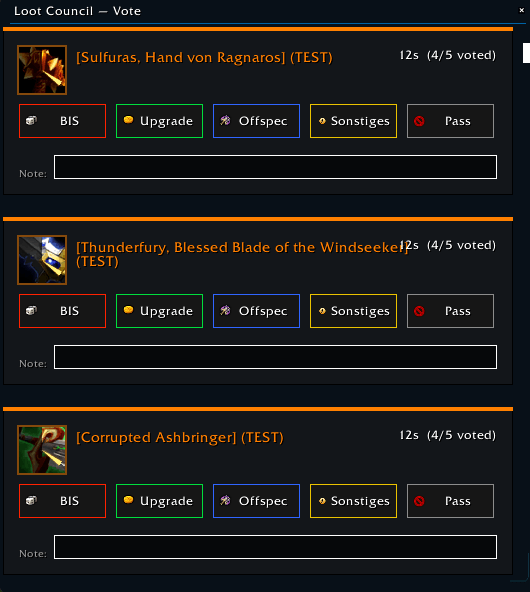
- Raider Voting: As soon as an item is up for distribution, a list with configurable vote buttons (default: BIS / Upgrade / Offspec / Other / Pass) appears simultaneously for all raiders, along with an optional note field to comment on their own vote. When multiple items drop at once (the normal case for most bosses), each item gets its own row with its own countdown — all drops are visible at the same time, so you can decide independently per item instead of clearing one before the next becomes visible. A row marks itself as done immediately after voting and disappears once its own voting time runs out.
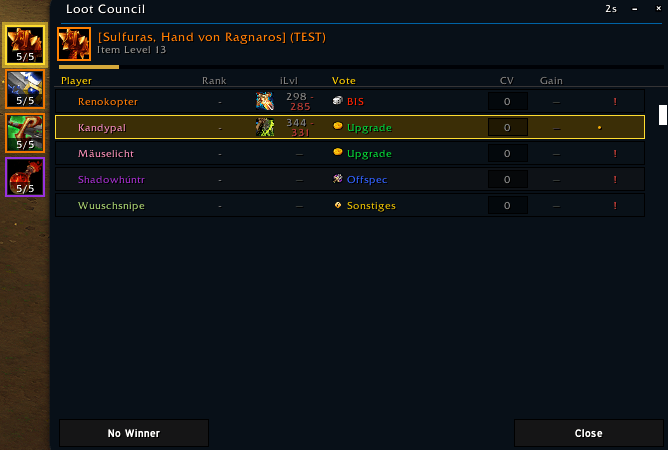
- Council Panel: Raid lead, assistants, and freely defined council members see a movable, scrollable panel with all votes (class-colored), sorted by vote priority, plus the item level (with icon) of each player's currently equipped comparison item. Multiple simultaneous rolls each get their own tab (colored by item quality, with a "votes/total" display); assigning an item doesn't auto-close its tab, so you can compare calmly. Hovering a tab shows its full vote breakdown without switching; new tabs only get a small "new" dot.
- 1-100 Random Rolls (à la RCLootCouncil): Optional raid-wide setting. When enabled, every eligible raider automatically rolls 1-100 as soon as an item comes up — shown as its own column, purely informational.
- Council Vote Counter: Every row has a "CV" button letting each council member mark a personal favorite; the count shows total council votes for that player. Purely for guidance — actual assignment is still only via right-click → Assign.
- Persistent Player Notes: "Edit Note" in the right-click menu attaches a permanent note to a player (e.g. "already has BIS trinket"), visible for every item. Distributed to all online council members and survives reloads.
- Armor Type Hint: Rows for players who can't wear the current item's armor type are shown dimmed — purely visual.
- Right-Click Assignment: Right-clicking a raider row opens Assign / Assign without reason (both award the item, with a confirmation lock against accidental double assignments) and Change Vote (cosmetic only, corrects a player's displayed vote). The "×" on a tab dismisses just that item; "No Winner" auto-closes its tab; "Close" only minimizes the window (tabs are preserved).
- Winner Notification: The chosen player gets a green notification; the decision is announced automatically in raid/party chat.
- Trade Reminder with Auto-Trade: KART remembers pending trades and shows a movable reminder window; opening a trade with the right player auto-places the matching item (still requires manual confirmation).
- Auto-Pass: Optional — automatically passes on loot rolls while the council is voting, to prevent accidental Need/Greed/Transmog clicks. Always a personal setting.
- Raid-Wide Authority: Voting timer, vote buttons, council members, minimum item quality, and the random rolls option are always controlled by the raid lead's settings, not each player's local settings — preventing unauthorized self-appointment to the council, for example.
- Minimum Item Quality: Items below the selected quality (default: Epic) don't trigger Loot Council — the normal WoW roll window is used instead.
- Loot History: Fully synchronized, searchable log of all assignments (item, player, reason, difficulty, timestamp), automatically kept by every KART user, with silent reconciliation for missed sessions.
- Module Toggle: Loot Council can be fully disabled (e.g. when conflicting with another loot addon like RCLootCouncil).
- KART Status Warning: A red icon per raider flags missing/outdated KART or locally disabled Loot Council.
- Test Mode: Two test buttons simulate the looter and loot master views, working together in real time, even fully solo — distributing 4 real (consequence-free) test items including armor type hints and gear comparison, with no broadcast or real history entries.
6. WoWUtils Import
- Import raid compositions directly from WoWUtils via copy-paste (boss-by-boss, with encounter, difficulty, and invite list).
- Each imported boss gets a row with Invite (invites missing players) and Remove (kicks anyone not on the list) buttons.
- Multiple imports merge instead of overwrite (matched by encounter + difficulty); a Reset button clears everything.
- Split Raids: A second roster for the same boss/difficulty is added as its own row, auto-labeled "Boss Name A" / "Boss Name B", etc.
- Saved across sessions, loaded automatically on login.
- Module Toggle: Can be fully disabled.
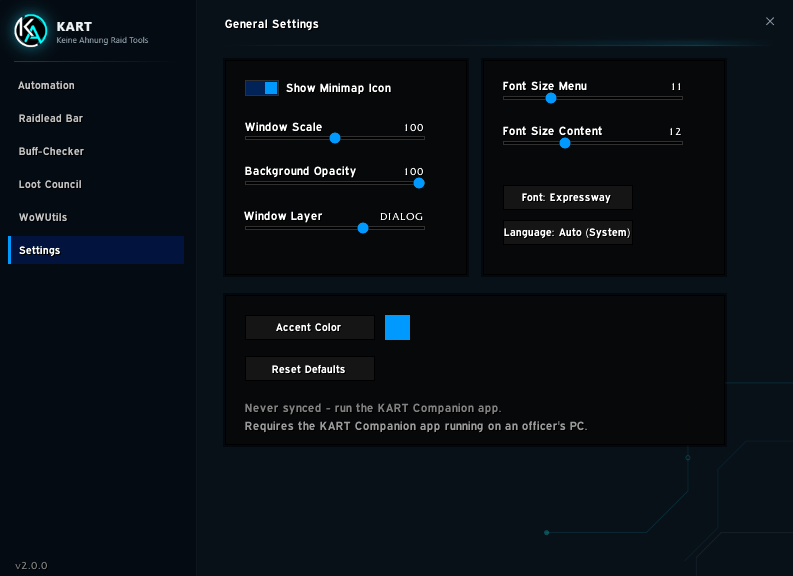
7. Customization (Settings)
- Fully customizable interface (colors, transparency, fonts).
- ESC closes windows/text fields.
- English and German language support.
- Access via minimap icon or the Addon Compartment frame.
- Version checker (
/kart v) to ensure all raiders run the latest KART version. - Modular Disabling: Loot Council, Buff Checker, and WoWUtils can each be individually disabled.
Keine Ahnung Raid Tools Team