ItemSentinal
- By
Protect the items that matter — before an accidental vendor click makes them disappear.
ItemSentinal.png
Description
🔒 ItemSentinal
Protect the items that matter.
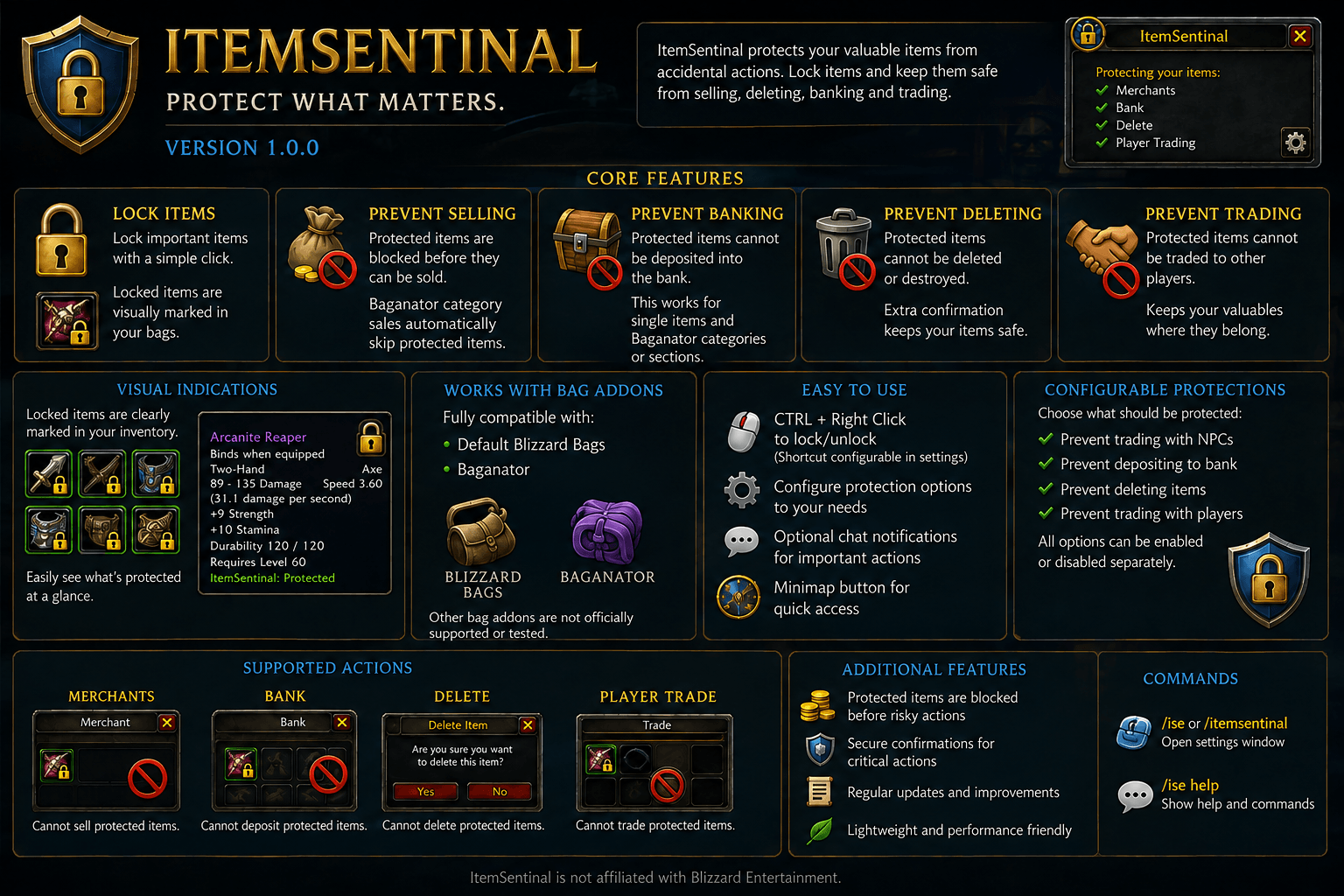
ItemSentinal is a lightweight World of Warcraft addon designed to protect important items from accidental actions.
Whether it's a valuable item, crafting material, rare drop, consumable, or simply something you don't want to lose, ItemSentinal allows you to mark an Item ID as protected directly from your bags.
Once protected, ItemSentinal helps prevent accidental selling, deleting, banking, or trading of that item.
Mark it. Protect it. Keep it.
✨ Features
🔒 Item Protection
Protect or unprotect items directly from your inventory using a configurable mouse shortcut.
By default:
CTRL + Right Click
Once an item is protected, ItemSentinal remembers its Item ID.
This means protection is based on the item itself rather than a specific stack or bag slot. Other stacks of the same Item ID on that character are protected as well.
🛡️ Protection
ItemSentinal can protect your items against several common accidental actions:
- 🛒 Selling items to vendors
- 🗑️ Deleting items
- 🏦 Depositing items into the bank
- 🤝 Trading items to other players
Each protection type can be enabled or disabled individually in the ItemSentinal settings.
This allows you to decide exactly how ItemSentinal should protect your inventory.
🛒 Vendor Protection
Protected items are prevented from being accidentally sold to vendors.
ItemSentinal protects against supported vendor interactions including:
- Right-click selling
- Drag & drop selling
- Bulk/category selling with Baganator
- Section-based selling with Baganator
With supported bag interfaces, protected items are stopped before they are transferred to the vendor.
When selling a Baganator category or section containing both protected and unprotected items, ItemSentinal skips the protected items while allowing the remaining items to be sold normally.
No automatic buyback system is required.
🏦 Bank Protection
Protected items can be prevented from being accidentally deposited into your bank.
This includes:
- Individual item deposits
- Right-click transfers
- Drag & drop transfers
- Baganator category transfers
- Baganator section transfers
When transferring an entire Baganator category or section, protected items remain in your inventory while unprotected items can continue to be deposited normally.
Protected items can still be withdrawn from the bank normally.
Bank protection can be enabled or disabled independently in the settings.
🤝 Player Trade Protection
ItemSentinal can prevent protected items from being accidentally given to another player.
When enabled, protected items are prevented from being transferred into the player trade window through supported interactions.
Player trade protection has been tested with:
- Blizzard's default bag interface
- Baganator
Player trade protection can be enabled or disabled independently.
🗑️ Deletion Protection
Accidentally dragging the wrong item out of your bags can be painful.
ItemSentinal provides an additional layer of protection by preventing protected items from being accidentally deleted.
Deletion protection can be enabled or disabled independently.
🎒 Baganator Compatibility
ItemSentinal officially supports Baganator in addition to Blizzard's default bag interface.
Dedicated Baganator compatibility has been implemented so ItemSentinal can work with Baganator's custom inventory, category, and transfer systems.
Supported Baganator interactions include:
- Locking and unlocking items
- Visual lock indicators
- Individual vendor sales
- Vendor category transfers
- Vendor section transfers
- Individual bank deposits
- Bank category transfers
- Bank section transfers
- Item deletion protection
- Player trading
When transferring an entire category or section, protected items are excluded while unprotected items can continue to be transferred normally.
If a category or section contains only protected items, those items simply remain in your inventory.
Protected-item indicators are restored automatically after login and /reload.
ItemSentinal's Baganator integration is also designed to leave normal item usage untouched. Potions, poisons, recipes, crafting materials, profession interactions, and other usable inventory items can continue to function normally.
⚠️ Other Bag Addons
Other third-party bag addons may work with ItemSentinal, but they are not officially supported or tested.
Bag addons can replace or modify Blizzard's standard inventory functions in different ways. Because of this, ItemSentinal cannot guarantee that every protection feature will work correctly with unsupported bag addons.
If you use another bag addon, please verify that the protection features you rely on work correctly before trusting ItemSentinal to prevent accidental item loss.
For officially tested compatibility, use:
- Blizzard's default bag interface
- Baganator
Support for additional bag addons may be added in future versions.
🖱️ Customizable Lock Shortcut
You decide how items are protected.
The default shortcut is:
CTRL + Right Click
The modifier key can be configured to use:
- CTRL
- ALT
- SHIFT
- None
You can also choose between:
- Left Click
- Right Click
Using the configured shortcut on an already protected item removes its protection again.
The shortcut is only used for the actual lock/unlock interaction — ItemSentinal does not continuously monitor the modifier key.
🟡 Visual Protection Indicators
Protected items are visually marked with a lock indicator directly inside supported bag interfaces.
This makes it easy to see which items are currently protected without opening the ItemSentinal settings.
Lock indicators are automatically restored after login and /reload and update when items are protected or unprotected.
Additional protection information can also be displayed in supported item tooltips.
👤 Character-Specific Protection
Protected Item IDs are stored separately for each character.
This means protecting an item on one character does not automatically protect the same Item ID on another character.
Each character can therefore maintain their own individual protection list.
General ItemSentinal settings remain shared between characters.
⚙️ Configuration
ItemSentinal includes its own configuration interface where you can manage the addon's behavior.
Available options include:
- Vendor protection
- Deletion protection
- Bank protection
- Player trade protection
- Protection modifier key
- Protection mouse button
- Tooltip notifications
- Chat notifications
- Minimap button visibility
- Protected Item ID management
The protected-items list allows you to review the Item IDs currently protected on your character and remove protection when needed.
🧭 Minimap Button
ItemSentinal includes a minimap launcher for quick access to the configuration window.
The minimap button can be hidden through the settings if you prefer a cleaner minimap.
🌍 Localization
ItemSentinal currently includes support for:
- 🇬🇧 English
- 🇩🇪 German
Additional languages may be added in future versions.
⚔️ Designed for Everyday Gameplay
ItemSentinal is intended to stay out of your way during normal gameplay.
Protection is applied only when necessary, allowing you to continue using your inventory normally.
Use your consumables.
Learn your recipes.
Apply your poisons.
Combine your crafting materials.
Use profession interactions.
Manage your inventory.
ItemSentinal steps in when your protected items are actually at risk.
✅ Tested for ItemSentinal 1.0.0
The first stable release has been tested with both Blizzard's default bags and Baganator.
Testing included:
- Fresh login
/reload- Locking and unlocking items
- Existing lock indicators after login
- Looting and stack changes
- Individual vendor sales
- Baganator category and section vendor actions
- Individual bank transfers
- Baganator category and section bank transfers
- Item deletion
- Player trading
- Normal use of protected items
- General performance and Lua error checks
❤️ Feedback & Bug Reports
ItemSentinal will continue to be improved after the 1.0.0 release.
If you encounter a situation where a protected item can still be sold, deleted, banked, or traded, please report it with as much information as possible.
Useful information includes:
- Your World of Warcraft version
- Whether you are using Blizzard bags or Baganator
- What action you performed
- Whether the problem occurred after login or
/reload - Any Lua error message that appeared
When reporting compatibility issues with another bag addon, please include the name and version of that addon.
🔒 ItemSentinal
Your inventory contains items you've spent time collecting, crafting, and earning.
ItemSentinal helps make sure an accidental click doesn't make them disappear.
Mark it. Protect it. Keep it.
ItemSentinal Team