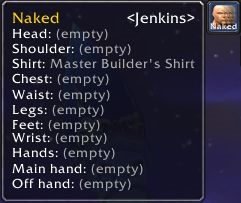
A gear set's tooltip with a title preview to the right of its name.
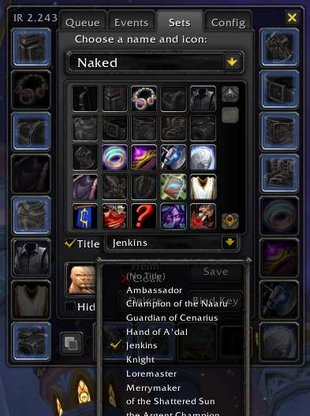
The ItemRack options window showing off a new title dropdown menu.
Description
ItemRackTitles is a small addition to Gello's ItemRack add-on that lets you attach one of your character's titles to each gear set. Of course, you must have ItemRack installed before ItemRackTitles will work.
Details
If you save a title for a gear set, that title will be shown any time you equip that set of gear. To change a set's title, open the normal ItemRack options menu and navigate to the “Sets” tab. Once there, use the checkbox and dropdown menu below the grid of icons to choose your title. To have a set remove your title entirely and only display your character's name, choose the first option, “(No Title)”.
The checkbox to the left of the title dropdown allows you to enable and disable title changes for the current set. That is, if the box isn't checked, your title won't swap when you equip that set; you'll keep your previous title.
Tooltips for your sets will show their titles to the right of their names as long as you have the “Tiny Tooltips” option turned off in ItemRack. Just mouse over the set's button from ItemRack's minimap menu to see which title it will display.
ItemRackTitles Team