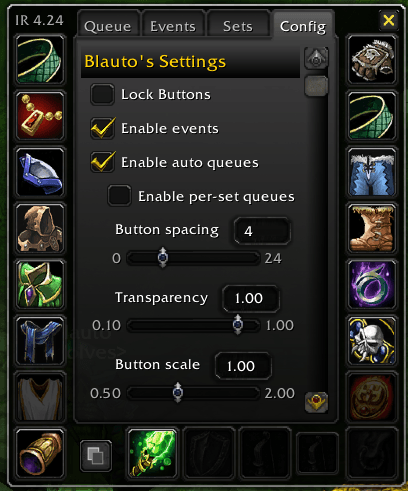
Config.png
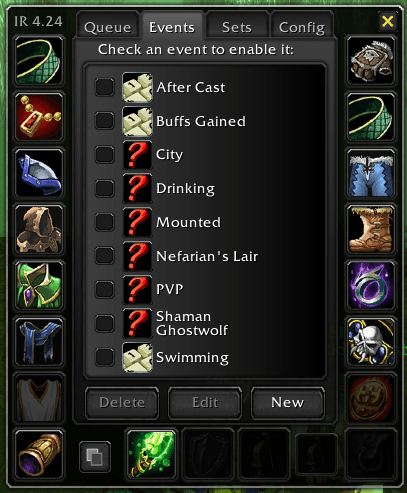
Events.png
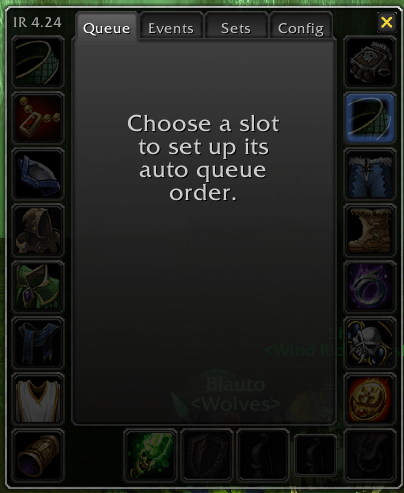
Que.png
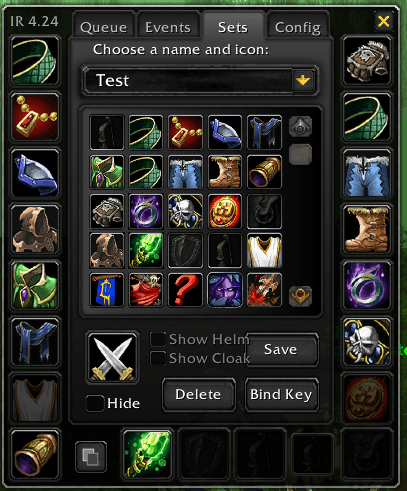
Sets.png
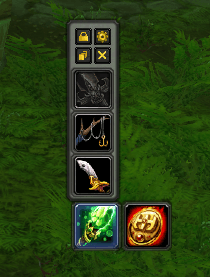
Quick Access.png
Description
ItemRack — One addon for Classic, TBC Anniversary, and Forever
ItemRack makes equipment management fast and predictable. Save full or partial gear sets, switch them from a menu or keybind, automate changes for game events, and rotate cooldown items through configurable queues.
One universal download
The same ItemRack-universal package supports:
- WoW Classic Era
- Hardcore
- Season of Discovery
- Burning Crusade Classic Anniversary
- WoW Forever/Camelot
There is no separate TBC or Forever edition. One shared compatibility layer selects the legacy or modern APIs available in the running client.
The ZIP installs two folders:
ItemRack— the main addonItemRackOptions— the load-on-demand configuration module
Keep both folders together in Interface\AddOns.
What ItemRack does
Gear sets
- Save complete outfits or partial sets that affect only selected slots.
- Equip sets from the minimap menu, set button, keybinds, macros, or events.
- Continue equipping available pieces when an optional saved item is missing.
- Prefer the exact saved copy when two items share a base ID but have different enchants, gems, suffixes, or runes.
Quick-access equipment menus
- Alt-click character-sheet slots to create movable equipment buttons.
- Hover buttons or character slots for compatible-item flyouts.
- Configure menu direction, scale, spacing, tooltips, counts, and hotkey labels.
- Lock the minimap and quick-access layout when it is positioned correctly.
Specializations, stances, and events
- Link sets to primary and secondary specializations.
- Automate gear for mounting, movement, zones, buffs, drinking, combat state, Ghost Wolf, and Druid forms.
- Preserve the player's newest manual choice when delayed automatic work is still pending.
- Restore the correct prior set and its per-set queues after temporary event gear ends.
Automatic specialization events are opt-in. Assign the set, then review and enable the event you want ItemRack to control.
AutoQueue
- Rank cooldown items by priority for each slot.
- Save queue enablement and configuration per gear set.
- Hold equipped items while their relevant buff remains active.
- Support proxy cooldowns for items whose effect is gated by another item.
- Track exact item variants so duplicate enchanted, gemmed, or runed copies do not burn one another.
Reliable swapping
- Pipeline non-conflicting multi-item moves in one frame where the client allows it.
- Queue restricted work through combat, casting, loading screens, and temporary item locks.
- Handle two-handed weapons, off-hands, paired rings/trinkets, dual-wield specialization changes, and partial sets safely.
- Reconcile the displayed set with the equipment the server actually accepted.
Script-event protection
Custom Script events run Lua with addon privileges. ItemRack protects its editor and SavedVariables path with explicit approval:
- Saving a valid script in ItemRack approves that exact event name, trigger, and source.
- Scripts inserted or changed by another addon remain disabled until the player accepts a warning prompt.
- Any source change invalidates the previous approval.
- Rejected, malformed, oversized, or invalid external additions cannot persist through ItemRack's script-event storage.
WoW addons share one Lua environment, so this cannot sandbox a hostile addon or WeakAura. Delete any untrusted addon or aura that supplied malicious code.
Installation
- Download the latest ItemRack universal ZIP.
- Extract it into the active client's
Interface\AddOnsdirectory. - Confirm both
ItemRackandItemRackOptionsare present. - Restart WoW or run
/reload.
Optional: install LibSoundIndex if you want ItemRack to suppress selected equipment-swap sounds without changing the game's global sound setting.
Basic controls
/itemrack opt— open Options- Left-click minimap button — choose a saved set
- Right-click minimap button — open Options
- Alt-click a character equipment slot — add/remove its quick-access button
- Alt-click the character model — add/remove the set button
- Alt-left-click a quick-access slot — toggle its AutoQueue
- Alt-right-click a quick-access slot — configure its queue
/itemrack debug— toggle diagnostic recording/itemrack dump— open a copyable support report
Getting help
When reporting a problem, include:
- Client family and client build
- ItemRack version
- Reproduction steps
- Expected and actual behavior
- Relevant set names and item links
- Full Lua error text
/itemrack dumpoutput after reproducing the issue
The dump identifies the exact ItemRack release and includes technical state such as event ownership, queues, equipment transactions, and locks. Review it before sharing because it can contain gear-set names and item information.
- Source and issue tracker: https://github.com/Bl4ut0/ItemRack-Anniversary
- Full controls: https://github.com/Bl4ut0/ItemRack-Anniversary/blob/master/CONTROLS.md
Credits
ItemRack was created by Gello. The Classic port was maintained by Rottenbeer and Roadblock. This Anniversary/universal edition is maintained by Bl4ut0.
The ItemRack Universal Team


Owner