InFlight Taxi Timer
- By
A timer bar for your flights, and their flight times on the flight map.
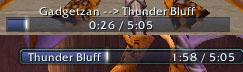
InFlight Timer Bars
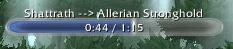
InFlight Timer Bar

Taxi Map and InFlight Timer Bar
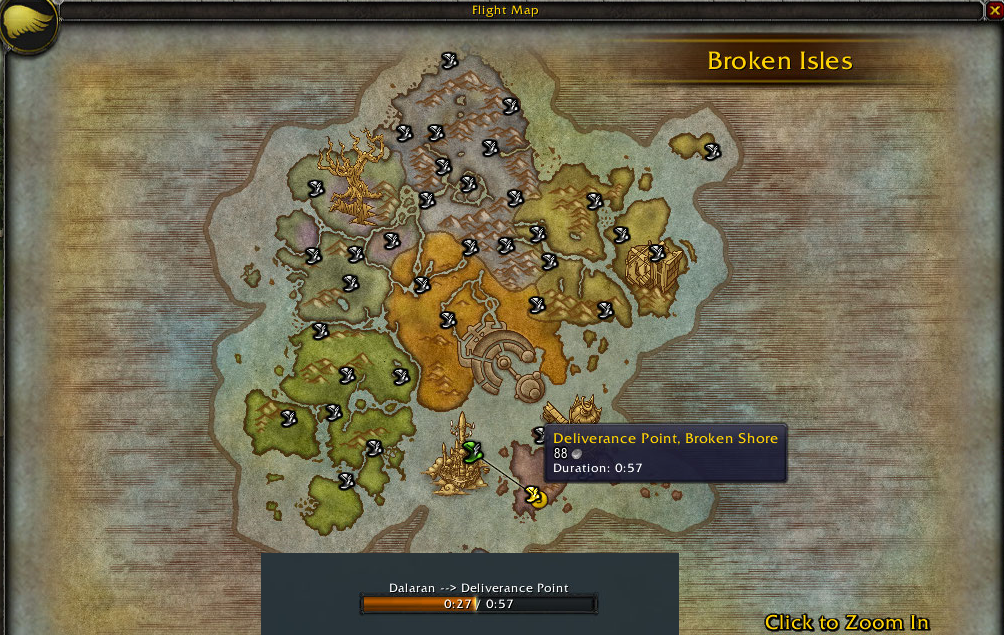
Flight Map and InFlight Timer Bar
Description
InFlight shows a timer bar while you fly with a flight master, so you know where you are headed and how long it will take. On the flight map, it also tells you how long each flight takes before you pick one.
InFlight works on Retail, Mists of Pandaria Classic, TBC Classic Anniversary and Classic Era.
Features
Timer Bar
When you take off, a bar shows your destination and the time left, or the time flown if you prefer to count up. If InFlight does not know a route yet, it estimates the time from the parts of the route it does know, or simply counts up, and remembers the time once you land. If a flight takes longer or shorter than InFlight expected, it corrects the time. Speed bonuses like the Khaz Algar Flight Master achievement or Ride Like the Wind in Mists of Pandaria Classic are taken into account.
The timer keeps running through a UI reload. Flights you start by talking to an NPC, like the Druid flights from Moonglade or the one from the Caverns of Time to Nozdormu's Lair, get a timer too, in every client language.
Flight Times on the Flight Map
Hover over a destination on the flight map, and its tooltip shows how long the flight takes. Thousands of flight times come with the addon, collected by its users over the years.
Your Own Look
Choose from Blizzard's own bar textures and borders, like those of the cast bar or the Monthly Activities, or use any texture, border or font from LibSharedMedia. You can pick the colours, the spark at the edge of the bar, the font and its size, and whether the text sits inside the bar or above it. While you go through the textures, borders, fonts and sizes in the menu, the bar tries each one on as you hover over it.
Edit Mode
InFlight is part of Blizzard's Edit Mode. Move the bar there along with the rest of your interface, and if you like, give each Edit Mode layout its own bar settings. You can also keep separate settings for a single character.
Settings
Right-click the bar, type /inflight, or open InFlight under Options > AddOns, where you can also show a preview bar while you change things. Shift-drag the bar to move it, and Ctrl-click it to close it.
InFlight can also ask before you take a flight, and post a chat message whenever it learns a new flight time.
Share Your Flight Times
When you have flown routes InFlight did not know yet, it lets you know every now and then. Type /inflight export and post the result on CurseForge, WoWInterface or GitHub, and your times will be in the next update for everyone.
Every Language
InFlight is fully translated into every language the game comes in:
🇺🇸 English, 🇩🇪 German, 🇫🇷 French, 🇪🇸 Spanish, 🇲🇽 Mexican Spanish, 🇮🇹 Italian, 🇧🇷 Brazilian Portuguese, 🇷🇺 Russian, 🇰🇷 Korean, 🇨🇳 Simplified Chinese, 🇹🇼 Traditional Chinese
Credits
InFlight was originally written by TotalPackage, temporarily maintained by Deranjata, and is now under the custody of Ludius.
InFlight Taxi Timer Team

Owner