


Improved Auto Shot Timer
- By
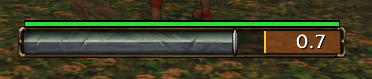
The default 500ms stop moving bar added on top of the Blizzard ranged swing timer. Also shows the range indicator attached to the top of the bar.

Shows the optional latency section which may help you stop in time on a higher ping connection.
Description
Improved Auto Shot Timer
Hunter Kiting Helper for WoW: Forever
Improves WoW: Forever's native ranged swing timer for hunters with a configurable stop-moving window before Auto Shot.
IMPORTANT: This add on isn't strictly necessary with the current auto-shot bug that results in no wind-up/pre-cast time for the first auto shot. Right now you can just turn auto shot on and off for each shot and cheese. Thankfully, Blizzard have said this will be fixed. Once it is, I will confirm the add on still operates as intended.
Source: https://us.forums.blizzard.com/en/wow/t/auto-shoot-bug-and-fix-incoming/2359185
ClassicUI Forever Integration
Supports ClassicUI Forever! With its Swing timers skin enabled, Improved Auto Shot Timer overlays match its vanilla-style bars, with shaded textures, slimmer markers, and a matching range indicator. The overlays adapt to your chosen border thickness and timer size.
Description
Pre-shot stop time defaults to 500 ms. Note that WoW: Forever differs from vanilla in that the first shot fires instantly, rather than after the short delay. For subsequent shots, you need to stop moving 500ms (+ latency) before the swing timer completes. This addon helps you judge that time with an extra bar over the native ranged swing timer.
Also contains an optional in/out of range indicator above the swing timer. Green = in range, red = out of range (or too close).
Go to Options -> Addons -> Improved Auto Shot Timer to configure options.
Features
- Configurable stop-moving indicator on native ranged swing timer
- Option to add latency to the above bar for more precision
- Optional range indicator
- Adjust font size of the timer on the ranged swing timer
- ClassicUI Forever integration with matching vanilla-style overlays
Requirements
- WoW: Forever Beta.
- Be a Hunter
- Swing Timers enabled in the Advanced options.
Coming soon
- Support for other classes
- Support for wands
Improved Auto Shot Timer Team
