Imperial Recruitment Command
- By
EMPIRE-only guild recruiting for WoW Forever with whisper-first or direct invites, shared contact protection, autosaving settings, and confirmed-recruit leaderboards.
Description
Imperial Recruitment Command
EMPIRE-only beta for World of Warcraft: Forever. Current EMPIRE guild membership is required; installing the addon does not grant access to other characters.
Coordinate guild recruitment, share contact history and Do not contact exclusions, and track confirmed recruits in an imperial purple-and-gold interface.
Choose how you recruit
- Whisper first: send a recruitment message, then queue a guild invitation when the player replies positively.
- Direct invite: send guild invitations without an introductory whisper.
Choose the method in Settings > General. Changing it saves immediately and pauses recruiting so you can restart when ready. Actions advance through permitted gameplay key presses and world clicks, with spacing and coordination checks. Typing into an editor does not advance recruitment. Reloading or logging in starts recruiting paused.
A simpler recruitment window
- Recruitment queue: see players ready to contact and pending replies or invitations.
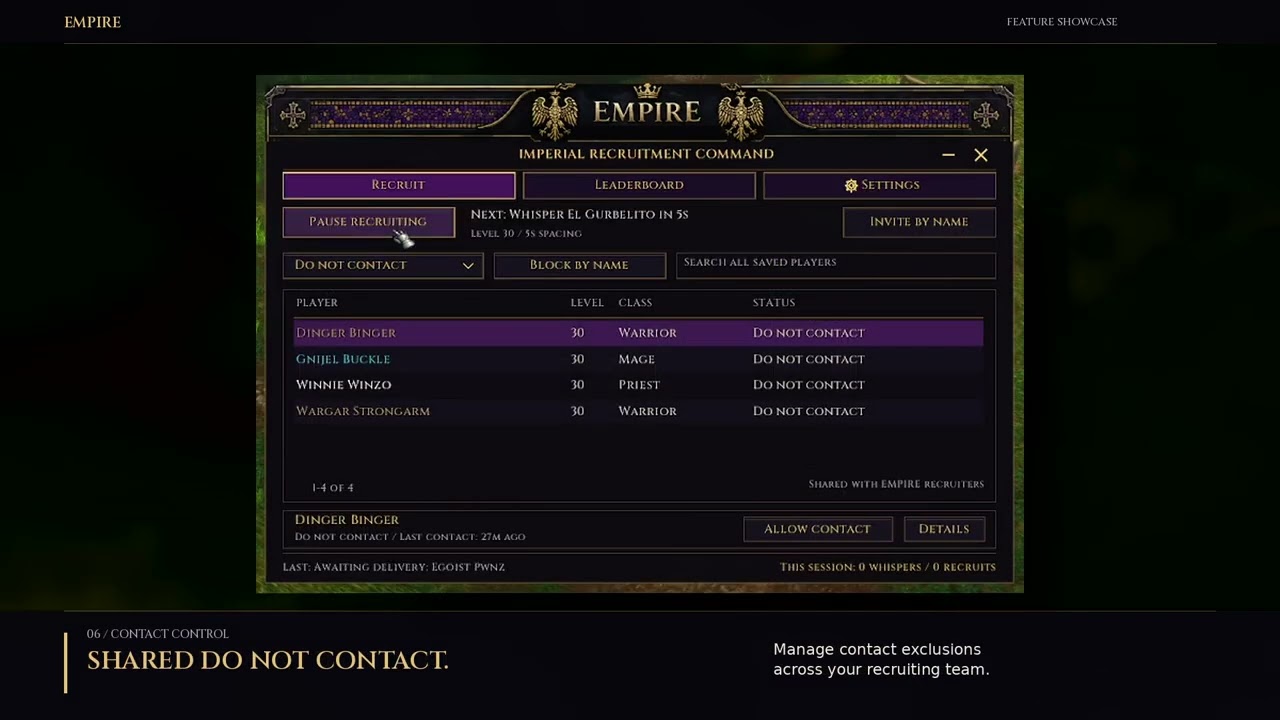
- Do not contact: manage shared exclusions, restore contact, or block a player by name.
- Search across all saved players, including completed contacts and their history.
- Open player details for replies, confirmed outgoing messages, invitation state and local notes.
- Keep track through a movable compact widget and minimap controls. Green, red and amber status indicators explain Recruiting, Paused and temporary holds.
Settings that save automatically
Checkboxes, message modes and method choices save when clicked. Numbers, messages and text fields save on Enter, Tab or leaving the field. Invalid edits show a warning and keep the last saved value; a brief Saved message confirms a completed change. Press Escape inside a field to cancel that unfinished edit.
Use one custom recruitment message or up to eight editable shuffled variations. Messages support {first}, {name}, {guild} and {discord} placeholders; supported square-bracket and capitalized aliases also work. Guild welcomes have their own editable messages and shuffle option.
Pause recruiting in combat is optional and defaults on when no saved choice exists. Turn it off to allow attempts during outdoor combat using normal gameplay input. The game may still block an action. Chat restrictions, battleground/arena holds, permissions, DNC, reservations and spacing still apply.
Shared contact protection
IRC shares contact cooldown history, exclusions and short player reservations to reduce duplicate outreach between recruiters. Use the same current addon version and contact cooldown across the team; the default cooldown is three days. History restores in the background, and known sharing failures can hold outreach. Guild addon messaging is best effort and cannot guarantee a central server lock.
Recognized opt-outs and clear hostile recruitment refusals create shared Do not contact blocks and cancel queued recipient actions without sending an automatic response. Specific reply phrases are matched; profanity alone is not an opt-out. Silence and maybe-later replies use cooldowns. A declined guild invitation stops automatic retries; an explicit reinvite request can queue another invitation.
Optional Block players I ignore and Block kicked members from recruitment controls are independent and off by default in Advanced. They monitor new confirmed events; existing ignores and old guild kicks are not imported. Voluntary departures are excluded. Allow contact lifts an addon block while retaining any applicable contact cooldown. Notes and reply text remain local.
Recruiter leaderboard
This week and All time rank recruiters by confirmed recruits. The table shows Rank, Recruiter, Recruits and Updated. Select a recruiter for confirmed recruit, invitation and whisper totals. Refresh stats requests current reports from online updated clients; cached offline reports remain available. Updated shows report age, not online status.
Welcomes and Discord
Coordinate one guild welcome from the credited inviting recruiter, with optional private Discord onboarding. Choose whether to include a saved Discord invite in recruitment whispers, private welcomes or guild welcomes. Other welcome addons do not participate in IRC's coordination.
Quick start
- Install the latest beta for the Forever client and start the game. When updating, replace the addon folder and keep saved-variable files.
- Type
/ircor use the minimap icon. - Choose your method, level range, timing, messages and welcome preferences. Valid edits save automatically.
- Click Start recruiting and play normally.
Your saved settings, messages, history, notes, DNC and recruiter totals are retained on update. The join glow has been removed; ordinary join notices, counters and the steady status dot remain.
Useful commands
/irc— open the main window/irc widget— show the widget/irc hide— hide the interface/irc startand/irc pause— control recruiting/irc leaderboard— open recruiter rankings/irc status— print private diagnostics
Beta feedback
Beta 44 passed 369 simulated checks covering recruiting protections, combat preference, autosave and page transitions. These checks do not replace in-game testing. Report the addon version, the action you took, what happened and relevant /irc status output, removing anything you do not want to share publicly.
The interface uses Cinzel fonts distributed with their included SIL Open Font License and attribution.
Imperial Recruitment Command Team