IberisUI Forever
- By
All-in-one UI for WoW Forever: unit frames, raid frames, nameplates, action bars, bags, chat and more in one look, set up from a single options window.
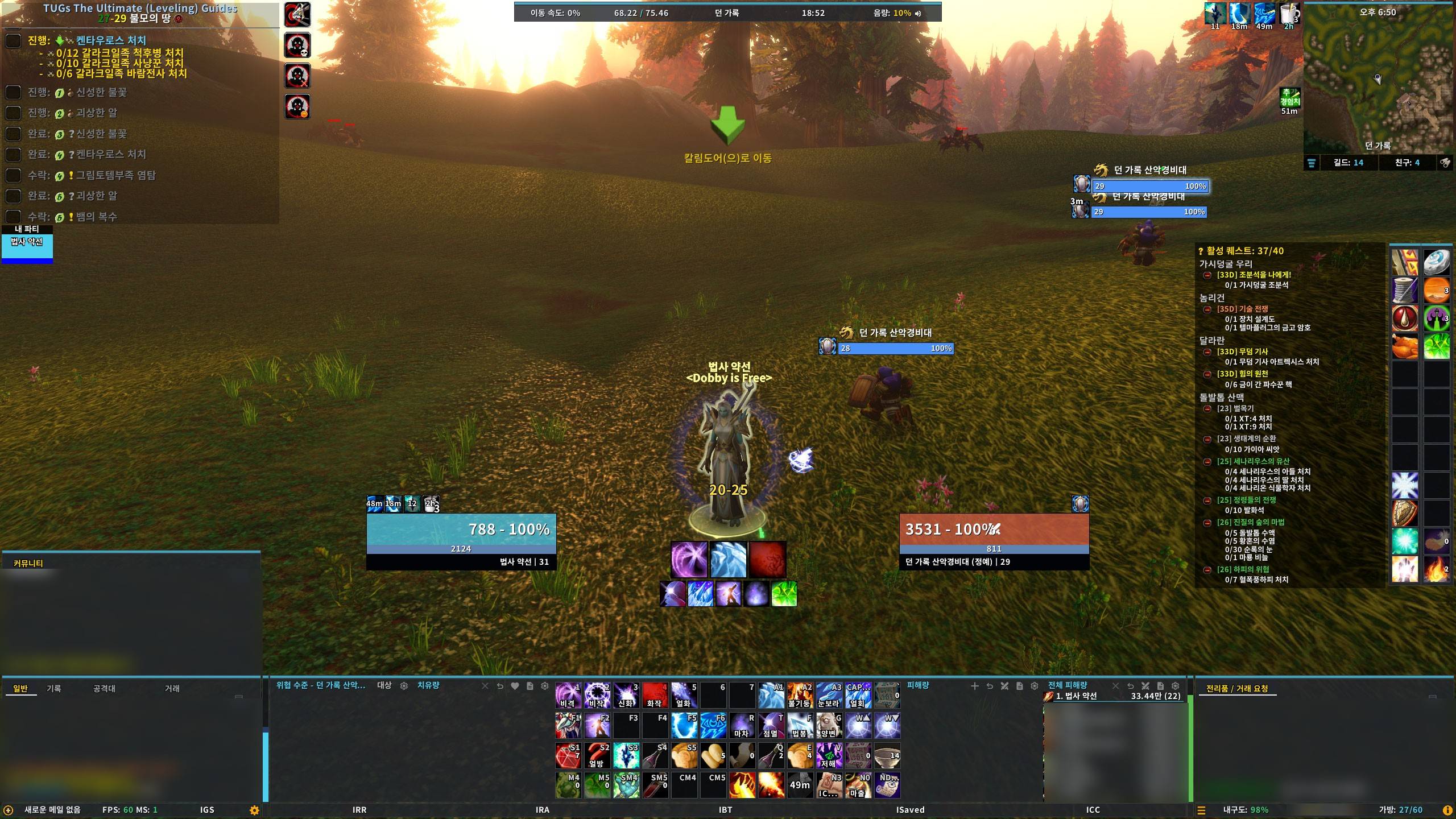
01_WoWScrnShot_111026_185203.jpg
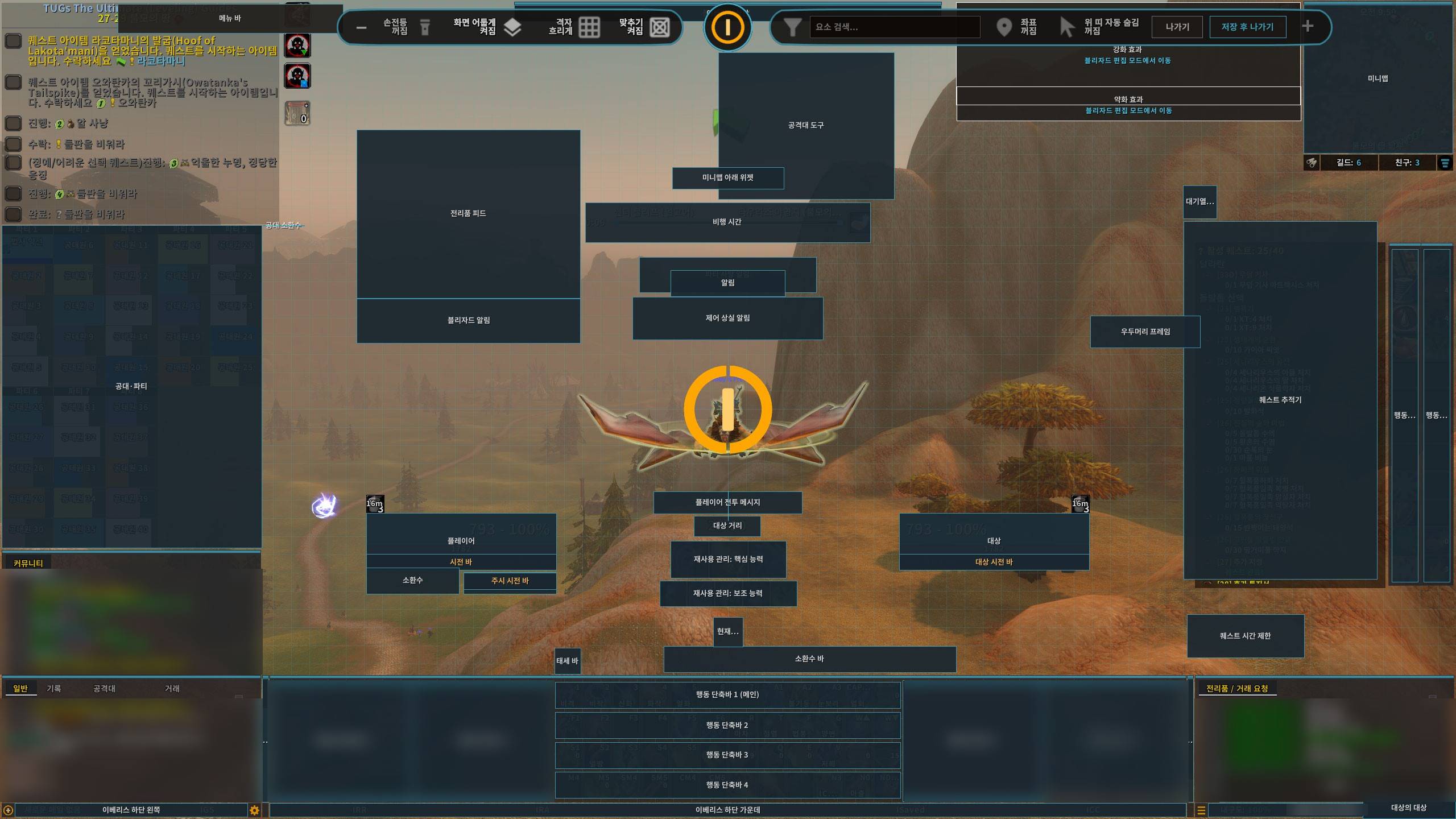
02_WoWScrnShot_111026_095042.jpg
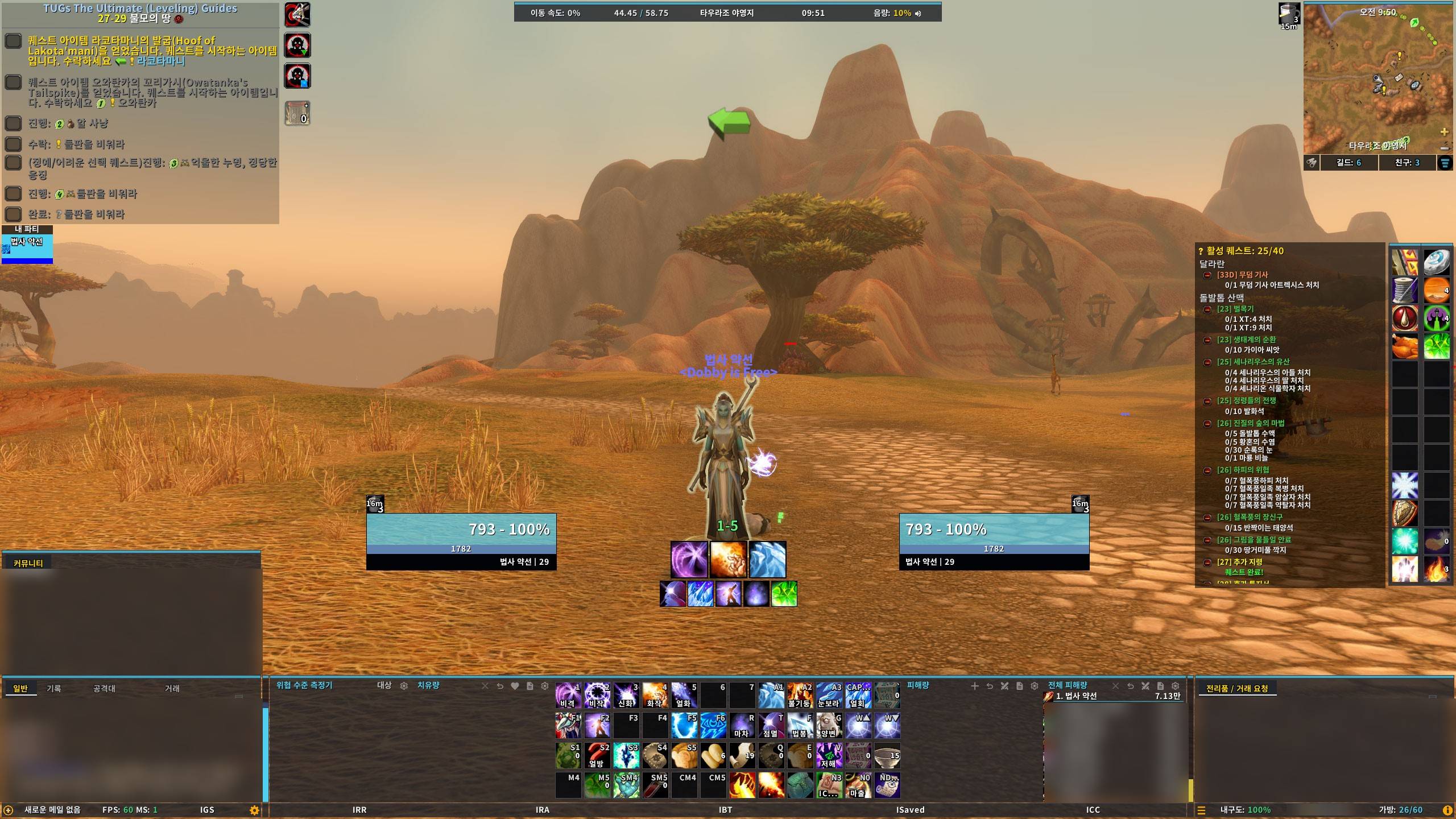
03_WoWScrnShot_111026_095127.jpg
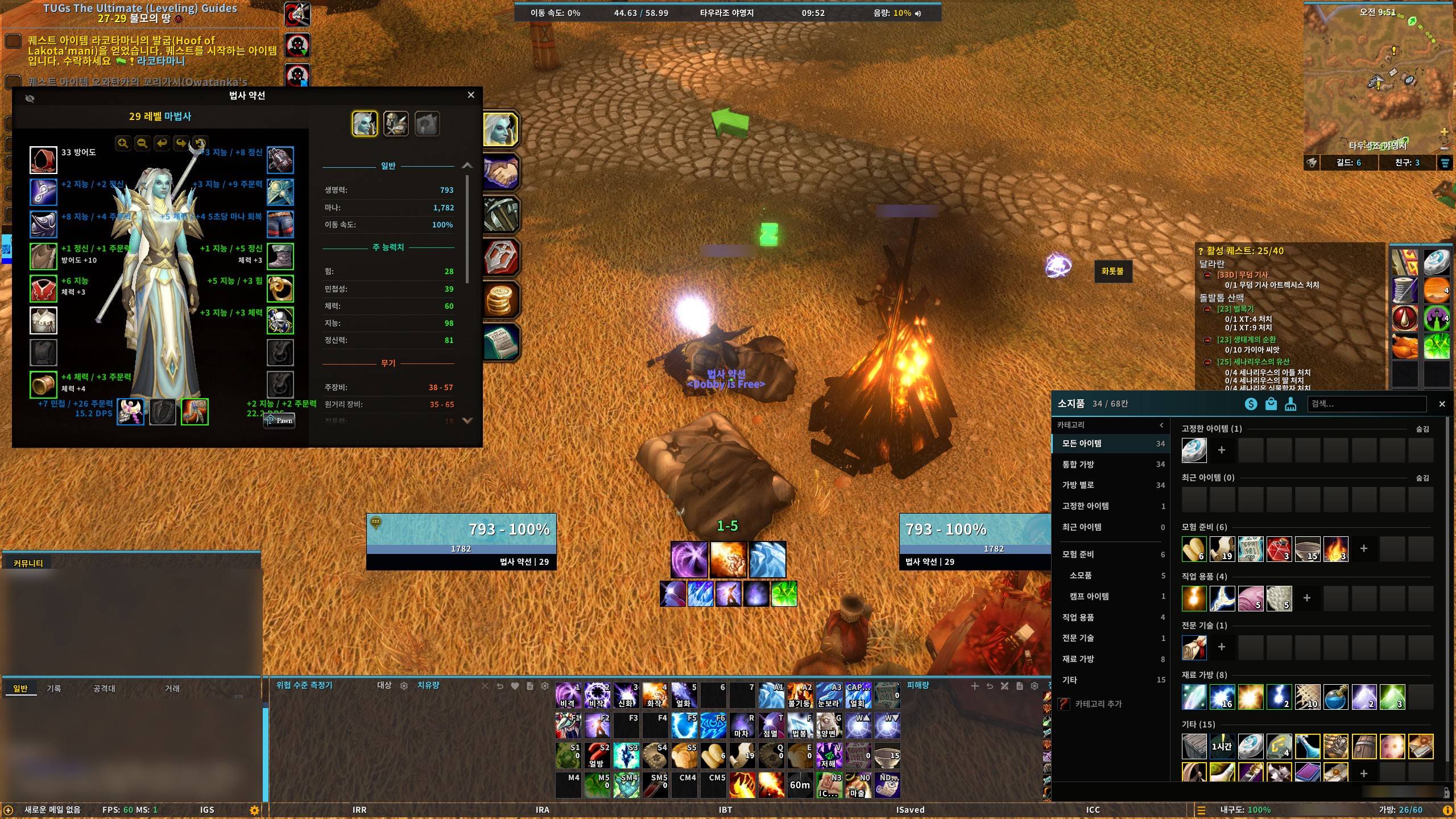
04_WoWScrnShot_111026_095220.jpg
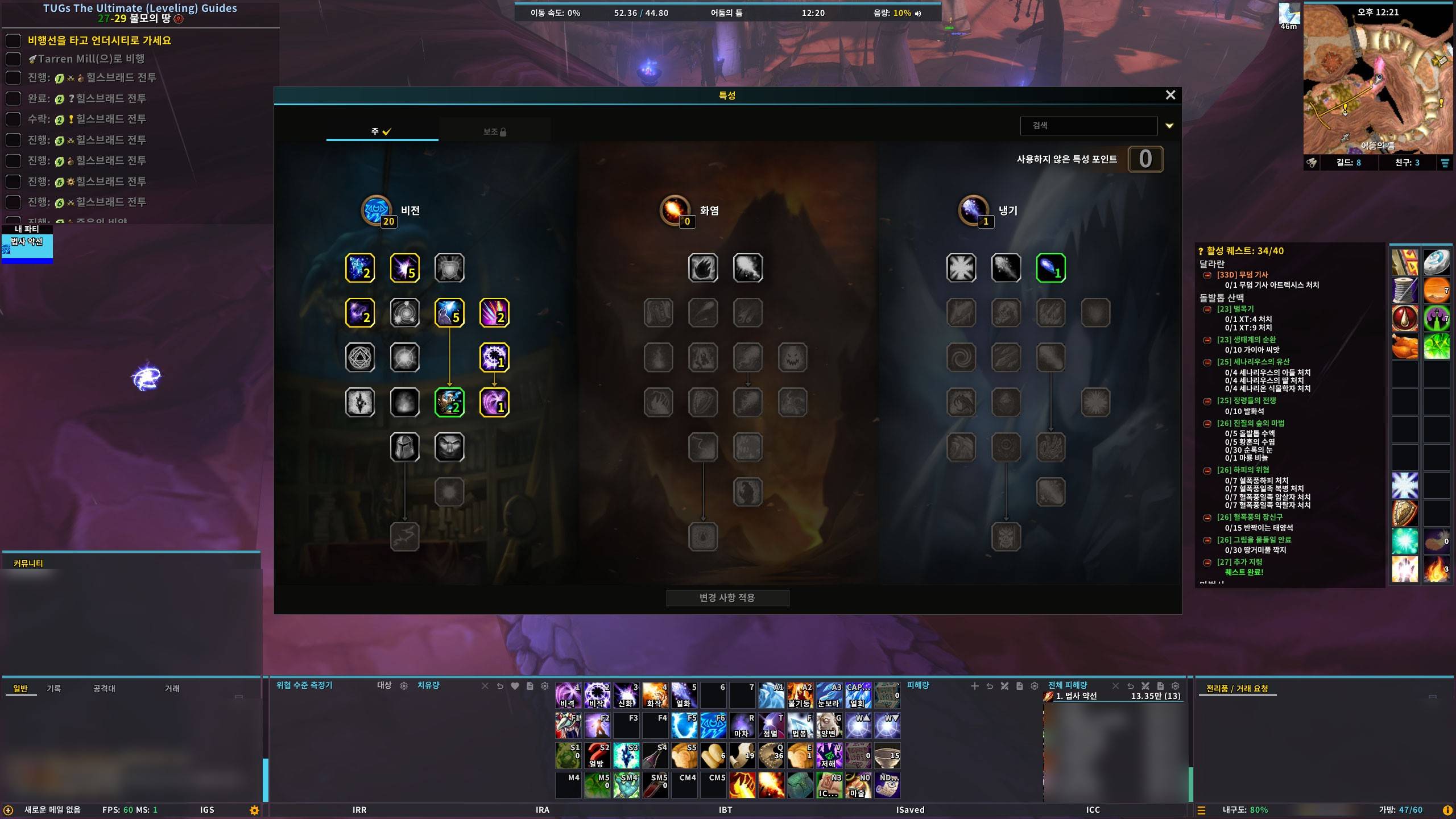
05_WoWScrnShot_111026_122048.jpg
Description
An all-in-one interface for WoW Forever: unit frames, raid frames, nameplates, action bars, bags, chat and more in one look, set up from a single options window.
WoW Forever 전용 통합 UI. 유닛프레임·공격대 창·이름표·행동바·가방·채팅까지 화면 전체를 한 가지 외형으로 맞추고, 설정은 창 하나에서 바꿉니다.
🚧 Test release (v0.3.6)
IberisUI Forever runs on the WoW Forever (1.60.1) client only. It is a test release, so some errors may remain. Please report them on the author's blog post (link at the bottom) with an error-logging addon such as BugSack.
⚠️ Always back up your WTF folder before installing a new UI. ^^
Greetings
Hi, I'm 서약선 (Iberis), the author of the IberisUI addons.
This is IberisUI Forever, made for WoW Forever. It does not need any other UI addon. Install it on its own and the whole screen is set up in one go. Everything you see is configured from a single options window, and the layout is moved by dragging in unlock mode.
Features
| Area | What's included |
|---|---|
| Unit frames | Player, target, target of target, focus, pet, boss, with cast bars, auras, text slots |
| Party / Raid | Party and raid frames, role icons, ready / buff check |
| Nameplates | Health and cast bars, target highlight, buffs and debuffs, threat colors |
| Action bars | 10 bars, pet and stance bars, keybinding mode |
| Resource bars | Health, power, combo points, cast bar, global cooldown, swing timer, totems |
| Cooldowns | Cooldown manager |
| Bags | Category view, bank, junk selling, search, sorting |
| Minimap / Data bar | Minimap buttons, clock, gold, reputation and more |
| Chat / Quests / Meter | Chat window, quest tracker, damage meter |
| Blizzard windows | Cleaner look for the default windows |
| Quality of life | Auto repair and sell, auto open containers, combat and range alerts, movable windows and more |
| Cursor | Cursor shape and trail effects (separate addon, IberisUI_CursorFX) |
Installation
CurseForge App (Recommended)
- Search for
IberisUI Forever→ Install
Manual install
- Download the zip from the Files tab
- Extract into
_forever_/Interface/AddOns/ - Restart the game (a reload is not enough for a first install)
First Login
A window asks whether to apply the Iberis preset.
- It sets up the layout and settings the author uses.
- It creates an 「이베리스」 profile instead of overwriting your Default profile, also for supported addons you have installed (Questie, AtlasLoot, RareScanner, Skillet and more).
- It can be undone from Profiles → Preset in the options window. A character that has applied it is not asked again.
Commands
| Command | Description |
|---|---|
/iuicfg |
Open the options window |
/unlock |
Unlock mode (drag frames to move them) |
/rl |
Reload the UI |
Notes
- If another addon that does the same job (bags, nameplates, minimap, chat) is enabled, a window asks which one to keep.
- When reporting issues, please reproduce with only IberisUI enabled. It makes the cause much easier to identify.
- Text is available in Korean and English.
- Questie and Guidelime are not included. Install them separately if you want the quest helper and leveling guide shown in the screenshots; the preset sets them up when they are installed.
- If something looks wrong, try
/reloadonce. If it stays the same, leave a comment with a screenshot on the blog post (link at the bottom).
Recent Changes
v0.3.6 (2026-11-15)
- New: display layer setting for the loot feed (Background, Low, Medium, High; Forever Essentials › Loot Feed).
- New: the totem bar is on by default for hunters and shows the Summon Hawk icons with their time left. It can be moved in Move Mode.
- Fixes: hunter hawk icons not showing on the totem bar, the bag 「+」 slot drawn outside the window while scrolling, empty bag slots closing up only after a few seconds, the first buff and debuff overlapping when debuffs are attached to buffs, the enemy buff 「Dispellable only」 filter showing buffs you cannot remove, the chat window shifting after a level up, a gap inside the border of square cooldown icons.
- The error alert button now sits outside the minimap button collection when an error is caught.
v0.3.5 (2026-11-14)
- New: pet, target-of-target and focus-target frames now use the same layout as the focus frame (health bar with a power bar below).
- Fixes: target-of-target and focus-target frames placed off screen by the Iberis preset, the gold unit missing from the bag money text in colorblind mode.
- The data bar money text now uses the same format as the bags (silver and copper shown even when zero).
v0.3.4 (2026-11-14)
- New: paladin blessings (Might, Wisdom, Kings) and Salvation in the raid and party buff check.
- Fixes: the group finder list loading forever after picking a category, the default tracked bars (such as Seal of Command) not showing, an error when hovering the threat window menu.
- What's New now lists this addon's own version history.
- Damage meter window titles renamed (Korean).
v0.3.3 (2026-11-14)
- New: player buffs and debuffs can be dragged in Move Mode. Icons per row, max rows and alignment (right or left) can be set (General › Buff and Debuff Rows).
- New: width setting for the bottom action bar panel (General › Bottom Background Panels).
- Fixes: bag clicks being ignored after using Disenchant or an enchant from a keybind while hold-to-cast was on, an error when opening the macro window for the first time.
v0.3.2 (2026-11-13)
- New: gathering markers. Ore veins, herbs and quest objects glow gold as you approach (off by default; Forever Essentials › Gathering Markers, with an opacity slider).
- New: width and height settings for the bottom background panels, and an on/off switch for the upper-left panel (General › Bottom Background Panels).
- New: the class-colored strip on an action bar background can be turned on or off per bar.
- Fixes: background left behind by a disabled action bar, the bag slot row staying open after closing the bags, the silver unit in the repair message.
- The default preset no longer turns on chat keyword alerts.
v0.3.1 (2026-11-12)
- Default preset fix.
v0.3.0 (2026-11-10)
- Unit frames, party and raid frames, the cooldown manager and the Blizzard window look were rebuilt.
- New: tooltips with talents and Gear Score, name formats for raid frames and tooltips, a spark on the target cast bar.
- Supported languages are Korean and English.
- Fixed many issues in bag sorting, vendor auto sell, the damage meter, raid frames and tooltips.
v0.2.0 (2026-11-09)
- First public test release, for WoW Forever (1.60.1) only.
- Rebuilt action bars, nameplates, resource bars, bags and quality of life features.
Credits
The layout is inspired by the classic Devil UI (bottom layout), and the look by ElvUI and BenikUI.
Screenshots / 스크린샷
Unlock mode / 이동 모드
Main screen / 기본 화면
Character window and bags / 캐릭터 창·가방
Talents / 특성 창
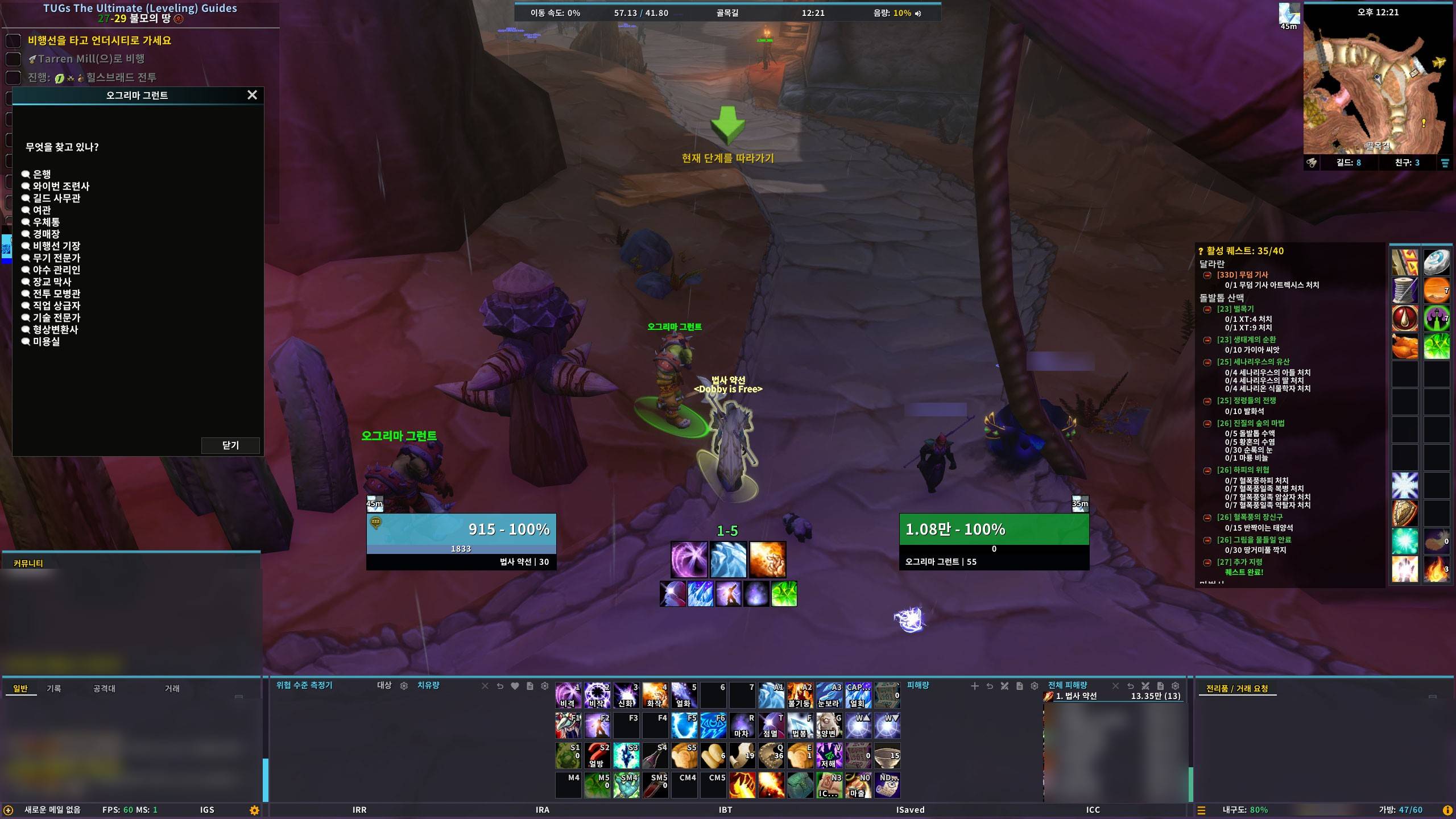 Gossip window / 대화 창
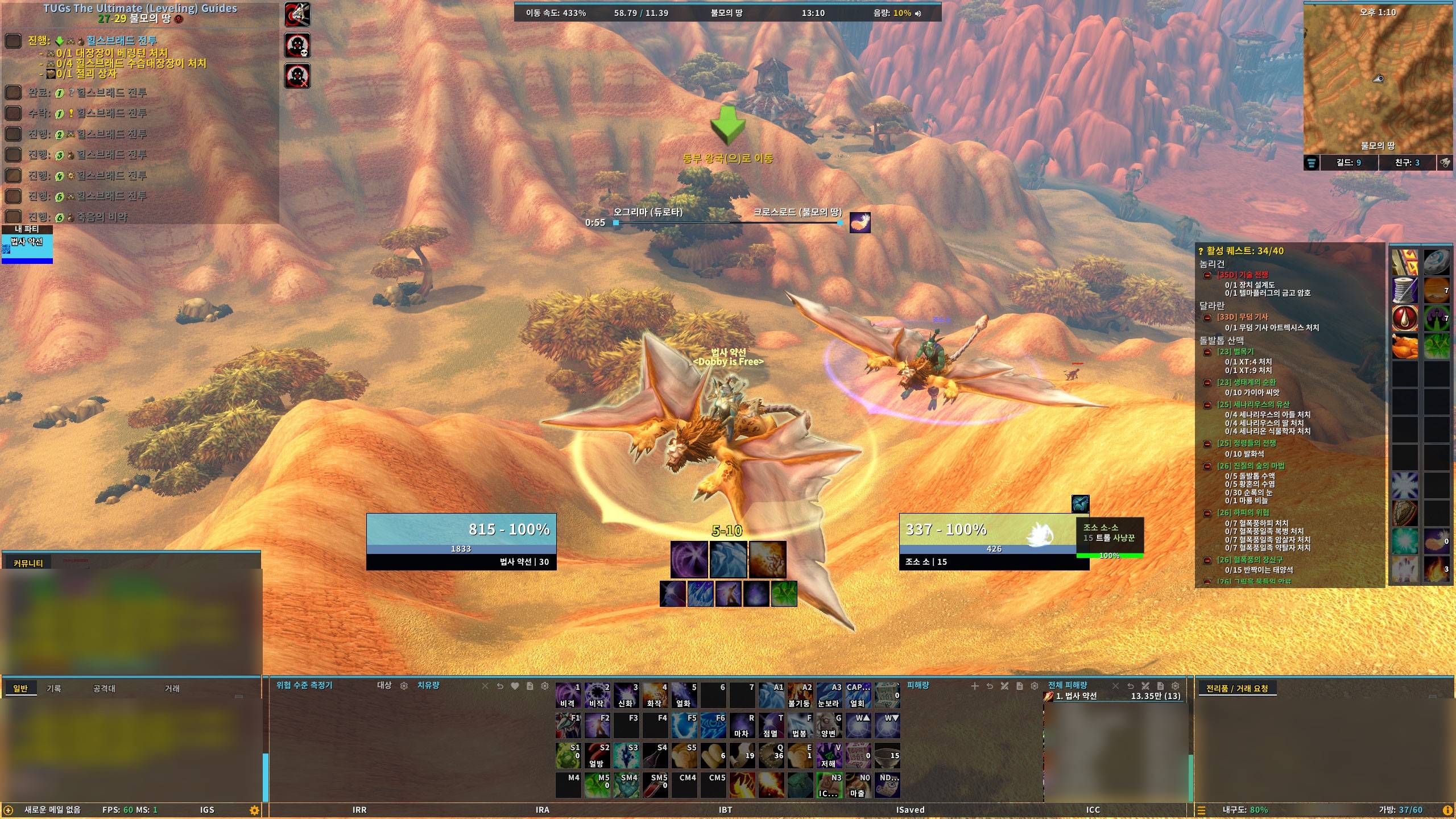 Flight timer / 비행 시간 표시
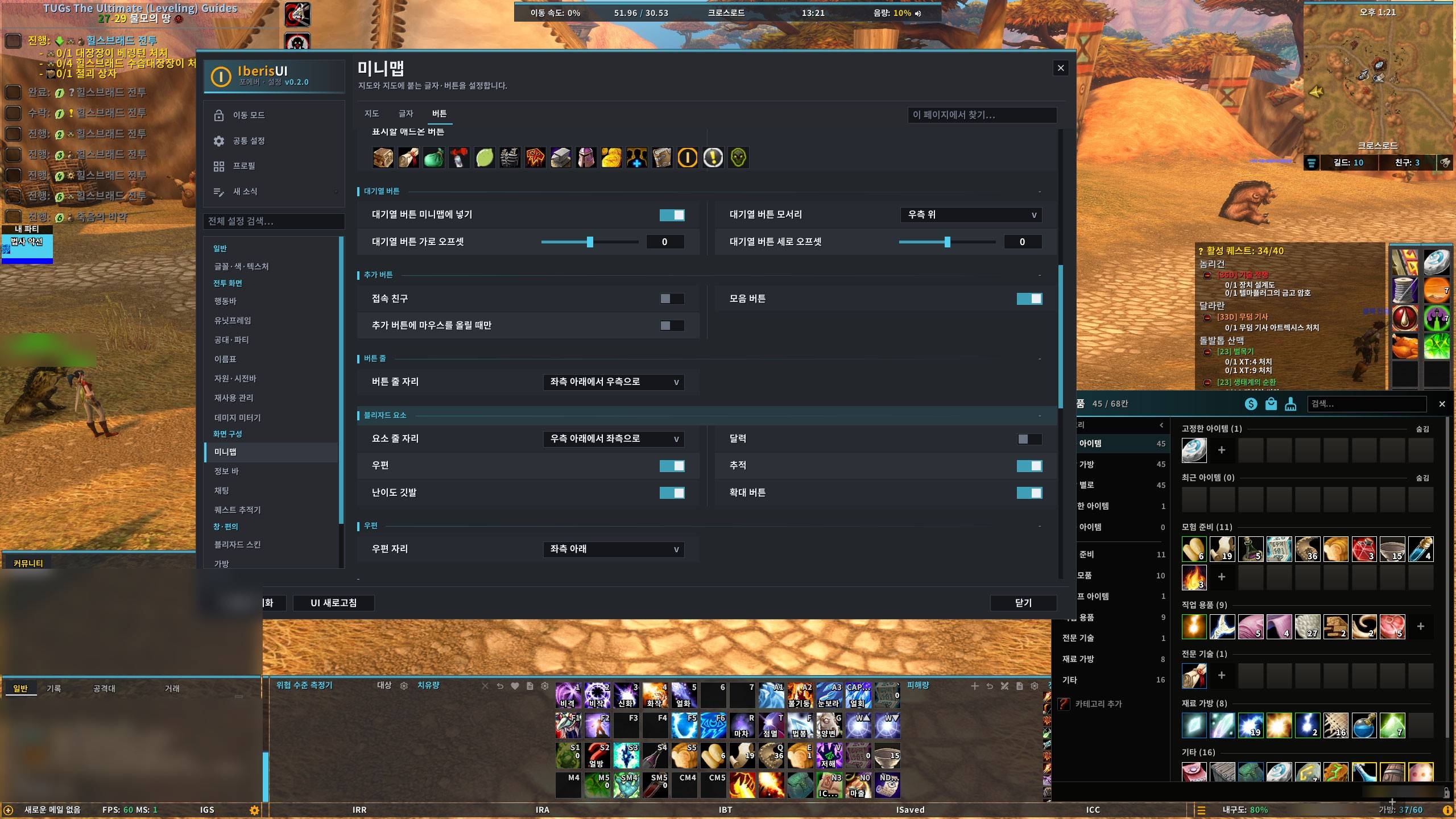 Options window / 설정창
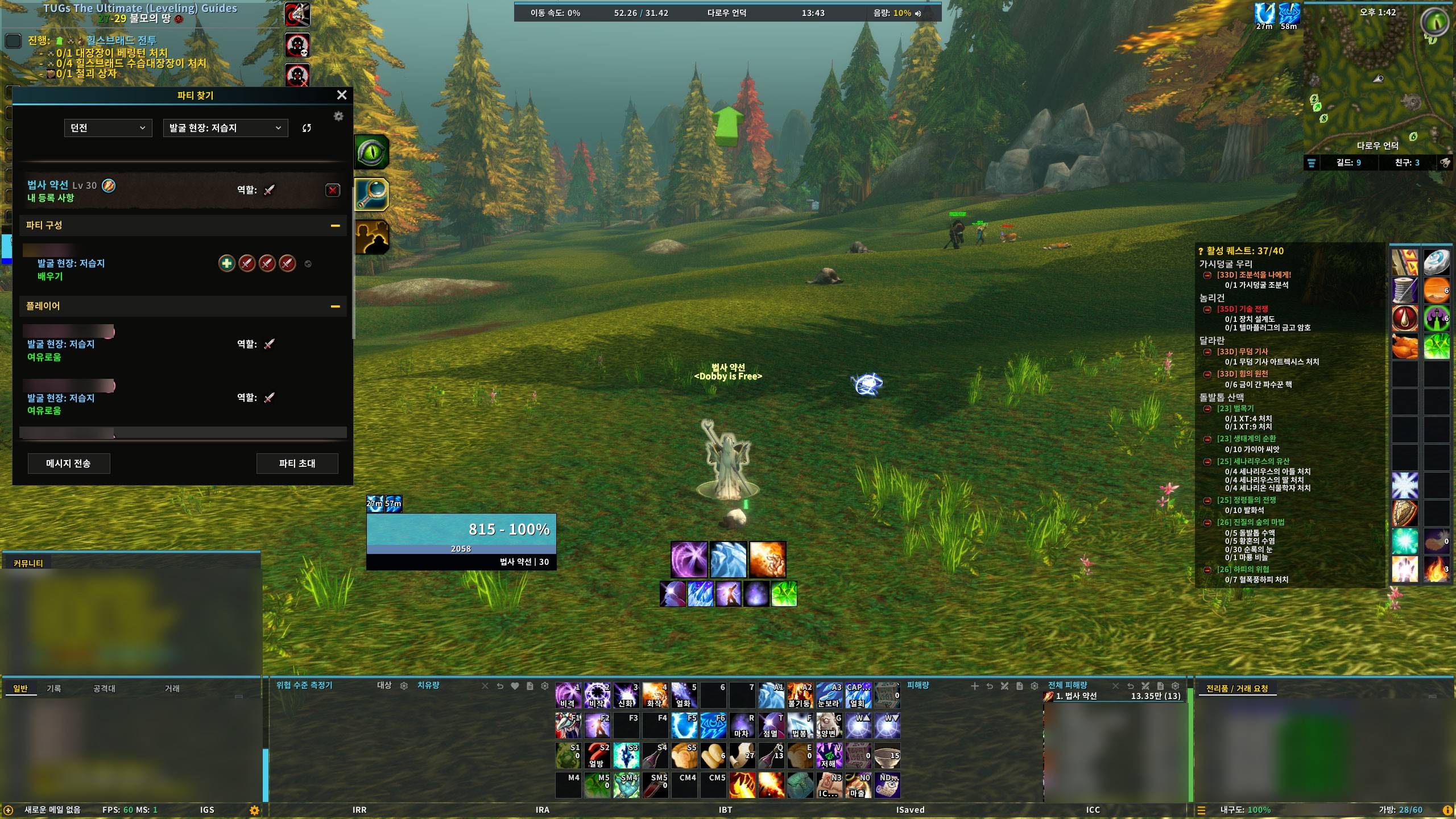 Group finder / 파티 찾기
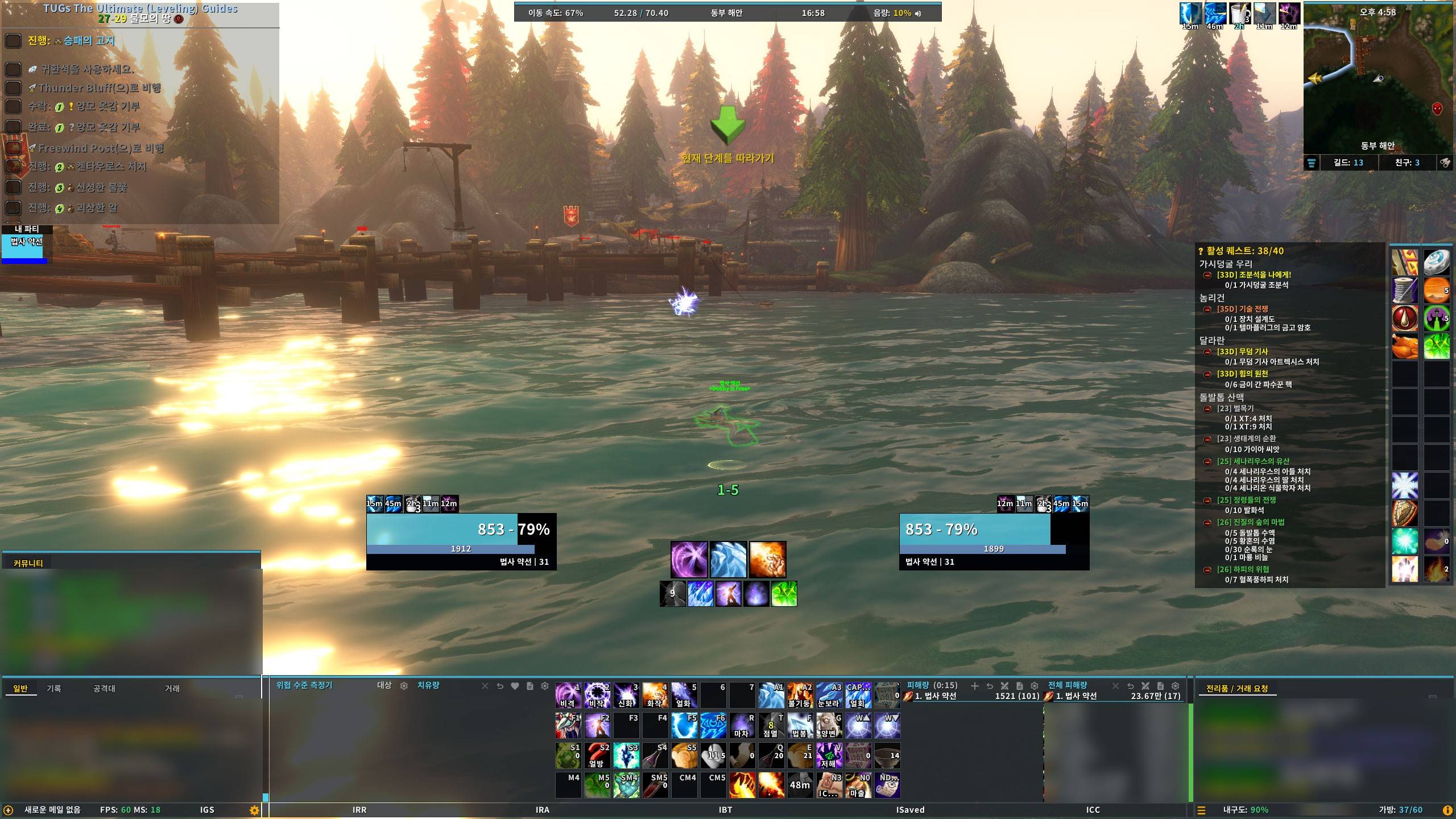 Main screen / 기본 화면
License
All Rights Reserved.
You may freely use IberisUI and modify it for personal use. Redistributing or republishing any part of this addon is not permitted; it is shared only through the author's own pages.
Bundled libraries (LibStub, CallbackHandler-1.0, LibDataBroker-1.1, LibSharedMedia-3.0) are governed by their own licenses.
🚧 시험판 (v0.3.6)
IberisUI Forever 는 WoW Forever(1.60.1) 클라이언트에서만 동작합니다. 시험판이라 오류가 남아 있을 수 있습니다. BugSack 같은 오류 기록 애드온으로 내용을 남겨 블로그 글 댓글로 알려 주시면 확인합니다(링크는 맨 아래).
⚠️ 새 UI 를 설치하기 전에는 WTF 폴더를 백업하는 습관을 권장합니다. ^^
인사말
이베리스 UI 공유해드리고 있는 서약선이라고 합니다.
이번 판은 와우 포에버 전용으로 새로 만든 IberisUI Forever 입니다. 다른 UI 애드온 없이 이것 하나만 설치하면 화면 전체가 한 번에 맞춰집니다. 설정은 창 하나에서 모두 바꾸고, 화면 배치는 이동 모드에서 끌어서 옮깁니다.
들어 있는 기능
| 분류 | 내용 |
|---|---|
| 유닛프레임 | 플레이어·대상·대상의 대상·주시·소환수·우두머리, 시전바·오라·글자 칸 |
| 파티·공격대 | 파티·공격대 창, 역할 아이콘, 준비 확인·버프 확인 |
| 이름표 | 체력바·시전바, 대상 표시, 강화·약화 효과, 위협 색 |
| 행동바 | 행동바 10개, 소환수·태세 바, 단축키 지정 |
| 자원 바 | 체력·자원·연계 점수, 시전바, 전역 재사용 대기시간, 자동 공격 타이머, 토템 |
| 재사용 대기시간 | 재사용 대기시간 관리 |
| 가방 | 분류별 보기, 은행, 잡동사니 판매, 검색, 정렬 |
| 미니맵·정보 바 | 미니맵 버튼, 시계·골드·평판 등 |
| 채팅·퀘스트·미터 | 채팅 창, 퀘스트 추적기, 피해량 측정기 |
| 블리자드 창 | 기본 창 외형 정리 |
| 편의 기능 | 자동 수리·판매, 상자 자동 열기, 전투·거리 알림, 창 옮기기 등 |
| 커서 | 커서 모양·꼬리 효과(별도 애드온 IberisUI_CursorFX) |
설치
CurseForge App (추천)
- CurseForge App 에서
IberisUI Forever검색 → 설치
수동 설치
- Files 탭에서 zip 을 다운로드
_forever_/Interface/AddOns/에 압축 해제- 게임 재시작 (처음 설치할 때는 리로드로는 부족합니다)
처음 접속하면
이베리스 프리셋을 적용할지 묻는 창이 뜹니다.
- 제작자가 쓰는 배치·설정으로 맞춰집니다.
- Default 프로필을 덮지 않고 「이베리스」 프로필을 새로 만듭니다. 설치된 외부 애드온(Questie·AtlasLoot·RareScanner·Skillet 등)도 같습니다.
- 설정창의 프로필 → 프리셋에서 되돌릴 수 있습니다. 한 번 적용한 캐릭터는 다시 묻지 않습니다.
명령어
| 명령어 | 내용 |
|---|---|
/iuicfg |
설정창 열기 |
/unlock |
이동 모드(끌어서 프레임 옮기기) |
/rl |
UI 다시 불러오기 |
주의사항
- 같은 일을 하는 다른 애드온(가방·이름표·미니맵·채팅)이 함께 켜져 있으면 어느 쪽을 쓸지 고르는 창이 뜹니다.
- 버그 리포트 시에는 IberisUI 만 켜고 재현해 주시면 원인 파악이 빠릅니다.
- 화면 글은 한국어와 영어를 지원합니다.
- 퀘스트 도우미(Questie)·레벨링 가이드(Guidelime)는 들어 있지 않습니다. 스크린샷의 퀘스트 표시·가이드 창이 필요하면 따로 설치하면 됩니다. 설치되어 있으면 프리셋이 맞춰 줍니다.
- 화면이 어색하게 보이면
/reload를 한 번 해 보시고, 그래도 같으면 스크린샷과 함께 블로그 글 댓글로 남겨 주시면 됩니다(링크는 맨 아래).
최근 패치 내역
v0.3.6 (2026-11-15)
- 새 기능: 전리품 피드 표시 층 설정(배경·낮음·중간·높음, 포에버 기능 › 전리품 피드).
- 새 기능: 사냥꾼은 토템 바가 기본으로 켜져 매 소환 아이콘과 남은 시간이 보입니다. 자리는 이동 모드에서 옮깁니다.
- 고친 것: 토템 바를 켜도 사냥꾼 매 소환 아이콘이 보이지 않던 문제, 가방을 스크롤하면 「+」 칸이 창 밖에 그려지던 문제, 아이템을 쓴 뒤 빈칸이 몇 초 뒤에야 당겨지던 문제, 「디버프를 버프에 붙이기」 를 켠 프레임에서 버프·디버프 첫 칸이 겹치던 문제, 적 버프 「해제 가능만」 이 내가 풀 수 없는 버프까지 보여 주던 문제, 레벨업 뒤 채팅창 자리가 밀리던 문제, 사각 칸의 재사용 그림이 테두리 안쪽에 틈을 남기던 문제.
- 오류가 잡히면 오류 알림 버튼이 미니맵 버튼 모음 밖에 따로 보입니다.
v0.3.5 (2026-11-14)
- 새 기능: 소환수·대상의 대상·주시 대상의 대상이 주시 프레임과 같은 구성(생명력 바 + 아래 자원 바)이 됩니다.
- 고친 것: 이베리스 프리셋에서 대상의 대상·주시 대상의 대상이 화면 밖에 놓여 보이지 않던 문제, 색맹 모드에서 가방 금액의 금 단위 글자가 빠지던 문제.
- 정보 바 금액을 가방과 같은 형식(은·동이 0이어도 표시)으로 맞췄습니다.
v0.3.4 (2026-11-14)
- 새 기능: 공대·파티 버프 확인에 성기사 축복(힘·지혜·왕)과 구원의 축복이 들어갔습니다.
- 고친 것: 파티 찾기에서 분류를 고르면 목록이 계속 로딩만 되던 문제, 게임 기본 추적 바(지휘의 문장 등)가 보이지 않던 문제, 위협 창 메뉴에 마우스를 올리면 나던 오류.
- 새 소식에 이 애드온의 버전별 변경 사항이 나옵니다.
- 데미지 미터기 창 이름을 피해량·치유량·전체 피해량으로 바꿨습니다.
v0.3.3 (2026-11-14)
- 새 기능: 버프·디버프 줄을 이동 모드에서 옮길 수 있습니다. 한 줄 아이콘 수·최대 줄 수·정렬(오른쪽·왼쪽)도 바꿀 수 있습니다(공통 설정 › 버프·디버프 줄).
- 새 기능: 하단 행동바 패널 너비 설정(공통 설정 › 하단 배경 패널).
- 고친 것: 「누르고 있으면 계속 시전」 을 켠 채 단축키로 추출·마법부여를 쓴 뒤 가방 클릭이 씹히던 문제, 매크로 창을 처음 열 때 나던 오류.
v0.3.2 (2026-11-13)
- 새 기능: 채집 표시. 광맥·약초·퀘스트 물체에 다가가면 금빛 표시가 뜹니다(기본 끔, 포에버 기능 › 채집 표시, 투명도 조절).
- 새 기능: 하단 배경 패널의 너비·높이 설정, 왼쪽 위 패널 켜고 끄기(공통 설정 › 하단 배경 패널).
- 새 기능: 행동바 배경의 직업색 띠를 바마다 켜고 끌 수 있습니다.
- 고친 것: 꺼 둔 행동바의 배경이 남던 문제, 가방을 닫아도 가방 칸 줄이 남던 문제, 수리 알림의 은화 단위.
- 기본 프리셋이 채팅 키워드 알림을 켜지 않습니다.
v0.3.1 (2026-11-12)
- 기본 프리셋 수정.
v0.3.0 (2026-11-10)
- 유닛프레임·파티·공격대 창·재사용 대기시간 관리·블리자드 창 외형을 새로 정리했습니다.
- 새 기능: 특성·Gear Score 가 나오는 툴팁, 공격대 창·툴팁 이름 형식, 대상 시전바 불꽃.
- 지원되는 언어는 한국어·영어입니다.
- 가방 통합 정렬·상인 자동 판매, 피해량 측정기·공격대·툴팁 등 여러 오류를 고쳤습니다.
v0.2.0 (2026-11-09)
- 첫 공개 시험판입니다. WoW Forever(1.60.1) 전용입니다.
- 행동바·이름표·자원 바·가방·편의 기능을 새로 정리했습니다.
크레딧
화면 배치는 오리지널 시절 데빌 UI 하단형에서, 외형은 ElvUI·BenikUI 에서 영감을 받았습니다.
라이선스
All Rights Reserved.
IberisUI 를 자유롭게 사용하시고 사적인 용도의 수정은 가능합니다. 다만 본 애드온의 일부 또는 전체를 재배포·재게시하는 것은 허용되지 않습니다. 배포는 제작자가 직접 운영하는 곳에서만 합니다.
함께 들어 있는 라이브러리(LibStub·CallbackHandler-1.0·LibDataBroker-1.1·LibSharedMedia-3.0)는 각자의 라이선스를 따릅니다.
Questions / 문의: Blog post (comments) / 블로그 글 댓글 · Discord discord.gg/d8dyPQpVxN (qna) · YouTube / Twitch: 이베리스
IberisUI Forever Team