IberisGearSet
- By
Gear sets with dual-spec switching: build sets on a paper-doll layout, equip in one click, link a set to each talent spec.
IberisGearSet_1_crop.png
IberisGearSet_2_crop.png
Description
Gear sets with dual-spec switching — build sets on a paper-doll layout, equip in one click, link a set to each talent spec.
장비 세트 저장·착용과 특성 전환 연동 — 캐릭터창 모양 칸에서 세트를 짜고 한 번에 갈아입고, 특성마다 세트를 연결합니다.
Greetings
Hi, I'm 서약선 (Iberis), the author of IberisUI. This addon is part of the Iberis addon series I use on the 20th Anniversary TBC server — built for my own raids and guild first, so Korean is the default language and the English UI is shown automatically on non-Korean clients.
Features
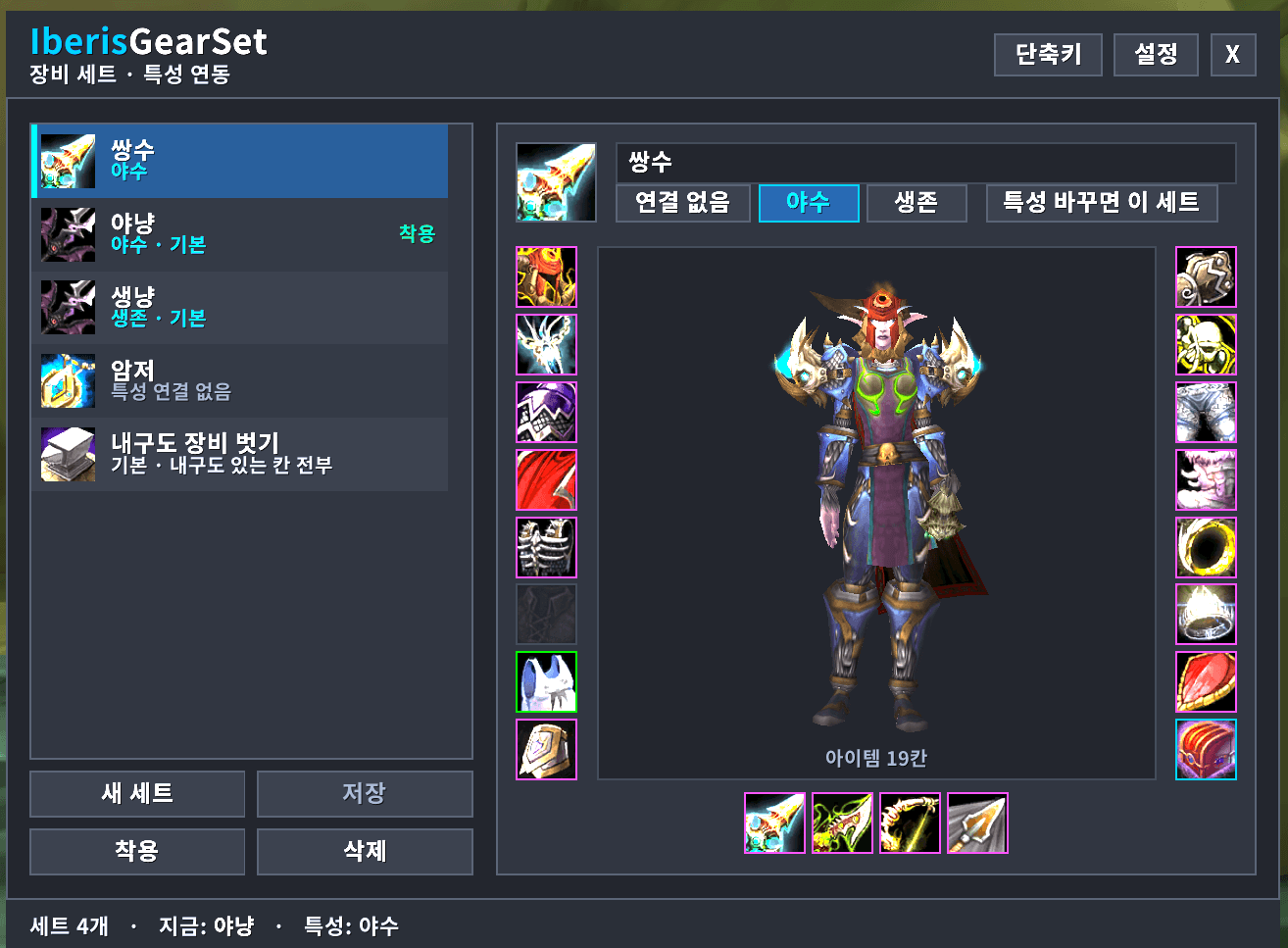
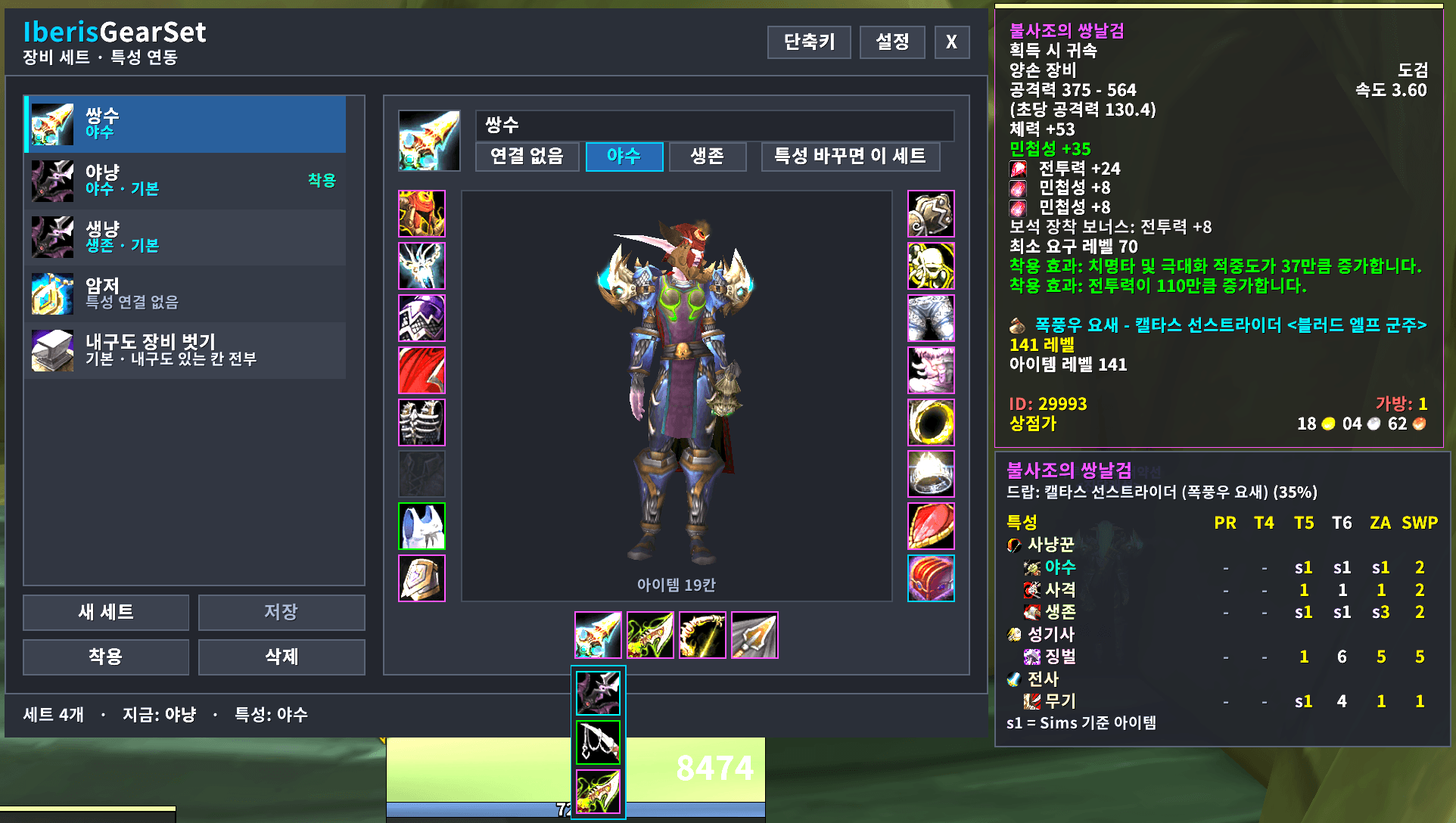
- Set window — build a set on a paper-doll layout: click a slot to add the equipped item, right-click to leave it empty, hover for a swap list of everything in your bags that fits. 3D preview of the set.
- Draft & Save — slot edits are kept as a draft until you press Save; the saved set is what Equip uses.
- Equip in one go — all slots are swapped in a single pass (rings/trinkets, two-hand ↔ main/off hand handled).
- Talent link — link a set to spec 1 / spec 2; switching spec equips that set automatically.
- Unequip durability gear / Re-equip — strip everything with durability before a corpse run, put it back with one click.
- Bank — deposit set items into the bank or pull them out while the bank is open.
- Keybinds — built-in bind mode: press Keybind, hover a set row, press a key (mouse 3/4/5 too). No other addon needed.
- Character frame [IGS] button, minimap quick menu, LDB data text
IGS: <set>. - ItemRack import — sets are imported once per character from your own ItemRack saved variables (enable ItemRack for that login, then it can be disabled).
Commands
/igs— open the window/igs <set name>— equip a set/igs strip//igs wear— unequip / re-equip durability gear/igs config— settings
Requirements
- No dependencies. ItemRack is only needed once if you want to import its sets.
Notes
- If ItemRack stays enabled, spec-based auto-equip is paused (both addons would swap gear twice). Disable ItemRack after the import.
- Newly bound keys are saved to the game's key bindings (per character/account binding set).
- Made and tested on TBC Anniversary (Interface 20506). Other clients are not supported.
- Always back up your
WTFfolder before trying a new addon. - Bug reports and questions: Discord (link at the bottom).
Iberis Addon Series
All addons I use on TBC Anniversary, distributed on CurseForge:
- IberisUI — ElvUI/BenikUI one-click UI installer
- IberisGearSet — Gear sets with dual-spec switching ← this page
- IberisSaved — Instance lockouts, gold and currencies of all characters
- IberisBisTracker — BiS lists with owned status, farming, gems, enchants and talents
- IberisRaidRoster — Raid roster by party with class specializations
- IberisCraftCost — Profession levelling cost from auction house prices
- IberisBloodSound — Bloodlust / Heroism music and icon
Credits / Data Sources
- Built from scratch. ItemRack (the addon this replaces for the author) is not included; only your own saved sets are read.
License
All Rights Reserved. You may use the addon freely and modify it for personal use. Redistributing or republishing any part of it outside the official CurseForge page is not permitted. Bundled libraries (LibStub, CallbackHandler, LibDataBroker, LibDBIcon) keep their own licenses.
인사말
이베리스 UI 공유해드리고 있는 서약선 이라고 합니다. 이 애드온은 제가 20주년 불성기념서버에서 직접 쓰는 이베리스 애드온 시리즈 중 하나입니다. 제 공대와 길드용으로 먼저 만든 것이라 한국어가 기본이고, 영문 클라에서는 영문 UI 가 자동으로 뜹니다.
기능
- 세트 창 — 캐릭터창 모양 칸에서 세트 구성: 칸 클릭 = 지금 입은 것 넣기, 우클릭 = 비워 두기, 마우스 올리면 가방의 맞는 아이템 교체 목록. 3D 미리보기.
- 초안 → 저장 — 칸을 고친 건 초안으로 두고 [저장]을 눌러야 세트에 들어갑니다. [착용]은 저장된 세트를 입습니다.
- 한 번에 갈아입기 — 모든 칸을 한 차례에 교체(반지·장신구, 양손 ↔ 주/보조 무기 처리).
- 특성 연결 — 세트를 1특성/2특성에 연결하면 특성을 바꿀 때 그 세트를 자동 착용.
- 내구도 장비 벗기 / 다시 입기 — 시체 달리기 전에 내구도 있는 장비를 전부 벗고, 한 번에 되돌립니다.
- 은행 — 은행이 열려 있을 때 세트 아이템 넣기·꺼내기.
- 단축키 — 애드온 자체 지정 모드: [단축키] 누르고 세트 줄에 마우스 올린 채 키(마우스 3/4/5 포함)를 누르면 끝. 다른 애드온 불필요.
- 캐릭터창 [IGS] 단추, 미니맵 빠른 메뉴, 데이터텍스트
IGS: 세트이름. - 아이템랙 가져오기 — 캐릭터마다 처음 한 번 아이템랙 저장값에서 세트를 가져옵니다(그 접속 때만 아이템랙을 켜 두고, 이후엔 꺼도 됨).
명령어
/igs,/장비세트— 창 열기/igs 세트이름— 세트 입기/igs 벗기//igs 입기— 내구도 장비 벗기 / 다시 입기/igs 설정— 설정
요구사항
- 필수 애드온 없음. 아이템랙은 세트를 가져올 때만 한 번 필요합니다.
주의사항
- 아이템랙을 계속 켜 두면 특성 자동 착용을 쉽니다(둘 다 갈아입혀 두 번 바뀜). 가져오기가 끝나면 아이템랙을 끄세요.
- 지정한 단축키는 게임 단축키 설정(캐릭터/계정 단축키 세트)에 저장됩니다.
- 불성 20주년 기념서버(Interface 20506)에서 만들고 테스트했습니다. 다른 클라이언트는 지원하지 않습니다.
- 새 애드온을 쓰기 전에는
WTF폴더를 백업하는 습관을 가지세요. - 버그 리포트·질문은 디스코드(아래 링크)로.
이베리스 애드온 시리즈
불성 기념서버에서 제가 쓰는 애드온 전부, CurseForge 배포:
- IberisUI — ElvUI/BenikUI 원클릭 UI 설치
- IberisGearSet — 장비 세트·특성 전환 연동 ← 이 페이지
- IberisSaved — 캐릭터별 귀속·골드·휘장 한눈에
- IberisBisTracker — BiS 목록·보유·파밍·보석/마부·특성
- IberisRaidRoster — 공대원 명단·파티 배치·신청 가져오기
- IberisCraftCost — 전문기술 올리기 비용 계산
- IberisBloodSound — 블러드 브금·아이콘
크레딧 / 데이터 출처
- 직접 만든 애드온입니다. 아이템랙 코드는 포함하지 않으며, 사용자 본인의 저장값만 읽습니다.
라이선스
All Rights Reserved. 자유롭게 사용하시고 사적인 용도의 수정은 가능합니다. 다만 애드온의 일부 또는 전체를 공식 CurseForge 페이지 외의 곳에 재배포·재게시하는 것은 허용되지 않습니다. 동봉 라이브러리(LibStub, CallbackHandler, LibDataBroker, LibDBIcon)는 각자의 라이선스를 따릅니다.
Links / 링크
- CurseForge: https://www.curseforge.com/wow/addons/iberisgearset
- Discord (Q&A): https://discord.gg/d8dyPQpVxN
The IberisGearSet Team