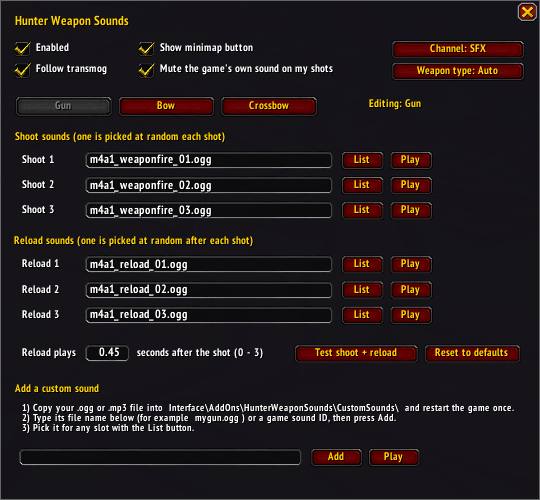
HWS Menu
Description
Hunter Weapon Sounds
The game’s own weapon sounds are muted so you only hear the addon’s sounds, and that also quiets other players’ weapons.
Features:
- Gun, Bow and Crossbow each have their own 3 shoot sounds and 3 reload sounds.
- Random variation: one of the 3 sounds is picked each shot and never repeats back to back. The reload sound plays a moment after the shot.
- Stock sounds muted: the game’s own gun, bow and crossbow sounds are muted so you only hear the new ones. You can switch this off.
- In-game menu: change any sound slot, set the reload timing per weapon, preview sounds, and reset a weapon to its defaults.
- Your own sounds: add .ogg or .mp3 files, a game sound ID, or a file path.
- Transmog support: the sounds match how your weapon looks, so a bow transmogged to look like a gun plays gun sounds.
- Manual override: force Gun, Bow or Crossbow sounds if detection is ever wrong.
- Minimap button: open the menu or turn the addon on or off from the minimap. You can hide the button in the menu.
Opening the menu:
- Type
/hwsto open the menu. - Go to
Options → AddOns → Hunter Weapon Sounds - Click the minimap button (left-click opens the menu, right-click turns the addon on or off, drag to move it
Using the menu:
- Enabled: turns the addon on or off. Off restores the game’s own sounds.
- Mute the game’s own sounds: stops the stock gun, bow and crossbow sounds from playing alongside yours.
- Follow transmog: uses the sounds of what the weapon looks like instead of the real item.
- Show minimap button: shows or hides the button.
- Channel: the sound channel (SFX, Master, Ambience or Dialog). SFX follows your Sound Effects volume.
- Weapon type: Auto detects your weapon. Click to force Gun, Bow or Crossbow.
- Gun / Bow / Crossbow tabs: choose which weapon’s sounds you are editing.
- Shoot and reload slots: each of the 3 slots can be changed with the List button or by typing a name and pressing Enter. Play previews it, and an empty slot is silent.
- Reload plays … seconds after the shot: sets how long after the shot the reload sound plays.
- Test shoot + reload: plays the full pair for the selected weapon.
- Reset to defaults: restores that weapon’s original sounds.
Adding your own sounds:
- Copy your
.oggor.mp3file intoHunterWeaponSounds\CustomSounds\. - Restart the game fully. WoW only sees new files when it starts, so /reload is not enough.
- In the menu, type the file name under Add a custom sound and press Add.
- Pick it for any slot with the List button. Custom sounds can be removed from the list with the red
X.
You can also type a game sound ID (a number) or a full file path instead of a file name.
Using the menu:
| Syntax | Output |
|---|---|
| /hws | Open the menu |
| /hws minimap | Show or hide the minimap button |
| /hws options | Open the Options → AddOns page |
Hunter Weapon Sounds Team
Owner