House Rules
- By
MainScreen_Wide.png
Description
House Rules
Run a gold-roll for your guild without a spreadsheet, without losing track of who joined, and without arguing afterwards about who owes what.
Set a join keyword, let people type it in chat, close entries, and House Rules handles the roster, the rolls, the payouts and the ledger. Eight game modes, a live board that re-sorts as results land, and a permanent record of every game you have run.
Written from scratch — no Ace libraries, no external dependencies.
Signups that hold up under a rush
The moment someone types your keyword, they are seated. The roster is updated synchronously inside the chat event itself, so a burst of ten people typing in the same second is ten people in their seats — signups do not depend on addon comms, throttles, or anything round-tripping through the server.
Everything else about the roster is built so nobody has to ask whether they got in:
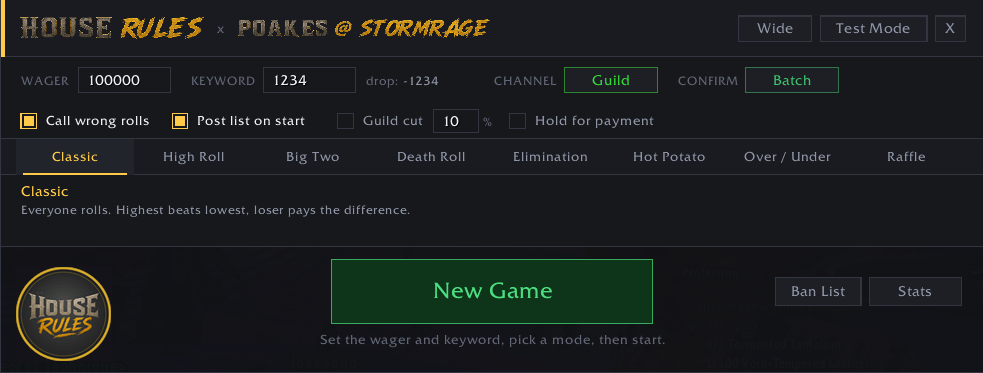
- Join confirmation, three ways. Batch (default) posts one public line naming everyone who joined in the last few seconds —
IN (7): Bob, Sue, Tim. Whisper confirms each joiner privately. Off stays quiet until you post the list. - Re-typing the keyword answers
You're already in — seat 4 of 9instead of doing nothing, so checking your seat is always safe. - Post List dumps the numbered roster to chat with a last call for anyone missing.
- Add by name seats someone manually, and right-click a row removes them while entries are open.
Every outbound line runs through a single priority queue — game flow first, then roster and confirmations, then callouts, then whispers. A signup rush delays whispers rather than losing them to the chat throttle, and "everyone roll now" never gets stuck behind twenty confirmations. If a backlog builds, the window footer shows you how many lines are queued.
One keyword, nothing else to configure
You set one join keyword. The drop word follows from it automatically:
| Keyword | Drop word |
|---|---|
1 |
-1 |
in |
out |
-<keyword> is always accepted as well, so anyone expecting the minus convention is never turned away. Multi-word keywords work (deal me in), and Match mode lets you choose between requiring the exact line or matching the keyword as a whole word anywhere in it — so im in counts for in, but spin does not.
Eight game modes
| Mode | Rules |
|---|---|
| Classic | Everyone rolls. Highest beats lowest, loser pays the difference. |
| High Roll | Highest roll wins; everyone else pays the wager. |
| Death Roll | 1v1. The range shrinks to the last roll. Roll a 1 and you pay. |
| Elimination | Lowest roll is out each round. The final two settle it Death Roll style. |
| Hot Potato | Five rounds of 1–100. Lowest holds it; the last holder pays the table. |
| Over / Under | Call over or under 50, host rolls 1–100. Exactly 50 and the house sweeps. |
| Big Two | Coin flip on /roll 2. |
| Raffle | One ticket each; the host's roll draws the winner. |
Ties re-roll automatically among the tied players only.
A board that keeps up
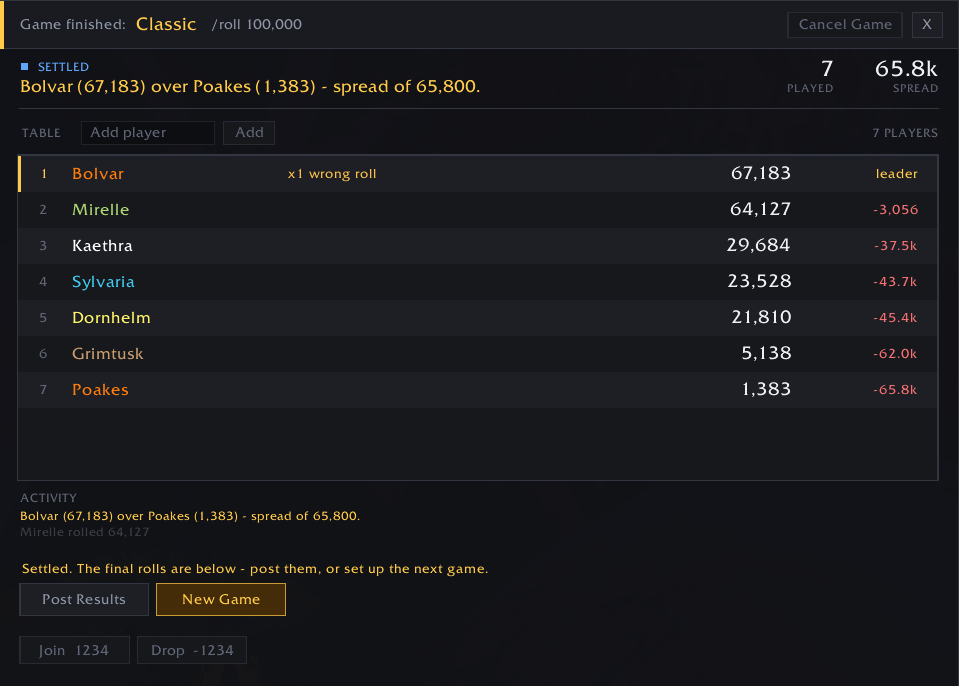
Once rolls open, the roster becomes a leaderboard that re-sorts itself as results come in:
 1   Poakes         147,221    leader
 2   Sue            133,004    -14.2k
 3   Tim             98,110    -49.1k
 4   Ann                       x2 wrong rolls (1-15k)
 5   Joe                       waiting to roll
Rolled players sort high to low; anyone still pending sits underneath in seat order. The delta column is the gap to the leader, and the ribbon carries a live SPREAD readout — in Classic, that number is the payout.
Names are class-coloured on the board, in both ledgers and in the history summaries, resolved from whatever source is available and then remembered — so people stay coloured even when they join by keyword from outside your group.
Wrong rolls get called out
A player who rolls the wrong amount usually has no idea. House Rules checks the range every mode expects and, when it is wrong:
- Posts a callout —
Poakes rolled 1-15,000 — that doesn't count. Re-roll: /roll 150,000 - Marks them on the board with a strike count
- Counts it in the session stats
Throttled per player, so one person spamming cannot flood the channel. In Death Roll the same mechanism produces it's Sue's turn — /roll 4,213.
A ledger that remembers
- Session — resets each login. Games, players, gold moved, bad rolls caught.
- Lifetime — net gold, W/L, games played, per-mode splits.
- History — the last 200 games with mode, headcount and result.
Ran a night with an outside group and want the ledger back to just your guild? Hover any row and click the red ×, or use Purge Outsiders to drop everyone not on your guild roster in one pass — it lists exactly who goes before you commit. Removing a player deletes their totals and scrubs them from every recorded game.
Guild cut is optional and off by default. Tick it, set a percent, and the cut comes out of the winner's take while the loser still owes the full amount. The running total is tracked separately as gold owed to the guild bank, and the table is told the percentage when the game opens.
Coming from CrossGambling
If you have been running CrossGambling, Import CG brings your existing ledger across: net gold per player, per-mode splits, the house rake, bans, and past games rebuilt from the audit log. It shows you exactly what it found and asks before it commits.
CrossGambling does not store win, loss or game counts, so those columns start at zero for imported players rather than being invented. Two notes: CrossGambling has to be enabled for the import to see its data (WoW only loads saved variables for enabled addons), and the import records that it ran so a second pass cannot double your totals.
Test mode
Tick Test mode and a bench opens beside the window. Nothing reaches the server while it is on — every outbound line is echoed to your own chat frame instead, addon comms are a no-op, and rolls are simulated. You can try the whole thing out inside a live guild without anyone seeing a word of it.
Run Full Game plays a mode end to end hands-off. You can also seat bots, auto-play rolls, or force a tie. Bots optionally misbehave — rolling wrong amounts, rolling twice, or stalling — so the callouts and edge cases actually get exercised.
Slash commands
/hr                       open or close the table
/hr keyword <word>        set the join keyword
/hr drop <word> | auto    override the drop word, or derive it again
/hr wager <amount>        set the roll amount
/hr channel say|party|raid|guild
/hr mode <name>           classic, highroll, deathroll, elimination,
                          hotpotato, overunder, raffle, bigtwo
/hr start                 open the table
/hr roster                post the player list to chat
/hr rolls                 close entries, open rolling
/hr left                  post who still has to roll
/hr cancel                abandon the game
/hr ban <name> | unban <name> | bans
/hr import [force]        bring a CrossGambling ledger across
/hr forget <name>         delete one player from the ledger
/hr purgeguild            delete everyone not on your guild roster
/hr stats | session | history | resetstats
/hr minimap
/hr test                  toggle test mode
Making it yours
Drop a 256×256 .tga or .blp in the addon's Media folder and /hr logo <file> puts it on the window badge and the minimap button. Drop a .ttf or .otf in Fonts and /hr font <file> restyles the header wordmark. Both folders contain a README with the format rules — WoW is fussy about texture dimensions and needs a full client restart to see new files.
Notes
- Channel resolution happens at send time. A "Raid" game run in a party posts to party, and in an LFG group posts to instance chat, rather than silently sending nothing.
- Works outside enUS. The roll parser is built from the client's own roll-result string rather than a hardcoded English one.
- Spectators running House Rules see the host's table update live.
Bugs and suggestions
Bug reports and feature requests go to the House Rules issue tracker on GitHub.
If you are reporting a bug, the two things that help most are your addon version and — if a red Lua error appeared — the full error text from BugSack. There is a short checklist on the tracker's front page covering the handful of things that look like bugs but are not.
The House Rules Team