Hourstone – Azeroth Hours
- By
Track character playtime and guilds, plus Retail keystones, weekly Mythic+ best and Great Vault progress in a compact window.
Hourstone – Azeroth Hours
Your characters. Your time. See your World of Warcraft characters' total /played time and your current session in one compact window. In Retail, check keystones, your weekly Mythic+ best and Great Vault slots in the Progress tab. Hourstone works on its own: no other addon, desktop app or external account is required.
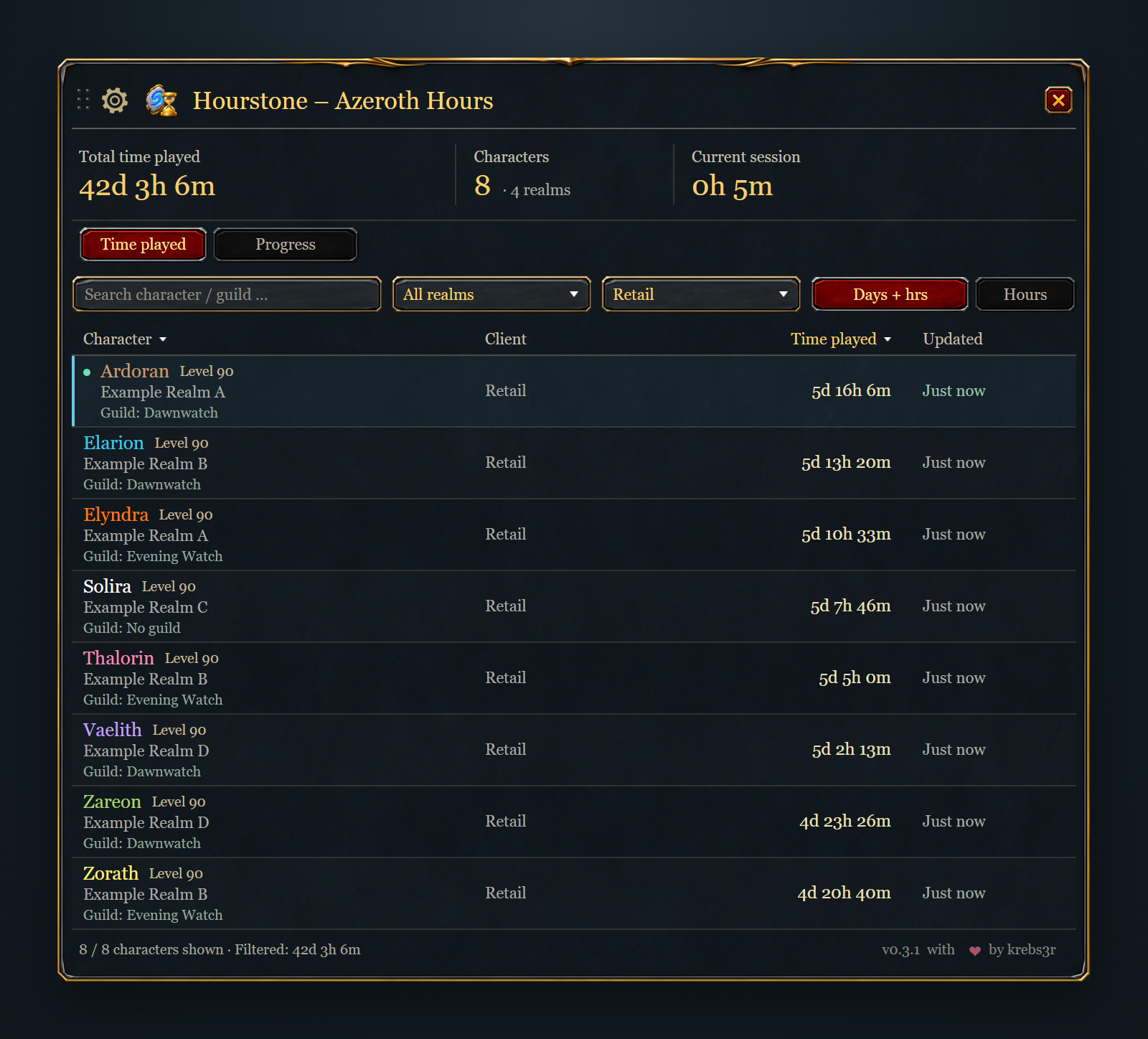
Rendered Hourstone character overview with realm and client filters and example characters.
Your character overview
- Character name, class color, level, realm and last recorded guild.
- A separate client column beside playtime and the last update.
- Search by character or guild, filter by realm and client, and sort the list.
- Total and filtered playtime, displayed as decimal hours or days, hours and minutes.
- Retail Time played / Progress tabs for playtime and weekly progress in the same window.
- A movable window with 65–200% scaling in 5% steps and an optional draggable minimap button.
- German and English interfaces.
Open with /hourstone or /azerothhours. Use the gear button for display settings and hover a character to see its full recorded details. Every character appears after its first login with Hourstone enabled. The server's total includes time played before installation; offline time is excluded. WoW saves the data per installation and account when you log out or use /reload. Characters you have not visited with Hourstone cannot be discovered automatically.
Drag the title bar to move the window; its position is saved when you release it. Version 0.3.1 fixes the window jumping back during a drag. Larger size settings show fewer rows, with scrolling to reach every character. The window automatically fits the screen if its width or minimum height would otherwise be too large.
Guild information updates when you play the character. No guild means the character was confirmed to be guildless; Not yet recorded means Hourstone has not recorded its guild status yet.
Right-click a character and confirm Delete to exclude the entry from the overview and totals. Your WoW character and saved playtime remain intact. Under the gear menu, choose Deleted characters and right-click an entry to restore it. A new character login also restores a deletion already known to the addon; /reload alone does not.
Retail: keystones and Great Vault
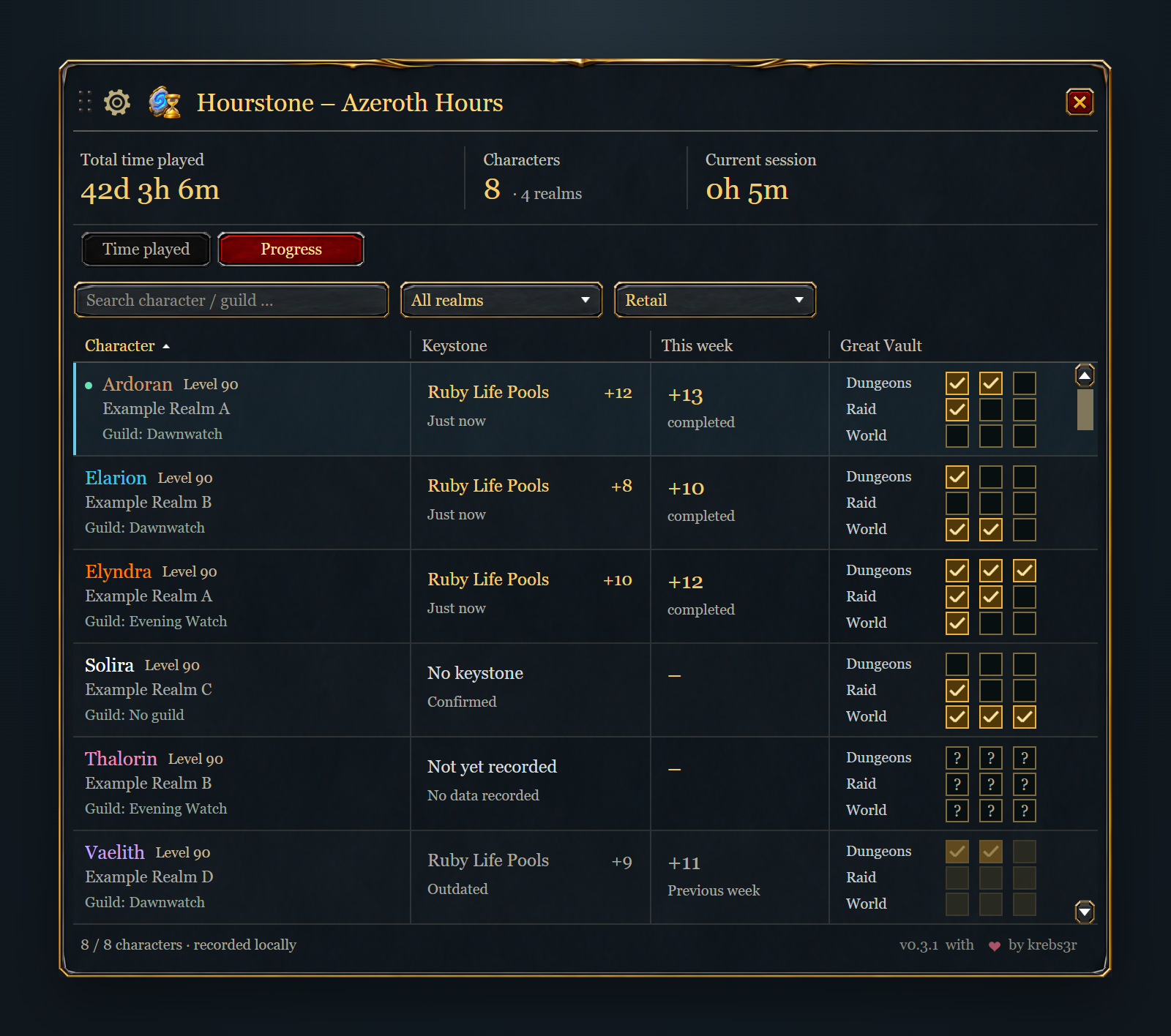
Rendered Progress view with example characters. Character, realm and guild stay visible beside:
- The character's current keystone, with dungeon name and level.
- The highest completed Mythic+ level this week, including overtime completions.
- Three Great Vault slots each for Dungeon, Raid and World activities.
Dungeon names, keystone levels, weekly runs and Vault requirements are read directly from WoW. Hover a cell for full names, slot progress, difficulty and the time the data was recorded. Search and realm/client filters work in both views. Classic clients retain the playtime view with the same size settings.
Log in with each Retail character to record its progress. Other characters show their last recorded state. No keystone, Not yet recorded and Outdated remain distinct; old weekly data is marked outdated after the reset until it is recorded again. Abandoned runs and claimable rewards from the previous week do not count as current weekly progress.
WoW saves locally recorded progress at logout or /reload. Hourstone 0.3.2 and a protocol-4 Companion can synchronize progress between selected installations and PCs. Received progress stays separate from local measurements.
Optional Windows Companion
Progress synchronization requires Companion 0.2.0 on every participating PC. Companion 0.2.0 is awaiting Microsoft Store certification and is not yet publicly available at this release. Existing Companion versions keep their playtime, guild and visibility features; Hourstone remains fully usable on its own.
Playing several WoW versions or using more than one PC? We recommend the optional Hourstone Companion. It brings the saved Hourstone data from your selected installations and accounts into one overview, including characters, guilds and playtime. The same character is counted once even if it is played on several devices.
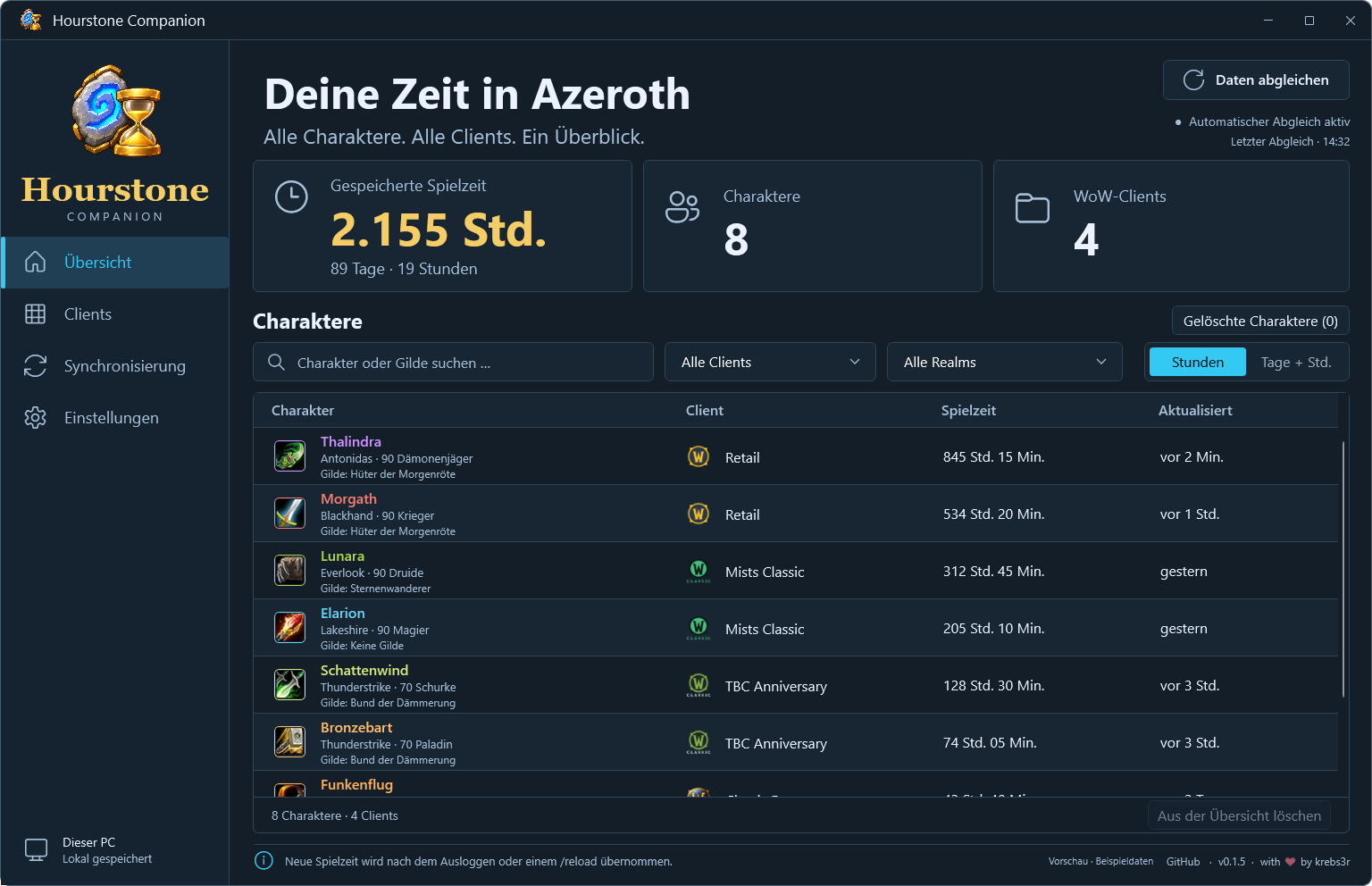
Hourstone Companion: your characters and playtime across WoW clients.
For multiple PCs, choose a shared folder that Dropbox, OneDrive or another folder-sync service keeps synchronized and available locally on every device. The Companion exchanges its data through that folder; no Hourstone server or separate Companion account is needed. Without a shared folder, it can still combine data from local installations.
The exchange is automatic but not live: WoW must first save by logging out or using /reload, the Companion processes the saved data, and the folder service transfers changes between PCs. Hourstone reads the combined overview at the next login or /reload; after the first setup of the Companion data addon, fully close and restart WoW once. A deletion made while another PC was offline must reach that PC before a new character login can restore the entry.
Download Companion 0.1.6 for Windows 11 x64 as an installer or portable package. This is an unsigned preview release. Setup instructions and source code are in the Companion repository.
Use Hourstone 0.2.2 or newer and Companion 0.1.3 or newer on all participating PCs. Hourstone 0.3.2 remains compatible with protocol-3 Companions and additionally receives progress from protocol-4 Companions. Older Hourstone 0.1.x versions do not support the Companion. If the newest addon version is awaiting CurseForge approval, download Hourstone 0.3.2 from GitHub. The addon remains fully usable without Companion and continues to update separately through CurseForge.
Supported clients
Retail, Mists of Pandaria Classic, TBC Anniversary and Classic Era are supported client families. Hardcore and Season of Discovery use the Era family and have not been separately verified. See each release's notes for compatibility and validation.
Source and installation guide · Report an issue
Also from krebs3r: Soundstone – Azeroth Audio.
Deutsch
Deine Charaktere. Deine Spielzeit. Hourstone zeigt die gesamte /played-Zeit deiner erfassten Charaktere und die aktuelle Sitzung in einem kompakten Fenster. In Retail zeigt die Ansicht Fortschritt zusätzlich Schlüsselsteine, die beste M+-Stufe dieser Woche und Schatzkammer-Slots. Das Addon funktioniert eigenständig; eine zusätzliche App oder ein externes Konto ist nicht erforderlich.
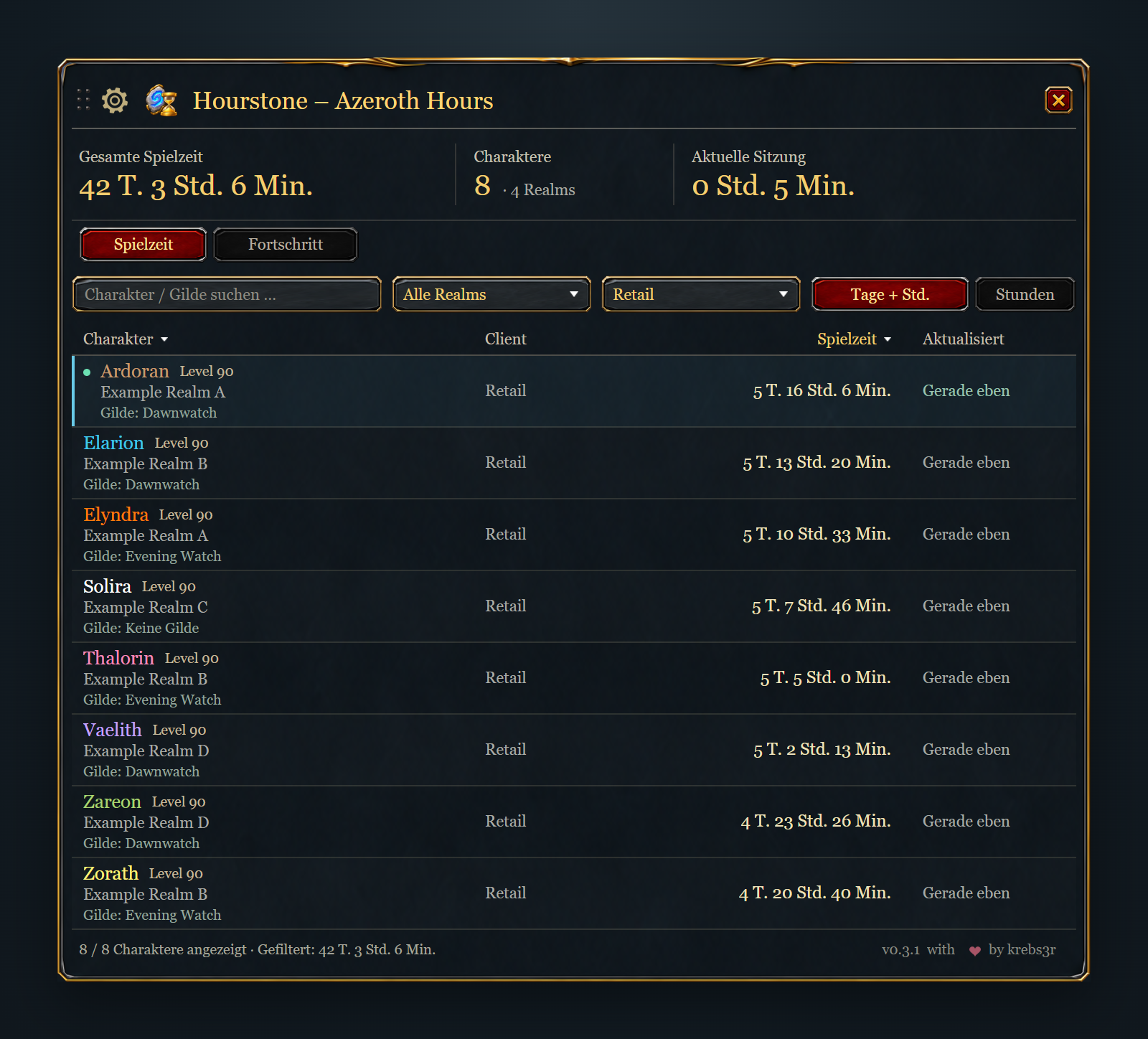
Gerenderte Hourstone-Charakterübersicht mit Realm- und Clientfiltern und Beispielcharakteren.
Die Übersicht zeigt Name, Klassenfarbe, Level, Realm, zuletzt erfasste Gilde, Client, Spielzeit und letzte Aktualisierung. Suche nach Charakter oder Gilde, kombiniere Realm- und Clientfilter und sortiere die Spalten. Wähle zwischen Dezimalstunden und Tagen, Stunden und Minuten. Fensterposition, Größe und Minimap-Einstellung bleiben gespeichert.
Die Fenstergröße lässt sich am Zahnrad in 5-%-Schritten von 65 bis 200 % einstellen. Bei hoher Skalierung erscheinen weniger Zeilen; durch Scrollen erreichst du alle Charaktere. Passt die Breite oder Mindesthöhe nicht auf den Bildschirm, wird das Fenster automatisch verkleinert. Ziehe die Titelleiste zum Verschieben. Version 0.3.1 behebt das Zurückspringen beim Ziehen; beim Loslassen wird die Position gespeichert.
Öffnen mit /hourstone oder /azerothhours. Jeder Charakter erscheint nach dem ersten Login mit aktiviertem Addon; auch zuvor gespielte Zeit zählt. WoW speichert die Daten je Installation und Account beim Ausloggen oder mit /reload. Keine Gilde ist ein bestätigter Zustand; Noch nicht erfasst bedeutet, dass noch keine Gildeninformation vorliegt.
Per Rechtsklick und Löschen lässt sich ein Eintrag aus der Übersicht und ihren Summen ausblenden. Dein WoW-Charakter und die gespeicherte Spielzeit bleiben erhalten. Unter Zahnrad → Gelöschte Charaktere stellt ein Rechtsklick den Eintrag wieder her. Ein neuer Charakter-Login stellt bereits bekannte Löschungen ebenfalls wieder her; /reload allein genügt nicht.
Retail: Schlüsselsteine und Schatzkammer
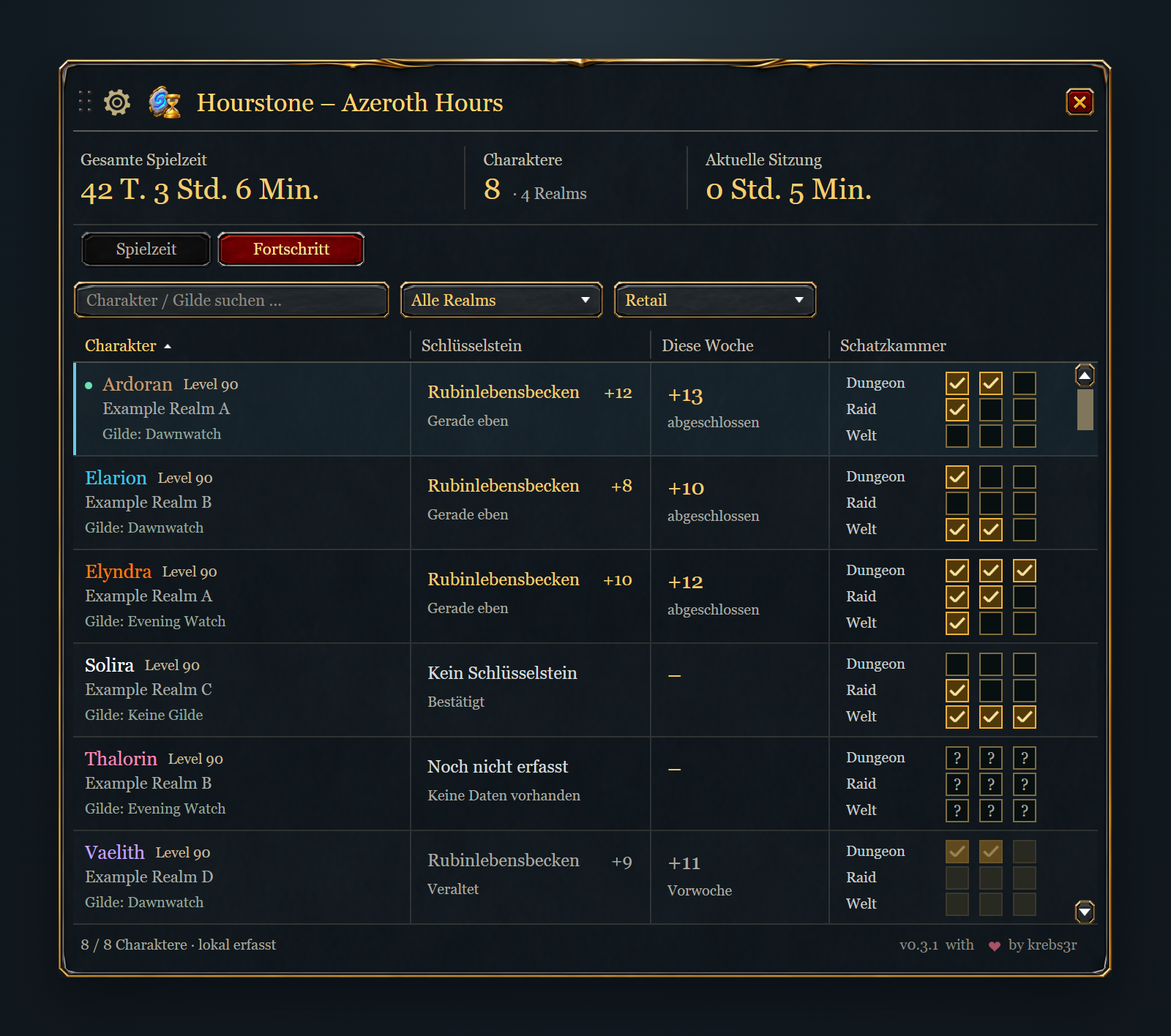
Gerenderte Fortschrittsansicht mit Beispielcharakteren. Neben Charakter, Realm und Gilde siehst du:
- Den aktuellen Schlüsselstein mit Dungeonname und Stufe.
- Die höchste abgeschlossene M+-Stufe dieser Woche, auch bei Abschlüssen außerhalb der Zeit.
- Je drei Schatzkammer-Slots für Dungeon, Raid und Welt.
Hourstone fragt Namen, Stufen, Wochenabschlüsse und Slot-Anforderungen direkt in WoW ab. Du musst keine Instanzen oder Saisonlisten kennen oder pflegen. Tooltips zeigen vollständige Namen, Fortschritt, Schwierigkeit und Erfassungszeit. Suche und Realm-/Clientfilter gelten in beiden Ansichten. Classic behält seine Spielzeitansicht mit derselben Größeneinstellung.
Logge dich mit jedem gewünschten Retail-Charakter ein, um seinen Fortschritt zu erfassen. Andere Charaktere zeigen den letzten gespeicherten Stand. Kein Schlüsselstein, Noch nicht erfasst und Veraltet bleiben unterscheidbar. Nach dem Wochenreset werden alte Wochenwerte bis zur nächsten Erfassung als veraltet markiert. Abgebrochene Läufe und abholbare Vorwochenbelohnungen zählen nicht als aktueller Wochenfortschritt.
WoW speichert lokal erfassten Fortschritt beim Ausloggen oder mit /reload. Hourstone 0.3.2 und ein Companion mit Protokoll 4 können Fortschritt abgleichen, auch zwischen PCs. Empfangene Daten bleiben von lokalen Messungen getrennt.
Empfehlung: Hourstone Companion für Windows
Für den Fortschrittsabgleich ist Companion 0.2.0 auf jedem beteiligten PC nötig. Companion 0.2.0 wartet auf die Microsoft-Store-Zertifizierung und ist zum Zeitpunkt dieses Releases noch nicht öffentlich verfügbar. Vorhandene Companion-Versionen behalten Spielzeit-, Gilden- und Sichtbarkeitsabgleich; Hourstone bleibt allein nutzbar.
Wenn du mehrere WoW-Versionen oder mehrere PCs nutzt, empfehlen wir den optionalen Hourstone Companion. Er führt die gespeicherten Charakter-, Gilden- und Spielzeitdaten deiner ausgewählten Installationen und Accounts zusammen. Derselbe Charakter wird auch bei Nutzung auf mehreren Geräten nur einmal gezählt.
Für den Austausch zwischen PCs wählst du einen gemeinsamen Ordner, den beispielsweise Dropbox oder OneDrive auf allen Geräten synchronisiert und dauerhaft lokal verfügbar hält. Ein eigener Hourstone-Server oder ein zusätzliches Companion-Konto ist nicht nötig. Ohne gemeinsamen Ordner bleibt der Abgleich lokaler Installationen verfügbar.
Der Austausch erfolgt automatisch und zeitversetzt: WoW speichert beim Ausloggen oder mit /reload, der Companion liest den gespeicherten Stand ein und der Ordnerdienst überträgt die Änderungen. Das Addon übernimmt die gemeinsame Übersicht beim nächsten Login oder /reload. Nach der ersten Einrichtung des Companion-Datenaddons WoW einmal vollständig schließen und neu starten. Nach einer Löschung während des Offline-Betriebs zuerst synchronisieren, danach erneut mit dem Charakter einloggen, um den Eintrag wiederherzustellen.
Companion 0.1.6 für Windows 11 x64 herunterladen – als Installer oder portables Paket. Dies ist eine unsignierte Vorschauversion. Anleitung und Quellcode stehen im Companion-Repository.
Benötigt werden Hourstone ab 0.2.2 und Companion ab 0.1.3 auf allen beteiligten PCs. Hourstone 0.3.2 bleibt mit Companions mit Protokoll 3 kompatibel und empfängt zusätzlich Fortschritt von Companions mit Protokoll 4. Die alten Addon-Versionen 0.1.x unterstützen den Companion noch nicht. Sollte die neueste Addon-Version auf CurseForge noch auf Freigabe warten, lade Hourstone 0.3.2 bei GitHub herunter. Das Addon bleibt ohne Companion nutzbar und wird weiterhin separat über CurseForge aktualisiert.
Hourstone – Azeroth Hours Team