🚀 Horizontal Zoomer
Horizontal Zoomer is an ultra-lightweight, high-performance camera utility for World of Warcraft. It provides players with simple, error-free macro commands to dynamically shift their camera to a custom over-the-shoulder perspective without breaking your main layout settings.
🔧 Perfect DynamicCam Compatibility:
This addon is specifically engineered to maintain your preferred DynamicCam settings while letting Horizontal Zoomer control the left and right views. It allows DynamicCam to fully manage your vertical angles, camera speeds, and automated head-tracking perfectly, while shielding your custom horizontal shoulder offsets from being reset when you zoom your mouse wheel.
🖱️ Hardware Macro & Auto-Hold Support:
The addon's math matrix is fully optimized to support rapid hardware inputs. If you use a mouse utility (like Logitech G Hub, Razer Synapse, or Corsair iCUE) to auto-press or spam the keybind while holding a button down, the code safely registers and handles inputs up to 11 clicks a second. Your camera will slide smoothly and instantly across your screen without tearing or freezing your client.
✨ Core Features:
- The Scroll Wheel Shield: Securely overrides DynamicCam's internal resets. You can scroll and zoom your mouse wheel as fast as you want, and your custom horizontal shoulder views will never get wiped out.
- 0% Performance Impact: Built entirely using modern event-driven logic (
C_CVar). Unlike older camera scripts, this addon features no heavy frame tracking loops, keeping your system resources completely clean and lag-free for intense combat. - Anti-Character Limit: Moves the calculation logic out of your macros and into the addon directory, keeping your macro buttons extremely small, snappy, and completely immune to the 255-character Lua text crash limit.
⌨️ How to Setup & Use (Highly Recommended Layout):
To map these commands directly to your mouse buttons, you can use the Clique addon.
For the ultimate experience, it is recommended to use a mouse that features a tiltable scroll wheel (middle mouse wheel left and right clicks). Since World of Warcraft cannot natively detect side-scrolling scroll wheel clicks, you need to configure your mouse software (like Logitech G Hub or Razer Synapse) to bind those clicks to keys the game can detect:
- Open Macros in-game and map your bindings using these exact macros
- Macro1 Left:
/run ShiftCam("left") - Macro2 Right:
/run ShiftCam("right") - Macro3 Reset:
/run _G.camPct = 0 C_CVar.SetCVar("test_cameraOverShoulder", "0")
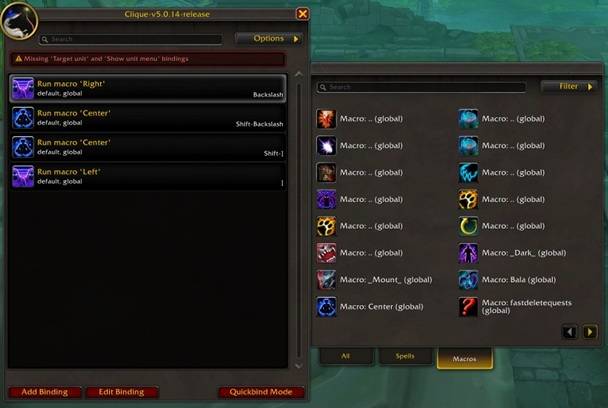
This is what the 4 macros should look like if u use Clique
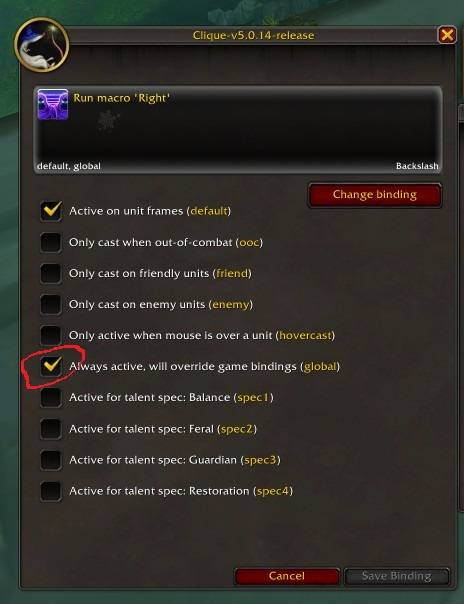
Dont forget to check this box in the edit keybind options and set its keybinds.
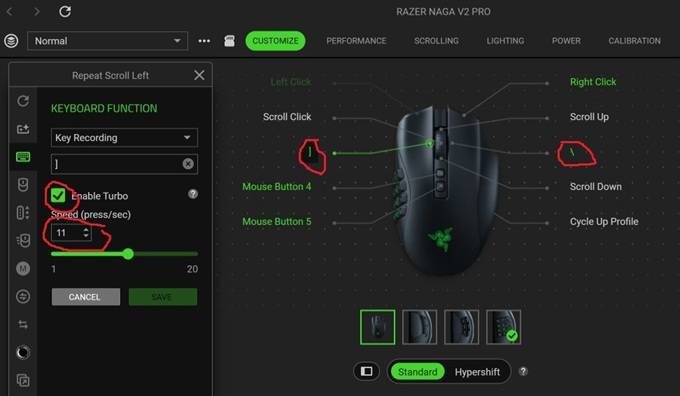
Open your mouse utility app on your desktop.
Remap Scroll Wheel Left Click to the ] key.
Remap Scroll Wheel Right Click to the \ key.
(If your mouse doesn't have an extra side-scrolling wheel, don't worry! You can map these functions to any extra side buttons or keys you want).
Horizontal Zoomer Team