Holo UI Forever
- By
A holographic sci-fi interface for World of Warcraft: Forever, made for keyboard and gamepad
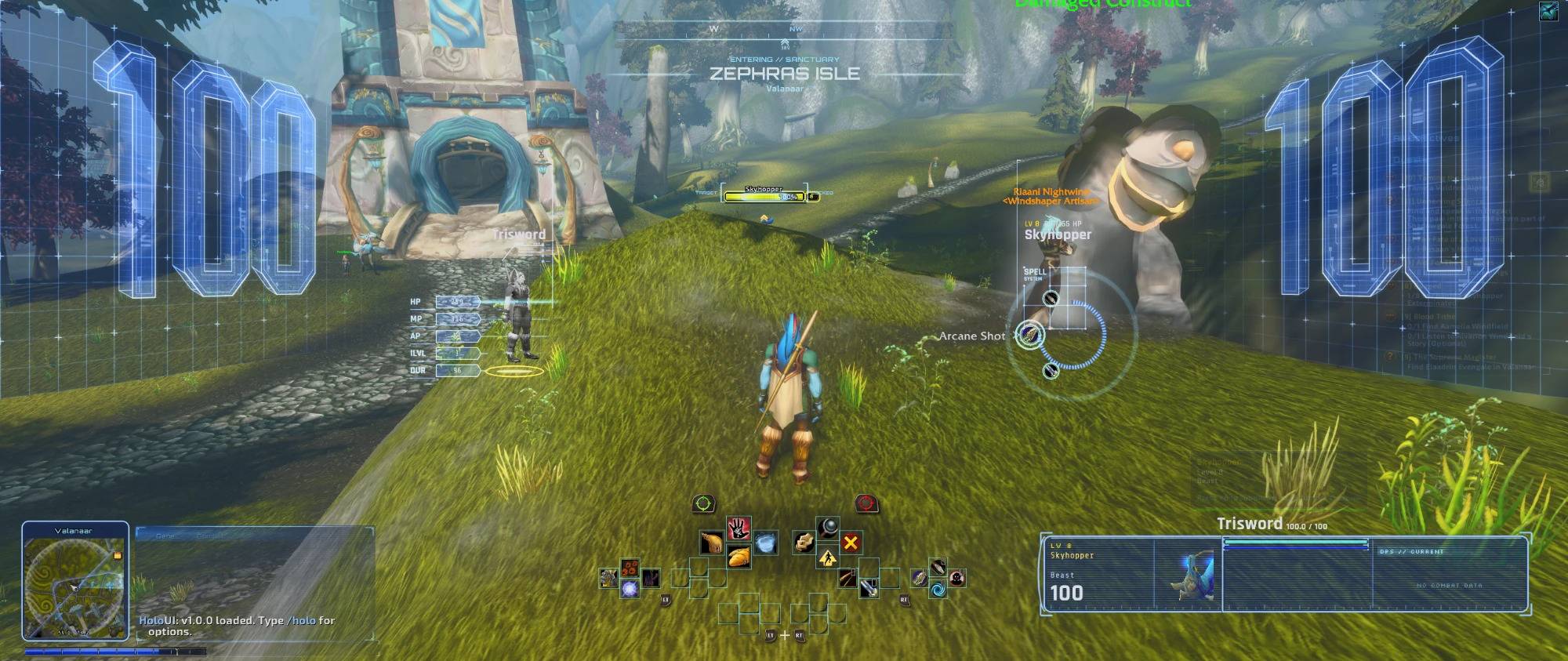
Combat HUD with a controller The holographic combat HUD on a target: 3D health screens, your character as a hologram with its stats, the spell ring, and the gamepad cross bar under your character.
Description
HoloUI Forever
A holographic sci-fi interface for World of Warcraft: Forever, made for keyboard and gamepad.
HoloUI Forever turns your screen into a starship HUD: giant 3D health numbers on curved glass screens, your own character as a turning hologram, a spell ring around your target, and a cyan holographic skin over every part of the game's interface. It is the World of Warcraft: Forever edition of HoloUI, with a full gamepad layout. A single standalone addon, inspired by SilverUI2 by SilverLion (2015).
Combat HUD
The HUD opens when you target an enemy and powers down when you untarget it or the fight ends.
- Holographic health: curved side screens with giant 3D numbers for you and your target.
- Your character as a hologram: your own 3D model, in your current gear, with HP, mana, attack power, item level and durability beside it.
- Spell ring: a rotating drum with your spells, cooldowns and charges; big cooldowns are kept for you to time and glow when ready.
- Power and defense cards beside the ring: your big cooldown and your class's defensive, at the rank you know (Divine Shield, Ice Block, Evasion, Shield Wall, Barkskin, Deterrence...).
- Combo points on holographic arcs for rogues and cat-form druids, read on your target.
- Swing timer: the game's own main hand, off hand and ranged bars, picked for your class and dressed like the HUD, right under your cast bar.
- Cast bars, a global cooldown ring, pet gauge with a heal hint (Mend Pet, Health Funnel), interrupt banner, target lock on the nameplate, low-health alarm, damage glitch.
Gamepad layout
Turn on the game's gamepad interface and HoloUI switches with it:
- Its own Edit Mode layout, "HoloUI Gamepad": the cross bar at the bottom centre, chat, tracker, tooltip, buffs and group frames where HoloUI puts them. Back on the keyboard, the keyboard layout comes back.
- The cross bar is dressed like the HUD and shows only with a target or in combat (and while a trigger opens it). Faded, it still works.
- Dialogues and quests with the controller: A (cross) takes the highlighted option, X / Y (square / triangle) the 2nd / 3rd one, the D-pad moves the highlight and picks the reward, B (circle) says goodbye or declines, LB / RB scroll the text. Your controller's own button icons are shown on screen.
- The installer and HoloUI's windows take the controller too.
- The game's button legend steps aside while the combat HUD is up.
Holographic dialogues
Talking to an NPC opens HoloUI's comm link instead of the game's windows.
- The NPC as a hologram: the world dims, a projector pod powers up and the NPC materialises on it as a large turning hologram, with a scan ring, drifting motes and the odd signal glitch.
- Made for reading: large text with roomy paragraphs, a soft white on a dark panel, real typography, a drop cap like a book, and your name picked out in cyan.
- Quests too: the briefing with objectives and rewards, the progress with how many of each item you have, and the report where you choose your reward.
- Keys: 1-9 picks an option or a reward, Space accepts or continues, Esc says goodbye (or the controller, above).
The whole interface, holographic
HoloUI uses the game's own frames, so everything keeps working the Blizzard way:
- An Edit Mode layout "HoloUI" places the action bars, pet bar, micro menu, bags, chat, minimap, buffs, party / raid frames, swing timers and the objective tracker. Your own layouts are kept, and you can still move everything in Edit Mode.
- Holographic skin for action bars, chat, tooltips, bags, buffs and debuffs, party and raid frames, nameplates, experience and reputation bars.
- Damage meter in the bottom-right panel, using the game's own meter.
- Minimap radar with a rotating sweep, coordinates and the zone name.
- The game's windows in cyan glass: character, spellbook, talents, professions, world map, options, dialogs and so on.
Exploration and immersion
- Boot sequence when you log in.
- Compass at the top of the screen: heading, your tracked quest or map pin with its distance, and your corpse when you are a ghost.
- Holographic zone banner and notifications for quests, loot and gold.
- "SIGNAL LOST" death screen and "SYSTEM STANDBY" AFK screen with your hologram.
- Synthesised sci-fi sounds: boot, target lock, combat, cooldown ready, alerts.
Quality of life
- Merchant helpers: junk sold and gear repaired when you open a merchant.
- Dialog keys: Space accepts, 1-9 pick options. Risky popups are never accepted by a key.
- Error console that catches every addon's Lua errors in a copyable window.
Setup
- Install HoloUI Forever and log in.
- Accept the welcome message (or type
/holo install). The installer sets the UI scale, the interface layout and a few game settings, then reloads once. With a controller: A applies, X skips, B goes back. - Target an enemy to see the HUD.
Options are in Esc → Options → AddOns → HoloUI. Every module, effect and sound can be turned off. Colour themes: cyan, amber, red, Matrix green, violet.
| Command | What it does |
|---|---|
/holo |
help and options |
/holo install |
run the installer again |
/holo preview |
show the HUD without a target |
/holo scale 1.1 |
HUD size (0.5 - 2.0) |
/holo theme amber |
colour theme |
/holo spells |
spell ring back to your class default |
/holo bars |
apply the HoloUI Edit Mode layout again |
/holo vendor |
merchant helpers (junk, repair, guild) |
/holo errors |
error console |
/holo reset |
reset all HoloUI settings |
Compatibility
- World of Warcraft: Forever (Interface 16001, game version 1.60). For Midnight (Retail), use HoloUI.
- Keyboard and mouse, or gamepad (Xbox, PlayStation and other controllers the game supports).
- Any resolution from 1920x1080, including ultrawide (21:9, 32:9) and 16:10.
- Windows and macOS. All nine classes.
- English, Português (Brasil), 简体中文.
Not in this edition, because Forever does not have them: boss timers and warnings (no encounter timeline) and the skyriding HUD.
Health, auras and enemy casts are "secret" to addons in Forever, as in the modern game. HoloUI only uses the APIs Blizzard provides for them: nothing is automated, and the game decides what is shown in combat.
Credits
HoloUI Forever is made by Trisword. It is dedicated to SilverUI2 by SilverLion (2015), whose holographic HUD inspired it. HoloUI is a new, independent addon: all of its code, textures and sounds were made for it.
License
MIT for all of HoloUI (code, textures and sounds). Fonts (Exo 2, Orbitron, Rajdhani, Share Tech Mono, Silkscreen) are under the SIL Open Font License; the libraries keep their own licenses.
Holo UI Forever Team