Hoardlight
- By
A modern LootAppraiser-inspired addon for tracking loot value, farming sessions, gold rates, and multiplayer loot challenges.
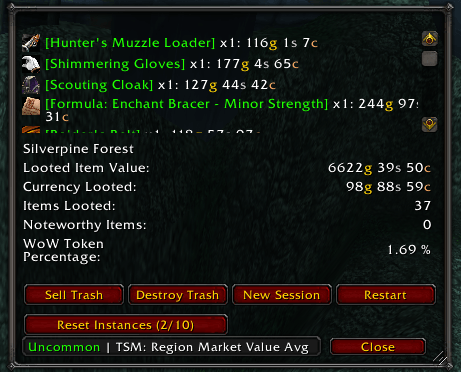
Track looted items, currency, farming time, noteworthy drops, instance resets, and estimated market value.
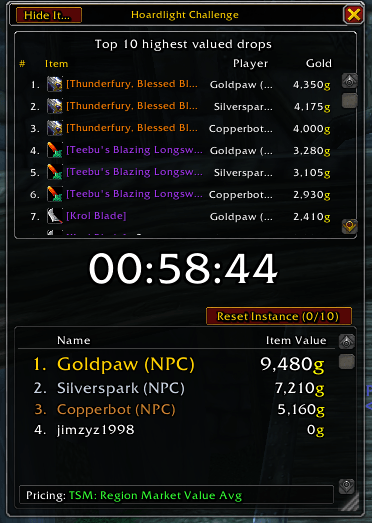
Compete with Battle.net friends using synchronized rankings, shared rules, and host-authoritative pricing.
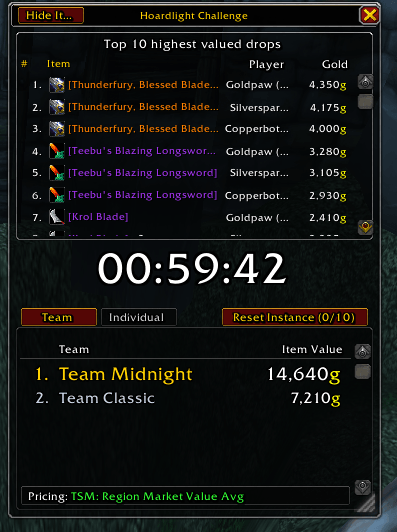
Create races with 2–4 custom teams, automatic balancing, individual assignments, and detailed contributor tooltips.
Description
Hoardlight
Track what you loot. Measure your farming sessions. Challenge your friends.
Hoardlight reveals the estimated value hidden in everything you collect. It tracks loot, currency, farming time, gold per hour, noteworthy drops, instance resets, and supported auction-house prices through a compact and customizable interface.
Hoardlight is an independent modern fork inspired by LootAppraiser and LootAppraiser Reloaded, expanded with extensive quality-of-life improvements and a complete multiplayer Challenge system.
Hoardlight is currently built for World of Warcraft Retail 12.1.0.
Hoardlight is currently in beta. Core loot tracking, UI behavior, Challenge recovery, and multiplayer synchronization have passed automated tests and simulations with up to 40 clients. Real-player feedback and complete Lua error reports are greatly appreciated while broader in-game testing continues.
Main features
- Track the estimated value of looted items
- Monitor farming time and value per hour
- Track directly looted gold, silver, and copper
- Display recent drops with item icons and tooltips
- Highlight noteworthy and high-value drops
- Filter tracked loot by item quality
- Optional Summary Mode for combined item totals
- Track group loot when enabled
- Record farming-session history
- Track vendor sales and repair costs
- Sell poor-quality items when visiting a vendor
- Destroy eligible trash one item per click
- Monitor the rolling
10 instances per hourlimit - Display progress toward the current WoW Token price
- Adjustable font size and loot-list length
- Configurable buttons and window presentation
- Hoardlight and Classic interface styles
- Optional title bar with background dragging when hidden
- Movable loot-notification messages
Interface styles
Hoardlight includes two interface styles without changing its underlying tracking or pricing behavior.
Hoardlight
The default style includes:
- Item icons in the recent-loot list
- Clearer action-button organization
- A separate Reset Instances row
- Optional title-bar visibility
- Background dragging when the title bar is hidden
Classic
The Classic style retains the familiar LootAppraiser-inspired presentation:
- Text-focused recent-loot list
- Traditional flowing button layout
- Familiar framed appearance
You can switch styles without resetting your session, loot, pricing source, or Challenge progress.
Hoardlight Challenges
Create synchronized farming races with Battle.net friends directly inside Hoardlight.
Individual and team races
- Create individual competitions or races with 2–4 teams
- Choose an exact duration or enter a custom duration
- Select the Challenge quality filter and pricing source
- Give teams custom names
- Shuffle and balance teams automatically
- Assign players to teams manually
- Allow or prevent late joining
- Add an optional title, description, location, and rewards
- Automatically use Hoardlight Challenge when no title is entered
Invitations and ready checks
- Discover compatible online Battle.net friends
- See each compatible player’s current Retail character and Hoardlight version
- Invite one player or everyone with Hoardlight
- Re-send pending invitations
- Request to join a friend’s open Challenge
- Choose a custom display name
- Optionally ask for your display name before every Challenge
- Send a ready check before starting
- See which participants are ready
- Remove players who are not ready when the race starts
- Preserve the late-join option for removed or delayed players
Live leaderboard
- Synchronized individual and team rankings
- Gold, silver, and bronze styling for the top three
- Large shared countdown timer
- Host-authoritative scoring and pricing
- Raw looted gold, silver, and copper included in scores
- Player tooltips showing their five most valuable drops
- Loot-location percentages showing where value was earned
- Expandable list of the race’s ten most valuable items
- Shared Challenge pricing source displayed in the footer
- Team tooltips showing the five highest contributors and each player’s best item
- Item icons and normal item tooltips
- Shared instance-reset tracking
Recovery and results
- Host-disconnect pause with a five-minute reconnect period
- Challenge timer freezes while the host is disconnected
- Loot is safely queued during temporary disconnections
- Queued loot is submitted after reconnection
- Participant reconnect and automatic synchronization
- Challenge state, scores, pending loot, and the linked Hoardlight timer are preserved through normal
/reload - The normal Hoardlight timer continues from the original Challenge start
- Late joiners inherit the ongoing Challenge timeline
- Completed Challenge history
- Winner and winning-team summaries
- Top-five winner loot with item icons
- Full participant rankings
- Multi-select deletion for saved results
- Provisional results when final reports are missing
Challenge scoring
The host controls the Challenge rules and validates incoming loot reports.
- The host’s selected pricing source is authoritative
- The host’s quality filter temporarily applies to every linked Hoardlight session
- Each player’s previous quality filter is restored afterward
- Raw currency looted during the Challenge is included
- Vendor sales and unrelated money sources are not included
- Only loot received during the active Challenge period is scored
- Duplicate loot reports are rejected
- The first successfully resolved item value is retained for stable scoring
- The highest-priced item is determined by the value of one item, not the total value of a large stack
- Tied players or teams are preserved as joint winners
Challenge location and reward fields are descriptive. Hoardlight does not restrict players to a particular zone or distribute rewards automatically.
Pricing sources
TradeSkillMaster is recommended for the best Hoardlight experience. It provides the regional market values and custom pricing formulas commonly used to estimate farming value. TSM is not strictly required—Hoardlight can also use Auctionator, Oribos Exchange, or Blizzard vendor values. Hoardlight supports optional integrations with:
- TradeSkillMaster
- Oribos Exchange
- Auctionator
- Blizzard vendor values
- Supported vendor and disenchant fallback values
Available pricing sources depend on which supported pricing addons are installed and loaded.
Prices represent estimated asset value, not guaranteed auction income. You must still sell the items to realize that value.
For Custom pricing, configure the formula in Hoardlight’s settings before opening a Challenge.
Instance-reset tracking
Hoardlight monitors successful instance resets within the rolling one-hour limit.
- The main window and Challenge leaderboard share the same reset history
- The complete
(x/10)counter is displayed - Expired resets automatically disappear when a slot becomes available
- Reset Instance buttons use the same underlying reset action
Minimap controls
- Left-click: Open the main Hoardlight window
- Right-click: Open Hoardlight settings
- Shift-left-click: Open Hoardlight Challenges
- Shift-right-click: Show or hide the active Challenge leaderboard
- Drag: Move the minimap button
The minimap button can be disabled from Hoardlight’s General settings.
Commands
/hoardlightor/hl— Open the main Hoardlight window/hlconfig— Open Hoardlight settings/hlc— Show or hide the active Challenge leaderboard/hlchallenge— Open Hoardlight Challenges/hlhistory— Open session history/hlite— Open the compact value window/hlalert— Open the noteworthy-item window/hl freset— Reset Hoardlight frame positions
Important compatibility information
Disable LootAppraiser Reloaded and LootLedger Midnight while using Hoardlight.
Running multiple loot trackers simultaneously may create:
- Duplicate session updates
- Duplicate minimap buttons
- Conflicting loot processing
- Incorrect or confusing totals
Challenge participants need compatible Hoardlight versions and must be Battle.net friends.
Like every World of Warcraft addon competition, Challenge results cannot be made completely cheat-proof because each participant’s game client reports its own loot events. Hoardlight reduces accidental inconsistencies through host validation, duplicate rejection, synchronized pricing, and authoritative scoring.
Beta feedback
Hoardlight is under active development. Please report:
- Lua or BugGrabber errors
- Incorrect loot or currency values
- Challenge start or completion problems
- Dungeon-transition issues
- Reload or reconnect problems
- Late-join problems
- Incorrect leaderboard synchronization
- UI positioning, resizing, or visibility problems
- Differences between normal Hoardlight and Challenge totals
- Pricing-source compatibility problems
When reporting a problem, please include:
- Your Hoardlight version
- Your World of Warcraft version
- Your selected pricing source
- Whether you were hosting or participating
- What happened immediately before the problem
- The complete Lua error message when available
Credit and license
Hoardlight is an independent modern fork of LootAppraiser Reloaded 3.4.4.
- Original LootAppraiser creator: ProfitzTV
- LootAppraiser Reloaded developer: Berickus
Hoardlight is not an official update and is not affiliated with, sponsored by, endorsed by, or supported by the original authors or Blizzard Entertainment.
Hoardlight is distributed under Creative Commons Attribution 4.0 International, except for separately identified bundled libraries. Full attribution, modification notices, and third-party terms are included with the addon.
Hoardlight Team