Screenshot 2026-05-11 104848.jpg
Screenshot 2026-06-23 195544.jpg
Screenshot 2026-06-23 195605.jpg
Screenshot 2026-06-23 195703.jpg
Screenshot 2026-05-25 084019.png
Screenshot 2026-07-04 184352.png
Description
HealReforged
HealReforged is a retail World of Warcraft addon built around clear live frames, secure click-casting, visible debuff handling, practical in-game setup, and compact tank utility tools.
It is designed for healers who want fast triage information, obvious status signals, and a full in-game configuration workflow, while also giving tank characters a click-driven marker and pull setup panel.
What HealReforged Gives You
Live Healing Frames
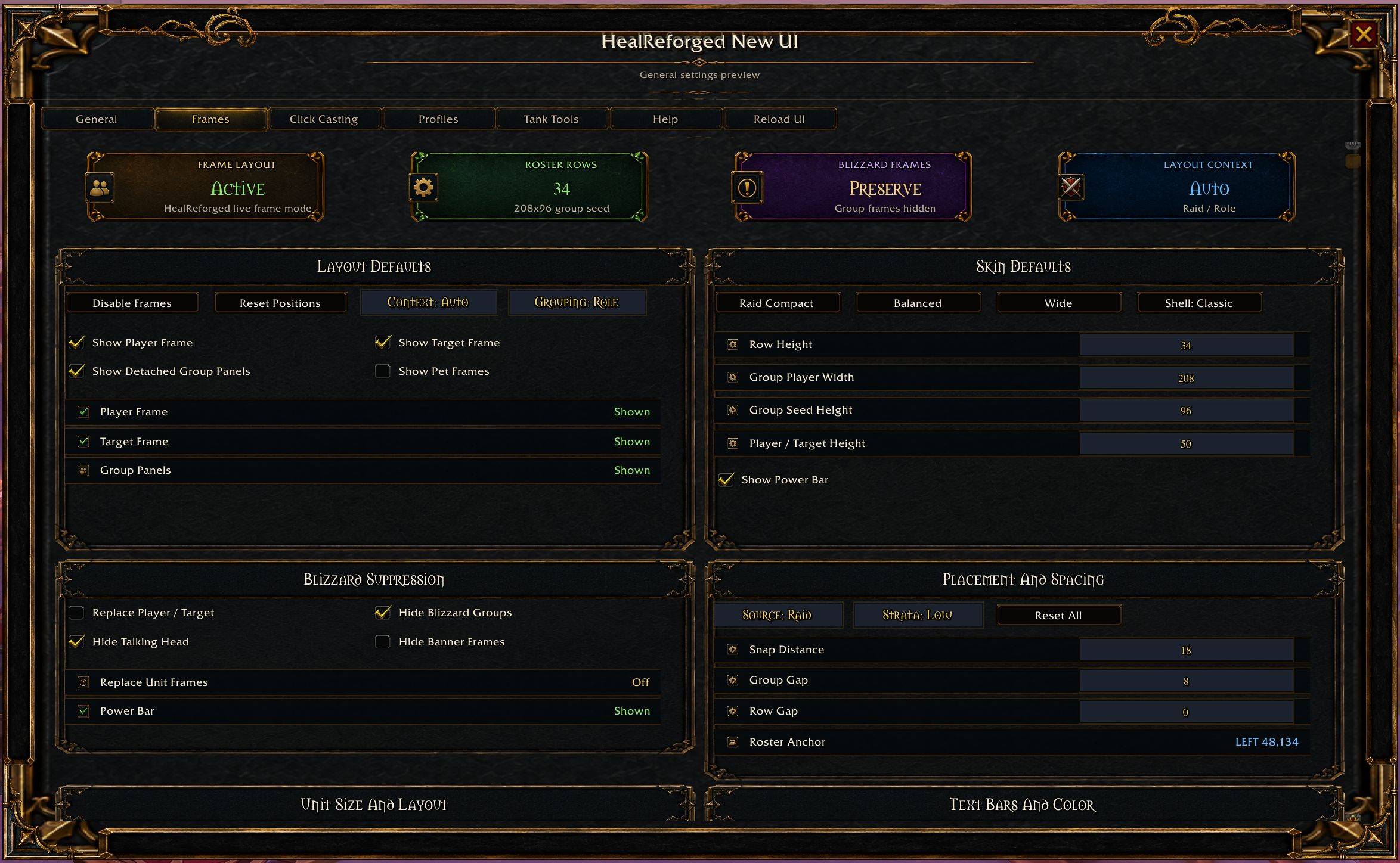
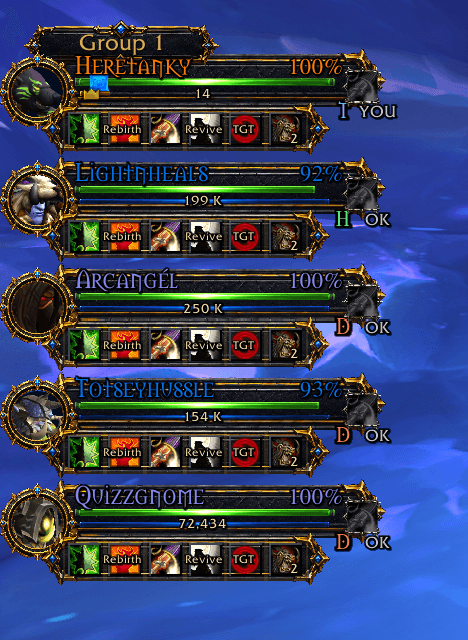
- Player, target, and group or raid roster views.
- Clear unit-state presentation for fast healing decisions.
- Layout editing with movement, resizing, spacing controls, and anchor presets.
- Configurable health and power text modes: percent, value, value/max, or hidden.
- Class color can be assigned to either health text or the health bar, with a color picker for the other side.
- Optional portrait avatar on the player and target frames.
- Replacement target frame supports Blizzard-style target clearing from terrain clicks and ESC, including self-target clearing.
- Optional toggle to hide all Blizzard unit frames while HealReforged is active.
Click Casting
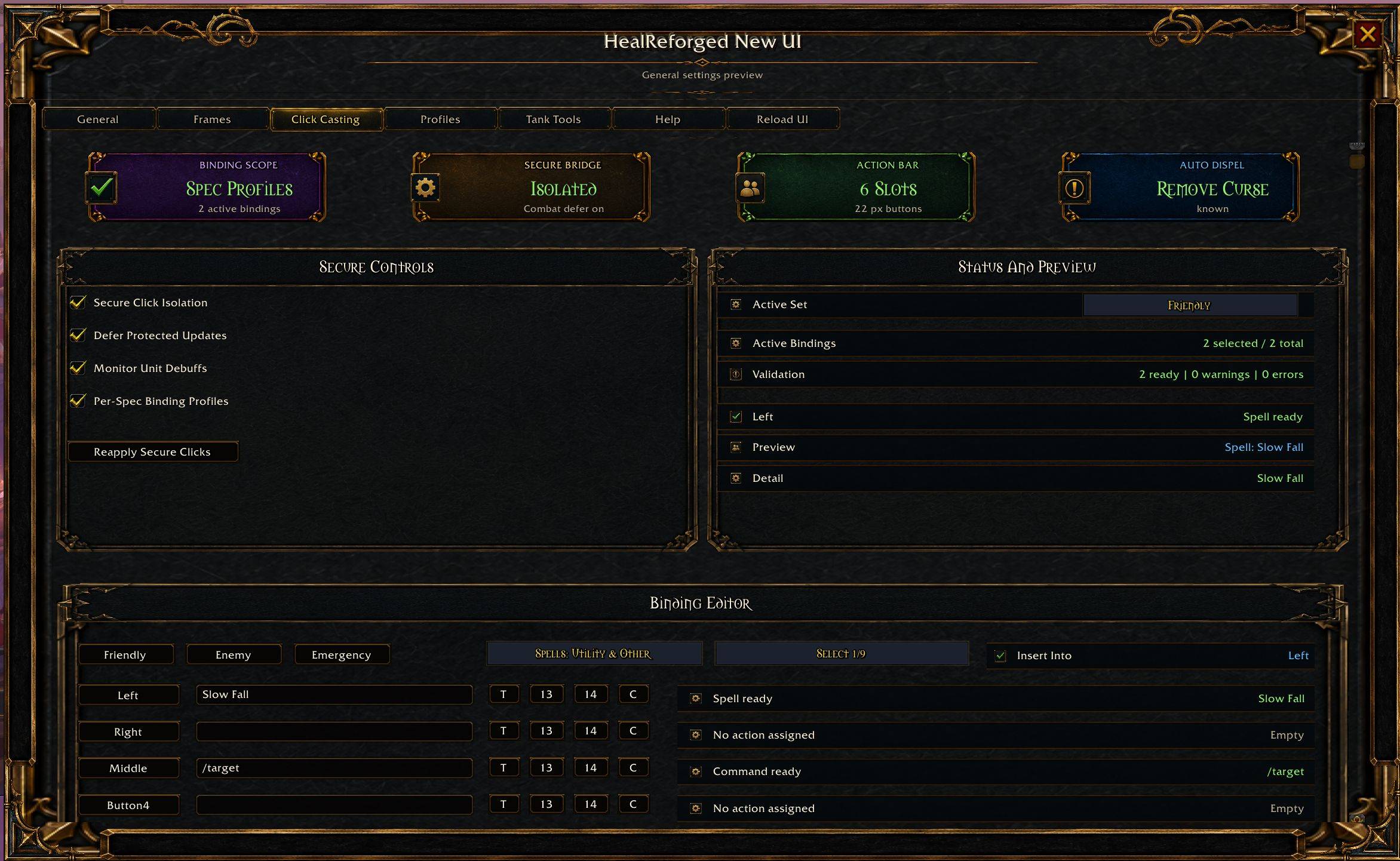
- Full in-game Click Casting editor.
- Support for spells, built-in actions, macros, and modifier combinations.
- Binding presets for raid, dungeon, and solo setups.
- Optional mirrored roster action buttons based on your configured bindings.
- Controls to increase or decrease mirrored action button size directly from the Click Casting pane.
- Per-row action buttons show Blizzard-style click feedback and real cooldown sweeps without every button flashing during the global cooldown.
Debuffs And Utility
- Aura and dispel indicators directly on unit frames.
- A right-side dispel slot that lights up when a unit has a removable debuff and automatically selects the correct spell for your spec.
- Full spec-aware dispel coverage: Restoration Druid (Nature's Cure), Balance/Feral/Guardian Druid (Remove Corruption), Holy/Disc Priest, Shadow Priest, Holy Paladin, Ret/Prot Paladin, Mistweaver Monk, Restoration Shaman, Preservation Evoker, Devastation/Aug Evoker, and Mage.
- Aggro, raid icon, range, ready-check, party leader, resurrection, summon, main-assist, and other encounter utility indicators.
Tank Tools
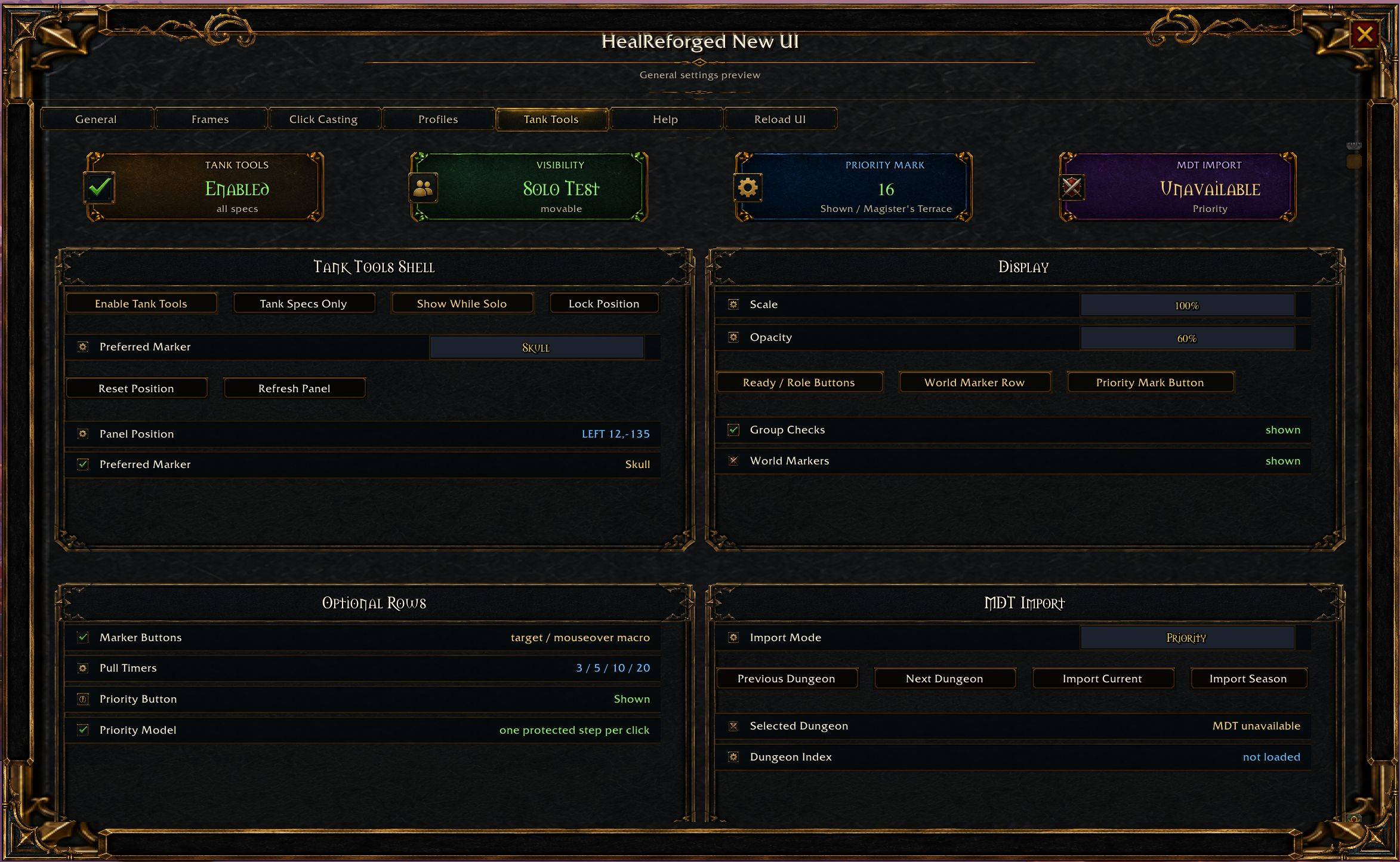
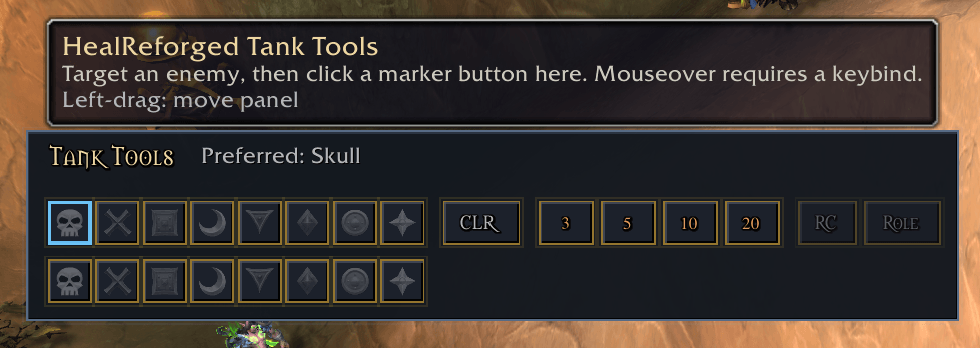
- Optional compact tank panel with tank-spec defaults, group and instance visibility rules, position lock, scale, and opacity controls.
- Secure Skull-through-Star target marker buttons for your current target, with mouseover support when triggered from a keybind or hardware click while the cursor stays over the enemy.
- Right-click any target marker to save it as the preferred marker, with a clear selected-marker visual state.
- Single Mark button for M+ priority marking that steps through target and mark actions one protected click at a time from the Tank Tools UI.
- Per-dungeon priority mob lists show what was pasted or imported and let you add mobs, remove mobs, move mobs up or down, see MDT-derived mob type labels, and change which raid marker each mob should receive.
- Select an MDT dungeon, choose Priority, Casters, or All import mode, import that dungeon, or seed the current MDT season; MDT imports skip bosses and focus Priority mode on cast-capable adds.
- Curated Skyreach priority list matching the working MPlusMarker data shape: Blinding Sun Priestess, Driving Gale-Caller, and High Sage Viryx.
- Priority list marker assignments reserve Square and Moon by default for tank/healer markers, using the remaining six raid icons for adds.
- Export the current list or every stored dungeon list as an HR priority code, then import that code on another setup for fast sharing.
- Paste priority mobs manually or import MDT dungeon mobs, then use Mark to step through the active priority list without dragging a macro to an action bar.
- Pull timer buttons for 3, 5, 10, and 20 seconds using Blizzard countdowns first, with DBM, BigWigs, and grouped chat fallback paths.
- Compact ready-check and role-check buttons, plus an opt-in secure world marker row with left-click placement, right-click clearing, active marker highlights, and permission-aware dimming.
- Built around user clicks and secure macro actions instead of background target or marker automation.
Healing Awareness
- Incoming-heal and absorb visuals.
- HoT and maintenance-buff awareness.
- Middle-click minimap button toggles the outer roster shell without closing group cards.
Profiles
- Account-wide and character-specific profile slots.
- Per-character frame skin, layout, click-cast binding, profile, and theme state.
- Setup options built to survive reloads and character swaps.
Retail Safety And Performance
- Built for modern Retail API behavior, including 12.0.5-safe handling around aura, cooldown, health, power, incoming-heal, and absorb values.
- Combat-safe secure-frame updates for protected click actions and live frame layout changes.
- Performance-oriented raid refresh behavior with render throttling, cached aura and spell lookups, and paced range refreshes for larger groups.
Why Use It
- Important debuff and aggro signals use separate visual lanes instead of fighting for the same space.
- Click-casting can be configured entirely in addon.
- The mirrored roster action bar can be resized in-game and keeps cooldown feedback focused on the button you actually clicked.
- Tank Tools gives tank characters a compact click-driven marker and pull setup panel, including a Mark stepper fed by pasted lists, curated dungeon data, or MDT dungeon mobs.
- Layouts and profiles are easier to save, reuse, and adjust per character.
- Target clearing behaves like Blizzard targeting, including terrain-click, ESC, and self-target cleanup on the replacement Target frame.
- Class and spec dispel handling covers every healing spec so removable debuffs are easy to trust.
- The addon is built around secure click handling and combat-safe update paths.
Slash Commands
/hror/healreforgedopens settings./hr helpopens the Help pane./hr framestoggles live frames./hr versionprints the current addon version in chat./hr inspect playerprints a simple diagnostic snapshot.
Quick Setup
- Type
/hrto open settings. - Open the Frames pane and position your layout.
- Open Click Casting and assign your healing clicks.
- Save the setup to a profile.
- Use the minimap button or addon compartment button for quick access later.
Notes
- Built for modern retail WoW.
- Designed around secure click handling and combat-safe updates.
- Bug reports are most useful when they include screenshots and BugGrabber or Lua error text.
HealReforged (HR) Team