HarvestMate: Herbalism, Mining & Skinning Helper
- By
Walk up to a herb, vein or chest and press one key. Required skill, skill-up ranges, drops and prices on every node in WoW Forever.
Снимок ÑкÑана 2026-11-18 181245.png
Снимок ÑкÑана 2026-11-18 181315.png
Description
HarvestMate — Herbalism, Mining & Skinning Helper
Walk up to a herb, vein or beast — press one key — gathered. Press it again — mounted and off to the next one.
HarvestMate is a gathering companion for World of Warcraft: Forever. It gathers with one key, puts you back on your mount, keeps both herbs and ore on your minimap, and tells you what every node needs, what it drops and what it's worth.
✨ Features
🔑 One-key gathering
- Stand next to a herb, vein, skinnable corpse or locked chest and press one key (F by default) to gather it.
- The key is only borrowed while you're at a node. Walk away and it goes back to whatever it did before.
- The key only appears for nodes you can actually gather with your skill.
- Pick any key, Shift/Ctrl/Alt combo or side mouse button: just press it in the settings.
- Optional: Click-to-Move and auto loot are switched on only while you're at a node, then put back.
🐺 Ride on with the same key
- When the node is used up, the same key mounts you or switches you to Ghost Wolf, Travel Form or Aspect of the Cheetah for a few seconds.
- It picks the fastest thing that works where you stand (no mount indoors), or what you prefer: Mount first or Class form first.
- Works with journal mounts, mount items in your bags and paladin/warlock class mounts.
🧭 Herbs and ore on the minimap at once
- Only one tracking works at a time. Have both Herbalism and Mining? HarvestMate switches Find Herbs and Find Minerals back and forth every few seconds while you travel, so both keep showing up.
- Never in combat, while casting or looting.
- Shift+click the minimap button to turn it on or off.
🎯 Nearby highlight
- A bobbing icon floats above the node in front of you, ringed in its difficulty color.
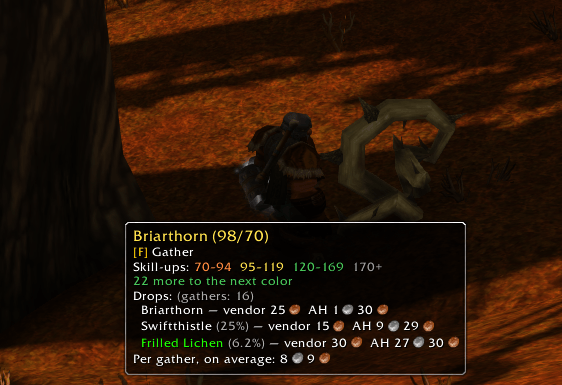
- A small plate shows your skill, skill-up ranges, drops and the gather key.
- Optional sound when there's something you can actually gather.
🌿 Smarter tooltips
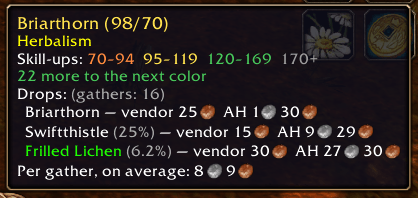
Peacebloom (42/1): your skill next to the skill the node needs, colored by difficulty.- Skill-ups:
1–24 25–49 50–99 100+, so you see exactly when a node turns yellow, green and grey, and how much is left to the next color. - Works on herbs, ore, skinnable beasts and locked chests (rogues) in the world.
- Tauren get Cultivation status right in the herb tooltip.
💰 Drops & prices
- See what a node gives before you touch it. Gems and extras are learned from your own loot, with real drop chances.
- Vendor price and auction price (via Auctionator or TradeSkillMaster, if installed).
- Best deal: ore and leather tooltips tell you whether to vendor it, auction it, or smelt / combine it first and sell the result.
📈 Farming session
- A small window with your gathers, the value of everything you picked up and gold per hour.
- What I gathered: your loot as icons, most valuable first, with totals per profession.
- Share a session summary to guild or group chat in one click.
/hm bagstells you the best way to sell every stack of ore and leather you're carrying./hm nextlists what gives skill-ups right now.
🏆 Achievements & records
- 25 goals, 90 steps across Herbalism, Mining, Skinning, Lockpicking, one-key gathering and earnings.
- A Wrath-style pop-up with animation and sound, with buttons to share it with your guild or group.
- Records: best gold per hour, most valuable session, most valuable single gather and lifetime totals.
🔔 Reminders
- Tracking is off: on WoW Forever dying switches tracking off. A reminder with a one-click button turns it back on. Dwarves get one for Find Treasure too.
- Trainer ranks: a heads-up when you can learn the next rank, and another when your skill is capped.
- Gathering gear: a reminder to put on your +skill gloves or pick, or optional automatic swapping while you gather.
⚙️ Settings that are easy to find
- Its own settings window with sections, a search box and a tooltip for every option.
- New options are marked NEW until you've seen them.
🧠 Learns as you play
- New WoW Forever nodes are remembered after your first gather, once the loot confirms it.
- Lower skill requirements are picked up automatically.
- It remembers which creatures, and whole beast families, can and can't be skinned.
🌍 Languages
English · Русский · Deutsch · Français · Español (EU & LatAm) · Italiano · Português (BR) · 한국어 · 简体中文 · 繁體中文
⌨️ Commands
| Command | What it does |
|---|---|
/hm |
Open the main window |
/hm config |
Open the settings (/hm config <word> opens them with a search) |
/hm travel |
What the gather key will use after gathering (/hm travel auto, mount or form to choose) |
/hm key |
Choose the gather key by pressing it (/hm key F sets it directly) |
/hm soft |
Turn on Soft Target Interact (/hm soft off turns it off) |
/hm session |
Open the farming session window |
/hm ach |
Open achievements |
/hm bags |
Best way to sell the ore and leather in your bags |
/hm next |
What gives skill-ups now and what comes next |
/hm skills |
Show your gathering skills |
/hm near |
What the nearby highlight sees (handy for bug reports) |
/hm tip |
Why the last herb or vein tooltip did or didn't show your skill |
/hm reset |
Restore default settings |
/hm forget |
Wipe everything the addon has learned |
Minimap button: click for the main window, right-click for the session window, Shift+click to switch herb/ore tracking by turns on or off.
❓ FAQ
The nearby highlight / gather key doesn't work.
Both rely on the game's own Soft Target Interact setting. On first launch HarvestMate asks whether to turn it on, and after that it keeps it on, even on another PC. You can also type /hm soft at any time.
Why isn't my skill shown on minimap tooltips anymore? Since the game update of 12 November 2026, Blizzard doesn't let addons read minimap tooltips. Hover the node itself in the world. If Blizzard opens minimap tooltips again, the skill there will come back without an update.
Can I keep running as a wolf even though I have a mount? Yes: set What to use to Class form first in Node next to you > After gathering.
Does the gather key work in combat? No, the game doesn't allow changing key bindings in combat. The key is released before combat starts and comes back afterwards.
A node shows no numbers.
It's probably new to WoW Forever. Gather it once and HarvestMate will remember it. /hm tip tells you what it saw.
🐞 Bugs & ideas
Please leave a comment with what happened. For highlight issues, stand at the node, type /hm near and paste what it prints. For Lua errors, the full error text helps a lot.
Author: AndreiBerkut · License: MIT Localized herb and ore names for de/fr/es/it/pt/ko/zh clients come from GatherSkillTooltip (MIT).
HarvestMate: Herbalism, Mining & Skinning Helper Team

Owner