FishMate: One-key fishing
One-key casting and hooking, a cast bar with your bite window, a skill guide to 300, pool tracking on the map, catch stats and session goals.
Снимок ÑкÑана 2026-11-18 181737.png
Снимок ÑкÑана 2026-11-18 181804.png
Description
FishMate
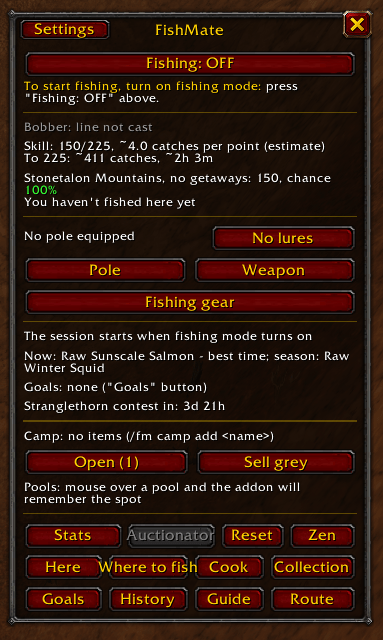
A fishing companion for WoW Forever, playable with keyboard, mouse or controller. One key casts and hooks, and a cast bar shows when the fish usually bites. The addon also tells you where to fish and where to train next. It keeps track of everything you've caught along the way.
Casting and hooking
- One key for everything. Bind a key (
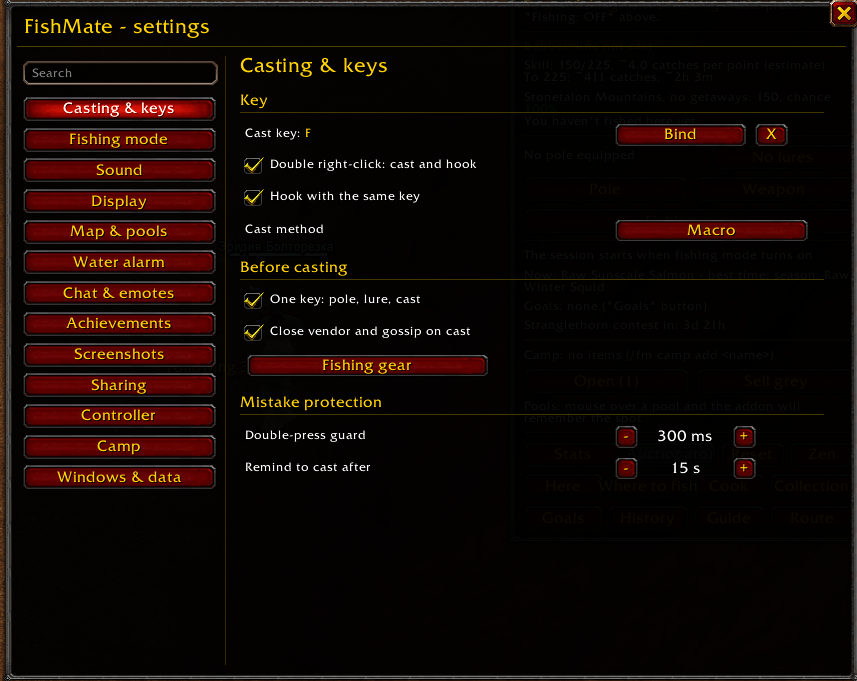
/fm key F) and press it to cast. Press it again when the bobber splashes to hook the fish. Double right-click works too if you prefer the mouse. - Step-by-step prep. If you have "One key: pole, lure, cast" turned on, the same key first puts your pole on, then applies a lure, then casts.
- Cast bar with your bite window. After a few catches the addon learns when fish usually bite for you and highlights that part of the bar. You stop guessing whether a splash was yours or your neighbour's.
- Loud splash. While fishing, effects go to 100% and music, ambience and dialog are muted. Your normal sound settings come back afterwards.
- Lure reminder. You get a warning before the lure runs out, and a button on the panel applies the best lure in your bags.
Playing with a controller
FishMate works with a gamepad out of the box, including WoW Forever's own gamepad UI. Controller support was added at the request of Chefsword.
- Press LB + RB + X (L1 + R1 + Square on PlayStation) to open FishMate. Move around with the D-pad, press with A, close with B. The bumpers switch between open windows, and X works as a right-click.
- The first time, pick two buttons: one to fish with (cast and hook) and one to stop fishing. "Pick (A and B)" does it for you. Both only work in fishing mode; the rest of the time those buttons do what they normally do, so your usual controls stay untouched.
- Select "Fishing: OFF" to start. While you fish, the menu steps aside and your fishing button casts and hooks. The panel shows which button stops fishing.
- Press your stop button to stop. If the line is out, it reels in right away. After that the menu works with the D-pad again until you close it.
Also:
- The controller vibrates on a water alarm.
- FishMate is in the addon drawer by the minimap.
- Navigation turns off in combat.
- Settings are under Settings → More → Controller.
- If the combo clashes with something else, change it with
/fm padcombo.
Pole and weapon
- The Pole button checks your bags. If you have one pole, it gets equipped. If you have several, you pick one.
- Your weapon is remembered and put back on when you stop fishing.
- In combat the weapon goes on right away, and the cast key turns into an "equip weapon" key, so a surprise murloc doesn't catch you holding a stick.
Where to fish and what to train
- Where to Fish. Zones where your current skill catches everything with no escapes, plus zones where only a few fish get away. Each one comes with distance and an optional waypoint. Enemy faction capitals are left out.
- Skill guide 1-300. Shows your current rank, what to do next and what you still need. It names the place and the NPC and tells you how to get there from your faction's side. A button drops a map pin on the trainer or NPC.
- Where to fish for gold. The same window has a second tab that ranks zones by expected gold per hour. It uses the loot tables, your auction prices, your escape chance and your own average time per cast.
- What Bites Here. The loot table for the spot you're standing at, with base chances, your own catches and catches reported by other FishMate users. The data comes from wowforever.ninja.
Zen mode and safety
- Zen button. Hides everything except FishMate and brings the camera down to the water. Leaves on its own when combat starts.
- Water alarm. While you fish, a hostile player who can attack you or a mob that targets you sets off a sound, a flashing game icon and a warning in the middle of the screen. Enemy nameplates stay on for this but are fully transparent.
Pools
- Pools you mouse over are saved and shown on the world map and the minimap.
- A pool you fish out disappears from the map, and so do old sightings after a while (30 minutes by default).
- Route. Builds a path through the known pools in the zone, nearest first. Uses TomTom if you have it.
- Sightings are shared quietly with other FishMate users on the same realm.
Stats and goals
- Per-session counters: catches, casts, escapes, empty casts, gold per hour.
- Per-zone breakdown: your top catches with auction or vendor prices, plus a note on whether a fish is worth more cooked or raw.
- Goals for the session: 20 of a certain fish, 100 catches, 2 gold, an hour of fishing. You get progress and an ETA.
- A history of past sessions and an export to plain text.
Collection and achievements
- A collection of every fish and item you've pulled out of the water, with where you caught it.
- Mastery ranks for each fish, from bronze to legend.
- A small set of achievements and personal records: longest clean streak, fastest bite, best session.
Everything else
- Fish tooltips. Hover a fish in your bags, at the auction house or in chat to see where it's caught, the skill for no escapes, how many you've caught and the auction price.
- Auto screenshots of rare catches, first catches of a new fish and new achievements.
- Cook. Shows what you can cook from the fish in your bags, then cooks it in a batch. It can also light a Basic Campfire.
- Containers. Opens chests, crates and clams one by one. One button sells the grey catch at a vendor.
- Bag space warning before your catch starts getting lost.
- Fishing camp (WoW Forever): reminders for camp objects and buffs.
- Stranglethorn Fishing Extravaganza: a countdown and a Tastyfish counter.
- Emotes and chat: optional "Started fishing!" emote, a session summary when you stop, and links to rare catches in your own chat. All off or rate-limited by default.
Commands
| Command | What it does |
|---|---|
/fm |
Show or hide the panel |
/fm help |
All commands |
/fm key F |
Set the cast and hook key |
/fm guide |
Skill guide |
/fm padsetup |
Pick the controller buttons |
/fm padcombo |
Change the combo that opens FishMate |
/fm nav |
Control the panel with a controller |
/fm zen |
Zen mode |
/fm alarm |
Water alarm on/off |
/fm zones money |
Zones for gold |
/fm goal ... |
Session goals |
/fm map restore |
Bring back hidden map pins |
Left-click the minimap button to open the panel, right-click for settings. Shift-click toggles fishing mode, Ctrl-click shows What Bites Here.
Optional
- TomTom for waypoints and routes. Without it the addon uses the built-in map pin.
Languages
English, Deutsch, Français, Español, Italiano, Português (BR), Русский, 한국어, 简体中文, 繁體中文.
Feedback
Found a bug? Please type /fm debug, reproduce it and post the error with a screenshot in the comments or on the Issues page. Ideas are welcome too.
Zone and loot data are based on the original game tables, so some details in WoW Forever may differ.
FishMate: One-key fishing Team